External Certificate Authority
The External Certificate Authority (CA) feature is for large enterprises and government customers who deploy an on-premise Orchestrator and have a requirement to use their own certificate authority (CA) rather than the default self-signed Orchestrator certificate authority. This section covers how to enable and configure External CA.
When External CA is configured, instead of the Orchestrator receiving a certificate signing request (CSR) and issuing the device certificates itself, the Orchestrator is required to pass the CSR to an external CA for issuance of the certificate. The device certificate will be returned to the Orchestrator and sent to the Edge or Gateway.
A customer using this feature would be expected to have deployed a commercial certificate authority, for example from PrimeKey (EJBCA PKI), or in some cases, may have implemented their own proprietary CA.
Beginning with Release 5.1.0, an Orchestrator where external CA is activated may be configured with two new API-ready modes:
These modes are added to Synchronous or Automated Mode, which was the first mode introduced. With Synchronous mode, the Orchestrator integrates directly with an external CA (which, for Release 5.0.0 and forward, offered PrimeKey EJBCA PKI as the only available external certificate authority) and through REST APIs for certificate request, renewal, and revocation.
Enable External CA
The External CA feature is enabled through two System Properties. Enabling these system properties may only be done by an Operator with a Superuser role.
The first system property that must be enabled is ca.external.configuration. This property is manually created with a JSON data type and the JSON is populated consistent with the example seen below in the Sample External CA Configuration section.
Only after ca.external.configuration is created and enabled, should the Operator enable the second system property: ca.external.enable.
- Using the search box on the System Properties page enter
ca.external.enableas shown in the images below.Figure 1. System Properties 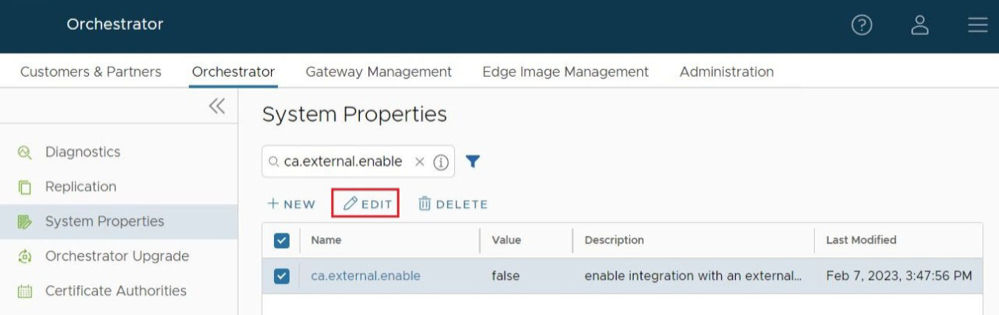
- Change the
ca.external.enableproperty to True and select Save Changes to complete the change as shown in the image below.Figure 2. Modify System Property 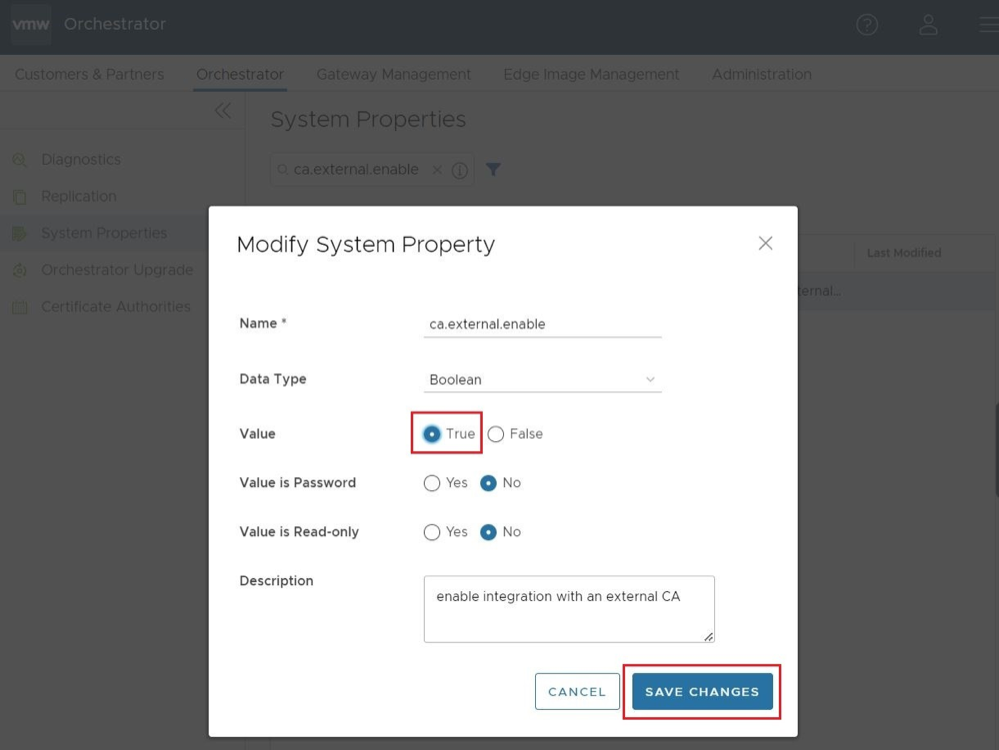 The System Property page displays a confirmation that the property was successfully modified, and will now show that
ca.external.enableis True.Figure 3. Confirmation Message 
Configure External CA
Having enabled the External CA System Property, the Operator can now select to begin configuring an external certificate authority.
- Automated (Synchronous): With Automated mode, only one external certificate authority is supported: PrimeKey EJBCA PKI.
- Manual: Manual mode provides support for any certificate authority and provides flexibility and control with the user manually performing each step in the certificate process.
Figure 5. Manual Mode 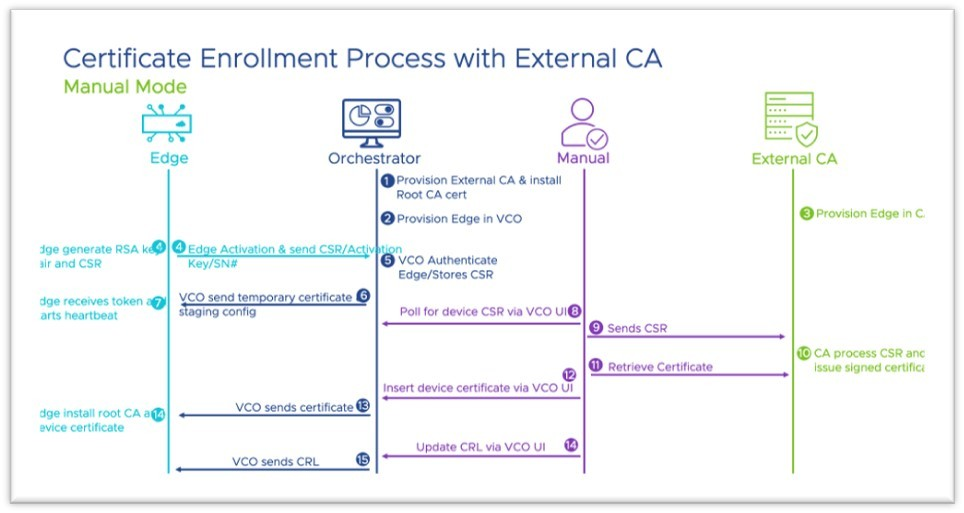
- Asynchronous: Asynchronous mode provides support for any certificate authority with the ability to script the manual steps while automating the recurring tasks.
Figure 6. Asynchronous Mode 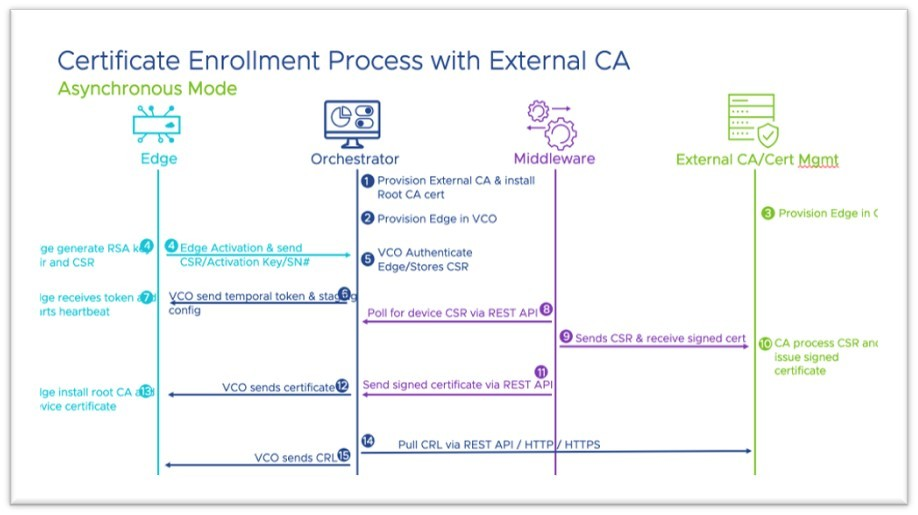
- External CA can only be enabled on an On-Premise Orchestrator managed by a single customer. This feature is not available on Orchestrators hosted by Arista.
- On an Orchestrator using Release 5.0.0, this feature can only use PrimeKey EJBCA PKI as an external CA.
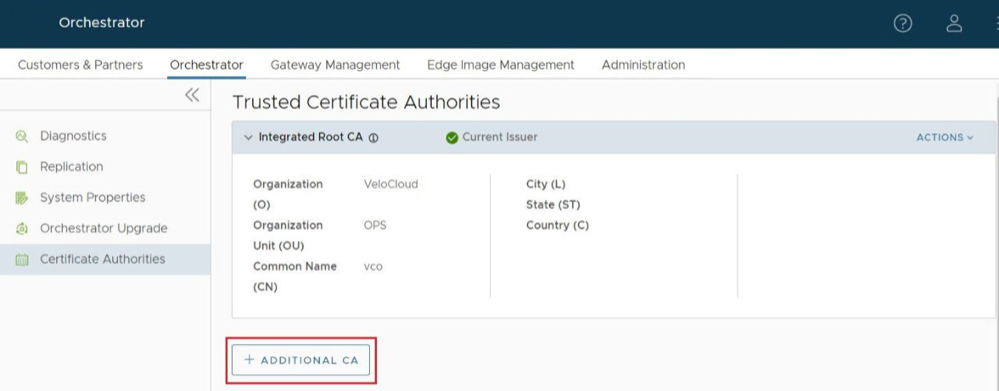
- After selecting + Additional CA, the UI will change to CA Type with a drop down menu with the options of Intermediate CA and External CA. Select on External CA.
Figure 7. CA Type 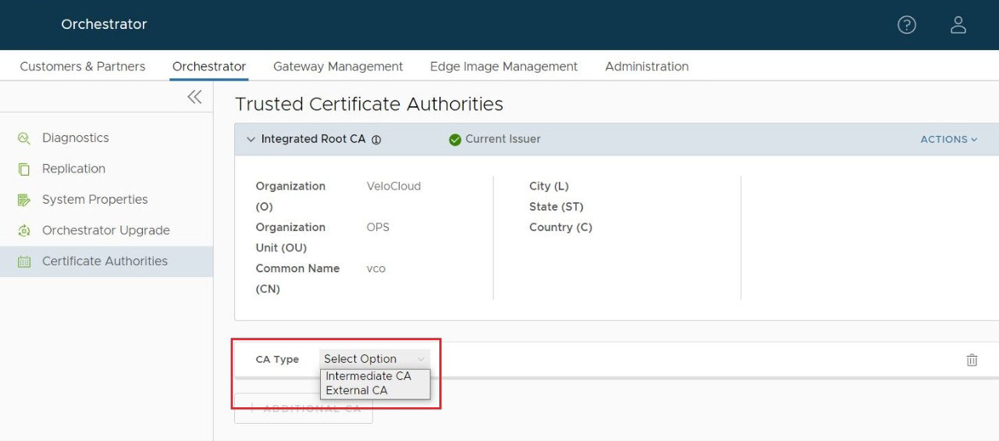
- Once External CA is selected, the screen changes to the Add External CA screen where an Operator can choose between the three previously mentioned External CA Modes: Automated (Synchronous), Asynchronous, and Manual.
Figure 8. External CA Mode 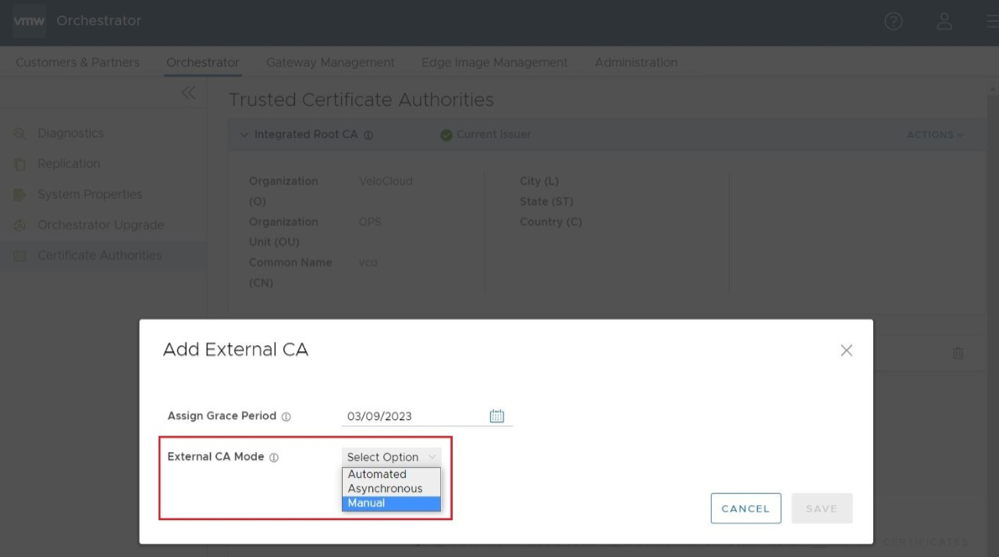
- Having selected a CA Mode, the Add External CA screen changes to allow additional configuration of the external CA. This is where the Operator would paste in the CA Root Certificate.
By checking the box for Activate VCO to poll for CRL, the Operator elects to have the Orchestrator to conduct certificate revocation checks using the Certificate Revocation List (CRL). If this option is checked, two additional configuration parameters appear to be configured by the Operator:
- CRL Poll Interval in Minutes determines how often in minutes the Orchestrator will conduct certificate revocation checking against the latest CRL.
- CRL Distribution Point is the URL where the Orchestrator retrieves the latest CRL.
Figure 9. Add External CA 
- After the Operator has filled out all the required fields, they would select Save.
Once an external CA is configured the Operator will have newly available options to Import CRL and Download CRL.
Figure 10. Import CRL 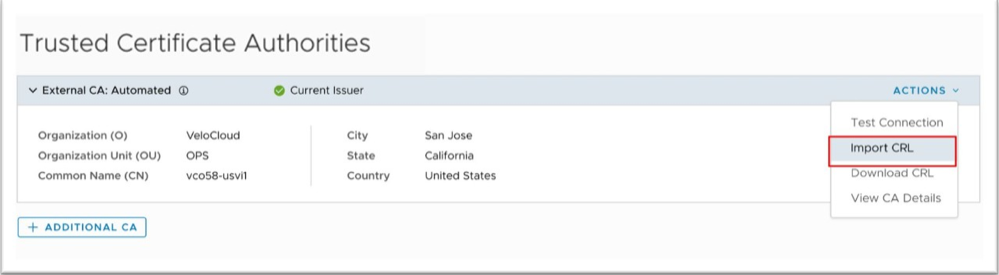
Figure 11. Download CRL 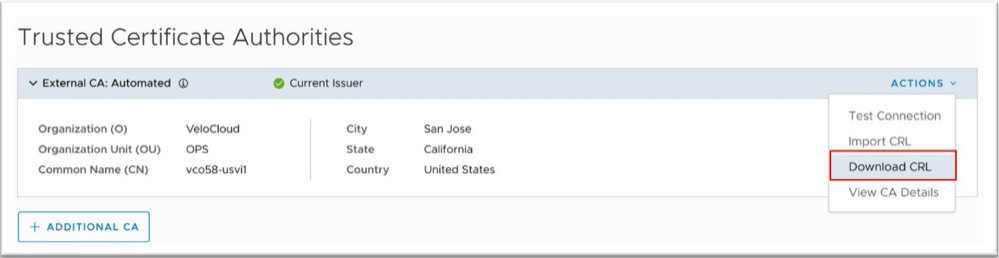
Using Import CRL while also having Orchestrator CRL Polling configured, an Operator can perform batch or individual imports and exports.
Figure 12. Import CRL 
The CRL would perform a validation after any import of your certificates, and the Orchestrator distributes your CRL to every Edge and Gateway connected to your Orchestrator.
Note:- There is a third System Property:
ca.external.caCertificate. This System Property will appear once External CA is enabled and there is connectivity to a valid external CA. This property requires a PEM (privacy enhanced mail) encoded certificate. - Edge/Gateway generated Certificate Sign Request (CSR) has only a Common Name (CN). While signing the CSR, the External CA adds the required subject.
- There is a third System Property:
This section provides an example of a configuration for the ca.external.configuration field.
{ "integrationType": "SYNCHRONOUS", "csrDistinguishedName": { "CN_PID_SN": "Arista-SDWAN" }, "synchronous": { "synchronousIntegrationType": "EJBCA", "ejbca": { "serverCaCertificate": "-----BEGIN CERTIFICATE-----\nMIIFFzCCA3+gAwIBAgIUGgattlewRnm/gyPxJ7PW6uJOjCcwDQYJKoZIhvcNAQEL\nBQAwgZIxIzAhBgoJkiaJk/IsZAEBDBNyLTA1OTVhMTNjMTUzZDc2YWU1MRUwEwYD\nVQQDDAxNYW5hZ2VtZW50Q0ExHjAcBgNVBAsMFWFtaS0wMmE0NDc0YzFmNzQ5NDBh\nODE0MDIGA1UECgwraXAtMTAtODEtMTI1LTEzMi51cy13ZXN0LTIuY29tcHV0ZS5p\nbnRlcm5hbDAeFw0yMTAyMDQxOTA0MTRaFw00NjAyMDUxOTA0MTNaMIGSMSMwIQYK\nCZImiZPyLGQBAQwTci0wNTk1YTEzYzE1M2Q3NmFlNTEVMBMGA1UEAwwMTWFuYWdl\nbWVudENBMR4wHAYDVQQLDBVhbWktMDJhNDQ3NGMxZjc0OTQwYTgxNDAyBgNVBAoM\nK2lwLTEwLTgxLTEyNS0xMzIudXMtd2VzdC0yLmNvbXB1dGUuaW50ZXJuYWwwggGi\nMA0GCSqGSIb3DQEBAQUAA4IBjwAwggGKAoIBgQC2r0YYVKnusA7NS6aCSjbRdzMA\nNgbF1j3+aeWn6ZokjpFsk9Tavnu0c9gETIMfVVFj6jCyTLZcHWuPt2r1aEfvuDyk\nW/u4kY8IaGSE5Z5+QH2I8gifTfegQBqFBSk8q4dN7oOnoXFKhUgCRtTf6hd7aSji\nynIUkEV6P/t5q+Mwql1EK6RdZzL6w9ycQOkG7mitfW4onJJcbIKy3abB/vkiTmd8\nSQ10DyDXOzN6gwCrcUV0RfxIgd4YKN8Cj+/+bMw+It8mn5Dd/xl9FutYAQ+brZhy\nSDw5m2W66y/znh3Fr1+DUn8b0wlgHrwPSi9i/QlOefRDMvFmjiDyXq+E/peirDyl\njVxYwn0ySgO5TympwkWw1Riibp4fJpYtwYT4EJU85em1rD6PPrzfBPsGQeG4ljQE\nCZ2YrnOLctbv+sF5rYQzTl0lOrLMAuqJLyV4Shv+3Oj1SzXKwkqJC0sCLcX+djmq\nYOJ9YxBke7DQKubTezHkyuk9tarEq5iHr68Ig3sCAwEAAaNjMGEwDwYDVR0TAQH/\nBAUwAwEB/zAfBgNVHSMEGDAWgBRp8EFk1aYW+s/tweOUwuXh/xuMJzAdBgNVHQ4E\nFgQUafBBZNWmFvrP7cHjlMLl4f8bjCcwDgYDVR0PAQH/BAQDAgGGMA0GCSqGSIb3\nDQEBCwUAA4IBgQCzAO0RZIHJUJw2xbcLr2Cvr0tj+3qbY5f/LYN5GfyMk5RjLK+u\nbaius7FxpRpw40oZ/FH2ichDD4FO8ulqJt4znU3VtwJ0/JmaY2x0XqwEI0CWiEiE\naKiSMzaHjsMvJ7gNQSfcB+QEm8IM/PSPKcxNj2+QnHtDnQwgb5iMN6n88Bjeygrk\nJG0RH0EUJ0sQr9pXo+Gcn66b99HgEyIjojqsGC1dYzkZVHQuFH7RINfU//1OmnRN\nmb6JgjNGgbdPKKHdWrfwrGpCiz1c44yznlkWVFrMdbLA1B+1uLpb8Xka7Hq5qZZn\nLVC0O7Q483FBa8Lkg+RXQjIxYXgx4wkiV600UyKP1pwNSLMJvUUBmIM/Byl1h8xR\nyKIIZn7rc5wA4aKcfnJ9CUVfKCjtUPZffOWlvMt8bDZfaloif20Z0KydJyAStl3Z\nQbsMvcA6747aQQ25JD4tid5rDeRDb2bYi7nLl+lNnhmn5ZB4qGgnaXGj3oFDoN0R\n+kEK69DlZRNudn4=\n-----END CERTIFICATE-----", "apiCertificate": "-----BEGIN CERTIFICATE-----\nMIIEKzCCApOgAwIBAgIUM83EYfZz4vi4ty1EOJr+n6wMksAwDQYJKoZIhvcNAQEL\nBQAwgZIxIzAhBgoJkiaJk/IsZAEBDBNyLTA1OTVhMTNjMTUzZDc2YWU1MRUwEwYD\nVQQDDAxNYW5hZ2VtZW50Q0ExHjAcBgNVBAsMFWFtaS0wMmE0NDc0YzFmNzQ5NDBh\nODE0MDIGA1UECgwraXAtMTAtODEtMTI1LTEzMi51cy13ZXN0LTIuY29tcHV0ZS5p\nbnRlcm5hbDAeFw0yMTAyMDUwMDA1MTRaFw0yNjAyMDUwMDA1MTNaMBUxEzARBgNV\nBAMMClN1cGVyQWRtaW4wggEiMA0GCSqGSIb3DQEBAQUAA4IBDwAwggEKAoIBAQC/\nrPdG0oY89GGUgHbV9iG3n3Y1mPBmQ+iVBvKYD3YpM7fG+KnVQTdJLrYoH5vP7lVY\nQj9H6pjxq0Bh53Mse2Fl9UE/Gew6IZiRd2OK9yM1xRKH7hjPB3tqFlA98mar+BYA\nGPhapmq+sSFz6TS2ssToUllG8QgJeMxh6+vSP/Ca9O+HiDB7TqECufVv6lrL7sfK\nqfyQ5YzITKm7IGDQfdCiorwndvd1i1NB+vviiYsk1fEW8gvRUu7wMRlzmPwxnUxd\nKmb/b7+O65md7+FlkqU6EzYMQ/224ZJonwJfzmNTO1AGt4aaJDNKn1i5wV22xqqQ\nZvA6nrkBd+06pUwVTen1AgMBAAGjdTBzMAwGA1UdEwEB/wQCMAAwHwYDVR0jBBgw\nFoAUafBBZNWmFvrP7cHjlMLl4f8bjCcwEwYDVR0lBAwwCgYIKwYBBQUHAwIwHQYD\nVR0OBBYEFFj+bk/epA/jPXZywy1D4XV5sWlMMA4GA1UdDwEB/wQEAwIF4DANBgkq\nhkiG9w0BAQsFAAOCAYEARNN08PUMCAWI+wLpu4FRuApRJrWn7U07D2ZDirV5a7pq\nICCbREe34EYmbLyqdUCMHS8xJlPun5ER3E5YFzckC7wJ9y2h8giB7O3cjx/wWkax\nNEkz/Is634XZveIRNf1TmV9/71LnfUBDJjHYFPNzyw6CBtVn/niL1Q9o3SvbbZLQ\nCcdcpFm1rxku0UOuCaQgOSuLn5nqTFCNi4Sx40shg8wDrc1AUuv+yX09dM2G+27h\ndCJrkqHwbtWQMY2sOBdTIq6TMyJyrsvTCTQ67vqRtdJuSqOw/CnPnSo2/lSrkNWC\nIl7mQzq6+2ayQBxsm6xuHXD0INoRB+flq/QhY+CQIaTLYLezVITo0bZhe0TpNqYK\nlINUWjxI8mCBBiXZZ9zxbyOqzZouZcNH12OCEqU8alTfyW0EpGYClemRTgXxboDK\n+uEwKH6sngYMkG0Usni4WIKBvZV2dJa5o8RhuCUFhwBJ2aHuiTq86RLrazJBE3wA\nGvpl0ZmGVYmond3aBOYu\n-----END CERTIFICATE-----", "apiKey": "-----BEGIN PRIVATE KEY-----\nMIIEvgIBADANBgkqhkiG9w0BAQEFAASCBKgwggSkAgEAAoIBAQC/rPdG0oY89GGU\ngHbV9iG3n3Y1mPBmQ+iVBvKYD3YpM7fG+KnVQTdJLrYoH5vP7lVYQj9H6pjxq0Bh\n53Mse2Fl9UE/Gew6IZiRd2OK9yM1xRKH7hjPB3tqFlA98mar+BYAGPhapmq+sSFz\n6TS2ssToUllG8QgJeMxh6+vSP/Ca9O+HiDB7TqECufVv6lrL7sfKqfyQ5YzITKm7\nIGDQfdCiorwndvd1i1NB+vviiYsk1fEW8gvRUu7wMRlzmPwxnUxdKmb/b7+O65md\n7+FlkqU6EzYMQ/224ZJonwJfzmNTO1AGt4aaJDNKn1i5wV22xqqQZvA6nrkBd+06\npUwVTen1AgMBAAECggEAL5DVVnp0/JhqxMbydptbd613UMqw0bgFdkIgnrKrkIL4\nlsRrpPPHq/4PDzr02C9dd4cNHCQwKzzjv8gHkWDW5U3tEKM2t6BRs7usdLZqwvOy\naxAfkPTa4BNEe3L1nrR0hTatHxXQRJ1BX3nebn5DliGlbRDwfSVAlwZMYcMjStiS\nZNyS71vrxRmYFyUNyjGDCZsBDRdSb41cQJ0GmwMd2B8AE5I0spMZm2Y5FM0ZcddX\nlDcELonz1LCTNZaXyhdDBCQ8ecWrSWJZ8REhTlK/wsTtPbLi1OxIAemcLxzTJQRC\n0tyWzA2zl90hmpJs3of7geGvDCDwRu/MgvuH31MFwQKBgQDxbHm/982/txuB440+\nMm+x/Ma5HzZg0l8sMdH0wQ5qJYd/lrgz2Ik79FqmFPh0l6LcekA0zGri+4PiRVRx\nAlY9pLFdegIY6jJpvJxJH+kQ00xEdeUSZ1O0aAn4dlsHaX3wg+SBJ0NiZxsOeQ9m\nrMDKYT7LE3F5indOimDCug2GoQKBgQDLP5FPvA3uWh5Lff14yhVb0T1oiyeiqe01\nylO7LkCI0s002/M7U0gWXd2XNqAr98KRFtVsbf9gZxsKXTvDI+Vsd11xGGfNZXmM\nwodSK9zIeL4Eve7mRtcB/ZDjtqOn0Um2YeVfXZrEacQoopYo7B4pwjpJmIq/40w3\nOlhXOXEm1QKBgQDPkd9/8LQCwJEy9Q1sS3sDQf0uDyr2xgkz+0W0NQSKuOeuCE0p\nrmQXmzkREHip7fIFtEpd2t+PdoZm1gsK+uJhL6ebYhpJh5p+lL6elIQThkhNmDuy\nvgoW01i3OjN7xPSWBSBC9xoVkeaOZAGc2q0Lk96kRXxL7oQzkAAvjD2y4QKBgHEe\neQaSmIJO/8tuXLNsbYTDqNTVlgKvZoloiT+FV3+PK4y+2dnr2RQxu9GcIns2EsDj\nn3cQpXCHEgKrr0ZFZTwAFy6JscQcNRFFd0Ehjmi44rEK8LqTNLkz4f8KuHz/O3JZ\ne+qe0zN71iPzkXVHLOZ65ivtzVNM8y9NtrsdCj/dAoGBAJNM0+Fbt3i1El+U/jOQ\nKwD8vBVwsJEZ0UspoxETTAnu0sgIUbRECVhn/BQ5ja3HusRaDRsKb7ROLyjnRuC7\nnR/wM//oENnRm50hEi4Ocfp0eAOx7XQOUuE08XhUMyXp00mOCo1NwOFtL0WdG6Bk\nSNV2aPx+2+DGSZEVbuLXviHs\n-----END PRIVATE KEY-----", "host": "ip-10-81-125-132.us-west-2.compute.internal", "port": "443", "distinguishedName": "UID=r-0595a13c153d76ae5,CN=ManagementCA,OU=ami-02a4474c1f74940a8,O=ip-10-81-125-132.us-west-2.compute.internal", "certificateProfile": "ENDUSER", "endEntityProfile": "EMPTY" } } }Monitoring External CA
Monitoring certificates is done on the same page.
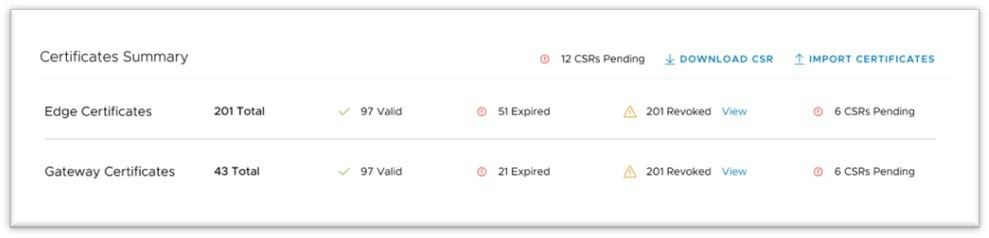
The Certificates Summary page provides an Operator with a visual status of key indicators for their certificates' life cycle. The Operator would also import certificates and download CSRs in this section.
In the Certificates section, the Operator can download a complete list of all Edge or Gateway certificates in the .csv format.
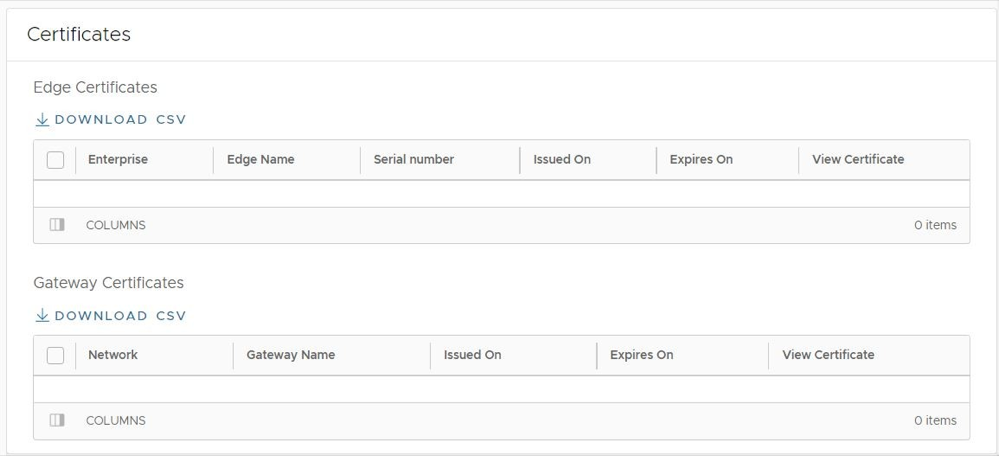
An Operator, Partner, or Customer administrator can also examine a particular Edge's certificate by navigating to .