VeloCloud SD-WAN 6.0 - Operator Guide - Configure Advisory Notice and Consent Warning Message for Orchestrator
Print
Configure Advisory Notice and Consent Warning Message for Orchestrator
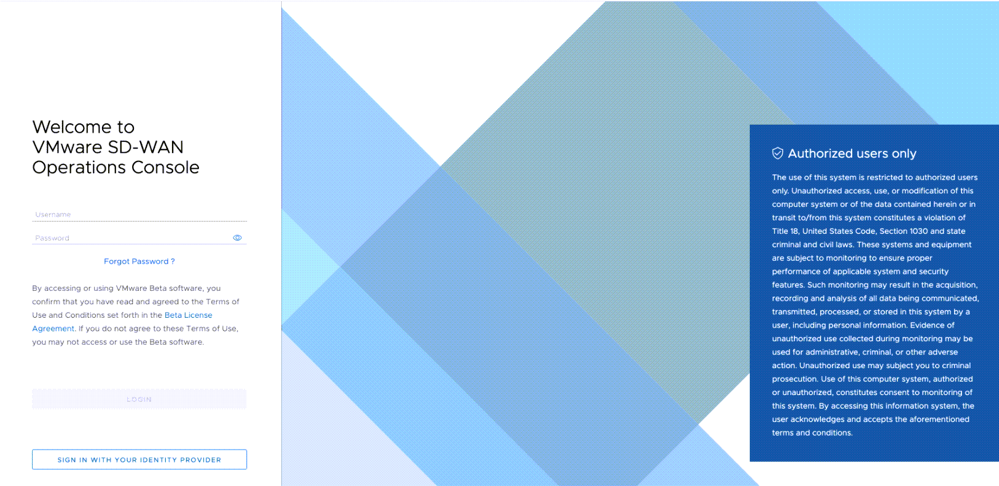
As an Operator user, you can configure and display a Security Administrator-specified advisory notice and consent warning message regarding the use of VeloCloud Orchestrator for Operators, Partners, and Enterprises.
To configure the consent warning message:
In the Operator portal, go to System Properties.
Search and locate the login.warning.banner.message system property.
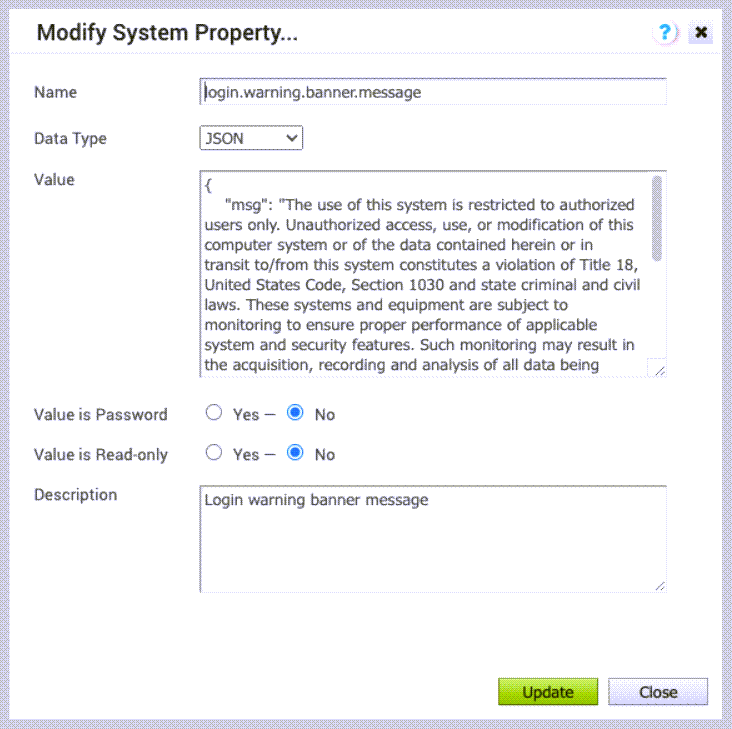
Select the system property, and then select Actions > Modify System Property. The Modify System Property page appears.
Figure 1. Modify System Property
Ensure that the Data Type field is set to JSON.
In the Value text area, the default value is as follows:
{ "msg": "" }
In the msg variable, type the required warning message between "".
Ensure that the Value is Password and Value is Read-only fields are set to No.
Select Update.
The warning message is displayed in the VeloCloud Orchestrator prior to user login for Operator, Partner, and Enterprise.