Configure Advisory Notice and Consent Warning Message for Orchestrator
As an Operator user, you can configure and display a Security Administrator-specified advisory notice and consent warning message regarding the use of Orchestrator for Operators, Partners, and Enterprises.
To configure the consent warning message:
- In the Operator portal, go to System Properties.
- Search and locate the
login.warning.banner.messagesystem property. - Select the system property, and then select . The Modify System Property … page appears.
Figure 1. Modifying System Properties 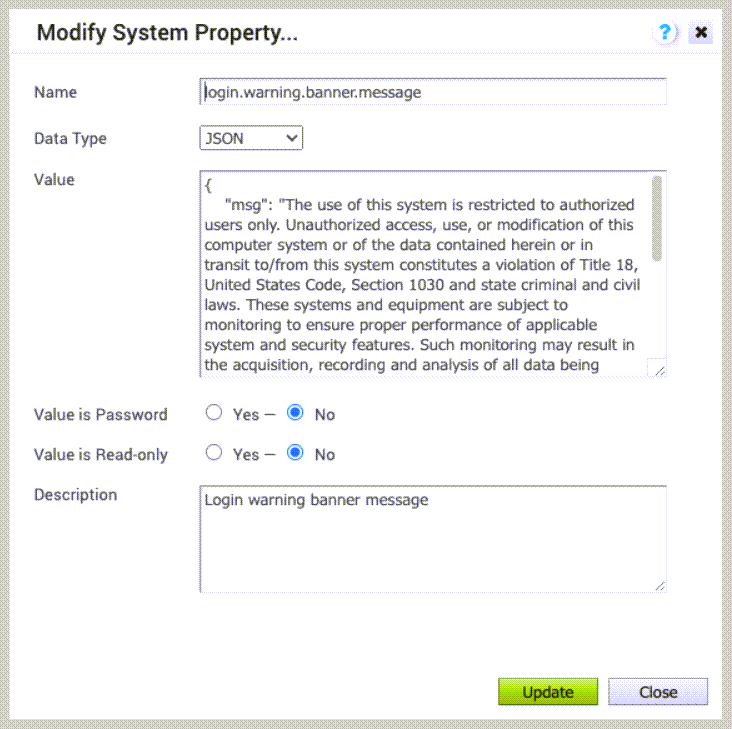
- Ensure that the Data Type field is set to JSON.
- In the Value text area, the default value is as follows:
{ "msg": "" }In the "msg" variable, type the required warning message between "".
- Ensure that the Value is Password and Value is Read-only fields are set to No.
- Select Update.
The warning message displays in the Orchestrator prior to user login for Operator, Partner, and Enterprise.
