Activate SD-WAN Edges using Edge Auto-activation
Edge Auto-activation allows you to activate Edges by powering on the Edges and connecting them to the Internet.
This method eliminates the need of an activation link. Using this feature, the Service Provider can preconfigure the Edges and ship them to the Customers. The Customers just power-on the Edges and connect the cables to the internet to activate the Edges.
This method of Edge activation becomes useful when the person at the remote site cannot connect a laptop, tablet, or phone to the Edge, and cannot use an email or cannot select an activation code/URL.
- Edge Auto-activation supports Edge models: 510, 510 LTE, 6x0, 7x0 and 3xx0.
- For Edge Auto-activation to work, use the Orchestrator software version 4.3.0 or later.
Sign Up for Edge Auto-activation
The configuration requires Outbound Internet connectivity using DHCP to complete the push activation successfully.
Assign Edges to Customers
- Select all the Edges to assign to the Customer, and then select Assign To Customer.
The Edge Assignment window appears.
Figure 1. Edge Assignment 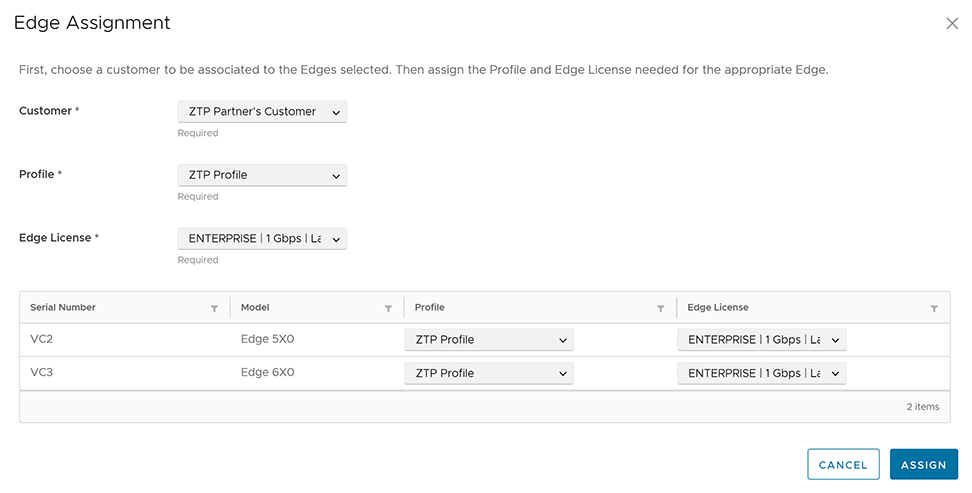
Reassign an Edge to Another Customer
If you decide to reassign an activated, you must deactivate the Edge, and then reassign the Edge to another Customer. For instructions about deactivating an Edge, refer to the topic Remote Actions. After you deactivate the Edge, its state changes to Offline. You can now reassign the Edge to another Customer.
To reassign an Edge to another Customer, perform the following tasks: