VeloCloud Edge on Azure Private MEC Architecture
This document illustrates a basic architecture and a high-level workflow to deploy a VeloCloud Edge on Azure Private MEC.
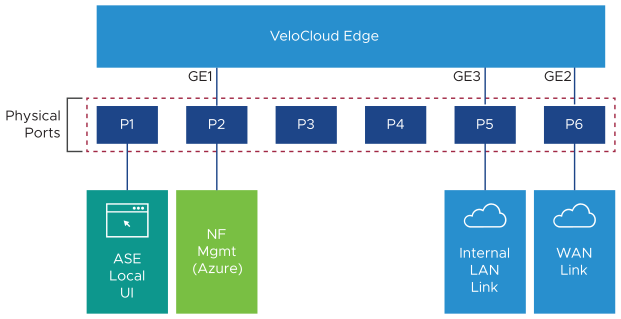
The following diagram illustrates the architecture of Azure Private MEC and describes how a Virtual Edge is integrated into it. The VeloCloud Edge on Azure Private MEC has three Edge interfaces GE1 (Management Interface), GE2 (WAN Interface), and GE3 (LAN Interface). The GE1 Edge interface is connected to the Management Port (P2) on Azure Stack Edge (ASE), and it is used to login into the Edge for troubleshooting purposes. The GE2 Edge interface is connected to the WAN Port (P6) on ASE, and it is used to establish SD-WAN tunnels for communicating with other network devices on the SD-WAN network. The GE3 Edge interface is connected to the LAN Port (P5) on ASE. ASE used in Azure Private MEC uses the Port P1 to connect to Local UI and Port P2 to connect to Azure portal. Whenever activating a stack Edge, ensure to configure an IP address for each of the ASE ports (P1, P2, P5, and P6). You must configure IP address in the same range for the ASE port and the Edge interface connected to it.