印刷

Enterprise Settings

The Enterprise Settings option allows configuring user information, privacy settings, and primary contact details for Enterprise users.

Follow the below steps to configure Enterprise Settings:

  1. In the Enterprise portal, on the Global Navigation bar, expand the Enterprise Applications drop-down menu.
  2. Select the Global Settings service.
  3. From the left menu, select Enterprise Settings.
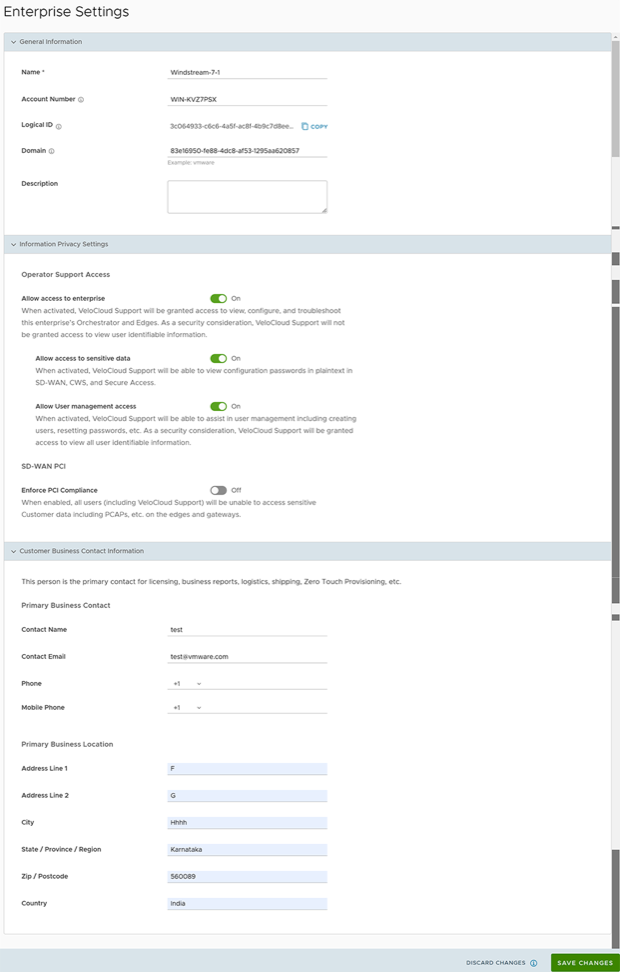
    The following screen appears:
    Figure 1. Enterprise Settings
  4. Configure the following parameters, and then select Save Changes:
    Table 1. Enterprise Settings - Options and Descriptions
    Option Description
    General Information
    Name Enter the name of the new Customer. This field is mandatory.
    Account Number Enter the account number for the Customer.
    Logical ID Displays a unique identifier. Copy this unique ID to be used by the APIs.
    Domain The domain name activates SSO authentication for Orchestrator.
    Note: This Domain is not the domain of the IdP, but of the Enterprise. It does not correspond to any URL domain. It is only present to differentiate various SSO configurations.
    Description Enter a description. This field is optional.
    Information Privacy Settings Use the toggle button to allow or deny access to sensitive data and user management.

    Turn on the Enforce PCI Compliance to prevent operations that are disallowed for PCI compliance reasons. Currently, the only operation this option prevents is the ability to request PCAP Diagnostic Bundles from the Edge.

    Customer Business Contact Information Enter primary contact details of the Customer such as contact name, email address, phone number, location details etc.

After configuring the Enterprise Settings, set up the SSO Authentication. Before setting up the SSO authentication, set up Users and Roles. For more information, see User Management - Enterprise.

Log into the Orchestrator using Single Sign On. For additional information, see the topic Log in to Orchestrator using Single Sign On in Arista VeloCloud SD-WAN Administration Guide.

..