Configure Forcepoint Cloud Security Gateway
The configuration requires a configured Edge Device to route traffic from VeloCloud SD-WAN to Forcepoint Cloud Security Gateway for inspection and filtering.
To create a new Edge Device in Forcepoint Cloud Security Gateway:
- Navigate to , select the drop-down Icon under the headline, and select Add Edge Device.
Figure 1. Adding an Edge Device 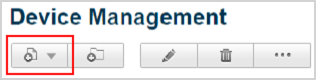
- In the Tunneling Type window, select IPsec Advanced and configure the following settings:
Figure 2. Selecting the Tunneling Type 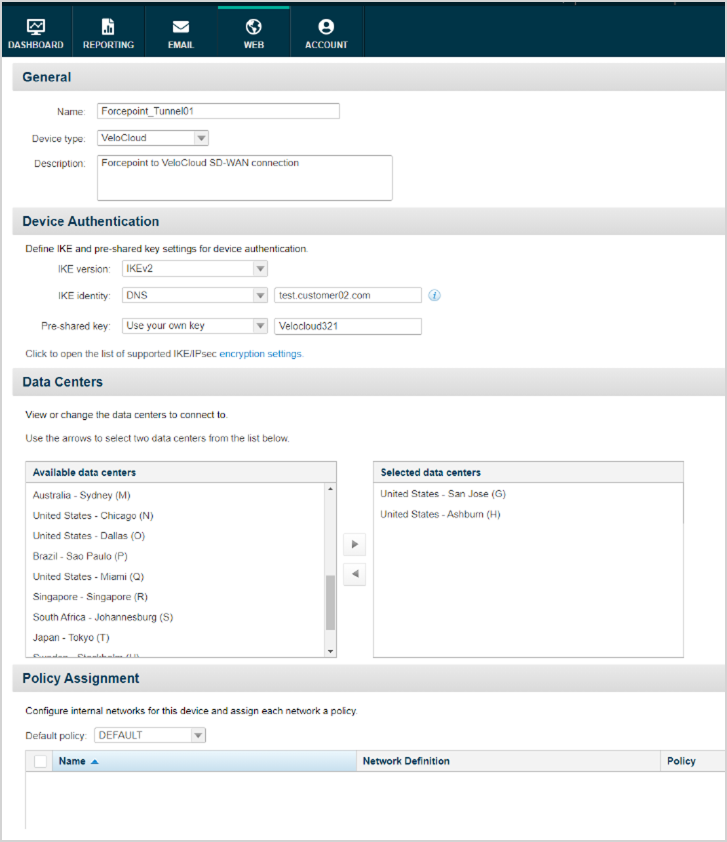
Table 1. Tunnel option Descriptions Option Description Name Enter a descriptive name to identify the connection of the Edge. Device type Select VeloCloud from the list. Description You can enter more details describing the connection. IKE version Select IKEv2 from the list. IKE identity Select DNS and enter a DNS name within your namespace to configure on the VeloCloud SD-WAN as well. Pre-shared key Select Use your own key and enter the same key to use on the VeloCloud SD-WAN. Data Centers Select any two data centers close to the location of VeloCloud Edges, from Available data centers and move them to the Selected data centers pane. The latency is minimal when you choose the data centers close to the VeloCloud Edges. Policy Assignment Select a default policy from the list, that applies to all traffic coming from the VeloCloud Edges. - In the Device Management page, select the newly created Edge Device and note the Service IP of both the Data Centers from the Status menu. The VeloCloud SD-WAN configuration requires these details.
Figure 3. Device Management 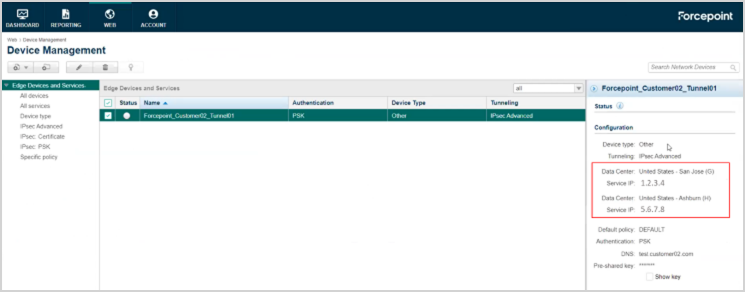
The Edge Device on Forcepoint Cloud Security Gateway waits for connections initiated by the VeloCloud Gateway.
Configure the components of the VeloCloud Edge Cloud Orchestrator to connect the Forcepoint Cloud Security Gateway to one of the following:
- Gateway – See Configure Tunnels on VeloCloud Gateway
- Edge – See Configure Tunnels on VeloCloud Edge