Partner Gateway Upgrade and Migration
This document provides instructions on how to upgrade the Partner Gateway from the 3.3.2 or 3.4 release to the 4.0 release.
- A new system disk layout based on LVM to allow more flexibility in volume management
- A new kernel version
- New and upgraded base OS packages
- Improved security hardening based on Center for Internet Security benchmarks
ifupdownhas been deprecated in favor of https://netplan.io/ifupandifdownare no longer available.- Network configuration is now in /etc/netplan vs /etc/network/
- etc/network/ifup.d and /etc/network/ifdown.d no longer work. Network-dispatcher locations should be used
/usr/lib/networkd-dispatcher (dormant.d, no-carrier.d,
off.d, routable.d)
.
- Substantial changes to cloud-init. Cloud-init deployment scripts must be reviewed and tested for compatibility.
- net-tools (ifconfig, netstat, etc.) are considered deprecated and may be removed in the future versions.
Network Configuration
ifupdown has been deprecated in favor of https://netplan.io/. Network configuration has moved from /etc/network to /etc/netplan.
network:
version: 2
ethernets:
eth0:
    addresses:
        - 192.168.151.253/24
    gateway4: 192.168.151.1
    nameservers:
        addresses:
        - 8.8.8.8
        - 8.8.4.4
        search: []
    routes:
        - to: 192.168.0.0/16
        via: 192.168.151.254
        metric: 100
eth1:
    addresses:
        - 192.168.152.251/24
    gateway4: 192.168.152.1
    nameservers:
        addresses:
            - 8.8.8.8
        search: []
echo 'network: {config: disabled}' > /etc/cloud/cloud.cfg.d/99-disable-network-config.cfg
Cloud-init
Cloud-init was upgraded to version 20.2. More information on Cloud-init can be found here: https://cloudinit.readthedocs.io/en/stable/index.html
Example 1: Simple
meta-data:
instance-id: vcg1
local-hostname: vcg1
#cloud-config
hostname: vcg1
password: Velocloud123
chpasswd: {expire: False}
ssh_pwauth: True
Example 2: New-style network configuration (network-config file)
instance-id: vcg1
local-hostname: vcg1
#cloud-config
hostname: vcg1
password: Velocloud123
chpasswd: {expire: False}
ssh_pwauth: True
ssh_authorized_keys:
- ssh-rsa … rsa-key

velocloud:
vcg:
    vco: demo.velocloud.net
    activation_code: F54F-GG4S-XGFI
    vco_ignore_cert_errors: false
runcmd:
    - 'echo “Welcome to VeloCloud”'
network-config Example 1:
version: 2
ethernets:
eth0:
addresses:
    - 192.168.152.55/24
gateway4: 192.168.152.1
nameservers:
    addresses:
    - 192.168.152.1
eth1:
addresses:
    - 192.168.151.55/24
gateway4: 192.168.151.1
nameservers:
    addresses:
     - 192.168.151.1
network-config Example 2:
version: 2
ethernets:
eth0: addresses: [192.168.82.1/24]
eth1: addresses: [70.150.1.1/24]
routes:
- {metric: 1, to: 0.0.0.0/0, via: 70.150.1.254}
eth2:
addresses: [70.155.1.1/24]
routes: - {metric: 2, to: 0.0.0.0/0, via: 70.155.1.254}
Net-tools
| Old Net-tool Utilities | New Corresponding Net-tool Utilities |
|---|---|
| arp | ip n (ip neighbor) |
| ifconfig | ip a (ip addr), ip link, ip-s (ip-stats) |
| nameif | ip link, ifrename |
| netstat | ss, ip route (for netstat-r), ip-s link (for netstat-i), ip maddr (for netstat-g) |
| route | ip r (ip route) |
Sample Command Output for Net-tool Utilities
The sample output is confirmation that the command is successful. Sample command outputs for ip n (ip neighbor), ip a (ipaddr), and ip link are shown below.
root@SS-gateway-1:~# ip n
192.168.0.100 dev eth2 lladdr 00:50:56:84:85:d4 REACHABLE
192.168.0.250 dev eth2 lladdr 00:50:56:84:97:66 REACHABLE
13.1.1.2 dev eth0 lladdr 00:50:56:84:e7:fa REACHABLE
root@SS-gateway-1:~#
root@SS-gateway-1:~# ip a
1: lo: <LOOPBACK,UP,LOWER_UP> mtu 65536 qdisc noqueue state UNKNOWN group default qlen 1000
link/loopback 00:00:00:00:00:00 brd 00:00:00:00:00:00
inet 127.0.0.1/8 scope host lo
    valid_lft forever preferred_lft forever
inet6 ::1/128 scope host
    valid_lft forever preferred_lft forever
2: eth0: <BROADCAST,MULTICAST,UP,LOWER_UP> mtu 1500 qdisc mq state UP group default qlen 4096
link/ether 00:50:56:84:a0:09 brd ff:ff:ff:ff:ff:ff
inet 13.1.1.1/24 brd 13.1.1.255 scope global eth0
    valid_lft forever preferred_lft forever
inet6 fe80::250:56ff:fe84:a009/64 scope link
    valid_lft forever preferred_lft forever
3: eth1: <BROADCAST,MULTICAST,UP,LOWER_UP> mtu 1500 qdisc mq state UP group default qlen 1000
link/ether 00:50:56:84:a6:ab brd ff:ff:ff:ff:ff:ff
inet 101.101.101.1/24 brd 101.101.101.255 scope global eth1
    valid_lft forever preferred_lft forever
inet6 fe80::250:56ff:fe84:a6ab/64 scope link
    valid_lft forever preferred_lft forever
4: eth2: <BROADCAST,MULTICAST,UP,LOWER_UP> mtu 1500 qdisc mq state UP group default qlen 1000
link/ether 00:50:56:84:bc:75 brd ff:ff:ff:ff:ff:ff
inet 192.168.0.201/24 brd 192.168.0.255 scope global eth2
    valid_lft forever preferred_lft forever
inet6 fe80::250:56ff:fe84:bc75/64 scope link
    valid_lft forever preferred_lft forever
6: gwd1: <POINTOPOINT,MULTICAST,NOARP,UP,LOWER_UP> mtu 1500 qdisc fq_codel state UNKNOWN group default qlen 4096
link/none
inet 169.254.129.1/32 scope global gwd1
    valid_lft forever preferred_lft forever
inet6 fe80::27d5:9e46:e7f7:7198/64 scope link stable-privacy
    valid_lft forever preferred_lft forever root@SS-gateway-1:~#
root@SS-gateway-1:~# ip link
1: lo: <LOOPBACK,UP,LOWER_UP> mtu 65536 qdisc noqueue state UNKNOWN mode DEFAULT group default qlen 1000
link/loopback 00:00:00:00:00:00 brd 00:00:00:00:00:00
2: eth0: <BROADCAST,MULTICAST,UP,LOWER_UP> mtu 1500 qdisc mq state UP mode DEFAULT group default qlen 4096
link/ether 00:50:56:84:a0:09 brd ff:ff:ff:ff:ff:ff
3: eth1: <BROADCAST,MULTICAST,UP,LOWER_UP> mtu 1500 qdisc mq state UP mode DEFAULT group default qlen 1000
link/ether 00:50:56:84:a6:ab brd ff:ff:ff:ff:ff:ff
4: eth2: <BROADCAST,MULTICAST,UP,LOWER_UP> mtu 1500 qdisc mq state UP mode DEFAULT group default qlen 1000
link/ether 00:50:56:84:bc:75 brd ff:ff:ff:ff:ff:ff
6: gwd1: <POINTOPOINT,MULTICAST,NOARP,UP,LOWER_UP> mtu 1500 qdisc fq_codel state UNKNOWN mode DEFAULT group default qlen 4096
link/none
root@SS-gateway-1:~#
Upgrade Considerations
Due to substantial changes to the disk layout and system files, an in-place upgrade is not possible from older releases to the 4.0 release. The migration will require deploying new 4.0 Gateway systems and decommissioning systems running older code.
For VPN Gateways or NAT Gateways with well-known public IP addresses, adhere to the following procedure below if the public IP of the Gateway must be preserved.
Procedure: (VNP or NAT Gateways with Well-Known Public IP Addresses)
- Obtain the activation key from the existing Gateway record in the Orchestrator (as described in the steps below).
- An information box expands and you can find the activation key at the bottom, as shown in the image below.
Figure 1. Activation Key for Gateways 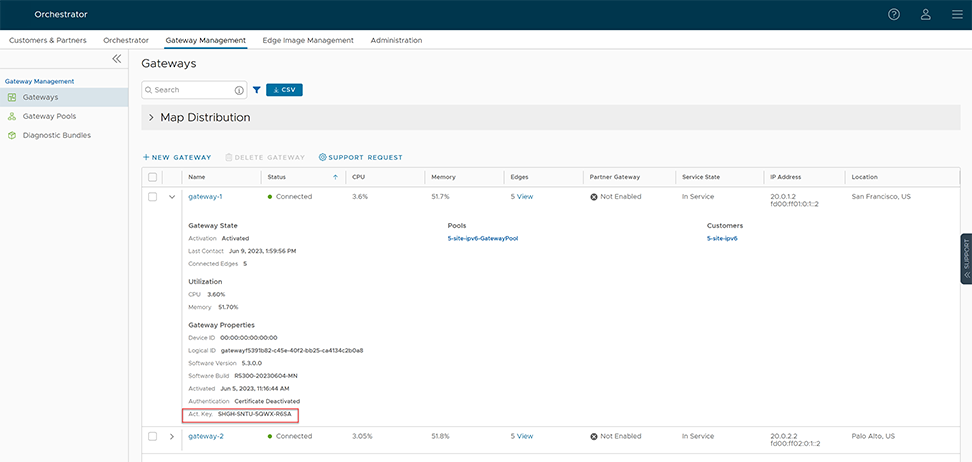
- An information box expands and you can find the activation key at the bottom, as shown in the image below.
- Set the following system property
gateway.activation.validate.deviceIdto False, as shown in the image below. Refer to the System Properties section in the VeloCloud SD-WAN Operator Guide, if necessary for more information.Figure 2. System Properties Modification 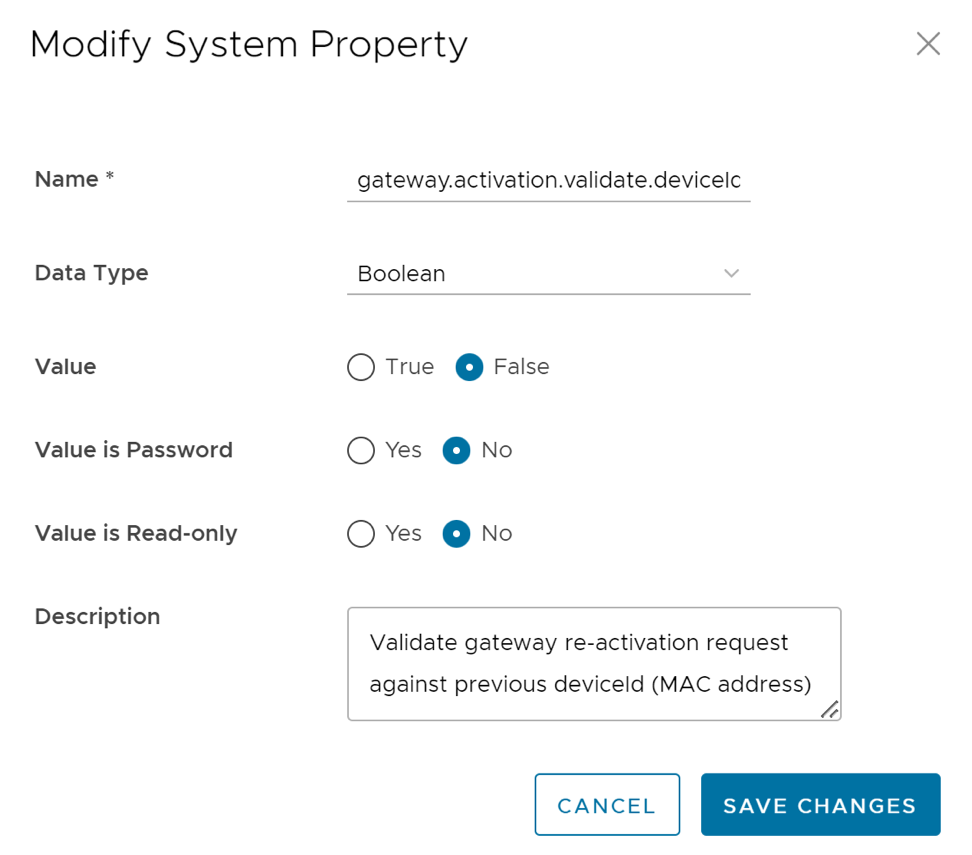
Gateways Without Well-known Public IPs
This section is only for Gateways without a well-known public IP, such as, VPN Gateways. If this scenario applies, follow the procedure below.
Obtaining Gateway Activation Key Via API
To deploy using the API Method, use the following: network/getNetworkGateways
Sample response:
{"jsonrpc":"2.0","result":[{"id":1, "activationKey":"69PX-YHY2-N5PZ-G3UW …
Configure Handoff Interface in Data Plane
To configure Handoff Interface in Data Plane, see the topic Post-Installation Tasks.