Rack Mounting the Switch
The rack mounting procedure is identical for all switches covered by this guide. Illustrations in this chapter depict the mounting of a DCS-7050QX-32S switch.
Les procédure de montage du bâti est identique pour tous les commutateurs visés par ce guide. Illustrations dans ce chapitre montrent le montage d’un interrupteur de DCS-7050QX-32S.
- Two-Post Rack Mount provides instructions for mounting the switch in a two-post rack.
- Four-Post Rack Mount provides instructions for mounting the switch in a four-post rack.
After completing the instructions for your rack type, proceed to Cabling the Switch.
Two-Post Rack Mount
Discusses two-post rack mounting options.
To mount the switch onto a two-post rack, assemble the mounting brackets to the chassis, then attach the brackets to the rack posts. Two-post accessory kits include the following two-post mounting parts:
2 - Three-hole Mounting Brackets
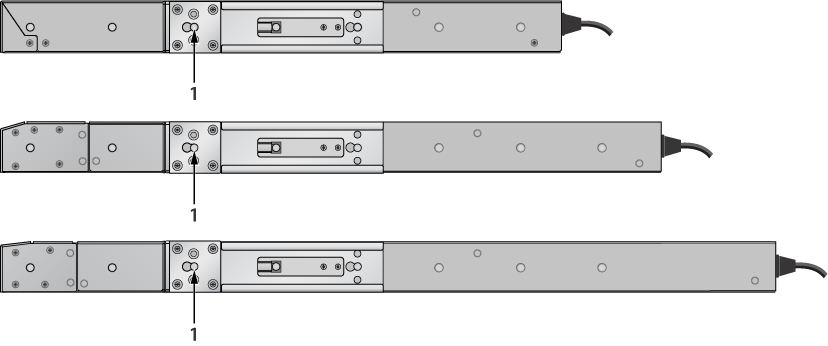
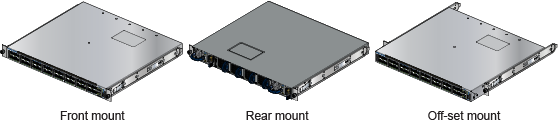
Each chassis side has attachment pins that align with bracket holes. Pin orientation is symmetric and equidistant, supporting bracket placements where the flange is flush with the front switch panel, flush with the rear panel, or not flush with either panel. Each bracket hole includes a key opening for placing the bracket flush with the chassis and then locking it into place.
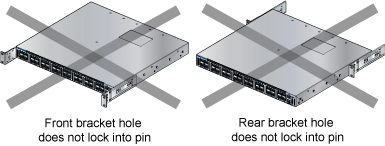
Attachment pins must engage all three upper bracket holes.
Goupilles de fixation doivent être bloquer tous les trois trous de la bride supérieure.
Figure 1 - Bracket Mount Examples for Two-Post Rack Mount displays proper bracket mount configuration examples.displays improper bracket mount configuration examples.
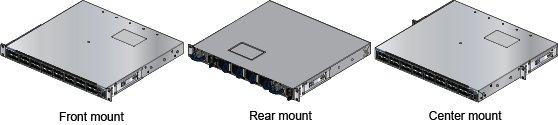
Figure 2 - Improper Bracket Mount Examples for Two-Post Rack Mount
Attaching Mounting Brackets to the Two-Post Chassis
The following image displays the front bracket alignment for mounting the switch into a four-post rack.
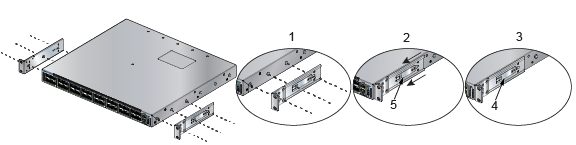
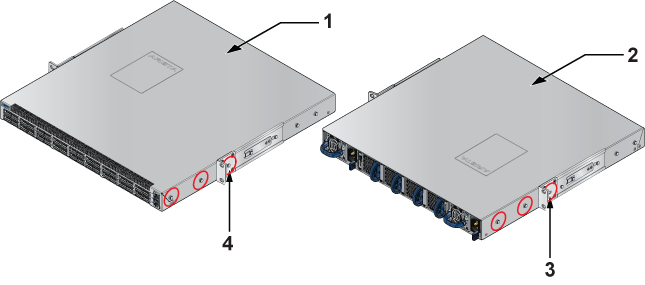
This procedure attaches mounting brackets to the switch chassis as depicted by Figure 3 - Attaching the Mounting Brackets to the Switch Chassis (Front Mount)Attaching the Mounting Brackets to the Switch Chassis and Figure 4 - Attaching the Mounting Brackets to the Switch Chassis (Center Mount).
Inserting the Switch into the Rack
This procedure attaches the switch to the rack (Figure 5 - Inserting the Switch into the Rack (Front Mount)).
- Attach the bracket flanges to the rack posts.
Figure 5. Inserting the Switch into the Rack (Front Mount)
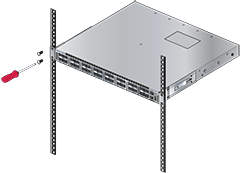
Figure 6. Inserting the Switch into the Rack (Center Mount - Recommended) 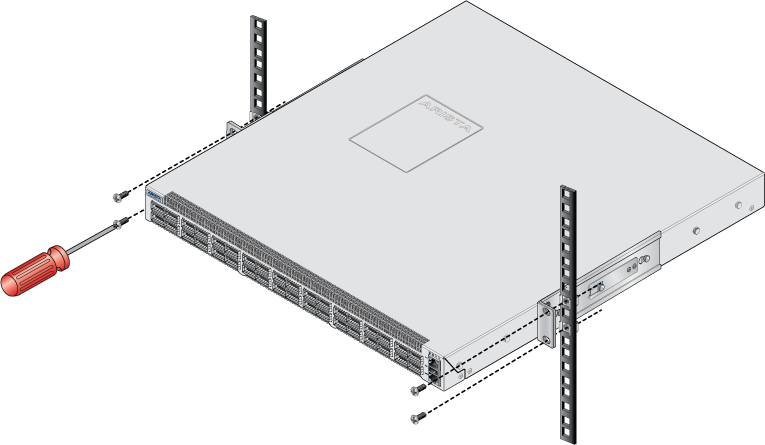
After completing the two-post rack mount, proceed to Cabling the Switch.
Four-Post Rack Mount
Discusses the four-post racking option.
The switch is mounted onto a four-post rack by assembling two rails onto the rear posts, sliding the switch onto the rails, and securing the switch to the front posts.
- 2 six-hole mounting brackets
- 2 rail-rods
- 2 rail-slides
The rail rods and rail slides assemble into two identical slide rails.
Each chassis side has attachment pins that align with bracket holes. Pin orientation is symmetric and equidistant, supporting bracket placements where the flange is flush with the front switch panel, flush with the rear panel, or not flush with either panel. Each bracket hole includes a key opening for placing the bracket flush with the chassis and then locking it into place.
Attachment pins must engage at least five of the six bracket holes.
Goupilles de fixation doivent être lock au moins cinq des trous du six support.
Figure 7 - Bracket Mount Examples for Four-Post Rack Mountdisplays proper bracket mount configuration examples. Figure 8 - Improper Bracket Mount Example for Four-Post Rack Mount displays an improper bracket mount configuration example.
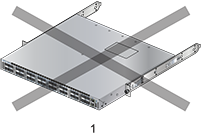
| 1 | Bracket not attached by at least 5 pins |
Attaching Mounting Brackets to the Four-Post Chassis
The following image displays the front bracket alignment for mounting the switch into a four-post rack.
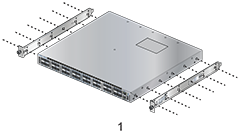
This procedure attaches mounting brackets to the switch chassis as depicted by Figure 9 - Attaching the Mounting Brackets to the Switch Chassis (Front Mount)Attaching the Mounting Brackets to the Switch Chassis.
Assembling the Rails onto the Equipment Rack
Rail rods and rail slides assemble into two identical rails. Each rail connects a front post to a rear post. When the rails are installed, the switch slides on the rails into the rack. Each bracket includes a screw that attaches the switch to the rail.
Each end of an assembled rail contains two rack plugs (Figure 10 - Attaching the Four-Post Mounting Brackets to the Switch Chassis). The rails are installed into a rack by inserting the plugs into rack slots. When installing rails into posts with threaded or rounded holes, remove all plugs on both sides of the assembled rails, then install the rails with bolts that fit the rack.
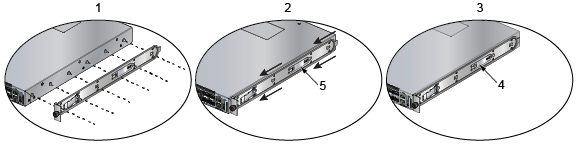
| 1 | Step 1 | 2 | Step 2 | 3 | Step 3 |
| 4 | Bracket clip (attached) | 5 | Bracket clip (aligned) |
This procedure attaches the rails to a four-post rack:
- Slide a rail rod into a rail slide (Figure 11 - Assembling the Rails) until the rail clip makes an audible click.
The rail clip prevents the extension of the rail beyond the maximum supported distance between the front and rear rack posts.
Figure 11. Assembling the Rails
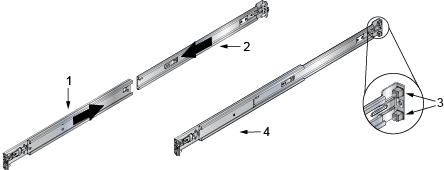
1 Rail slide 2 Rail rod 3 Rack plugs 4 Rail (assembled) - Repeat Step 1 through 3 for the left posts. Ensure the rails are on the same horizontal level.
Figure 12. Attaching the Rails
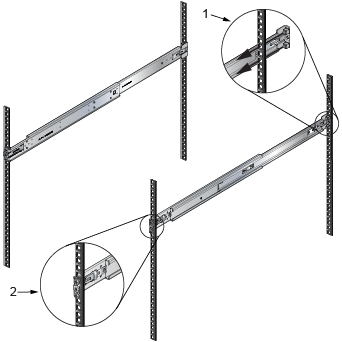
1 Detail A 2 Detail B
Attaching the Switch to the Rack
After the rails are installed, the switch slides on the rails into the rack. Each bracket includes a thumb screw that attaches the switch to the rail.
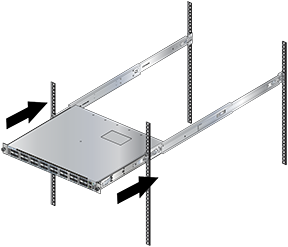
- Lift the switch into the rack and insert the mounting brackets into the slide rails.
Figure 13. Inserting the Switch onto the Rails
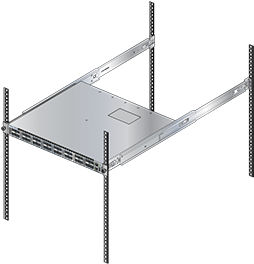
- Attach the bracket flanges to the rack post using the quick-release thumb screws supplied with the brackets (Figure 14 - Attaching the Switch to the Rack Posts).
Figure 14. Attaching the Switch to the Rack Posts
After completing the four-post rack mount, proceed to Cabling the Switch.