Status Indicators
LCD Panel Features
The system's LCD panel provides system information and status and error messages to indicate if the system is operating correctly or if the system needs attention.
The LCD back-light lights blue during normal operating conditions. When the system needs attention, the LCD lights amber, and displays an error code followed by descriptive text.
The LCD back-light turns OFF when the system is in standby mode and can be turned on by pressing either the Select, Left, or Right button on the LCD panel.
The LCD back-light remains OFF if LCD messaging is turned off through the iDRAC utility, the LCD panel, or other tools.
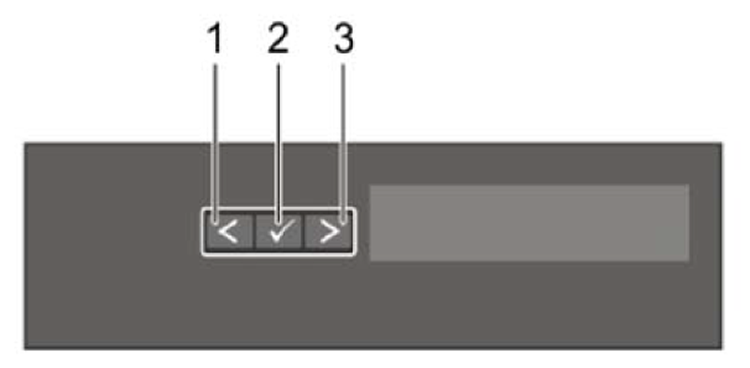
| Item | Button | Description |
|---|---|---|
| 1 | Left | Moves the cursor back in one-step increments. |
| 2 | Select | Selects the menu item highlighted by the cursor. |
| 3 | Right | Moves the cursor forward in one-step increments. During message scrolling:
|
AC Power Supply Status Indicators
Each AC power supply has an illuminated translucent handle that indicates whether power is present or whether a power fault has occurred.
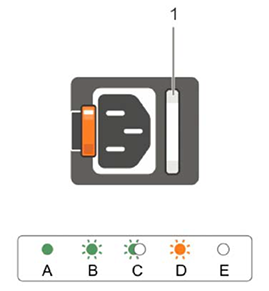
| OK LED | Status |
|---|---|
| Green | A valid power source is connected to the power supply and the power supply is operational. |
| Flashing green | When updating the firmware of the power supply unit is being updated, the power supply handle flashes green. |
| Flashing green and turns off | When hot-adding a power supply, the power supply handle flashes green five times at 4 Hz rate and turns off. This indicates that there is a power supply mismatch with respect to efficiency, feature set, health status, and supported voltage. Replace the power supply with a power supply that matches the capacity of the other power supply. |
| Flashing amber | Indicates a problem with the power supply. |