Powering on the Access Point
Plug one end of the Ethernet cable into the PoE++ switch or compatible PoE injector, a Single-port High Power Midspan, 802.3bt compliant, up to 5Gigabit PoE with PD54V in power output, and the other end into the LAN1 (PoE++) on the AP. Be sure to turn on the PoE++ source. Use an active wrench with a 27 mm opening to open the LAN (PoE++) port cap.
The access point (AP) package must contain the components shown in the following figure.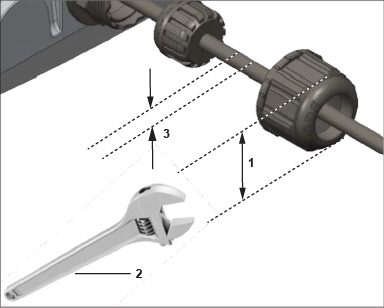
| Label | Description |
|---|---|
| 1 | The LAN port cap has a width of 27mm. |
| 2 | Use an active wrench to open the LAN port cap. |
| 3 | Insert LAN cable. |
Earthing or Grounding: The AP must be properly grounded using a copper grounding wire (12 ~ 10 AWG) and a tin-plated lug as shown in the following image. The wire and the lug must be tightened at the grounding screw on the AP.
The following two images show the position of the grounding screw on the AP, displayed as 1, and the dimension of the lug that attaches to the grounding screw.
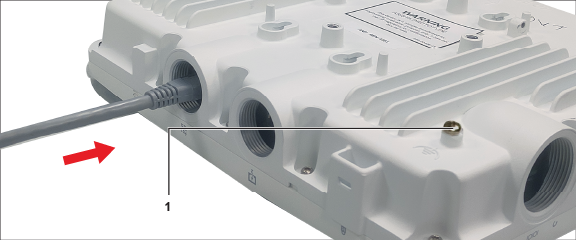
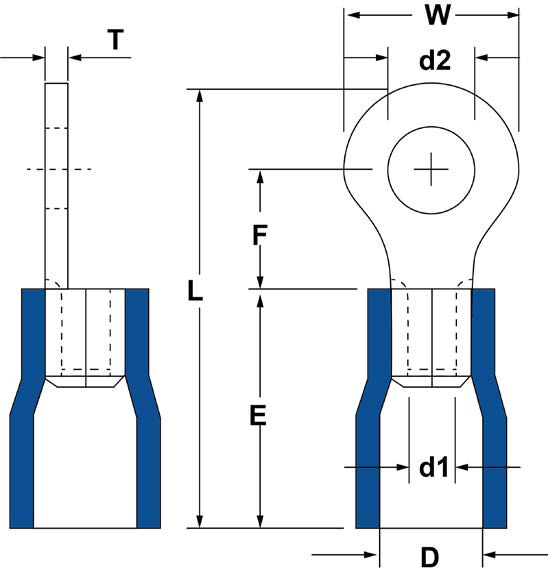
The following table shows the dimension of the grounding screw and lug.
| Item | 1 | 2 | 3 | 4 | 5 | 6 | 7 | 8 |
| Tolerance | W: ± 0.5 | d2: ± 0.2 | L: ± 0.5 | F: ± 0.5 | E: ± 0.5 | d1: ± 0.2 | D: ± 0.2 | T: ± 0.5 |
| Size | 7.20 | 4.30 | 21.50 | 5.90 | 13.00 | 3.40 | 6.70 | 1.00 |