Diagnostic Bundles for Edges
To generate and download Diagnostic Bundles:
- Select Diagnostic Bundles to request the following bundles:
- Request PCAP Bundle– The Packet Capture bundle is a collection of the packet data of the network. Operators, Standard Admins, and Customer Support can request PCAP bundles. For more information, see Request Packet Capture Bundle for Edges.
- Request Diagnostic Bundle– The Diagnostic bundle is a collection of all the configuration and logs from a specific Edge. Only Operators can request Diagnostic bundles. For more information, see Request Diagnostic Bundle for Edges.
Note: Only an Operator user can access the Request Diagnostic Bundle option. A Partner user or an Enterprise user can request for a PCAP Bundle.The Diagnostic Bundles window displays the generated bundles.Figure 1. Diagnostic Bundles 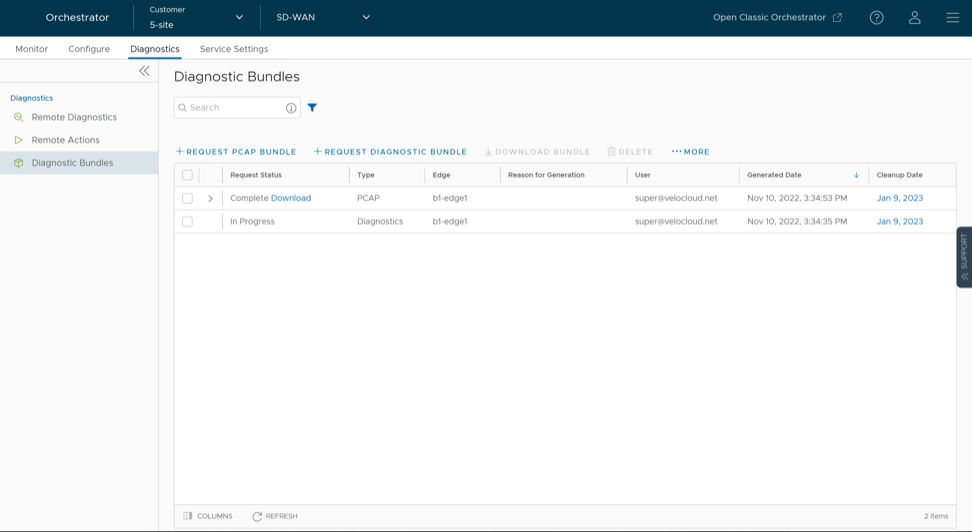
Request Packet Capture Bundle for Edges
To generate a PCAP bundle:
- In the Request PCAP Bundle window, configure the following:
Figure 2. Request PCAP Bundle 
Table 1. Request PCAP Bundle - Options and Descriptions Option Description Target Choose the target Edge from the drop-down menu. The Orchestrator collects packets from the selected Edge. Interface Choose an Interface or a VLAN from the drop-down menu. The Orchestrator collects packets from the selected Interface. Duration Choose the time in seconds. The Orchestrator collects packets for the selected duration. Reason for Generation Enter a reason for generating the bundle. This field is optional. PCAP Filters Define PCAP filters to control the generated packet data by selecting the following options: - IP1 - Enter an IPv4 address, IPv6 address, or Subnet mask.
- IP2 - Enter an IPv4 address, IPv6 address, or Subnet mask.
- IP1:Port1 - Enter a Port ID associated with IP1.
- IP2:Port2 - Enter a Port ID associated with IP2.
- Protocol - Select a protocol from the list.
This field is optional.
Note: To use the PCAP filtering capability, define at least one filter.Advanced Filters Define free form filters to control the generated packet data. This field is optional. The Diagnostic Bundles window displays the details of the generated bundle, including its status.
Packet Capture for Edges configured for High Availability

Request Diagnostic Bundle for Edges
To generate a Diagnostic bundle:
- In the Request Diagnostic Bundle window, configure the following:
Figure 4. Request Diagnostic Bundle for Edges 
Table 2. Request Diagnostic Bundle - Options and Descriptions Option Description Target Select the target Edge from the drop-down menu. The Orchestrator collects data from the selected Edge. Reason for Generation Enter a reason for generating the bundle. This field is optional. Core Limit Select a value from the drop-down menu to reduce the size of the uploaded bundle when Internet connectivity is experiencing issues. The Diagnostic Bundles window displays the details of the generated bundle, including its status. To download the generated bundle, see the topic Request Diagnostic Bundle in the Arista VeloCloud Administration Guide.