SD-WAN Edge in a vNET Connecting to a vWAN Hub
Integrate an SD-WAN Edge in a traditional vNET with a vWAN Hub as an alternative design to deploying Edges as a managed NVA inside of the vWAN Hub resulting in the following similar topology.
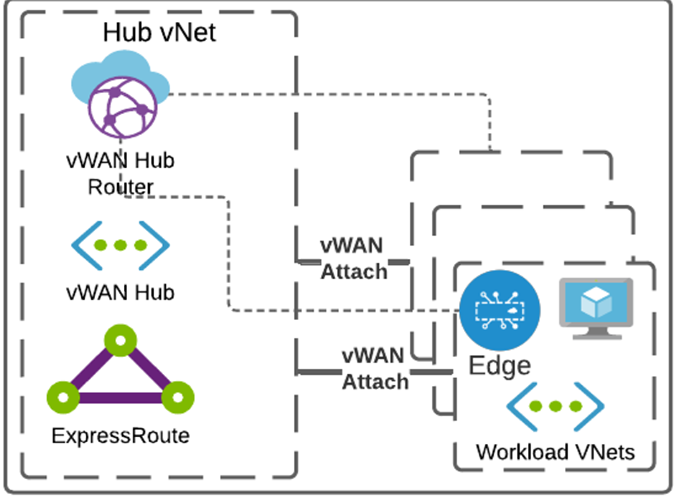
Adhere to the following important points:
- You must deploy the Virtual Edge in a vNET.
- Azure Virtual WAN Hub must be deployed,and the following must be created in the desired Azure region:
- A Resource Group
- A Virtual WAN (vWAN)
- A Virtual Hub (vHUB)
Note: This section assumes that Edges, vWAN, and applicable Hub(s) have already been deployed as documented in the Azure Virtual Edge Deployment Guide and the section titled "Deploy VeloCloud SD-WAN in Azure Virtual WAN Hub" in the Administration Guide.
To integrate an SD-WAN Edge in a traditional vNet with a vWAN hub:
- The vNET where the Edge(s) deploy must be attached to the vWAN Hub by navigating to the vWAN by selecting Virtual network connections and then selecting Add connection.
Figure 2. Adding a Virtual Network Connection 
- When creating the connection, ensure it propagates to the default route table of the vWAN Hub you connect. This ensures reachability for BGP peering.
Figure 3. Selecting the Default Route Table 
- After completing the vNet attachment, navigate to the vWAN hub and select BGP Peers from the Routing menu. Make a note of the IPs listed, as they become the addresses that peer with the Edge.
Figure 4. Selecting BGP Peers 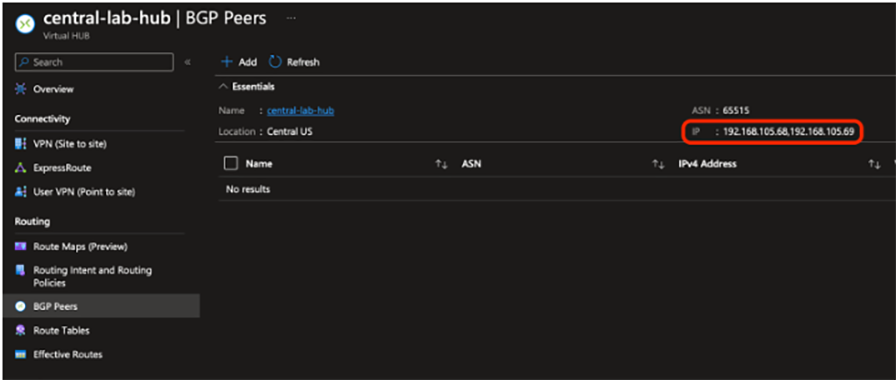
- Select Add and enter the ASN and LAN IP address of the SD-WAN Edge to the peer vWAN Hub router.
Figure 5. Adding the ASN and LAN IP Address 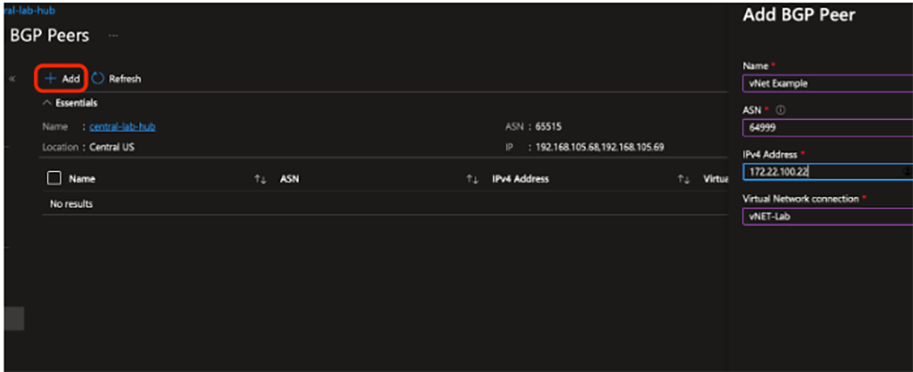
- The Hub router is not on the SD-WAN Edge’s local subnet; therefore, a static route must be configured for the IPs recorded in Step 3 and pointed to the Gateway IP of the LAN subnet.
Figure 6. Configuring a Static Route 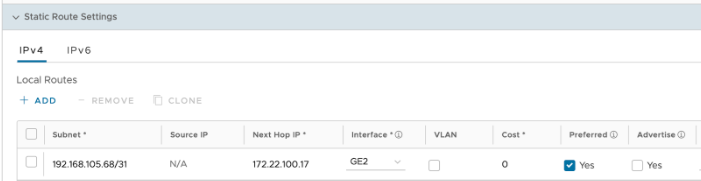
- Create BGP neighbors with each of the IP addresses recorded in Step 3 using Microsoft’s ASN of 65515. If using BGP multi-hop, the Max-Hop option must be set to 2.
Figure 7. Creating BGP Neighbors 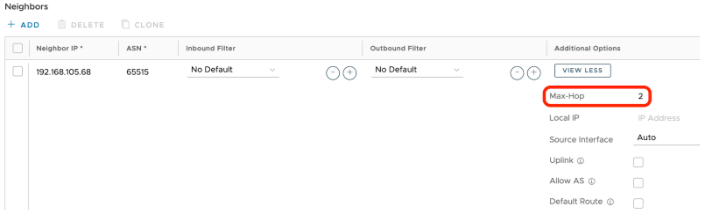
- Once the configuration applies, the BGP neighborship establishes, the SD-WAN Edge learns Azure routes, and SD-WAN overlay routes present in the Azure vWAN Default route table.