Print

Enterprise Settings

The Enterprise Settings option allows you to configure the user information, privacy settings, and primary contact details for the Enterprise users.

To configure Enterprise Settings, perform the following steps:

  1. In the Enterprise portal, on the Global Navigation bar, expand the Enterprise Applications drop-down menu.
  2. Select Global Settings service.
  3. From the left menu, select Enterprise Settings. The Enterprise Settings screen appears.
    Figure 1. Enterprise Settings
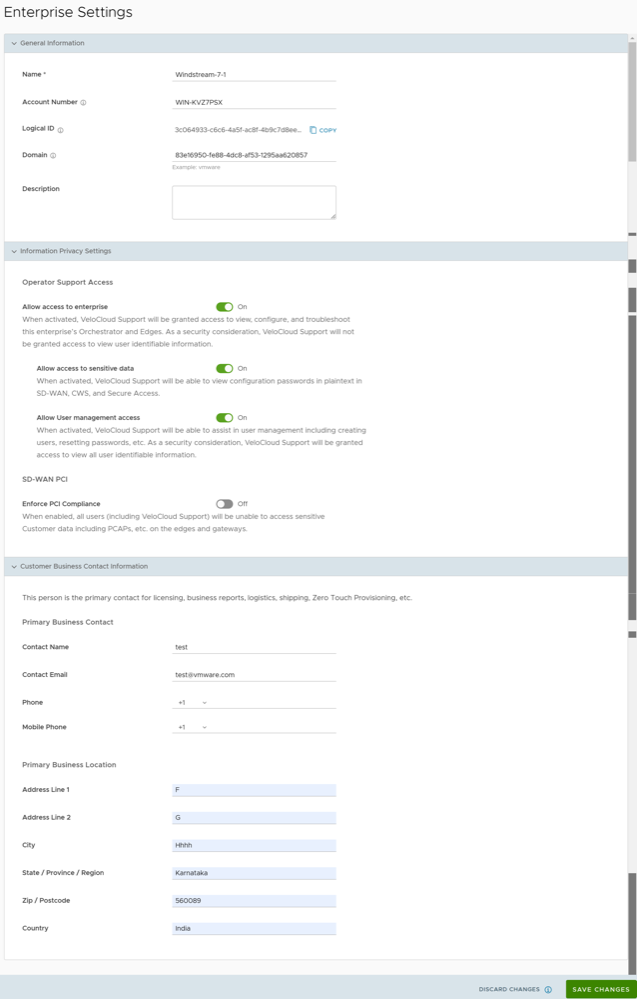
  4. You can configure the following parameters, and then select Save Changes.
    Table 1. Enterprise Settings Option Descriptions
    Option Description
    Name Enter the name of the new Customer. This field is mandatory.
    Account Number Enter the account number for the Customer.
    Logical ID Displays a unique identifier. You can copy this unique ID to be used by the APIs.
    Domain The domain name is used to activate the SSO authentication for the Orchestrator and to turn on the Edge Intelligence.
    Note: Modifying the domain after configuration, affects the EI integration with the Orchestrator.
    Description Enter a description. This field is optional.
    Information Privacy Settings Use the toggle button to allow or deny access to sensitive data and user management.

    Turn on the Enforce PCI Compliance to prevent operations that are disallowed for PCI compliance reasons. Currently, the only operation this option prevents is the ability to request PCAP Diagnostic Bundles from the Edge.

    Customer Business Contact Information Enter primary contact details of the Customer such as contact name, email address, phone number, location details etc.
After you have configured the Enterprise Settings, you must set up the SSO Authentication. Before setting up the SSO authentication, you must set up Users and Roles. For additional information, see User Management - Enterprise.

You can now log in to the VeloCloud Orchestrator using Single Sign On. For additional information, see the topic Using Single Sign On Login for Enterprise Users in Arista VeloCloud SD-WAN Administration Guide.

..