Rear Panel
This section displays the rear panel of all Arista NDR appliances covered by this guide.
Note: All devices are designed to fit into a 19” rack. The appearance may be different than those shown based on the PSU types and the modules used.
DCA-NDR-S100MB, DCA-NDR-S1
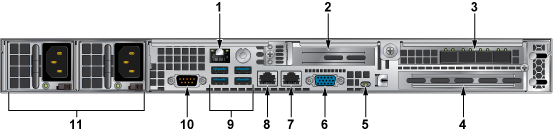
| 1 | Ethernet port | 2 | Unused slot | 3 | Packet capture ports |
| 4 | Unused slot | 5 | UID LED | 6 | VGA |
| 7 | Unused port | 8 | Management port | 9 | USB ports |
| 10 | COM port | 11 | Power supplies |
DCA-NDR-A5, DCA-NDR-S5
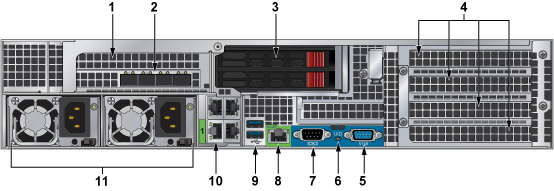
| 1 | Unused slot | 2 | Packet capture ports | 3 | SSD drives |
| 4 | Unused slots | 5 | VGA | 6 | UID LED |
| 7 | COM port | 8 | IPMI Ethernet port | 9 | USB ports |
| 10 | Management port | 11 | Power supplies |
DCA-NDR-S10
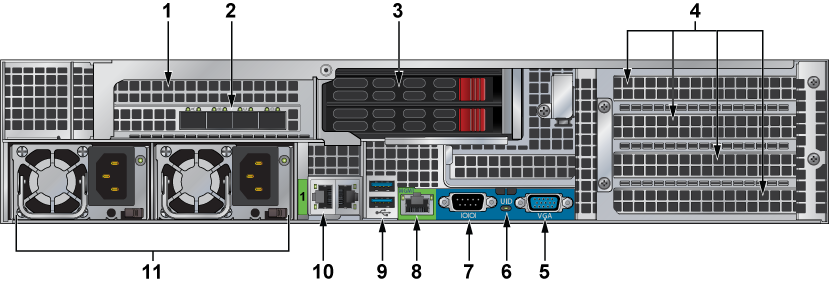
| 1 | Unused slot | 2 | Capture ports | 3 | SSD drives |
| 4 | Unused slots | 5 | VGA | 6 | UID LED |
| 7 | COM port | 8 | IPMI Ethernet port | 9 | USB ports |
| 10 | Management port | 11 | Power supplies |
DCA-NDR-NB10, DCA-NDR-CC
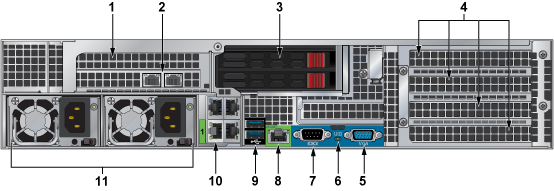
| 1 | Unused slot | 2 | Interconnect ports | 3 | SSD drives |
| 4 | Unused slots | 5 | VGA | 6 | UID LED |
| 7 | COM port | 8 | IPMI Ethernet port | 9 | USB ports |
| 10 | Management ports | 11 | Power supplies |
DCA-NDR-NB10x
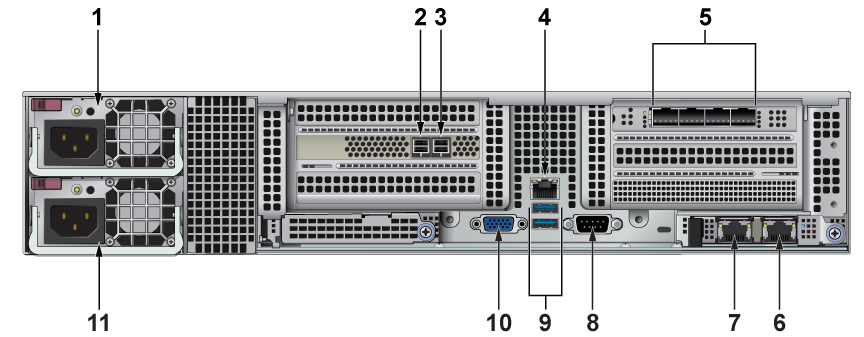
| 1 | PSU1 | 2 | JBOD port | 3 | JBOD port |
| 4 | IPMI 1Gb Ethernet Port | 5 | 25/10 GbE SFP28 Interconnect Ports | 6 | Spare 10 GbE port |
| 7 | 10 GbE Management port | 8 | COM port | 9 | USB ports |
| 10 | VGA port | 11 | PSU2 |
DCA-NDR-S40
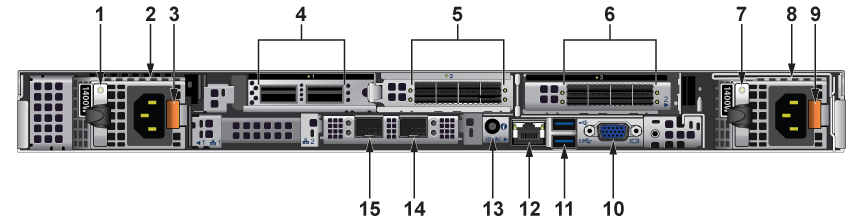
| 1 | AC PSU status indicator | 2 | Power supply plug | 3 | Release latch |
| 4 | 100 Gb QSFP28 Capture ports | 5 | Storage connector ports | 6 | Storage connector ports |
| 7 | AC PSU status indicator | 8 | Power supply plug | 9 | Release latch |
| 10 | VGA port | 11 | USB port | 12 | IPMI 1 Gb Ethernet port |
| 13 | System ID LED | 14 | Spare 25/10 GbE SFP28 port | 15 | 25/10 GbE SFP28 Management port |
DCA-NDR-STR
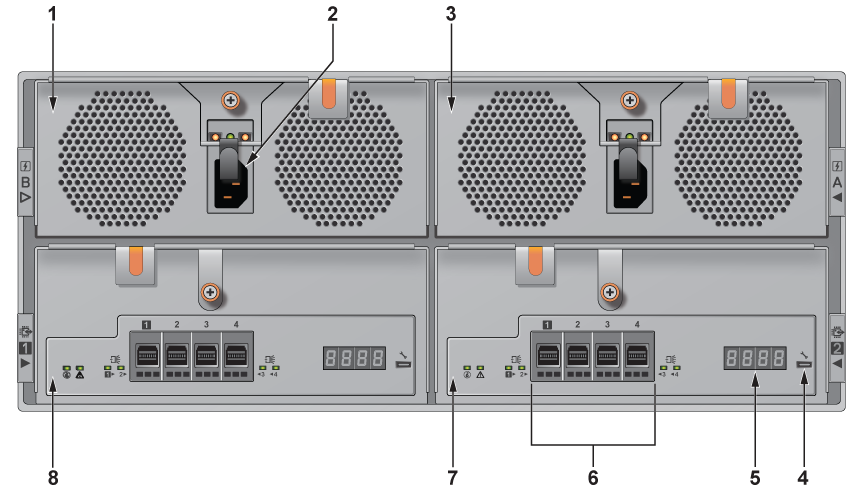
| 1 | PSU B | 2 | Power supply plug | 3 | PSU A |
| 4 | USB Type-C debug port | 5 | 7-segment LED | 6 | Mini-SAS HD port |
| 7 | EMM slot A | 8 | EMM slot B |