Edge Licensing
Edge Licensing enables a customer to associate a software subscription with an Edge. Bandwidth, the Edge software edition, Gateway regional geo-location, and subscription duration define a software subscription.
Edge License Types
The Orchestrator provides different types of licenses for deployed Edges. These license types account for POC deployments where no subscription is purchased, and production deployments where a variety of license types are available to align with the customer’s purchased subscriptions.
POC Deployments
When deploying an Enterprise as a proof-of-concept (POC), choose the POC license. There is only one POC license type available as follows:
POC | 10 Gbps | North America, Europe, Middle East and Africa, Asia Pacific, and Latin America | 60 months
This license is the only suitable choice for a POC Enterprise and should be the only license used by Edges within the POC Enterprise. The Orchestrator rejects additional licenses when a POC license is present.
Production Deployments
Enterprises deploying a production Edge must assign a license type consistent with their purchased software subscription. For example, when purchasing a subscription SKU NB-VC100M-PRE-HO-HG-L34S312P-C for an Edge configuration, ensure the license type matches this format:
PREMIUM | 100 Mbps | gateway geo-location region | 12 months as displayed in the highlighted sections of the SKU.
Assign an Edge License Type to a New Edge
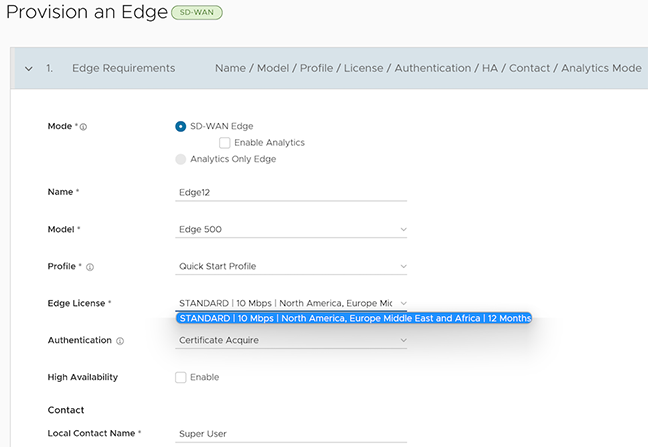
When users provision a new Edge, the Provision an Edge configuration screen displays an Edge License menu. Use this menu to select an available license type for the new Edge.
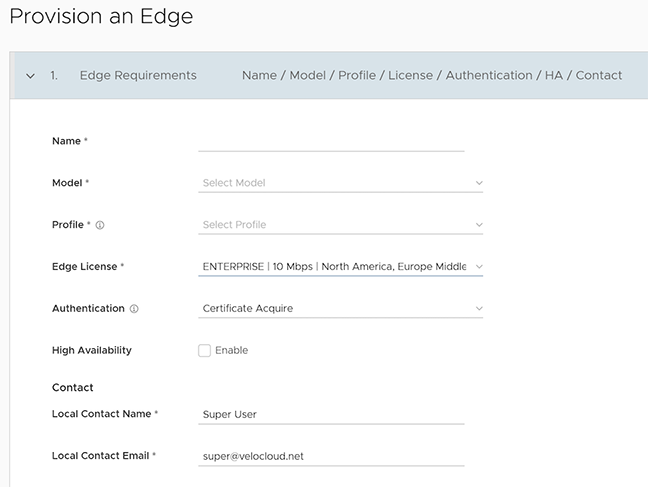
For more information on provisioning a new Edge, see Provision a New Edge.
Assign an Edge License Type to an Existing Edge
To assign a license to an existing Edge:
- In the SD-WAN service of the Enterprise portal, select .
- To assign a license to each Edge, select the link to the Edge, and then select the license in the Properties section of the Edge Overview page. Users can also select the Edge and select Assign Edge License to assign the license.
- To assign a license to multiple Edges, select the appropriate Edges, select Assign Edge License, and select the license.
If the menu does not display the correct license type for a subscription, contact the supporting partner to assign the license to the Enterprise. If the partner cannot locate the correct license type or if the Enterprise is managed directly by Arista Networks, then contact VeloCloud SD-WAN Support. Users can assign a temporary license type until the correct one becomes available. After the correct license is available, assign it to replace the temporary one.
Choosing an incorrect Edge license type invalidates the enterprise activation report and misaligns the license assignment with the customer’s purchases. Auditors will flag these licensing inconsistencies.
Edge License Reports
Standard Administrator Superusers, Standard Administrators, Business Specialists, and Customer Support users can view and generate a report of the licenses assigned to their Enterprise.
In the SD-WAN service portion of the Enterprise portal, select .
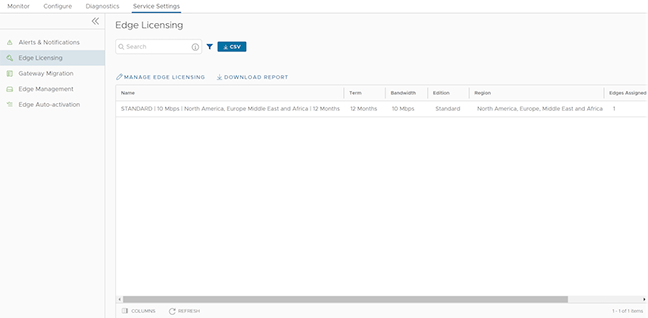
Select Download Report to generate a report of the licenses and the associated Edges in CSV format.
Example of Edge Licensing
Assume that the Enterprise User has purchased the following:
| Product | Description | Quantity |
|---|---|---|
| VC-510-HO-36-P | VeloCloud Edge 510 Appliance, Deployment: Hosted Orchestrator for 3 years | 11 |
| VC-610-HO-36-P | VeloCloud Edge 610 Appliance, Deployment: Hosted Orchestrator for 3 years | 1 |
| VC100M-STD-HO-L34S1-36P | VeloCloud SD-WAN 100 Mbps Standard Service Subscription for 3 years, Prepaid, Hosted Orchestrator, Basic Support Backline (L3-4) | 11 |
| VC350M-STD-HO-L34S1-36P | VeloCloud SD-WAN 350 Mbps Standard Software Subscription for 3 year, Prepaid, Hosted Orchestrator, Basic Support Backline(L 3-4) | 1 |
The purchase consists of 12 Edges and 12 Subscription Licenses. Users can activate 12 Edges and assign:
- STANDARD | 100Mbps | Gateway Geo-location Region | 36 Months to 11 Edges
- STANDARD | 350Mbps | Gateway Geo-location Region | 36 Months to 1 Edge
Follow these steps to assign the license type to an Edge:
- In the Provision an Edge window, configure a new edge and assign the license type:
Figure 3. Provision An Edge