Data Retention using Downsampling
This feature allows downsampling older data into smaller chunks, enabling retention of historical data for longer. It combines Elastic’s Index Lifecycle Management (ILM) and downsampling features.
- Hot Phase: This phase actively ingests the new data.
- Warm Phase: After 7 days and indices transition to the warm phase, where they are downsampled to reduce storage requirements while maintaining an acceptable level of granularity for long-term analysis.
- Cold Phase: After 30 days, indices transition to the cold phase. Even though the term says ‘Cold’, we keep data at the same storage level; hence, this phase is only for representation.
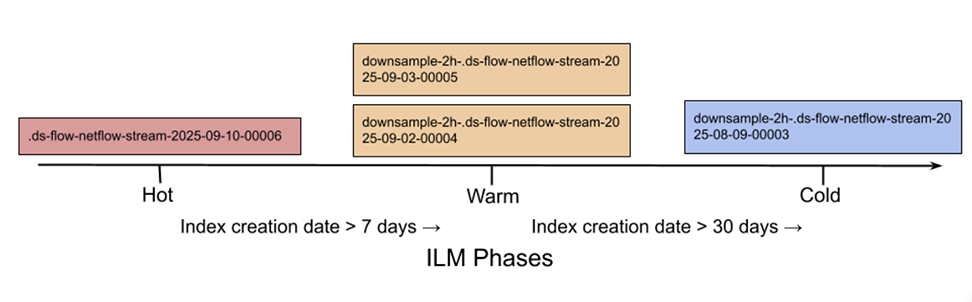
Data index downsampling occurs after the feature is enabled, when the index meets two criteria: it is at least 7 days old and in the Hot phase of Index Lifecycle Management (ILM). As shown in the previous figure, after the index is downsampled, it deletes the old index and creates a new index with downsample-2h- appended to the original index name. For example, .ds-flow-netflow-stream-2025-09-03-00005 becomes downsample-2h-.ds-flow-netflow-stream-2025-09-03-00005. Here, 2h is the fixed downsampling interval.
- Creates a new document for each group of documents with matching _tsid values (time series dimension fields), grouped into buckets that correspond to timestamps in a 2-hr interval. (Documents within an index are divided into 2-hour time buckets, i.e.,fixed_interval.)
- For each new document, copies all time_series_dimensions [sIp, dIp, proto, type, and Ip] from the source index to the target index. Dimensions are constant, so this step happens only once per bucket.
- These time_series_metric fields aggregate, reporting the minimum, maximum, sum, and count of values: bytes, upsampledByteCount, packets, upsampledPacketCount, and bps.
- For all other fields, copy the most recent value to the target index. (This loses values from all past documents having same time_series_dimensions and in the same bucket)
- Replaces the original index with the downsampled index, then deletes the original index.
Downsampling helps preserve aggregated data of time_series_metric fields, and preserves only recent values of non-time_series_metric fields. The new, downsampled index is created on the data tier of the original index and inherits the original settings, like number of shards and replicas.
This feature only supports downsampling for Netflow streams and is available from AN DMF 8.9.0 release and later.
Configuration
To manage downsampling, navigate to on the Main dashboard. In the Analytics Configuration panel on the right, click Downsample.
The user interface displays the toggle button to enable/disable.

Show Command and Troubleshooting
The configurations can be done using Elasticsearch APIs. These and other relevant Elasticsearch APIs are:
GET .config/_doc/downsample
GET _ilm/policy/an-data-flow-netflow-policy
{
  "an-data-flow-netflow-policy": {
    "version": 2,
    "modified_date": "2026-04-14T07:12:35.576Z",
    "policy": {
      "phases": {
        "warm": {
          "min_age": "7d",
          "actions": {
            "downsample": {
              "fixed_interval": "2h",
              "wait_timeout": "1d"
            }
          }
        },
        "cold": {
          "min_age": "30d",
          "actions": {}
        },
        "hot": {
          "min_age": "0ms",
          "actions": {
            "rollover": {
              "max_primary_shard_size": "50gb"
            }
          }
        }
      }
    },
    "in_use_by": {
      "indices": [
        ".ds-flow-netflow-stream-2026.04.14-000001"
      ],
      "data_streams": [
        "flow-netflow-stream"
      ],
      "composable_templates": [
        "flow-netflow-template"
      ]
    }
  }
}
Indices move through a lifecycle, starting from hot phase, then the warm phase, and finally at cold phase. The Elasticsearch Index Lifecycle Management (ILM) policy manages the lifecycle. The previous query shows one such policy (an-data-flow-netflow-policy) which specifically manages netflow indices. Note that the previous sample output was captured after enabling downsampling; hence, it shows all the fields configured specifically for downsampling.
- Hot Phase (Ingestion)
- Trigger: Immediate (min_age: 0ms).
- Action: The index actively receives new Netflow data.
- Transition: After a primary shard reaches 50GB, the rollover action triggers. The current index stops receiving new data (eventually becoming "read-only") and generates a new index.
- Warm Phase (Reduction)
- Trigger: 7 days after the index was rolled over.
- Action (Downsampling): This is the critical step for data efficiency. Elasticsearch takes the raw Netflow records (usually per-second or per-minute) and aggregates them into 2-hour blocks. It creates a new, smaller "downsampled" index. This summarized version replaces the original high-resolution data to save significant disk space while maintaining long-term trends.
- Wait Period: The system allows up to 1 day (wait_timeout) for this heavy compute task to finish.
- Cold Phase (Long-term Storage)
- Trigger: 30 days after rollover.
- Action: The downsampled index moves to the cold phase.
- Purpose: In this specific policy, no additional actions are applied, but the index remains searchable.
GET _component_template/an-data-flow-netflow-settings
{
  "component_templates": [
    {
      "name": "an-data-flow-netflow-settings",
      "component_template": {
        "template": {
          "settings": {
            "index": {
              "lifecycle": {
                "name": "an-data-flow-netflow-policy"
              },
              "mode": "time_series",
              "codec": "best_compression",
              "refresh_interval": "5s",
              "number_of_shards": "1",
              "auto_expand_replicas": "0-1",
              "look_ahead_time": "10m",
              "max_regex_length": "500",
              "routing_path": [
                "sIp",
                "dIp",
                "proto",
                "type",
                "lP"
              ]
            }
          }
        },
        "_meta": {
          "description": "Settings for data flow indices"
        }
      }
    }
  ]
}
While the ILM policy discussed earlier manages data timing, this template defines engine performance and storage optimization for the indices.
| Field | Description |
|---|---|
| lifecycle.name | Links this template to the an-data-flow-netflow-policy as reviewed previously. |
| mode: "time_series" | Enables optimized storage for Time Series Data (TSDS), which is essential for the downsampling action in ILM. |
| codec: "best_compression" | Uses a higher compression ratio (DEFLATE) to save disk space at the cost of slightly more CPU during indexing. |
| refresh_interval | Sets how often data is made searchable. 5s is a good balance for high-volume Netflow. |
| number_of_shards | Defines how many primary shards are used. Set to 1 here to minimize overhead for smaller data streams. |
| auto_expand_replicas | Automatically scales replicas between 0 and 1 based on the number of available nodes in the cluster. |
| look_ahead_time | Allows indexing of events that occur up to 10m in the future (buffer for clock drift). |
| routing_path | Lists the fields used to group similar data on disk, which drastically improves compression and query speed. This list of fields is the same as the time_series_dimension fields. |
Troubleshooting
[2025-12-19T11:14:01+0000Z][INFO] flow-netflow-stream rollover successfuly. New index: .ds-flow-netflow-stream-2025.12.19-000003
[2025-12-19T11:14:01+0000Z][INFO] Successfully updated index flow-netflow-stream.
[2025-12-19T11:14:01+0000Z][INFO] Processing complete: 1 total, 1 updated, 0 errors, 0 unchanged
If the log shows no errors and new documents are being added to the new index (e.g., .ds-flow-netflow-stream-2025.12.19-000003 in earlier log), the downsampling is successfully enabled or disabled according to the applied configuration. In case of errors, inspect the log file for troubleshooting information.
Limitations
- It is not compatible with MultiHop features.
- It currently only supports Netflow streams.
Note: Downsampling does not process old indices or the current index in which data is being written.
- After downsampling is enabled, it kicks in only after the current index rolls over.
- The system can not configure data retention parameters; it is fixed:
- The downsampling fixed interval is 2 hours.
- The minimum age for an index to be processed for downsampling is 7 days.
- Documents grouped within the same time bucket will share an identical timestamp, specifically the timestamp of the first document added to that bucket.