Integrate VeloCloud SD-WAN with Network Connectivity Center
- Deploy a 2-member cluster in a region.
- Deploy the Network Connectivity Center Hub.
- Define and associate spokes to the Network Connectivity Center hub.
- Connect on-premises either over Google’s network or to Google Cloud resources.
Prerequisites
- Obtain Enterprise account access to VeloCloud Orchestrator.
- Obtain access to the Google Cloud console with the appropriate IAM roles. For instructions, refer to Google Cloud Console.
Branch-to-Branch Connectivity
The following figure depicts the branch-to-branch connectivity across regions:
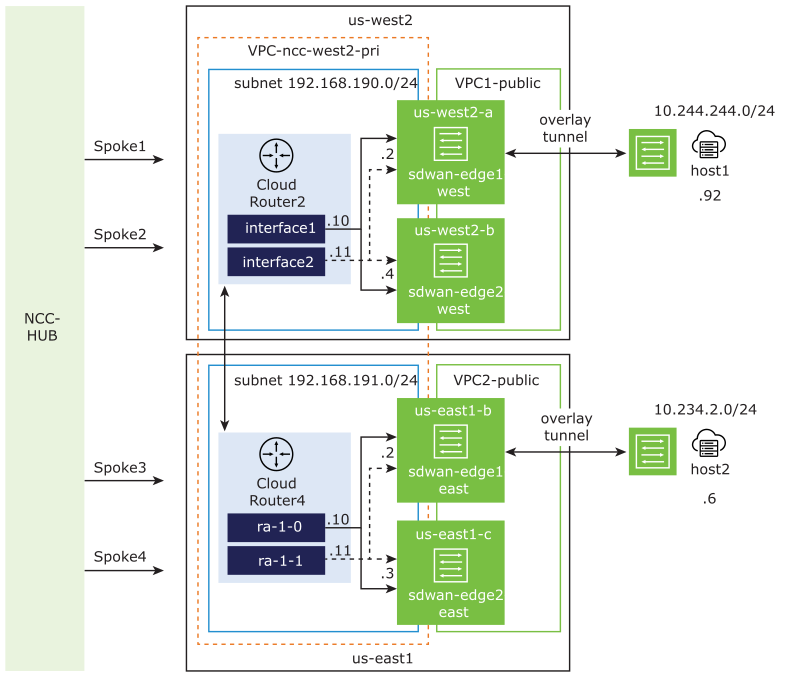
In the above diagram, “ncc-west2-pri” is the hub VPC that is associated to the Network Connectivity Center hub where two subnets are created. The subnet 192.168.190.0/24 is associated to the “us-west2” region and the subnet 192.168.191.0/24 is associated to the “us-east1” region. The “host1” is located on the West coast of the United States, while the “host2” is located on the East coast. You must connect “host1” to “host2” over Google’s network.
Establish Branch-to-Branch Connectivity Using CLI
To create SD-WAN virtual Edge instances and cloud router in the “us-east1” region, complete the following steps using Google's Command Line Interface (CLI) and VeloCloud Orchestrator.
Run a ping test to verify the connection between the SD-WAN virtual Edge instances and cloud routers across the two regions—“us-east1” and “us-west2”. For instructions, refer to the Ping Test topic in the VeloCloud SD-WAN Troubleshooting Guide.
Establish Branch-to-Branch Connectivity Using UI
To create SD-WAN virtual Edge instances and cloud router in the “us-east1” region, complete the following steps using Google Cloud Platform and VeloCloud Orchestrator:
Run a ping test to verify the connection between the SD-WAN virtual Edge instances and cloud routers across the two regions—“us-east1” and “us-west2”. For instructions, refer to the “Ping Test” section in the VeloCloud SD-WAN Administration Guide.
Establish Branch-to-Cloud Connectivity
When you have multiple VPC networks, set up VPC network peering to establish connectivity between Google Cloud and the various VPC networks so that you can access the resources remotely. For details, refer to VPC Network Peering Overview.
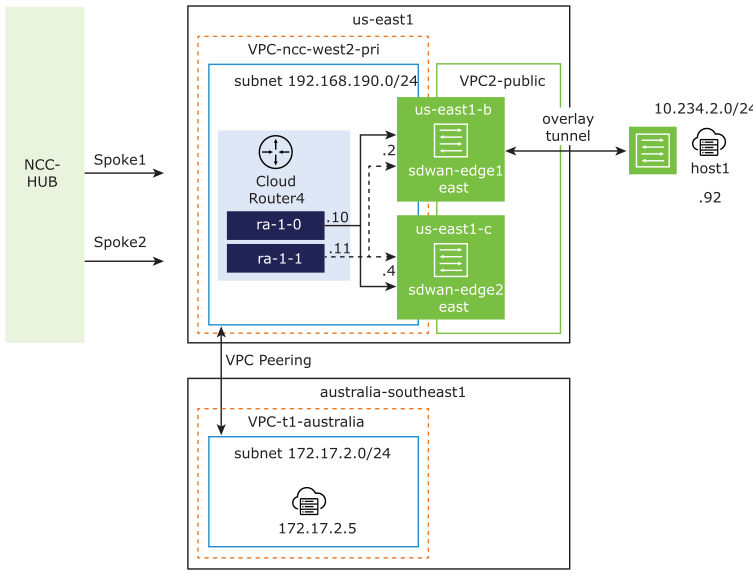
In the above diagram, “ncc-west2-pri” is the hub VPC that is associated to the Network Connectivity Center hub. The subnet 192.168.190.0/24 is associated to the “us-east1” region, where host1 is located. The “t1-australia” is the Spoke VPC where an Ubuntu virtual machine is installed. You must establish connectivity from host1, which is an on-prem appliance located on the West coast of the United States to the Ubuntu virtual machine located in Australia.
Complete the following tasks to establish branch-to-cloud connectivity using VPC network peering:
- From the Google Cloud Console, set up VPC network peering. For instructions, refer to Using VPC Network Peering.
Figure 3. VPC Network Peering 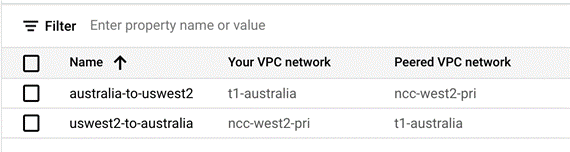
- Verify that your network is accepting custom routes from a peer network. For instructions, refer to the “Listing routes from peering connections” section in Using VPC Network Peering.
Figure 4. Peering Connection Details 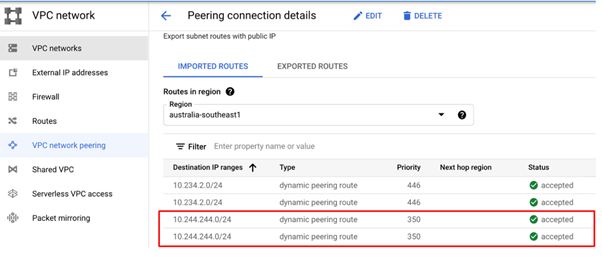
- Configure custom IP range on the Cloud Router to match the subnet of the Spoke VPC. This enables the Cloud Router to advertise the Spoke VPC “t1-australia” subnet to the SD-WAN Virtual Edge over BGP. For instructions about how to configure custom IP range, refer to Advertising custom IP ranges.
Figure 5. Cloud Router Configuration Details 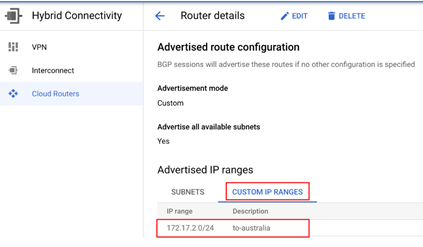
Run a ping test to verify the connection between the on-prem Edge instance, “host1” located on the West coast of the United States to the Ubuntu virtual machine located in Australia. For instructions, refer to the “Ping Test” section in the VeloCloud SD-WAN Troubleshooting Guide.