Rear Panel Features and Indicators
This section displays the rear panel of the CloudVision AGNI Appliance.
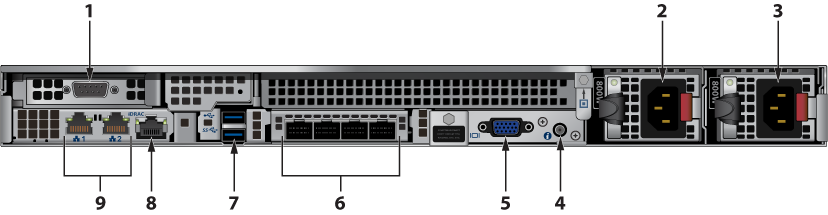
| Number | Indicator, Button, or Connector | Description |
|---|---|---|
| 1 | Serial connector | Allows you to connect a serial device to the system. |
| 2 | PSU1 | Power supply 1 |
| 3 | PSU2 | Power supply 2 |
| 4 | System identification button | The identification buttons on the front and back panels can be used to locate a particular system within a rack. When one of these buttons is pressed, the system status indicator on the back flashes until one of the buttons is pressed again.
Press to toggle the system ID on and off. If the system stops responding during POST, press and hold the system ID button for over five seconds to enter BIOS progress mode. To reset the iDRAC (if not disabled in the F2 iDRAC setup), press and hold the button for over 15 seconds. |
| 5 | Video connector | Allows you to connect a VGA display to the system. |
| 6 | Ethernet connectors | Unused |
| 7 | USB connector | Allows you to connect USB devices to the system. The port is USB 2.0-compliant. |
| 8 | iDRAC port | Dedicated management port for the iDRAC port card.
|
| 9 | Ethernet connector | Admin interface and Data interface.
|