
Front View of the System
This section discusses the following topic:
Front View of the System
This front view displays the features available on the front panel of the CloudVision AGNI Appliance.
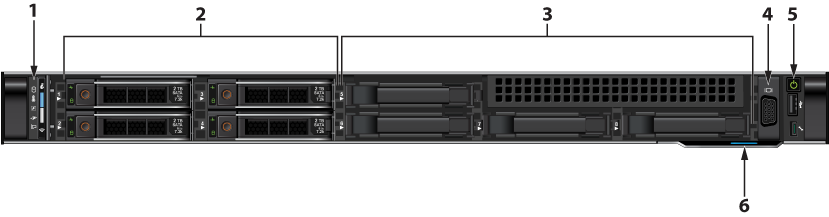
| Item | Ports, panels, and slots | Description |
|---|---|---|
| 1 | Left control panel | Contains the system health and system ID, status LED, and the iDRAC Quick Sync 2 (wireless) indicator.
Note: The iDRAC Quick Sync 2 indicator is available only on certain configurations.
|
| 2 and 3 | Hard drive slots | 8x2.5" hard drive/SSD slots. |
| 4 | VGA port | Allows you to connect a display to the system. |
| 5 | Right control panel | Contains the power button, USB port, iDRAC Direct micro port, and the iDRAC Direct status LED. |
| 6 | Information tag | A slide-out label panel that contains system information, such as Service Tag, NIC, and MAC address, for your reference. |