Monitor Customers
As an Operator user, you can monitor the status of your Customers and the Edges connected to the Customers.
Log into the VeloCloud Edge Cloud Orchestrator as an Operator user. In the SD-WAN service of the Operator portal, select .
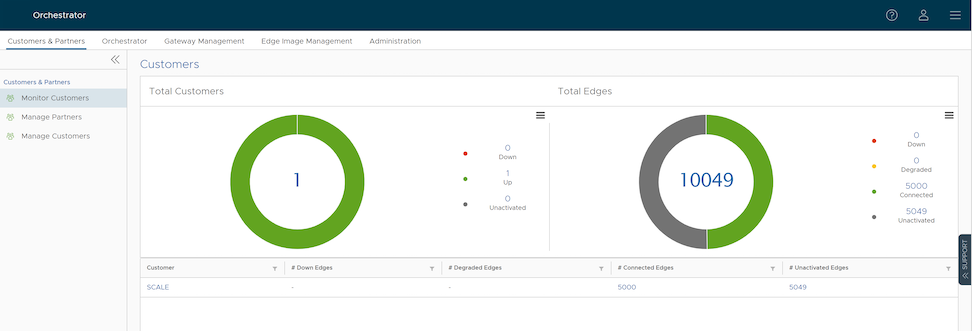
The Customers page displays the following details:
Total Customers
- Customers managed by the Operator.
- Number of Customers that are UP, DOWN, and UNACTIVATED. Select the number to view the corresponding Customer details at the bottom panel.
- In the bottom panel, select the Customer name to navigate to the Enterprise portal, where you can view and configure other settings corresponding to the selected customer. For additional information see the VeloCloud SD-WAN Administration Guide.
Total Edges
- Edges associated with the Customers.
- Number of Edges with the status DOWN, DEGRADED, CONNECTED, and UNACTIVATED. Select the number to view the corresponding details of the Edges in the bottom panel.
- In the bottom panel, place the mouse cursor on the Down Arrow displayed next to the number of Edges, to view the details of each Edge. Select the link to the Edge name to navigate to the Enterprise Monitoring portal, where you can view more details corresponding to the selected Edge. For more information see the VeloCloud SD-WAN Administration Guide.
Note: Orchestrator does not provide an option for auto refresh. You must refresh the window manually to view the current data.