VeloBrain Knowledge Assistant is a chat interface that curates VeloCloud documents and Knowledge Base articles, and uses them as references when providing answers. It only answers VeloCloud related questions.
To launch the VeloBrain Knowledge Assistant, follow the below steps:
Log into the Orchestrator.
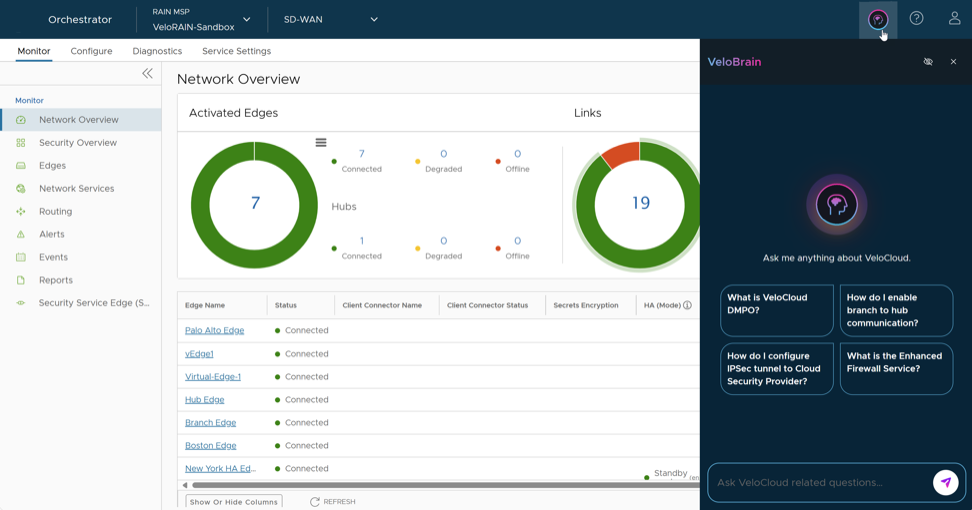
Select the VeloBrain icon from the top right of the Orchestrator screen.
Figure 1. Orchestrator Screen
The VeloBrain Knowledge Assistant is displayed on the right side of the Orchestrator screen. To get you started, it displays a few pre-populated questions. You can either select one of these or type a question in the text box.
You can request for the response in a particular format. Example: Paragraph, Number of lines, Bullet list, Numbered list etc.
A legal disclaimer appears before the response is displayed.
Certain responses may take up to 30 seconds to get displayed.
The responses are detailed and include references to the source documents.
The VeloBrain Knowledge Assistant understands the context of the conversation. So, you can have follow-up conversations with it.
Below is an example displaying a question and a follow-up question:
What is VeloCloud EFS?
How do I configure it?
After typing your question, select the Send button next to the text box, or press Enter on your keyboard.
You may choose to hide the chat interface by selecting the VeloBrain icon. This does not terminate your chat session and history. You can resume your chat session by selecting the VeloBrain icon.
Figure 2. Hiding the Chat
To terminate the chat session, select 'x'. After termination, the VeloBrain Knowledge Assistant erases all the memory of your previous chats.