Overview
SD-WAN is a cloud network service solution enabling sites to quickly deploy Enterprise grade access to legacy and cloud applications over both private networks and Internet broadband.
Cloud-delivered Software-defined WAN assures enterprises the cloud application performance over Internet and hybrid WAN, while simplifying deployments and reducing costs.
The following figure shows the SD-WAN solution components. The components are described in additional detail in the following sections.
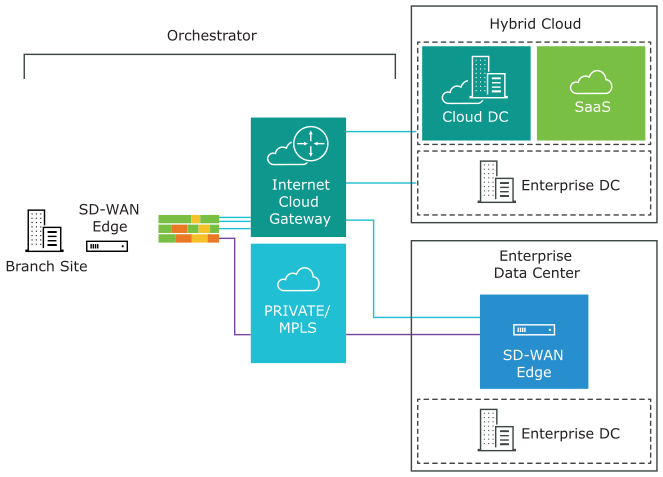
To become familiar with the basic configuration and Edge activation, see Activate SD-WAN Edges.
SD-WAN Routing Overview
This section provides an overview of SD-WAN routing functionality including route types, connected and static routes, dynamic routes with tie-breaking scenarios for them, and preference values in Overlay Flow Control (OFC) with Distributed Cost Calculation (DCC).
Overview
SD-WAN routing is built on a proprietary protocol called VCRP, which is multi-path capable and secured through VCMP transport. The SD-WAN endpoints are connected using VCRP in a manner similar to iBGP full mesh. The SD-WAN Gateway acts as a BGP route reflector which reflects the routes from one SD-WAN Edge to another SD-WAN Edge within the customer enterprise based on the profile settings.
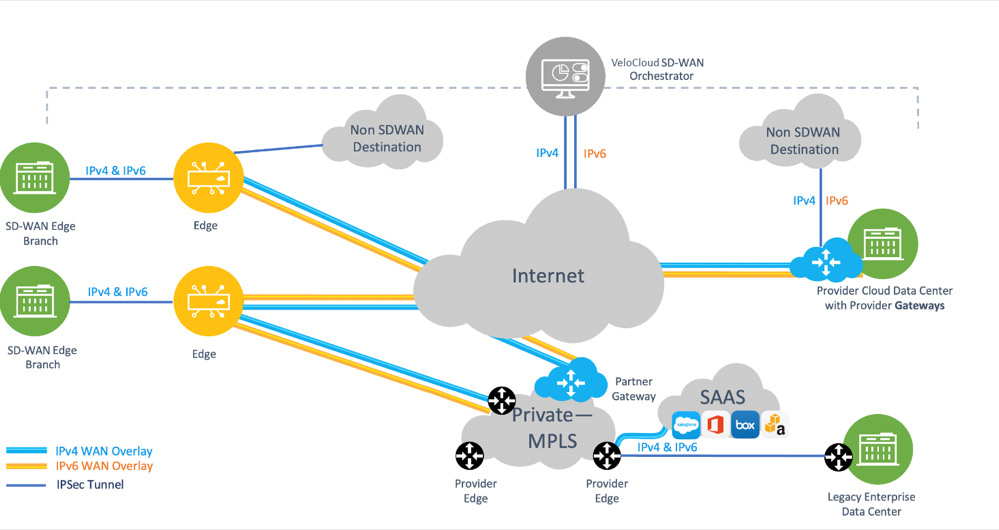
The following diagram depicts a typical SD-WAN deployment with Multi-Cloud Non SD-WAN Destinations where the Orchestrator performs the route calculation (as contrasted with the newer and preferred method using Dynamic Cost Calculation (DCC).
SD-WAN Components
- The SD-WAN Edge is an Enterprise-class device or virtualized cloud instance that provides secure and optimized connectivity to private, public and hybrid applications, and virtualized services. In SD-WAN routing the Edge is a Border Gateway. An Edge can function as a regular Edge (with no Hub configuration), as a Hub by itself or as part of a cluster, or as a Spoke (when Hubs are configured).
- The SD-WAN Gateway is autonomous, stateless, horizontally scalable, and cloud-delivered to which Edges from multiple tenants can connect. For any SD-WAN deployment, several SD-WAN Gateways are deployed as a geographically distributed (for lower latency) and horizontally scalable (for capacity) network with each Gateway acting as a Route Reflector for their connected Edges.
All routes that are locally learned on an Edge are sent to the Gateway based on the configuration. The Gateway then reflects these routes to other Edges in the enterprise, allowing for efficient full mesh VPN connectivity without building a full mesh of tunnels.
- The SASE Orchestrator is a multi-tenant cloud-based configuration and monitoring portal. In SD-WAN routing the Orchestrator manages routes for all enterprises and can override default routing behavior.
Figure 3. SASE Orchestrator 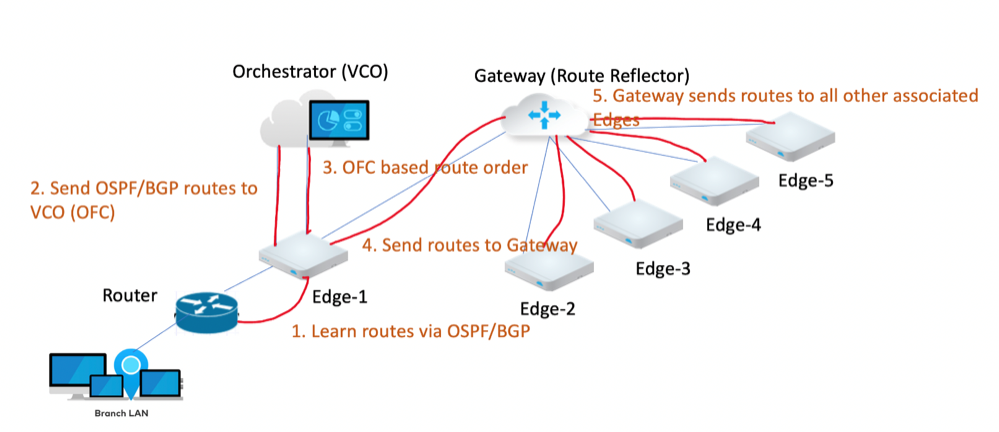
Route Types
- Local Routes: Any route that is learned locally on a SD-WAN Edge. This can either be a connected subnet, statically configured route, or any route that is learnt via BGP or OSPF.
- Remote Routes: Any route that is learned from VCRP, in other words a route that is not locally present on an Edge is a remote route. This route originated from a different Edge and is reflected by the Gateway to other Edges in the customer enterprise based on the configuration.
There is a strict order that SD-WAN uses to route traffic for non-dynamic routes (BGP and OSPF) that cannot be altered. However, in some scenarios you can use the technique of Longest Prefix Match to manipulate how the routing flows.
| 1. Longest Prefix Match |
| 2. Connected Local |
| 3. Static LAN/WAN Local |
| 4. Connected Remote |
| 5. Static LAN/WAN Remote |
| 6. Static Non SD-WAN Destination |
| 7. Static Partner Gateway |
| 8. Overlay Flow Control (OFC) Driven Route Order |
Connected and Static Routes
This section includes essential information regarding connected and static routes. A connected route is a route to a network that is directly attached to the interface. Information about static routes can be found in Configure Static Route Settings.
- For a connected route to be visible in SD-WAN, configure the following settings on the Orchestrator:
- Cloud VPN must be activated.
- The connected route must be configured with a valid IP address.
- The Edge interface for this route must be up at Layer 1, and functional at Layers 2 and 3.
- VLANs associated with this Edge interface must also be up.
- The Advertise flag must be set on the Edge interface under Interface IP settings for which the connected route is configured.
- For a static route to be visible in SD-WAN, configure the following settings on the Orchestrator:
- Cloud VPN must be activated.
- The Advertise flag must be set on the Edge interface for which the static route is configured.
- The static route configuration must have Preferred and Advertised checked.
- Static Routes can forward traffic to the WAN Underlay for Global Segments, and to the LAN or WAN Underlay for Non-Global Segments.
- Adding a static route bypasses the NAT on the Edge interface.
- ECMP (Equal-cost multi-path routing) with a static route is not supported, and only the first static route would be used.
- Use an ICMP Probe to avoid blackholing traffic.
- A static route with the Preferred flag checked is preferred over any VPN route learned over the Overlay.
When the Preferred check box is selected, the static route will always be matched first, even if a VPN route with a lower cost is available.
Not selecting this option means that any available VPN route is matched over the static route, even when the VPN route has a higher cost than the static route. The static route is matched only when corresponding VPN routes are not available.
The Preferred option is not available for an IPv6 address type.
When the Advertise check box is selected, the static route is advertised over VPN routes and other SD-WAN Edges in the network will have access to the resource.
Do not select this option when a private resource like a remote worker's personal printer is configured as a static route and other users should be prevented from accessing the resource.
The Advertise option is not available for an IPv6 address type.
The OFC Global Advertise Flags control which routes are added to the overlay. By default, the following route types are not advertised into the overlay: External OSPF and Non SD-WAN Destination iBGP. In addition, if an Edge is acting as both Hub and Branch, the Global Advertise Flags configured for the Branch will be used, not the Hub.
A Self Route refers to an interface-based prefix using IP Longest prefix match (LPM) (for example: 172.16.1.10/32) which is installed locally on the Edge but is not advertised to remote Edges. Another term for Self Routes is "Interface Routes". When looking in an Edge's logs, a user would see these Self Routes with the route flag "s".
A Self Route is distinguished from a Connected Route as a Connected Route can be advertised into the overlay so that the remote Edge clients can reach back to clients belonging to the connected route on the source Edge side. Self Routes are strictly local to the Edge itself.
A Cloud Route is indicated with a "v" flag and refers to a route installed on an Edge pointing to an SD-WAN Gateway for multi-path traffic destined for the internet (in other words, internet traffic using Dynamic Multi-Path Optimization (DMPO) which leverages a Gateway prior to reaching the internet).The Edge also uses a Cloud Route via a corresponding Gateway for management traffic destined for an Orchestrator which is hosted on the public cloud.
Overlay Flow Control (OFC) with Distributed Cost Calculation (DCC)
Distributed Cost Calculation Overview
Distributed Cost Calculation (DCC) is a feature that leverages the SD-WAN Edges and Gateways for route preference calculation instead of relying on the SASE Orchestrator. The Edge and Gateway each insert the routes instantly upon learning them and then convey these preferences to the Orchestrator.
DCC resolves an issue seen in large scale deployments where relying solely on the Orchestrator can prevent timely route preference updates either because it could not be reached by an Edge or Gateway to receive updated routing preferences, or because the Orchestrator could not deliver route updates quickly when it is calculating a large number of them at one time. Distributing the responsibilities for route preference calculation to the Edges and Gateways ensures fast and reliable route updates.
How Distributed Cost Calculation Preference is Done
| Edge | Partner Gateway / Hosted Gateway |
|---|---|
| NSD E BGP | NSD E/I BGP |
| NSD I BGP | E/I BGP |
| NSD Uplink BGP | |
| OSPF O | |
| OSPF IA | |
| E BGP | |
| I BGP | |
| OSPF OE1 | |
| OSPF OE2 | |
| Uplink BGP |
| O = OSPF Intra area |
| IA = OSPF Inter area |
| OE1 = OSPF External Type-1 |
| OE2 = OSPF External Type-2 |
| E BGP = External BGP |
| I BGP = Internal BGP |
| NSD = Non SD-WAN Destination |
| Device | Route Type | Default Preference |
|---|---|---|
| Edge | NSD E BGP | 997 |
| Edge | NSD I BGP | 998 |
| Gateway | NSD E/I BGP | 999 |
| Edge | NSD Uplink BGP | 1000 |
| Edge | OSPF O | 1001 |
| Edge | OSPF IA | 1002 |
| Edge | E BGP | 1003 |
| Edge | I BGP | 1004 |
| Partner Gateway | E/I BGP | 1005 |
| Hub | OSFP OE1 | 1001006 |
| Hub | OSPF OE2 | 1001007 |
| Hub | BGP Uplink | 1001008 |
- The Edge or Gateway learns a dynamic route.
- SD-WAN internally identifies what type of route it is and its default preference value.
- SD-WAN assigns the correct preference value and installs the route in the routing information base (RIB) and forwarding information base (FIB).
- SD-WAN considers the default advertising action configured for this route. Based on the advertising action, SD-WAN either advertises the route across the customer enterprise (advertised) or takes no action apart from adding the route locally into the RIB and FIB (not advertised).
- SD-WAN then synchronizes this route to the Orchestrator which displays it on the Orchestrator.
Preferred VPN Exit Points
This section covers Preferred VPN Exit Points: what they are, what routes can fall into which categories, and using route pinning to override default values.
In the SD-WAN service of the Enterprise portal, when navigating to , you can see a section titled Preferred VPN Exits. This section displays default priorities and marks some route categories to be preferred over others.
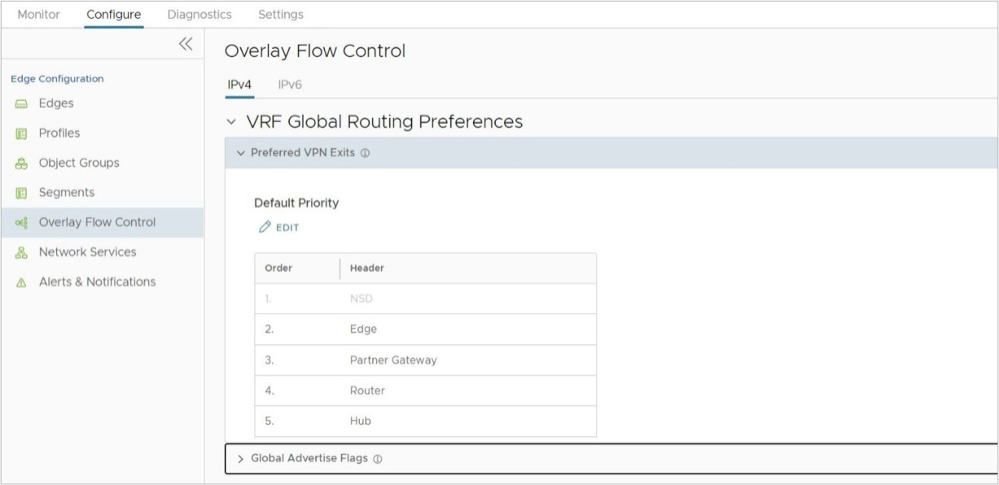
- Edge: Any internal route that can be learned either on a Hub or Spoke Edge falls under this category and is marked with the highest priority. An internal route cannot be an OSPF OE 1 / 2 or BGP Uplink type route.
- Hub: Any external site that is learned on an Edge falls into the Hub category and typically has a lower priority. Hub routes include OSPF OE1/2 and BGP Uplink.
- Partner Gateway: Any route learned on a Partner Gateway.
- Router: Router represents any route prefix learned by an Edge with BGP or OSPF and determines the preference that is assigned to a dynamic route. Typically, all exit points above Router in the VPN Exit are assigned a low preference value and are thus more preferred, while all exit points below Router are assigned a higher preference value and are thus less preferred.
- For example: When DCC is activated, all routes that belong to VPN Exit Points (Edge, Partner Gateway, or Hub) that are above Router get a preference value of less than 1,000,000, and the routes that are below Router get a preference value greater than 1,000,000.
- In the example below, the VPN Exit Points above Router, which are NSD, Edge, and Partner Gateway will get a preference value less than 1,000,000 and Hub will get a preference value greater than 1,000,000.
Figure 5. Preferred VPN Exit Points 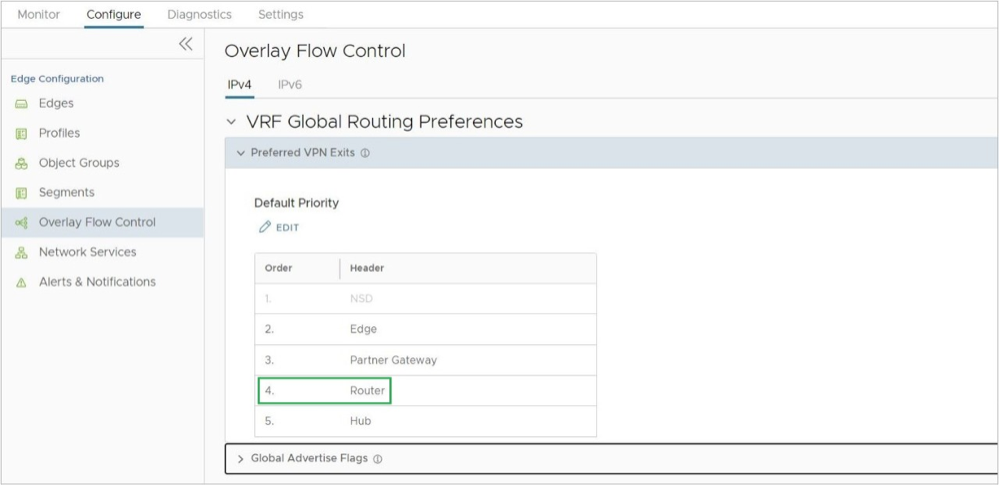
Pinning a Route to Override a Default Preference Value
- A user pins a route on the Overlay Flow Control page by either:
- On the Routes List, select one or more routes and then select the Pin Learned Route Preference option.
- Modifying the order of the Preferred VPN Exits by selecting Edit under the table.
- The Orchestrator sends this routing event to the relevant Edges in the customer enterprise.
- The Edges override the previous preference value to match the pinned order.
- The preference values that get assigned to pinned routes start from 1, 2, 3, and so on (the lowest values and thus the highest preferences), and this matches the order of the routes on the Overlay Flow Control page.
Note: For additional information on pinning a route, see Configure Subnets.
Tie-Breaking Scenarios for Dynamic Routes
What happens when an Edge receives the same prefix for two or more sources/neighbors?
A potential scenario in SD-WAN deployments is for the same prefix to be advertised from two different Edges or Partner Gateways. With SD-WAN, if the subnets are within the same category (Edge, Hub, or Partner Gateway) and have the same preference value, the BGP attributes or OSPF metrics are first considered for route sorting.
If there is still a tie, SD-WAN uses the logical ID (which is derived from the Edge or Gateway's universally unique identifier (UUID)) of the next hop device to break the tie. The next hop device can be a Gateway or a Hub Edge depending on the type of Branch to Branch VPN being used. If the customer enterprise is using Branch to Branch via Gateway, the next hop is a Gateway, while a customer using Branch to Hub would have the next hop be a Hub Edge.
There is a final tie-breaker if multiple Gateways advertise the same exact route type and preference. This final tie-breaker prefers the oldest route learned. To ensure the routing outcome you want, you can either pin certain routes or configure the BGP attributes and costs to favor some routes over others.
Dynamic Multipath Optimization (DMPO)
This section provides an in-depth overview of Dynamic Multipath Optimization (DMPO) as used by the SD-WAN service.
Overview
Arista SD-WAN™ is a solution that lets enterprise and service providers use multiple WAN transports at the same time. This way, they can increase bandwidth and ensure application performance. The solution works for both on-premise and cloud applications (SaaS/IaaS). It uses a Cloud-Delivered architecture that builds an overlay network with multiple tunnels. It monitors and adapts to the changes in the WAN transports in real time. Dynamic Multipath Optimization (DMPO) is a technology that SD-WAN has developed to make the overlay network more resilient. It considers the real time performance of the WAN links. This document explains the key features and benefits of DMPO.
The following diagram depicts a typical SD-WAN deployment with Multi Cloud Non SDWAN Destinations.
Key Functionalities
- For enterprise locations (Branch to Branch or Branch to Hub), the Edges create DMPO tunnels with each other.
- For cloud applications, each Edge creates DMPO tunnels with one or more Gateways.
Continuous Monitoring
Automated Bandwidth Discovery: Once the WAN link is detected by the SD-WAN Edge, it first establishes DMPO tunnels with one or more SD-WAN Gateways and runs bandwidth test with the closest Gateway. The bandwidth test is performed by sending short bursts of bi-directional traffic and measuring the received rate at each end. Since the Gateway is deployed at the Internet PoPs, it can also identify the real public IP address of the WAN link in case the Edge interface is behind a NAT or PAT device. A similar process applies for a private link. For the Edges acting as the Hub or head-end, the WAN bandwidth is statically defined. However, when the branch Edge establishes a DMPO tunnel with the Hub Edges, they follow the same bandwidth test procedures similar to how it is done between an Edge and a Gateway on the public link.
Continuous Path Monitoring: Dynamic Multipath Optimization (DMPO) performs continuous, uni-directional measurements of performance metrics- loss, latency and jitter of every packet, on every tunnel between any two DMPO endpoints, Edge or Gateway. SD-WAN’s per-packet steering allows independent decisions in both uplink and downlink directions without introducing any asymmetric routing. DMPO uses both passive and active monitoring approaches. While there is user-traffic, DMPO tunnel header contains additional performance metrics, including sequence number and timestamp. This enables the DMPO endpoints to identify lost and out-of-order packets, and calculate jitter and latency in each direction. The DMPO endpoints communicate the performance metrics of the path between each other every 100 ms.
While there is no user traffic, an active probe is sent every 100 ms and, after 5 minutes of no high priority user-traffic, the probe frequency is reduced to 500 ms. This comprehensive measurement enables the DMPO to react very quickly to the change in the underlying WAN condition, resulting in the ability to deliver sub-second protection against sudden drops in bandwidth capacity and outages in the WAN.
MPLS Class of Service (CoS): For a private link that has CoS agreement, DMPO can be configured to take CoS into account for both monitoring and application steering decisions.
Dynamic Application Steering
Application-aware Per-packet Steering: Dynamic Multipath Optimization (DMPO) identifies traffic using layer 2 to 7 attributes, e.g., VLAN, IP address, protocol, and applications. SD-WAN performs application-aware per-packet steering based on business policy configuration and real-time link conditions. The business policy contains out of the box Smart Defaults that specifies the default steering behavior and priority of more than 2500 applications: Customers can immediately use dynamic packet steering and application-aware prioritization without having to define any policy.
Throughout its lifetime, any traffic flow is steered onto one or more DMPO tunnels, in the middle of the communication, with no impact to the flow. A link that is completely down is referred to as having an outage condition. A link that is unable to deliver SLA for a given application is referred to as having a brownout condition. SD-WAN offers sub-second outage and sudden drops in bandwidth capacity protection. With the continuous monitoring of all the WAN links, DMPO detects sudden loss of SLA or outage condition within 300-500 ms and immediately steers traffic flow to protect the application performance, while ensuring no impact to the active flow and user experience. There is one minute hold time from the time that the brownout or outage condition on the link is cleared before DMPO steers the traffic flow back onto the preferred link if specified in the business policy.
Intelligent learning enables application steering based on the first packet of the application by caching classification results. This is necessary for application-based redirection, e.g., redirect Netflix onto the branch Internet link, bypassing the DMPO tunnel, while backhauling Office 365 to the enterprise regional hub or data center.
Example: Smart Defaults specifies that Microsoft Skype for Business is High Priority and is Real-Time application. Assuming there are 2 links with latency of 50 ms and 60ms respectively. Assume all other SLAs are equal or met. DMPO will chose the link the better latency, i.e. link with 50ms latency. If the current link to which the Skype for Business traffic is steered experiences high latency of 200 ms, within less than a second the packets for the Skype for Business flow is steered on to another link which has better latency of 60 ms.
Bandwidth Aggregation for Single Flow: For the type of applications that can benefit from more bandwidth, e.g. file transfer, DMPO performs per-packet load balancing, utilizing all available links to deliver all packets of a single flow to the destination. DMPO takes into account the real time WAN performance and decides which paths should be use for sending the packets of the flow. It also performs resequencing at the receiving end to ensure there is no out-of-order packets introduced as a result of per-packet load balancing.
Example: Two 50 Mbps links deliver 100Mbps of aggregated capacity for a single traffic flow. QoS is applied at both the aggregate and individual link level.
On-demand Remediation
Error and Jitter Correction: In a scenario where it may not be possible to steer the traffic flow onto the better link, e.g., single link deployment, or multiple links having issues at the same time, Dynamic Multipath Optimization (DMPO) can enable error corrections for the duration the WAN links have issues. The type of error corrections used depends on the type of applications and the type of errors.
Real-time applications such as voice and video flows can benefit from Forward Error Correction (FEC) when there is packet loss. DMPO automatically enables FEC on single or multiple links. When there are multiple links, DMPO will select up to two of the best links at any given time for FEC. Duplicated packets are discarded and out-of-order packets are re-ordered at the receiving end before delivering to the final destination.
DMPO enables jitter buffer for the real-time applications when the WAN links experience jitter. TCP applications such as file transfer benefit from Negative Acknowledgement (NACK). Upon the detection of a missing packet, the receiving DMPO endpoint informs the sending DMPO endpoint to retransmit the missing packet. Doing so protects the end applications from detecting packet loss and, as a result, maximizes TCP window and delivers high TCP throughput even during lossy condition.
- Transactional/Bulk traffic: In this case, we apply a NACK based retransmit algorithm, which is done at the VCMP protocol level where we attempt to correct the error condition before handing over the packet to the application.
- Realtime traffic: In this case, we apply adaptive FEC to replicate packets (activate/deactivate upon loss SLA violation) and/or jitter buffer correction (upon jitter SLA violation – this one can only be activated and will persist for the life of the flow).
The link SLA (loss, latency, jitter) is continually being monitored and measured on a periodic basis and FEC (packet duplication) will be activated upon threshold violation for real-time traffic (different values for voice vs. video applications).
In a single WAN link scenario, duplicate packets are transmitted on the same link adjacent to one another. Since packet drops due to congestion are random, it is statistically unlikely that two adjacent packets will be dropped, greatly increasing the likelihood that one of the packets will make it through to the destination. The replicated packets are sent on separate links in the case of two or more WAN links.
Adaptive FEC is triggered on a per-flow basis in real-time based on measured packet loss thresholds, and disabled in real-time once packet loss no longer exceeds the activation threshold. This ensures that available bandwidth is used as efficiently as possible, unnecessary packet duplication is avoided, and resource overhead is reduced. Another significant benefit of Adaptive FEC approach is that the effect of packet loss in the transport network on end-user devices is minimized or eliminated. When end-user devices do not see packet drops, they avoid retransmissions and TCP congestion avoidance mechanisms like slow start, which can negatively impact overall throughput, application performance, and end-user experience.
DMPO Real World Results
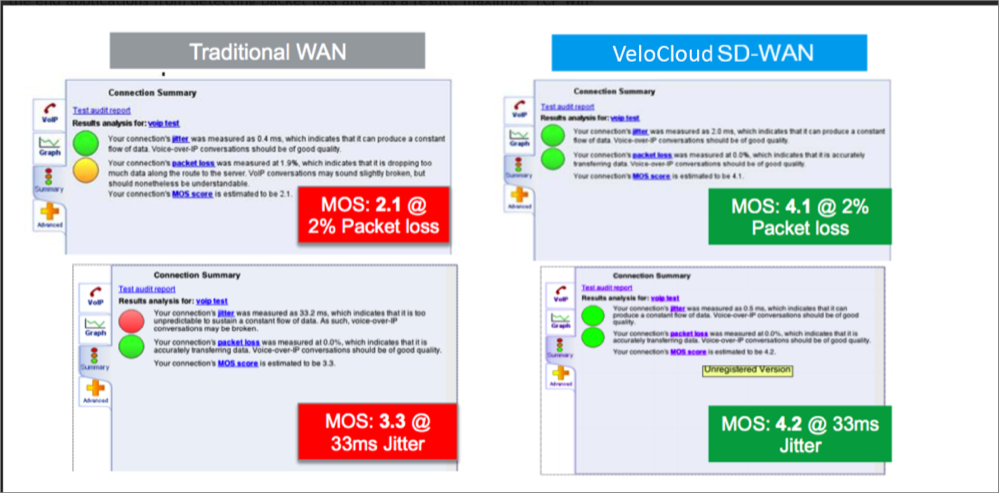
Scenario 1: Branch-to-branch VoIP call on a single link. The results in the below figure demonstrate the benefits of on-demand remediation using FEC and jitter remediation on a single Internet link with traditional WAN and SD-WAN. A mean opinion score (MOS) of less than 3.5 is unacceptable quality for a voice or video call.
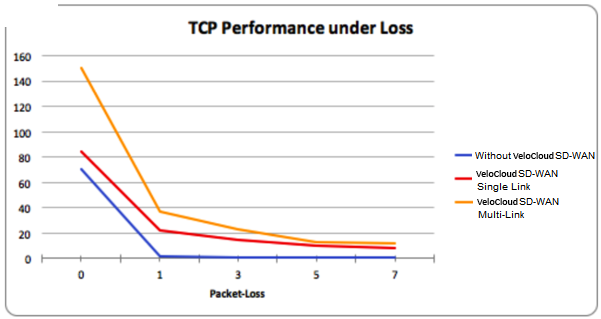
Scenario 2: TCP Performance with and without SD-WAN for Single and Multiple Links. These results show how NACK enables per-packet load balancing.
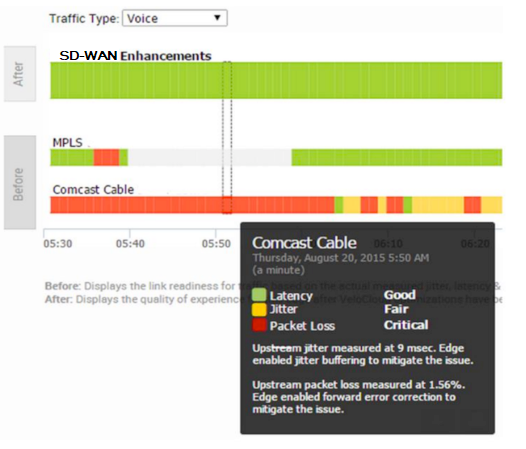
Scenario 3: Hybrid WAN scenario with an outage on the MPLS link and both jitter and loss on the Internet (Comcast) link. These results show how DMPO protects applications from sub-second outages by steering them to Internet links and enabling on-demand remediation on the Internet link.
Business Policy Framework and Smart Defaults
The business policy lets the IT administrator control QoS, steering, and services for the application traffic. Smart Defaults provides a ready-made business policy that supports over 2500 applications. DMPO makes steering decisions based on the type of application, real time link condition (congestion, latency, jitter, and packet loss), and the business policy. Here is an example of a business policy.
Each application has a category. Each category has a default action, which is a combination of Business Priority, Network Service, Link Steering, and Service Class. You can also define custom applications.
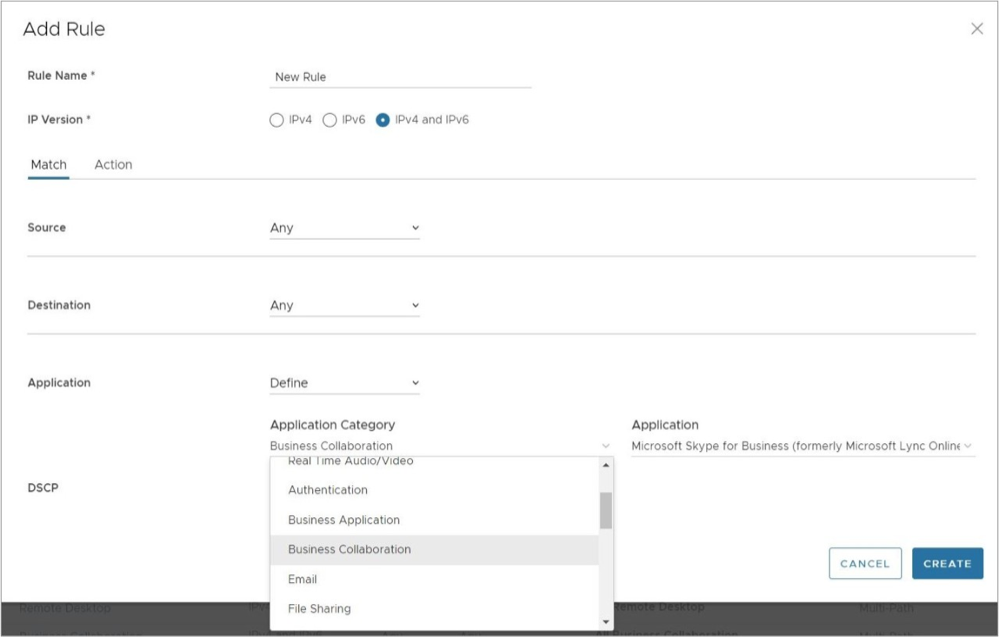
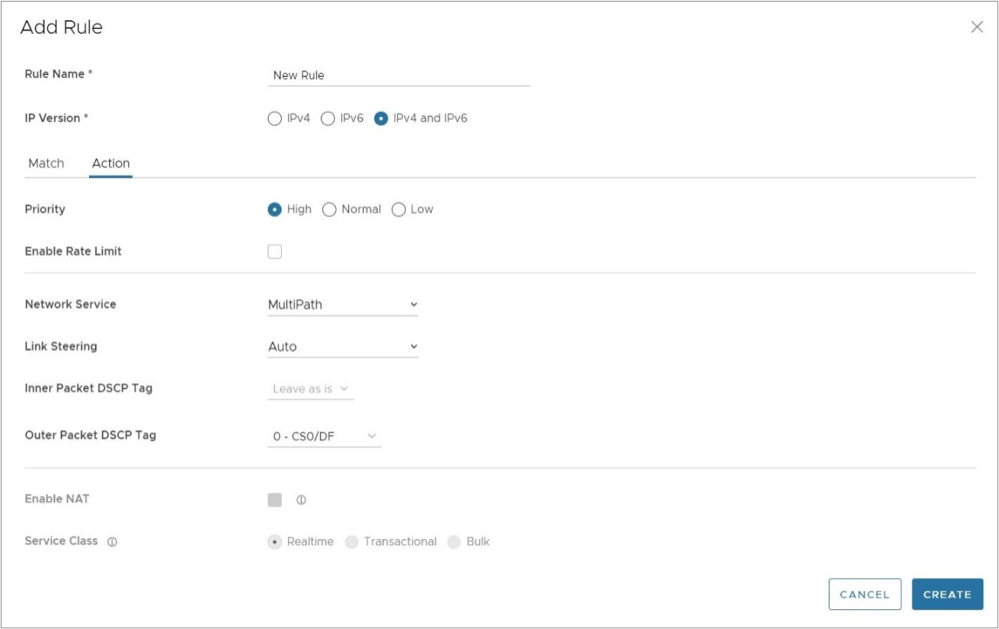
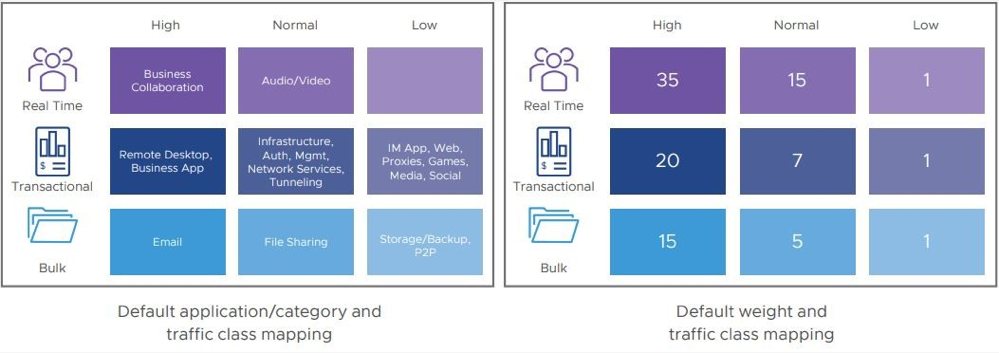
Each application has a Service Class: Real Time, Transactional, or Bulk. The Service Class determines how DMPO handles the application traffic. You cannot change the Service Class for the default applications, but you can specify it for your own custom applications.
Each application also has a Business Priority: High, Normal, or Low. The Business Priority determines how DMPO prioritizes and applies QoS to the application traffic. You can change the Business Priority for any application.
- Direct: This action is typically used for non-critical, trusted Internet applications that should be sent directly, bypassing DMPO tunnel. An example is Netflix. Netflix is considered a non-business, high-bandwidth application and should not be sent over the DMPO tunnels. The traffic sent directly can be load balanced at the flow level. By default, all the low priority applications are given the Direct action for Network Service.
- MultiPath: This action is typically given for important applications. By inserting the Multipath service, the Internet-based traffic is sent to the SD-WAN Gateway. The table below shows the default link steering and on-demand remediation technique for a given Service Class. By default, high and normal priority applications are given the Multipath action for Network Service.
- Internet Backhaul: This action redirects the Internet applications to an enterprise location that may or may not have the SD-WAN Edge. The typical use case is to force important Internet applications through a site that has security devices such as firewall, IPS, and content filtering before the traffic is allowed to exit to the Internet.
Link Steering Abstraction With Transport Group
Across different branch and hub locations, there may be different models of the SD-WAN Edge with different WAN interfaces and carriers. In order to enforce the centralized link steering policy using Profile, it is important that the interfaces and carries are abstracted. Transport Group provides the abstraction of the actual interfaces of the devices and carriers used at various locations. The business policy at the Profile level can be applied to the Transport Group instead, while the business policy at the individual Edge level can be applied to Transport Group, WAN Link (carrier), and Interfaces.
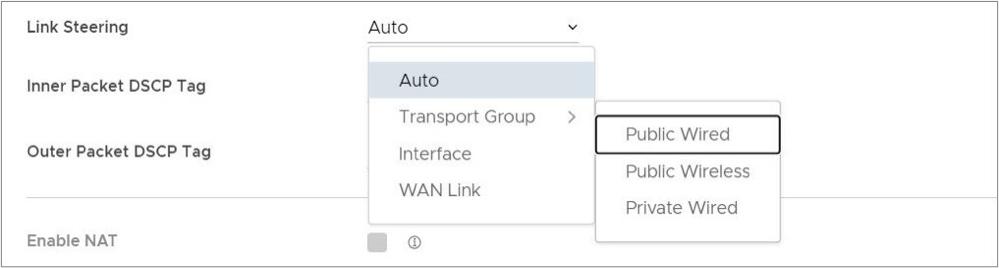
Link Steering by Transport Group
Different locations may have different WAN transports, e.g. WAN carrier name, WAN interface name, DMPO uses the concept of transport group to abstract the underlying WAN carriers or interfaces from the business policy configuration. The business policy configuration can specify the transport group (public wired, public wireless, private wired, etc.) in the steering policy so that the same business policy configuration can be applied across different device types or locations, which may have completely different WAN carriers and WAN interfaces, etc. When the DMPO performs the WAN link discovery, it also assigns the transport group to the WAN link. This is the most desirable option for specifying the links in the business policy because it eliminates the need for IT administrators to know the physical connectivity or WAN carrier.
Link Steering by Interface
The link steering policy can be applied to the interface, e.g. GE2, GE3, which will be different depending on the Edge model and the location. This is the least desirable option to use in the business policy because IT administrators have to be fully aware of how the Edge is connected to be able to specify which interface to use.
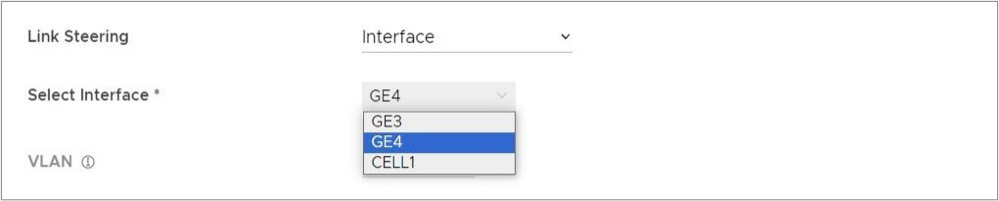
Link Steering and On-demand Remediation
There are four possible options for Link Steering – Auto, Preferred, Mandatory, and Available.
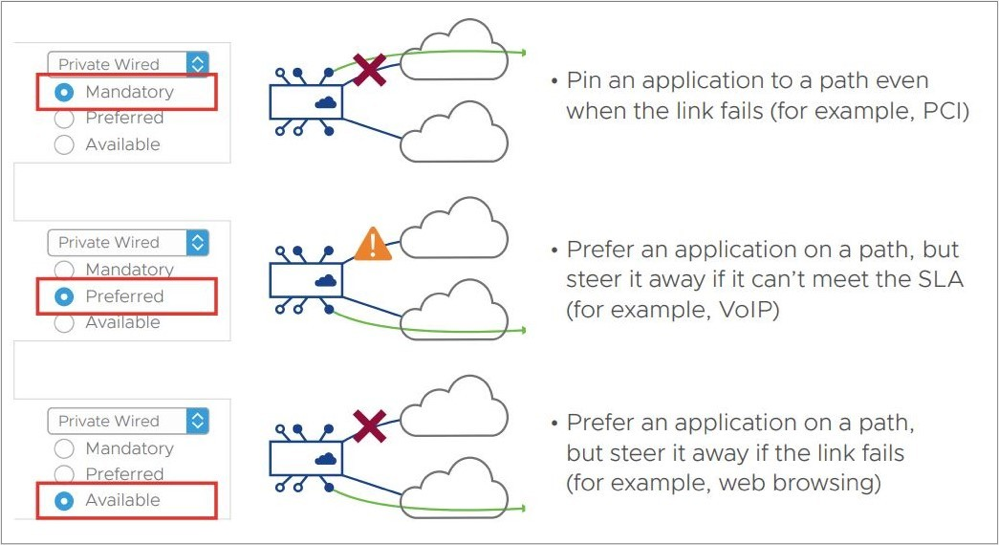
Link Selection: Mandatory– Pin the traffic to the link or the transport group. The traffic is never steered away regardless of the condition of the link including outage. On-demand remediation is triggered to mitigate brownout condition such as packet loss and jitter.
Example:Netflix is a low priority application and is required to stay on the public wired links at all times.
- Where the preferred Internet link has multiple public WAN link alternatives: Application traffic stays on the preferred link as long as it meets SLA for that application, and steers to other public links once the preferred link cannot deliver the SLA needed by the application. In the situation that there is no link to steer to, meaning all public links fail to deliver the SLA needed by the application, on-demand remediation is enabled. Alternatively, instead of steering the application away as soon as the current link cannot deliver the SLA needed by the application, DMPO can enable the on-demand remediation until the degradation is too severe to be remediated, then DMPO will steer the application to the better link.
- Example: Prefer the video collaboration application on the Internet link until it fails to deliver the SLA needed by video, then steer to a public link that meets this application's SLA.
- Where the preferred Internet link has multiple public WAN link and private WAN link alternatives:Application traffic stays on the preferred link as long as it meets SLA for that application, and steers to another public link once the preferred link cannot deliver the SLA needed by the application. The preferred link will NOT steer to a private link in the event of an SLA failure, and would only steer to that private link in the event both the preferred link and another public link were both either unstable or down completely. In the situation that there is no link to steer to, meaning another public links failed to deliver the SLA needed by the application, on-demand remediation is enabled. Alternatively, instead of steering the application away as soon as the current link cannot deliver the SLA needed by the application, DMPO can enable the on-demand remediation until the degradation is too severe to be remediated, then DMPO will steer the application to a better link.
- Example A: Prefer the video collaboration application on the Internet link until it fails to deliver the SLA needed by video, then steer to a public link that meets this application's SLA.
- Example B: Prefer the video collaboration application on the Internet link until it goes unstable or drops completely, other public links are also unstable or have also dropped completely, then steer to an available private link.
- Where the preferred Internet link has only private WAN link alternatives: Application traffic stays on the preferred link regardless of the SLA status for that application, and will not steer to another private links even if the preferred link cannot deliver the SLA needed by the application. In place of steering to the private links on an SLA failure for that application, on-demand remediation is enabled. The preferred link would steer to the private link(s) would only steer to another private link(s) in the event that the preferred link was either unstable or down completely.
- Example: Prefer the video collaboration application on the Internet link until the link goes unstable or drops completely, and then steer to an available private link.
Link Selection: Available– This option picks the available link as long as it is up. DMPO enables on-demand remediation if the link fails to meet the SLA. DMPO will not steer the application flows to another link unless the link is down.
Example: Web traffic is backhauled over the Internet link to the hub site using the Internet link as long as it is active, regardless of SLA.
Link Selection: Auto– This is the default option for all applications. DMPO automatically picks the best links based on the type of application and enables on-demand remediation when needed. There are four possible combinations of Link steering and On-demand Remediation for Internet applications. Traffic within the enterprise (VPN) always goes through the DMPO tunnels, so it always gets the benefits of on-demand remediation.
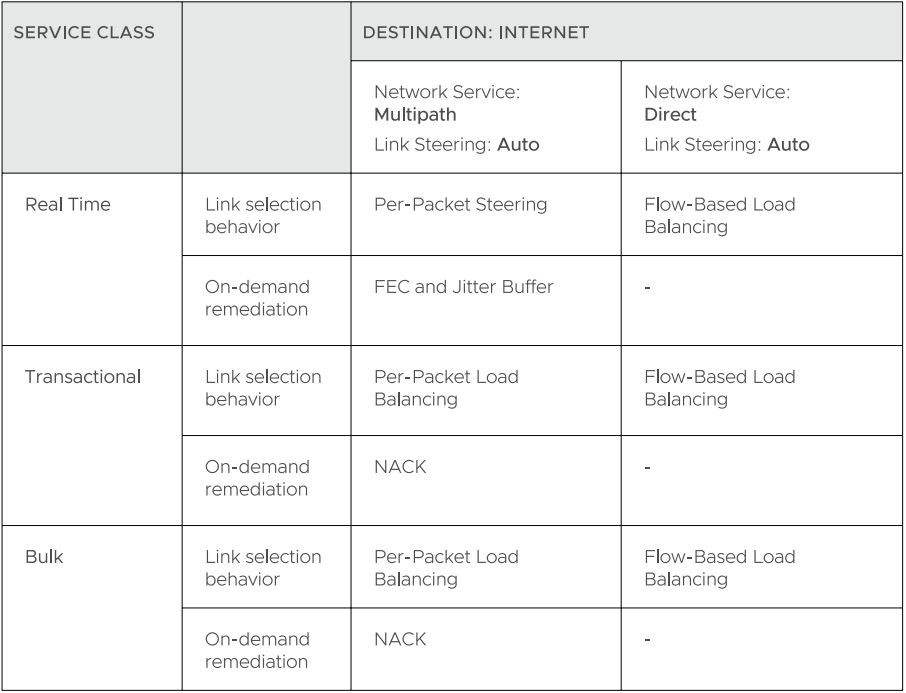
The below examples explain the default DMPO behavior for different type of applications and link conditions. Please see the appendix section for the default SLA for different application types.
- Scenario: There is one link that meets the SLA for the application.
Expected DMPO behavior: It picks the best available link.
- Scenario: There is one link with packet loss above the SLA for the application.
Expected DMPO behavior: It enables FEC for the real-time applications on this link.
- Scenario: There are two links with loss on only one link.
Expected DMPO behavior: It enables FEC on both links.
- Scenario: There are multiple links with loss on multiple links.
Expected DMPO behavior: It enables FEC on the two best links.
- Scenario: There are two links but one link is unstable, i.e. it misses three consecutive heartbeats.
Expected DMPO behavior: It marks the link as unusable and steers the flow to the next best available link.
- Scenario: There are two links with both jitter and loss.
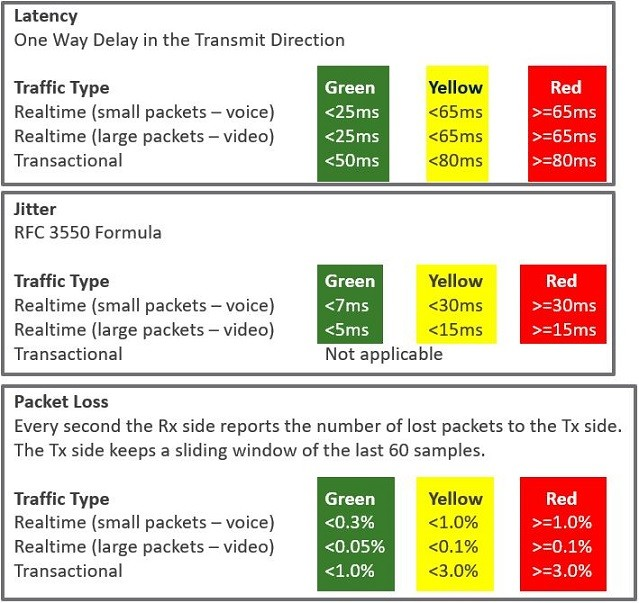
Expected DMPO behavior: It enables FEC and jitter buffer on both links. Jitter buffer is enabled when jitter is more than 7 ms for voice and more than 5 ms for video. The sending DMPO endpoint tells the receiving DMPO endpoint to enable jitter buffer. The receiving DMPO endpoint buffers up to 10 packets or 200 ms of traffic, whichever is first. It uses the original timestamp in the DMPO header to calculate the flow rate for de-jitter buffer. If the flow is not constant, it disables jitter buffering.
Example: Transactional and bulk applications. Enables NACK if packet loss exceeds the threshold that is acceptable per application type (see the appendix for this value).
Secure Traffic Transmission
DMPO encrypts both the payload and the tunnel header with IPsec transport mode end-to-end for private or internal traffic. The payload contains the user traffic. DMPO supports AES128 and AES256 for encryption. It uses the PKI and IKEv2 protocols for IPsec key management and authentication.
Protocols and Ports Used
- UDP/2426 – UDP/2426: This port is for overlay tunnel management and information exchange between the two DMPO endpoints (Edges and Gateways). It is also for data traffic that is already secured or not important, such as SFDC traffic from branch to the cloud between Edge and Gateway. SFDC traffic is encrypted with TLS.
- UDP/500 and UDP/4500 – These ports are for IKEv2 negotiation and for IPSec NAT transparency.
- IP/50 – This protocol is for IPSec over native IP protocol 50 (ESP) when there is no NAT between the two DMPO endpoints.
Appendix: QoE threshold and Application SLA
DMPO uses the SLA threshold below for different types of applications. It will immediately take action to steer the affected application flows or perform on-demand remediation when the WAN link condition exceeds one or more thresholds. Packet loss is calculated by dividing the number of lost packets by the total packets in the last 1-minute interval. The DMPO endpoints communicate the number of lost packets every second. The QoE report also reflects this threshold.
DMPO will also take action immediately when it loses communications (no user data or probes) within 300 ms.
Solution Components
This section describes Arista solution components.
VeloCloud Edge
A thin “Edge” that is zero IT touch provisioned from the cloud for secured, optimized connectivity to your apps and virtualized services. The SD-WAN Edges are zero-touch, enterprise-class devices or virtual software that provide secure and optimized connectivity to private, public and hybrid applications; compute; and virtualized services. SD-WAN Edges perform deep application recognition, application and per-packet steering, on-demand remediation performance metrics and end-to-end quality of service (QoS) in addition to hosting Virtual Network Function (VNF) services. An Edge pair can be deployed to provide High Availability (HA). Edges can be deployed in branches, large sites and data centers. All other network infrastructure is provided on-demand in the cloud.
VeloCloud Orchestrator
The Arista VeloCloud Orchestrator provides centralized enterprise-wide configuration and real-time monitoring, as well as orchestrates the data flow into and through the SD-WAN overlay network. Additionally, it provides the one-click provisioning of virtual services across Edges, in centralized and regional enterprise service hubs and in the cloud.
VeloCloud Gateways
SD-WAN network consists of gateways deployed at top tier network points-of-presence and cloud data centers around the world, providing SD-WAN services to the doorstep of SaaS, IaaS and cloud network services, as well as access to private backbones. Multi-tenant, virtual Gateways are deployed both by SD-WAN transit and cloud service provider partners. The gateways provide the advantage of an on-demand, scalable and redundant cloud network for optimized paths to cloud destinations as well as zero-installation applications.
For more information, see the KB article SD-WAN Gateways Functionality and Resiliency.
SD-WAN Edge Performance and Scale Data
This section discusses the performance and scale architecture of the SD-WAN Edge. It provides recommendations based on tests conducted on the various Edges configured with specific service combinations. It also explains performance and scale data points and how to use them.
Introduction
The tests represent common deployment scenarios to provide recommendations that apply to most deployments. The test data herein are not all-inclusive metrics, nor are they performance or scale limits. There are implementations where the observed performance exceeds the test results and others where specific services, extremely small packet sizes, or other factors can reduce performance below the test results.
Customers are welcome to perform independent tests, and results could vary. However, recommendations based on our test results are adequate for most deployments.
SD-WAN Edge
SD-WAN Edges are zero-touch, enterprise-class appliances that provide secure optimized connectivity to private, public, and hybrid applications as well as compute and virtualized services. SD-WAN Edges perform deep application recognition of traffic flows, performance metrics measurements of underlay transport and apply end-to-end quality of service by applying packet-based link steering and on-demand application remediation, in addition to supporting other virtualized network services.
Throughput Performance Test Topologies
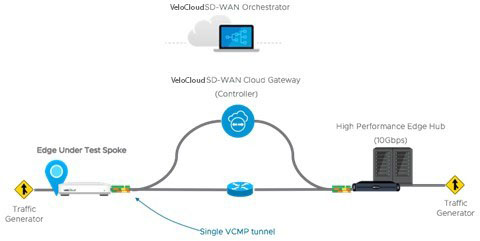
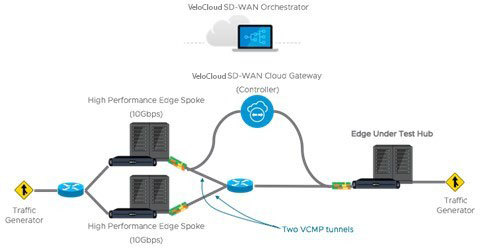
Test Methodology
This section discusses the performance and scale test methodology used to derive the results.
Performance Test Methodology
- Performance is measured using a fully operational SD-WAN network overlay (DMPO tunnels) test topology in order to exercise the SD-WAN features and obtain results that can be used to appropriately size WAN networks. Testing is conducted using stateful traffic that establishes multiple flows (connections) and are a mix of well-known applications. The number of flows depends on the platform model being tested. Platforms are divided by expected aggregate performance of under 1 Gbps and over 1 Gbps models. Typically, hundreds of flows are needed to fully exercise and determine max throughput of platforms expected to perform under 1 Gbps, and thousands of flows are used to exercise platforms of over 1 Gbps.
The traffic profiles simulate two network traffic conditions:
- Large Packet, a 1300-byte condition.
- IMIX, a mix of packet sizes that average to a 417-byte condition.
These traffic profiles are used separately to measure maximum throughput per profile.
- Performance results are recorded at a packet drop rate (PDR) of 0.01%. The PDR mark provides a more realistic performance result which accounts for normal packet drop that may occur within the SD-WAN packet pipeline in the device. A PDR of 0.01% does not impact application experience even in single link deployment scenarios.
- The device under test is configured with the following DMPO features; IPsec encrypted using AES-128 and SHA1 for hashing, Application Recognition, link SLA measurements, per-packet forwarding. Business Policy is configured to match all traffic as bulk/low priority to prevent DMPO NACK or FEC from executing and incorrectly altering the traffic generator’s packet count tracking.
Test Results
SD-WAN Edge Performance and Scale Results
Performance metrics are based on the Test Methodology detailed above.
Switched Port Performance: SD-WAN Edges are designed to be deployed as gateway routers between the LAN and the WAN. However, the Edges also provide the flexibility of meeting a variety of other deployment topologies. For example, SD-WAN Edges can have their interfaces configured to operate as switched ports—allowing the switching of LAN traffic between various LAN interfaces without the need for an external device.
An Edge with its interfaces configured as switched ports is ideal for small office deployments where high throughput is not required, as the additional layer of complexity required to handle traffic switching reduces the overall performance of the system. For most deployments, Arista recommends using all routed interfaces.
- The Edge device's Maximum Throughput is the sum of throughput across all interfaces of the Edge under test.
- Overall traffic is the “aggregate” of all traffic flows going to and from an Edge device.
| SD-WAN Edge | 510, 510N | 510-LTE | 520 | 520V | 540 | 610, 610C, 610N | 610-LTE | 710-W |
|---|---|---|---|---|---|---|---|---|
| Maximum Throughput Large Packet (1300-byte) | ||||||||
| Routed Mode All Ports | 850 Mbps | 850 Mbps | 850 Mbps | 850 Mbps | 1.5 Gbps | 850 Mbps | 850 Mbps | 950 Mbps |
| Maximum Throughput Internet Traffic (IMIX) | ||||||||
| Routed Mode All Ports | 300 Mbps | 300 Mbps | 300 Mbps | 300 Mbps | 650 Mbps | 300 Mbps | 300 Mbps | 350 Mbps |
| Routed Mode All Ports with Edge Intelligenceactivated. | 200 Mbps | 200 Mbps | 200 Mbps | 200 Mbps | 500 Mbps | 200 Mbps | 200 Mbps | 265 Mbps |
| Routed Mode All Ports with IPS, Malicious IP Filtering, and Stateful Firewall activated. | 150 Mbps | 150 Mbps | 150 Mbps | 150 Mbps | 350 Mbps | 175 Mbps | 175 Mbps | 250 Mbps |
| Routed Mode All Ports with Edge Intelligence, IPS, Malicious IP Filtering, and Stateful Firewall all activated. | 150 Mbps | 150 Mbps | 150 Mbps | 150 Mbps | 350 Mbps | 175 Mbps | 175 Mbps | 250 Mbps |
| Other Scale Vectors | ||||||||
| Maximum Tunnel Scale | 50 | 50 | 50 | 50 | 100 | 50 | 50 | 50 |
| Flows Per Second | 2,400 | 2,400 | 2,400 | 2,400 | 4,800 | 2,400 | 2,400 | 4,000 |
| Flows Per Second with Edge Intelligence activated | 1,200 | 1,200 | 1,200 | 1,200 | 1,200 | 1,200 | 1,200 | 3,200 |
| Maximum Concurrent Flows | 225K | 225K | 225K | 225K | 225K | 225K | 225K | 225K |
| Maximum Concurrent Flows with Edge Intelligence activated. | 110K | 110K | 110K | 110K | 110K | 110K | 110K | 110K |
| Maximum Concurrent Flows with IPS, Malicious IP Filtering, and Stateful Firewall activated. | 110K | 110K | 110K | 110K | 110K | 110K | 110K | 110K |
| Maximum Concurrent Flows with Edge Intelligence, IPS, Malicious IP Filtering, and Stateful Firewall activated. | 110K | 110K | 110K | 110K | 110K | 110K | 110K | 110K |
| Maximum Number of BGP Routes | 100K | 100K | 100K | 100K | 100K | 100K | 100K | 110K |
| Maximum Number of Segments | 32 | 32 | 32 | 32 | 32 | 32 | 32 | 32 |
| Maximum Number of NAT Entries | 225K | 225K | 225K | 225K | 225K | 225K | 225K | 225K |
| SD-WAN Edge | 640, 640C, 640N | 680, 680C, 680N | 840 | 2000 | 3400, 3400C | 3800, 3800C | 3810 |
|---|---|---|---|---|---|---|---|
| Maximum Throughput Large Packet (1300-byte) | |||||||
| Routed Mode All Ports | 5 Gbps | 8 Gbps | 6 Gbps | 15 Gbps | 10 Gbps | 15 Gbps | 15 Gbps |
| Maximum Throughput Internet Traffic (IMIX) | |||||||
| Routed Mode All Ports | 2 Gbps | 3 Gbps | 2 Gbps | 6 Gbps | 3.5 Gbps | 6.4 Gbps | 6.4 Gbps |
| Routed Mode All Ports with Edge Intelligence activated. | 1 Gbps | 2 Gbps | 1.5 Gbps | 5 Gbps | 3 Gbps | 5 Gbps | 5 Gbps |
| Routed Mode All Ports with IPS and Stateful Firewall activated. | 700 Mbps | 1.5 Mbps | 1 Gbps | 3.5 Gbps | 1.7 Gbps | 3.5 Gbps | 3.5 Gbps |
| Routed Mode All Ports with Edge Intelligence, IPS, and Stateful Firewall all activated. | 600 Mbps | 1.5 Gbps | 800 Mbps | 3.5 Gbps | 2.5 Gbps | 4 Gbps | 4 Gbps |
| Other Scale Vectors | |||||||
| Maximum Tunnel Scale | 400 | 800 | 400 | 6,000 | 4,000 | 6,000 | 6,000 |
| Flows Per Second | 19,200 | 19,200 | 19,200 | 38,400 | 38,400 | 38,400 | 38,400 |
| Flows Per Second with Edge Intelligence activated | 9,600 | 9,600 | 9,600 | 19,200 | 19,200 | 19,200 | 19,200 |
| Maximum Concurrent Flows | 1.9M | 1.9M | 1.9M | 3.8M | 1.9M | 3.8M | 3.8M |
| Maximum Concurrent Flows with Edge Intelligence activated | 960K | 960K | 960K | 960K | 960K | 960K | 960K |
| Maximum Number of Routes | 100K | 100K | 100K | 100K | 100K | 100K | 100K |
| Maximum Number of Segments | 128 | 128 | 128 | 128 | 128 | 128 | 128 |
| Maximum Number of NAT Entries | 650K | 650K | 650K | 960K | 960K | 960K | 960K |
- Large Packet performance is based on a large packet (1300-byte) payload with AES-128 encryption and DPI turned on.
- Internet Traffic (IMIX) performance is based on an average packet size of 417-byte payload with AES-128 encryption and DPI turned on.
- Edge Intelligence performance numbers were measured with a 400-byte payload.
- IPS and Stateful Firewall performance numbers were measured using TREX setup with an average packet size of 400-bytes.
For example: Edge 1 with public WAN links A, B, C, and D connects to Edge 2 with public WAN links E, F, G, and H. Edge 1's WAN link A establishes a tunnel with each of Edge 2's WAN links E, F, G, and H for a total of 4 tunnels for WAN link A to Edge 2. And this follows for Edge 1's other WAN links B, C, and D. Each establishes tunnels with Edge 2's four public WAN links and so four WAN links with 4 tunnels each results in Edge 1 having 16 total tunnels to Edge 2. In this example, no additional tunnels can be established between the two Edges if an additional WAN link is added to either Edge as the maximum has been reached.
| Edge Model | 520V | 620, 620C, 620N | 640, 640C, 640N | 680, 680C, 680N | 840 | 3400, 3400C | 3800, 3800C | 3810 |
|---|---|---|---|---|---|---|---|---|
| Max. Throughput with FW VNF (1300-byte) | 100 Mbps | 300 Mbps | 600 Mbps | 1 Gbps | 1 Gbps | 2 Gbps | 3 Gbps | 3 Gbps |
| Edge Model | 510, 510N | 510-LTE | 520, 520v | 540 | 610, 610C, 610N | 610-LTE | 710-W |
|---|---|---|---|---|---|---|---|
| Maximum Throughput (IMIX) Across Enhanced HA Link | 220 Mbps | 220 Mbps | 220 Mbps | 480 Mbps | 220 Mbps | 220 Mbps | 260 Mbps |
| Edge Model | 640, 640C, 640N | 680, 680C, 680N | 840 | 2000 | 3400, 3400C | 3800, 3800C | 3810 |
|---|---|---|---|---|---|---|---|
| Maximum Throughput (IMIX) Across Enhanced HA Link | 1 Gbps | 2 Gbps | 1 Gbps | 4 Gbps | 2.5 Gbps | 5 Gbps | 5 Gbps |
- There is a performance impact of up to 20% when analytics are activated.
- Flow capacity is reduced by half when analytics are activated due to the additional memory and processing required for analysis.
Platform Independent Edge Scale Numbers
| Feature | Supported Number | |
|---|---|---|
| IPv4 | IPv6 | |
| Maximum number of Port Forwarding rules on a single segment | 128 | 128 |
| Maximum number of Port Forwarding rules across 16 segments | 128 | 128 |
| Maximum number of Port Forwarding rules across 128 segments | 128 | 128 |
| Maximum number of Outbound Firewall Rules on a single segment | 2040 | 2040 |
| Maximum number of Outbound Firewall Rules across 16 segments | 2040 | 2040 |
| Maximum number of Outbound Firewall Rules across 128 segments | 2040 | 2040 |
| Maximum number of 1:1 NAT rules on a single segment | 128 | 128 |
| Maximum number of 1:1 NAT rules across 16 segments | 128 | 128 |
| Maximum number of 1:1 NAT rules across 128 segments | 128 | 128 |
| Maximum number of LAN side NAT rules on a single segment | 256 | - |
| Maximum number of LAN side NAT rules across 16 segments | 256 | - |
| Maximum number of LAN side NAT rules across 128 segments | 256 | - |
| Maximum number of Object Groups (1000 business policies, each business policy assigned to one object group, each object group supports 255 address groups) | 1000 | 1000 |
Virtual Edge
| Edge Device | Maximum Throughput | Maximum Number of Tunnels | Flows Per Second | Maximum Concurrent Flows | Maximum Number of Routes | Maximum Number of Segments | |
|---|---|---|---|---|---|---|---|
| ESXi Virtual Edge (2-core, VMXNET3) | 1.5 Gbps (1300-byte)
900 Mbps (IMIX) |
50 | 2400 | 240K | 35K | 128 | |
| KVM Virtual Edge (2-core, Linux Bridge) | 800 Mbps (1300-byte)
250 Mbps (IMIX) |
50 | 2400 | 240K | 35K | 128 | |
| KVM Virtual Edge (2-core, SR-IOV) | 1.5 Gbps (1300-byte)
900 Mbps (IMIX) |
50 | 2400 | 240K | 35K | 128 | |
| ESXi Virtual Edge (4-core, VMXNET3) | 4 Gbps (1300-byte)
1.5 Gbps (IMIX) |
400 | 4800 | 480K | 35K | 128 | |
| ESXi Virtual Edge (4-core, SR-IOV) | 5 Gbps (1300-byte)
1.5 Gbps (IMIX) |
400 | 4800 | 480K | 35K | 128 | |
| KVM Virtual Edge (4-core, Linux Bridge) | 1 Gbps (1300-byte)
350 Mbps (IMIX) |
400 | 4800 | 480K | 35K | 128 | |
| KVM Virtual Edge (4-core, SR-IOV) | 4 Gbps (1300-byte)
1.5 Gbps (IMIX) |
400 | 4800 | 480K | 35K | 128 | |
| ESXi Virtual Edge (8-core, VMXNET3) | 6 Gbps (1300-byte)
2 Gbps (IMIX) |
800 | 28800 | 1.9M | 35K | 128 | |
| ESXi Virtual Edge (8-core, SR-IOV) | 6 Gbps (1300-byte)
3 Gbps (IMIX) |
800 | 28800 | 1.9M | 35K | 128 | |
| KVM Virtual Edge (8-core, SR-IOV | 6.5 Gbps (1300-byte)
3.2 Gbps (IMIX) |
800 | 28800 | 1.9M | 35K | 128 | |
| 2 vCPU | 4vCPU | 8vCPU | 10vCPU | |
|---|---|---|---|---|
| Minimum Memory (DRAM) | 8 GB | 16 GB | 32 GB | 32 GB |
| Minimum Storage | 8 GB | 8 GB | 16 GB | 16 GB |
| Supported Hypervisors | Software version 4.0 and above:
|
|||
| Supported Public Cloud | AWS, Azure, GCP, and Alibaba | |||
| Support Network I/O | SR-IOV, VirtIO, VMXNET3 | |||
| Recommended Host Settings | CPUs at 2.0 GHz or higher
CPU configuration:
VMware ESXi required settings:
|
|||
Public Cloud
| AWS Instance Type | c5.large | c5.xlarge | c5.2xlarge | c5.4xlarge |
|---|---|---|---|---|
| Maximum Throughput | 100 Mbps (1300-byte)
50 Mbps (IMIX) |
200 Mbps (1300-byte)
100 Mbps (IMIX) |
1.5 Gbps (1300-byte)
450 Mbps (IMIX) |
4 Gbps (1300-byte)
1 Gbps (IMIX) |
| Maximum Tunnels | 50 | 400 | 800 | 2,000 |
| Flows Per Second | 1,200 | 2,400 | 4,800 | 9,600 |
| Maximum Concurrent Flows | 125,000 | 250,000 | 550,000 | 1.9M |
| Maximum Number of Routes | 35,000 | 35,000 | 35,000 | 35,000 |
| Maximum Number of Segments | 128 | 128 | 128 | 128 |
| Azure VM Series | D2d v4 | D4d v4 | D8d v4 | D16d v4 |
|---|---|---|---|---|
| Maximum Throughput | 100 Mbps (1300-byte)
50 Mbps (IMIX) |
200 Mbps (1300-byte)
100 Mbps (IMIX) |
1 Gbps (1300-byte)
450 Mbps (IMIX) |
1 Gbps (1300-byte)
450 Mbps (IMIX) |
| Maximum Tunnels | 50 | 400 | 800 | 2000 |
| Flows Per Second | 1,200 | 2,400 | 4,800 | 4,800 |
| Maximum Concurrent Flows | 125,000 | 250,000 | 550,000 | 550,000 |
| Maximum Number of Routes | 35,000 | 35,000 | 35,000 | 35,000 |
| Maximum Number of Segments | 128 | 128 | 128 | 128 |
| Azure VM Series | Ds3 v2 | Ds4 v2 | Ds5 v2 | D4d v5 | D8d v5 | D16d v5 |
|---|---|---|---|---|---|---|
| Maximum Throughput | 2.5 Gbps (1300-byte)1.5 Gbps (IMIX) | 5.3 Gbps (1300-byte)2.7 Gbps (IMIX) | 6.5 Gbps (1300-byte)3.1 Gbps (IMIX) | 4.5 Gbps (1300-byte)1.3 Gbps (IMIX) | 6.3 Gbps (1300-byte)
2.7 Gbps (IMIX) |
6.4 Gbps (1300-byte)2.9 Gbps (IMIX) |
| Maximum Tunnels | 400 | 800 | 2000 | 400 | 800 | 2000 |
| Flows Per Second | 2,400 | 4,800 | 4,800 | 2,400 | 4,800 | 4,800 |
| Maximum Concurrent Flows | 250,000 | 550,000 | 550,000 | 250,000 | 550,000 | 550,000 |
| Maximum Number of Routes | 35,000 | 35,000 | 35,000 | 35,000 | 35,000 | 35,000 |
| Maximum Number of Segments | 128 | 128 | 128 | 128 | 128 | 128 |
- Azure Accelerated Networking is supported only from release 5.4.0.
- Accelerated Networking is supported only on Connect-X4 and Connect-X5 NICs.
| GCP Instance Type | n2-highcpu-4 | n2-highcpu-8 | n2-highcpu-16 |
|---|---|---|---|
| Maximum Throughput | 850 Mbps (1300-byte)
500 Mbps (IMIX) |
4.5 Gbps (1300-byte)
1.6 Gbps (IMIX) |
6.5 Gbps (1300-byte)
1.9 Gbps (IMIX) |
| Maximum Tunnels | 50 | 400 | 800 |
| Flows Per Second | 1,200 | 2,400 | 4,800 |
| Maximum Concurrent Flows | 125,000 | 250,000 | 550,000 |
| Maximum Number of Routes | 35,000 | 35,000 | 35,000 |
| Maximum Number of Segments | 128 | 128 | 128 |
Use of DPDK on SD-WAN Edges
To improve packet throughput performance, SD-WAN Edges take advantage of Data Plane Development Kit (DPDK) technology. DPDK is a set of data plane libraries and drivers provided by Intel for offloading TCP packet processing from the operating system kernel to processes running in user space and results in higher packet throughput. For additional details, see https://www.dpdk.org/.
Edge hardware models 620 and higher and all virtual Edges use DPDK by default on their routed interfaces. Edges do not use DPDK on their switched interfaces. A user cannot activate or deactivate DPDK for an Edge interface.
Capabilities
This section discusses the SD-WAN capabilities.
Dynamic Multi-path Optimization
The SD-WAN Dynamic Multi-path Optimization is comprised of automatic link monitoring, dynamic link steering and on-demand remediation.
Link Steering and Remediation
Dynamic, application aware per-packet link steering is performed automatically based on the business priority of the application, embedded knowledge of network requirements of the application, and the real-time capacity and performance of each link. On-demand mitigation of individual link degradation through forward error correction, jitter buffering and negative acknowledgment proxy also protects the performance of priority and network sensitive applications. Both the dynamic per-packet link steering and on-demand mitigation combine to deliver robust, sub-second blocked and limited protection to improve application availability, performance and end user experience.
Cloud VPN
Cloud VPN is a 1-click, site-to-site, VPNC-compliant, IPsec VPN to connect SD-WAN and Non SD-WAN Destinations while delivering real-time status and the health of the sites. The Cloud VPN establishes dynamic edge-to-edge communication for all branches based on service level objectives and application performance. Cloud VPN also delivers secure connectivity across all branches with PKI scalable key management. New branches join the VPN network automatically with access to all resources in other branches, enterprise data centers, and 3rd party data centers, like Amazon AWS.
Firewall
SD-WAN delivers stateful and context-aware (application, user, device) integrated application aware firewall with granular control of sub-applications, support for protocol-hopping applications – such as Skype and other peer-to-peer applications (for example, turn off Skype video and chat, but allow Skype audio). The secure firewall service is user- and device OS-aware with the ability to separate voice, video, data, and compliance traffic. Policies for BYOD devices (such as Apple iOS, Android, Windows, and Mac OS) on the corporate network are easily controlled.
Network Service Insertion
SD-WAN Solution supports a platform to host multiple virtualized network functions to eliminate single-function appliances and reduce branch IT complexity. SD-WAN service-chains traffic from the branch to both cloud-based and enterprise regional hub services, with assured performance, security, and manageability. Branches leverage consolidated security and network services, including those from partners like Zscaler and Websense. Using a simple click-to-enable interface, services can be inserted in the cloud and on-premise with application specific policies.
Activation
SD-WAN Edge appliances automatically authenticate, connect, and receive configuration instructions once they are connected to the Internet in a zero-touch deployment. They deliver a highly available deployment with SD-WAN Edge redundancy protocol and integrate with the existing network with support for OSPF and BGP routing protocols and benefit from dynamic learning and automation.
Overlay Flow Control
SD-WAN Edge learns routes from adjacent routers through OSPF and BGP. It sends the learned routes to the Gateway/Controller. The Gateway/Controller acts like a route reflector and sends the learned routes to other SD-WAN Edge. The Overlay Flow Control (OFC) allows enterprise-wide route visibility and control for ease of programming and for full and partial overlay.
OSPF
SD-WAN supports inbound/outbound filters to OSPF neighbors, OE1/OE2 route types, MD5 authentication. Routes learned through OSPF will be automatically redistributed to the controller hosted in the cloud or on-premise.
BGP
SD-WAN supports inbound/outbound filters that can be set to Deny, or optionally add/change the BGP attribute to influence the path selection, that is RFC 1998 community, MED, AS-Path prepend, and local preference.
Segmentation
Network segmentation is an important feature for both enterprises and service providers. In the most basic form, segmentation provides network isolation for management and security reasons. Most common forms of segmentation are VLANs for L2 and VRFs for L3.
Typical Use Cases for Segmentation:
- Line of Business Separation: Engineering, HR etc. for Security/Audit
- User Data Separation: Guest, PCI, Corporate traffic separation
- Enterprise uses overlapping IP addresses in different VRFs
However, the legacy approach is limited to a single box or two physically connected devices. To extend the functionality, segmentation information must be carried across the network.
SD-WAN allows end-to-end segmentation. When the packet traverses through the Edge, the Segment ID is added to the packet and is forwarded to the Hub and cloud Gateway, allowing network service isolation from the Edge to the cloud and data center. This provides the ability to group prefixes into a unique routing table, making the business policy segment aware.
Routing
In Dynamic Routing, SD-WAN Edge learns routes from adjacent routers through OSPF or BGP. The SASE Orchestrator maintains all the dynamically learned routes in a global routing table called the Overlay Flow Control (OFC). The Overlay Flow Control allows management of dynamic routes in the case of "Overlay Flow Control sync" and "change in Inbound/Outbound filtering configuration." The change in inbound filtering for a prefix from IGNORE to LEARN would fetch the prefix from the Overlay Flow Control and install into the Unified routing table.
For additional information, see Configure Dynamic Routing with OSPF or BGP.
Business Policy Framework
Quality of Service (QoS), resource allocations, link/path steering, and error correction are automatically applied based on business policies and application priorities. Orchestrate traffic based on transport groups defined by private and public links, policy definition, and link characteristics.
Tunnel Overhead and MTU
VeloCloud, like any overlay, imposes additional overhead on traffic that traverses the network. This section first describes the overhead added in a traditional IPsec network and how it compares with VeloCloud, which is followed by an explanation of how this added overhead relates to MTU and packet fragmentation behaviors in the network.
IPsec Tunnel Overhead
- Padding
- AES encrypts data in 16-byte blocks, referred to as "block" size.
- If the body of a packet is smaller than or indivisible by block size, it is padded to match the block size.
- Examples:
- A 1-byte packet will become 16-bytes with 15-bytes of padding.
- A 1400-byte packet will become 1408-bytes with 8-bytes of padding.
- A 64-byte packet does not require any padding.
- IPsec headers and trailers:
- UDP header for NAT Traversal (NAT-T).
- IP header for IPsec tunnel mode.
- ESP header and trailer.
| Element | Size in Bytes |
|---|---|
| IP Header | 20 |
| UDP Header | 8 |
| IPsec Sequence Number | 4 |
| IPsec SPI | 4 |
| Initialization Vector | 16 |
| Padding | 0 – 15 |
| Padding Length | 1 |
| Next Header | 1 |
| Authentication Data | 12 |
| Total | 66-81 |
VeloCloud Tunnel Overhead
To support Dynamic Multipath Optimization™ (DMPO), VeloCloud encapsulates packets in a protocol called the VeloCloud Multipath Protocol (VCMP). VCMP adds 31-bytes of overhead for user packets to support resequencing, error correction, network analysis, and network segmentation within a single tunnel. VCMP operates on an IANA-registered port of UDP 2426. To ensure consistent behavior in all potential scenarios (unencrypted, encrypted and behind a NAT, encrypted but not behind a NAT), VCMP is encrypted using transport mode IPsec and forces NAT-T to be true with a special NAT-T port of 2426.
Packets sent to the Internet via the SD-WAN Gateway are not encrypted by default, since they will egress to the open Internet upon exiting the Gateway. As a result, the overhead for Internet Multipath traffic is less than VPN traffic.
| Element | Size in Bytes |
|---|---|
| IP Header | 20 |
| UDP Header | 8 |
| IPsec Sequence Number | 4 |
| IPsec SPI | 4 |
| VCMP Header | 23 |
| VCMP Data Header | 8 |
| Initialization Vector | 16 |
| Padding | 0 – 15 |
| Padding Length | 1 |
| Next Header | 1 |
| Authentication Data | 12 |
| Total | 97 – 112 |
| Element | Size in Bytes |
|---|---|
| IP Header | 20 |
| UDP Header | 8 |
| VCMP Header | 23 |
| VCMP Data Header | 8 |
| Total | 59 |
Impact of IPv6 Tunnel on MTU
SD-WAN supports IPv6 addresses to configure the Edge Interfaces and Edge WAN Overlay settings.
The VCMP tunnel can be setup in the following environments: IPv4 only, IPv6 only, and dual stack. For additional information, see IPv6 Settings.
When a branch has at least one IPv6 tunnel, DMPO uses this tunnel seamlessly along with other IPv4 tunnels. The packets for any specific flow can take any tunnel, IPv4 or IPv6, based on the real time health of the tunnel. An example for specific flow is path selection score for load balanced traffic. In such cases, the increased size for IPv6 header (additional 20 bytes) should be taken into account and as a result, the effective path MTU will be less by 20 bytes. In addition, this reduced effective MTU will be propagated to the other remote branches through Gateway so that the incoming routes into this local branch from other remote branches reflect the reduced MTU.
Path MTU Discovery
- For public Internet WAN links:
- Path MTU discovery is performed to all Gateways.
- The MTU for all tunnels will be set to the minimum MTU discovered.
- For private WAN links:
- Path MTU discovery is performed to all other Edges in the customer network.
- The MTU for each tunnel is set based on the results of Path MTU discovery.
The Edge will first attempt RFC 1191 Path MTU discovery, where a packet of the current known link MTU (Default: 1500 bytes) is sent to the peer with the "Don’t Fragment" (DF) bit set in the IP header. If this packet is received on the remote Edge or Gateway, an acknowledgement packet of the same size is returned to the Edge. If the packet cannot reach the remote Edge or Gateway due to MTU constraints, the intermediate device is expected to send an ICMP destination unreachable (fragmentation needed) message. When the Edge receives the ICMP unreachable message, it will validate the message (to ensure the MTU value reported is sane) and once validated, adjust the MTU. The process then repeats until the MTU is discovered.
In some cases (for example, USB LTE dongles), the intermediate device will not send an ICMP unreachable message even if the packet is too large. If RFC 1191 fails (the Edge did not receive an acknowledgement or ICMP unreachable), it will fall back to RFC 4821 Packetization Layer Path MTU Discovery. The Edge will attempt to perform a binary search to discover the MTU.
When an MTU is discovered for a peer, all tunnels to this peer are set to the same MTU. That means that if an Edge has one link with an MTU of 1400 bytes and one link with an MTU of 1500 bytes, all tunnels will have an MTU of 1400 bytes. This ensures that packets can be sent on any tunnel at any time using the same MTU. We refer to this as the Effective Edge MTU. Based on the destination (VPN or Internet Multipath) the overhead outlined above is subtracted to compute the Effective Packet MTU. For Direct Internet or other underlay traffic, the overhead is 0 bytes, and because link failover is not required, the effective Packet MTU is identical to the discovered WAN Link MTU.
VPN Traffic and MTU
Now that the SD-WAN Edge has discovered the MTU and calculated the overheads, an effective MTU can be computed for client traffic. The Edge will attempt to enforce this MTU as efficiently as possible for the various potential types of traffic received.
TCP Traffic
The Edge automatically performs TCP MSS (Maximum Segment Size) adjustment for TCP packets received. As SYN and SYN|ACK packets traverse the Edge, the MSS is rewritten based on the Effective Packet MTU.
Non-TCP Traffic without DF bit set
If the packet is larger than the Effective Packet MTU, the Edge automatically performs IP fragmentation as per RFC 791.
Non-TCP Traffic with DF bit set
- The first time a packet is received for this flow (IP 5-tuple), the Edge drops the packet and sends an ICMP Destination unreachable (fragmentation needed) as per RFC 791.
- If subsequent packets are received for the same flow which are still too large, these packets are fragmented into multiple VCMP packets and reassembled transparently before handoff at the remote end.
Jumbo Frame Limitation
SD-WAN does not support jumbo frames as of Release 5.0. The maximum IP MTU supported for packets sent across the overlay without fragmentation is 1500.
Network Topologies
This section discusses network topologies for branches and data centers.
Branches to Private Third Party (VPN)
Customers with a private data center or cloud data center often want a way to include it in their network without having to define a tunnel from each individual branch office site to the data center. By defining the site as a Non SD-WAN Destination, a single tunnel will be built from the nearest SD-WAN Gateway to the customer’s existing router or firewall. All the SD-WAN Edges that need to talk to the site will connect to the same SD-WAN Gateway to forward packets across the tunnel, simplifying the overall network configuration and new site bring up.
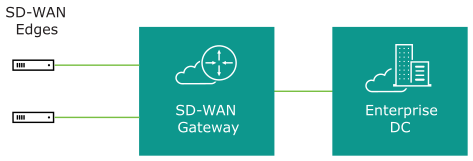
VeloCloud simplifies the branch deployment and delivers enterprise great application performance or public/private link for cloud and/or on-premise applications.
Data Center Network Topology
The Data Center Network topology consists of two hubs and multiple branches, with or without SD-WAN Edge. Each hub has hybrid WAN connectivity. There are several branch types.
The MPLS network runs BGP and peers with all the CE routers. At Hub 1, Hub 2, and Silver 1 sites, the L3 switch runs OSPF, or BGP with the CE router and firewall (in case of hub sites).
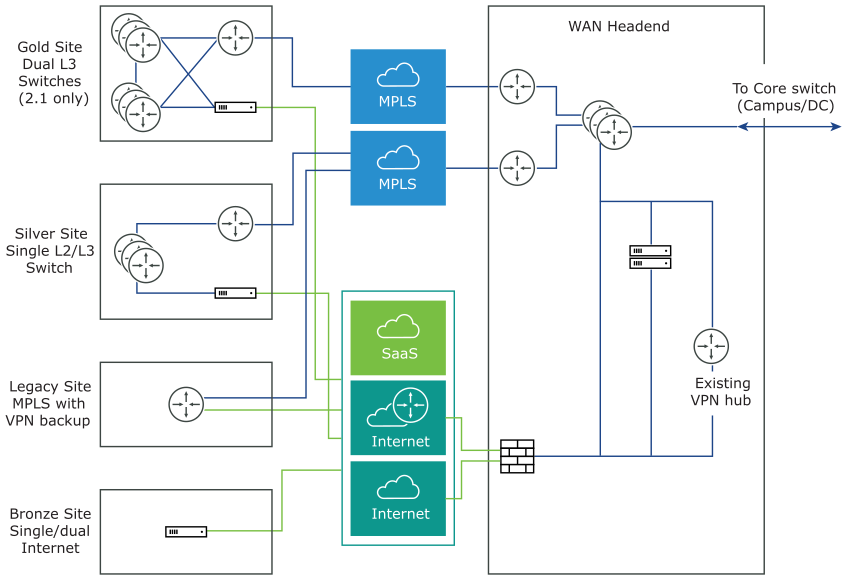
In some cases, there may be redundant data centers which advertise the same subnets with different costs. In this scenario, both data centers can be configured as edge-to-edge VPN hubs. Since all edges connect directly to each hub, the hubs in fact also connect directly to each other. Based on route cost, traffic is steered to the preferred active data center.
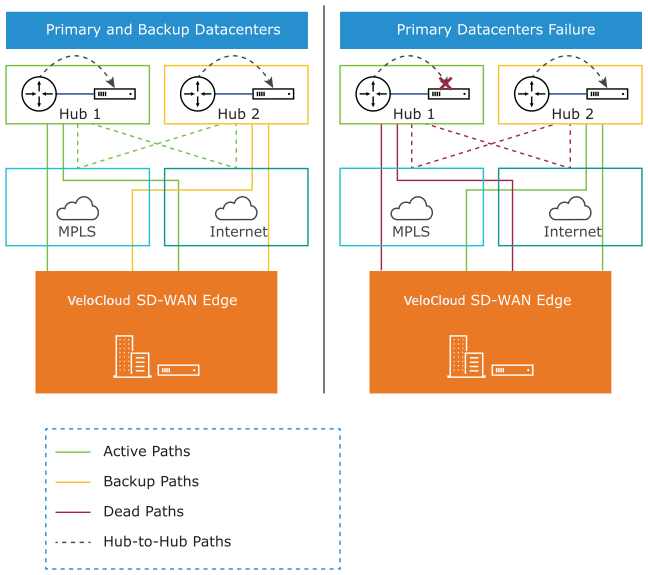
In previous versions, users could create an enterprise object using Zscaler or Palo Alto Network as a generic Non SD-WAN Destination. In 4.0 version, that object will now become a first-class citizen as a Non SD-WAN Destination.
The Cloud-Delivered solution of VeloCloud combines the economics and flexibility of the hybrid WAN with the deployment speed and low maintenance of cloud-based services. It dramatically simplifies the WAN by delivering virtualized services from the cloud to branch offices. VeloCloud customer-premise equipment, SD-WAN Edge, aggregates multiple broadband links (e.g., Cable, DSL, 4G-LTE) at the branch office, and sends the traffic to SD-WAN Gateways. Using cloud-based orchestration, the service can connect the branch office to any type of data center: enterprise, cloud, or Software-as-a-Service.
SD-WAN Edge is a compact, thin Edge device that is zero-IT-touch provisioned from the cloud for secure, optimized connectivity to applications and data. A cluster of gateways is deployed globally at top-tier cloud data centers to provide scalable and on-demand cloud network services. Working with the Edge, the cluster delivers Dynamic Multi-path Optimization so multiple, ordinary broadband links appear as a single, high bandwidth link. Orchestrator management provides centralized configuration, real-time monitoring, and one-click provisioning of virtual services.
Branch Site Topologies
The Arista service defines two or more different branch topologies designated as Bronze, Silver, and Gold. In addition, pairs of SD-WAN Edges can be configured in a High Availability (HA) configuration at a branch location.
Bronze Site Topology
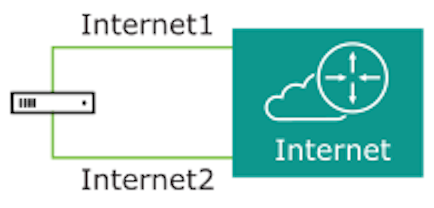
The Bronze topology represents a typical small site deployment where there are one or two WAN links connected to the public internet. In the Bronze topology, there is no MPLS connection and there is no L3 switch on the LAN-side of the SD-WAN Edge. The following figure shows an overview of the Bronze topology.
Silver Site Topology
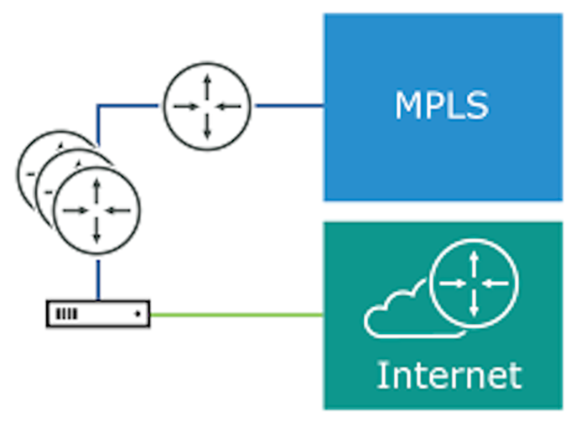
The Silver topology represents a site that also has an MPLS connection, in addition to one or more public Internet links. There are two variants of this topology.
The first variant is a single L3 switch with one or more public internet links and an MPLS link, which is terminated on a CE and is accessible through the L3 switch. In this case, the SD-WAN Edge goes between the L3 switch and Internet (replacing existing firewall/router).
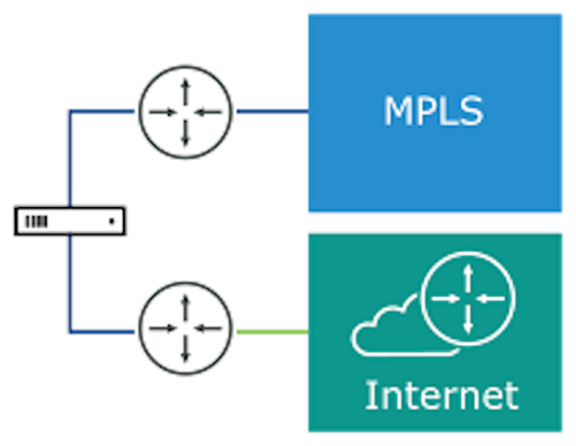
The second variant includes MPLS and Internet routers deployed using either Cisco's Hot Standby Router Protocol (HSRP) or Virtual Router Redundancy Protocol (VRRP) using a different router vendor, with an L2 switch on the LAN side. In this case, the SD-WAN Edge replaces the L2 switch.
Gold Site Topology
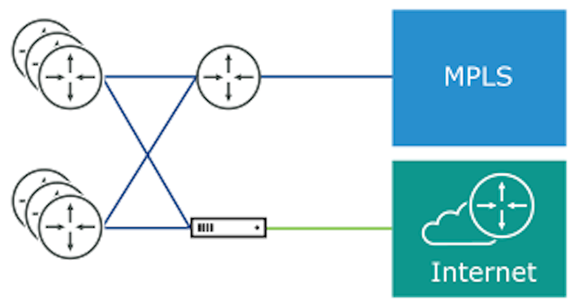
The Gold topology is a typical large branch site topology. The topology includes active/active L3 switches which communicate routes using OSPF or BGP, one or more public internet links and a MPLS link which is terminated on a CE router that is also talking to OSPF or BGP and is accessible through the L3 switches.
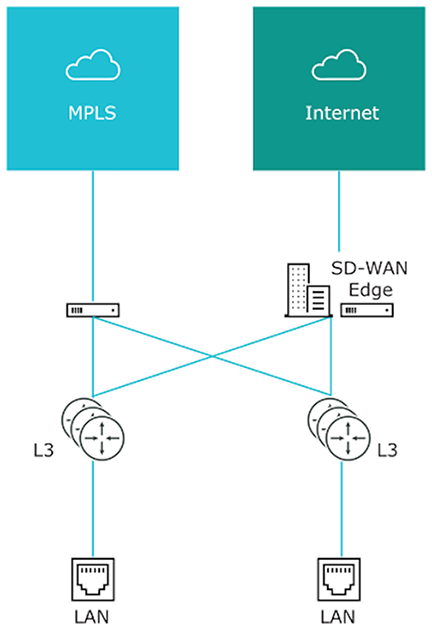
A key differentiation point here is a single WAN link is accessible via two routed interfaces. To support this, a virtual IP address is provisioned inside the Edge and can be advertised over OSPF, BGP, or statically routed to the interfaces.
High Availability (HA) Configuration
The following figure provides a conceptual overview of the Arista High Availability configuration using two SD-WAN Edges, one active and one standby.
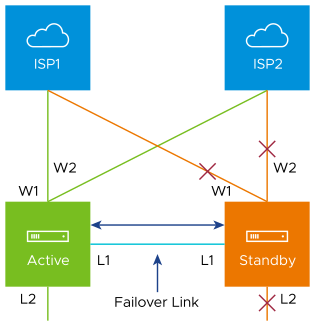
Connecting the L1 ports on each Edge is used to establish a failover link. The standby SD-WAN Edge blocks all ports except the L1 port for the failover link.
Roles and Privilege Levels
Arista has pre-defined roles with different set of privileges.
- IT Administrator (or Administrator)
- Site Contact at each site where an SD-WAN Edge device is deployed
- IT Operator (or Operator)
- IT Partner (or Partner)
Administrator
The Administrator configures, monitors, and administers the Arista service operation. There are three Administrator roles:
| Administrator Role | Description |
|---|---|
| Enterprise Standard Admin | Can perform all configuration and monitoring tasks. |
| Enterprise Superuser | Can perform the same tasks as an Enterprise Standard Admin and can also create additional users with the Enterprise Standard Admin, Enterprise MSP, and Customer Support role. |
| Enterprise Support | Can perform configuration review and monitoring tasks but cannot view user identifiable application statistics and can only view configuration information. |
Site Contact
The Site Contact is responsible for SD-WAN Edge physical installation and activation with the Arista service. The Site Contact is a non-IT person who can receive an email and perform the instructions in the email for Edge activation.
Operator
The Operator can perform all the tasks that an Administrator can perform, plus additional operator-specific tasks – such as create and manage customers, Cloud Edges, and Gateways. There are four Operator roles:
| Operator Role | Description |
|---|---|
| Standard Operator | Can perform all configuration and monitoring tasks. |
| Superuser Operator | Can view and create additional users with the Operator roles. |
| Business Specialist Operator | Can create and manage customer accounts. |
| Customer Support Operator | Can monitor Edges and activity. |
An Operator should be thoroughly familiar with networking concepts, web applications, and requirements and procedures for the Enterprise.
Partner
The Partner can perform all the tasks that an Administrator can perform, along with additional Partner specific tasks – such as creating and managing customers. There are four Partner roles:
| Partner Role | Description |
|---|---|
| Standard Admin | Can perform all configuration and monitoring tasks. |
| Superuser | Can view and create additional users with the Partner roles. |
| Business Specialist | Can perform configuration and monitoring tasks but cannot view user identifiable application statistics. |
| Customer Support | Can perform configuration review and monitoring tasks but cannot view user identifiable application statistics and can only view configuration information. |
A Partner should be thoroughly familiar with networking concepts, web applications, and requirements and procedures for the Enterprise.
User Role Matrix
This section discusses feature access according to Arista VeloCloud SD-WAN user roles.
Operator-level Orchestrator Features User Role Matrix
- R: Read
- W: Write (Modify/Edit)
- D: Delete
- NA: No Access
| Orchestrator Feature | Operator: Superuser Operator | Operator: Standard Operator | Partner: Business Specialist | Partner: Customer Support Operator | Super User | Standard Admin | Business Specialist | Customer Support |
|---|---|---|---|---|---|---|---|---|
| Monitor Customers | R | R | R | R | R | R | R | R |
| Manage Customers | RWD | RWD | RWD | R | RWD | RWD | RWD | R |
| Manage Partners | RWD | RWD | RWD | R | NA | NA | NA | NA |
| (Managing Edge) Software Images | RWD | RWD | R | R | *See Note | *See Note | *See Note | *See Note |
| System Properties | RWD | R | NA | R | NA | NA | NA | NA |
| Operator Events | R | R | NA | R | NA | NA | NA | NA |
| Operator Profiles | RWD | RWD | R | R | NA | NA | NA | NA |
| Operator Users | RWD | R | R | R | NA | NA | NA | NA |
| Gateway Pools | RWD | RW | R | R | RWD | RWD | NA | R |
| Gateways | RWD | RWD | R | R | RW | RW | NA | R |
| Gateway Diagnostic Bundle | RWD | RWD | R | R | NA | NA | NA | NA |
| Application Maps | RWD | RWD | R | R | NA | NA | NA | NA |
| CA Summary | RW | R | R | R | NA | NA | NA | NA |
| Orchestrator Authentication | RWD | R | NA | R | NA | NA | NA | NA |
| Replication | RW | R | NA | R | NA | NA | NA | NA |
Partner-level Orchestrator Features User Role Matrix
- R: Read
- W: Write (Modify/Edit)
- D: Delete
- NA: No Access
| Orchestrator Feature | Partner: Superuser | Partner: Standard Admin | Business Specialist | Customer Support |
|---|---|---|---|---|
| Monitor Customers | R | R | R | R |
| Manage Customers | RWD | RWD | RWD | R |
| Events | R | R | NA | R |
| Admins | RWD | R | NA | R |
| Overview | R | R | R | R |
| Settings | RW | R | R | R |
| Gateway Pools | RW | RWD | NA | R |
| Gateways | RW | RW | NA | R |
Enterprise-level Orchestrator Features User Role Matrix
- R: Read
- W: Write (Modify/Edit)
- D: Delete
- NA: No Access
| Orchestrator Feature | Enterprise: Super User | Enterprise: Standard Admin | Customer Support | Read Only |
|---|---|---|---|---|
| R | R | R | R | |
| R | R | R | R | |
| R | R | R | NA | |
| R | R | R | NA | |
| R | R | R | NA | |
| RWD | RWD | R | R | |
| RWD | RWD | R | NA | |
| RWD | RWD | R | NA | |
| RWD | RWD | R | NA | |
| RWD | RWD | R | NA | |
| RWD | RWD | R | NA | |
| RWD | RWD | R | NA | |
| RW | RW | R | NA | |
| RW | RW | RW | NA | |
| RW | RW | RW | NA | |
| RW | RW | RW | NA | |
| RWD | RWD | RWD | NA | |
| RW | RW | RW | NA | |
| RW | R | R | NA |
Key Concepts
This section discusses the key concepts and the core configurations of VeloCloud Orchestrator.
Configurations
The Arista service has four core configurations that have a hierarchical relationship. Create these configurations in the VeloCloud Orchestrator.
The following table provides an overview of the configurations:
| Configuration | Description |
|---|---|
| Network | Defines basic network configurations, such as IP addressing and VLANs. Networks can be designated as Corporate or Guest and there can be multiple definitions for each network. |
| Network Services | Defines several common services used by the Arista Service, such as BackHaul Sites, Cloud VPN Hubs, Non SD-WAN Destinations, Cloud Proxy Services, DNS services, and Authentication Services. |
| Profile | Defines a template configuration that can be applied to multiple Edges. A Profile is configured by selecting a Network and Network Services. A profile can be applied to one or more Edge models and defines the settings for the LAN, Internet, Wireless LAN, and WAN Edge Interfaces. Profiles can also provide settings for Wi-Fi Radio, SNMP, Netflow, Business Policies and Firewall configuration. |
| Edge | Configurations provide a complete group of settings that can be downloaded to an Edge device. The Edge configuration is a composite of settings from a selected Profile, a selected Network, and Network Services. An Edge configuration can also override settings or add ordered policies to those defined in the Profile, Network, and Network Services. |
The following image shows a detailed overview of the relationships and configuration settings of multiple Edges, Profiles, Networks, and Network Services.
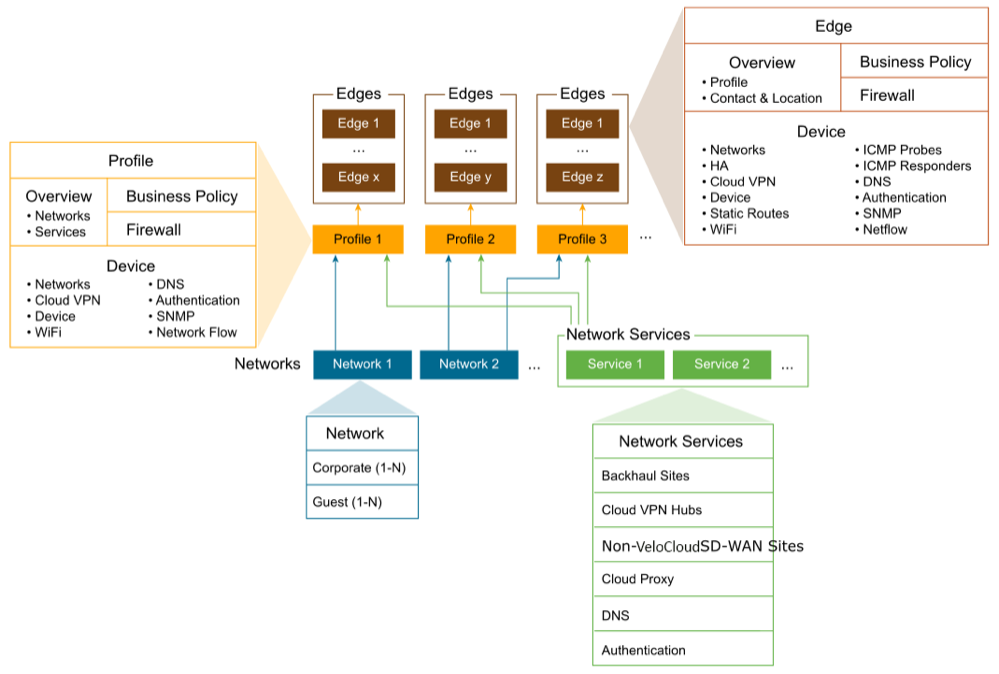
A single Profile can be assigned to multiple Edges. An individual Network configuration can be used in more than one Profile. Network Services configurations are used in all Profiles.
Networks
- Corporate or trusted networks, which can be configured with either overlapping addresses or non-overlapping addresses.
- Guest or untrusted networks, which always use overlapping addresses.
You can define multiple Corporate and Guest Networks, and assign VLANs to both the Networks.
With overlapping addresses, all Edges that use the Network have the same address space. Overlapping addresses are associated with non-VPN configurations.
With non-overlapping addresses, an address space is divided into blocks of an equal number of addresses. Non-overlapping addresses are associated with VPN configurations. The address blocks are assigned to Edges that use the Network so that each Edge has a unique set of addresses. Non-overlapping addresses are required for Edge-to-Edge and Edge-to- Non SD-WAN Destination VPN communication. The VeloCloud configuration creates the required information to access an Enterprise Data Center Gateway for VPN access. An administrator for the Enterprise Data Center Gateway uses the IPSec configuration information generated during Non SD-WAN Destination VPN configuration to configure the VPN tunnel to the Non SD-WAN Destination.
The following image shows unique IP address blocks from a Network configuration being assigned to SD-WAN Edge.
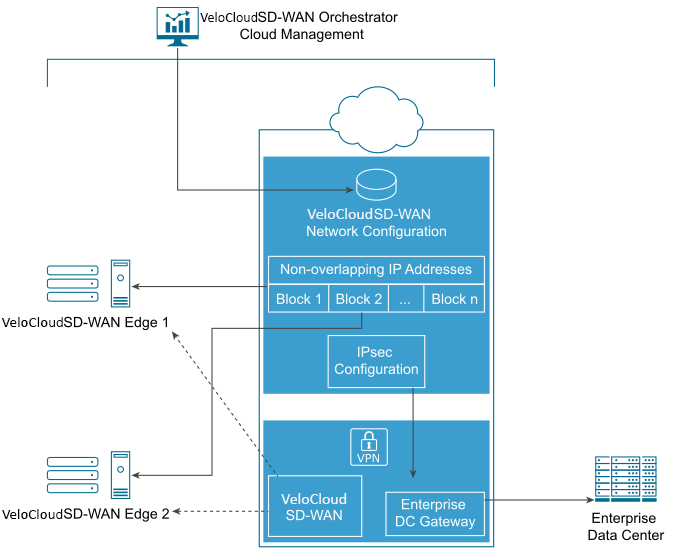
Network Services
You can define your Enterprise Network Services and use them across all the Profiles. This includes services for Authentication, Cloud Proxy, Non SD-WAN Destinations, and DNS. The defined Network Services are used only when they are assigned to a Profile.
Profiles
A profile is a named configuration that defines a list of VLANs, Cloud VPN settings, wired and wireless Interface Settings, and Network Services such as DNS Settings, Authentication Settings, Cloud Proxy Settings, and VPN connections to Non SD-WAN Destinations. You can define a standard configuration for one or more SD-WAN Edges using the profiles.
Profiles provide Cloud VPN settings for Edges configured for VPN. The Cloud VPN Settings can activate or deactivate Edge-to-Edge and Edge-to- Non SD-WAN Destination VPN connections.
Profiles can also define rules and configuration for the Business Policies and Firewall settings.
Edges
You can assign a profile to an Edge and the Edge derives most of the configuration from the Profile.
You can use most of the settings defined in a Profile, Network, or Network Services without modification in an Edge configuration. However, you can override the settings for the Edge configuration elements to tailor an Edge for a specific scenario. This includes settings for Interfaces, Wi-Fi Radio Settings, DNS, Authentication, Business Policy, and Firewall.
In addition, you can configure an Edge to augment settings that are not present in Profile or Network configuration. This includes Subnet Addressing, Static Route settings, and Inbound Firewall Rules for Port Forwarding and 1:1 NAT.
Orchestrator Configuration Workflow
Arista supports multiple configuration scenarios. The following table lists some of the common scenarios:
| Scenario | Description |
|---|---|
| SaaS | Used for Edges that do not require VPN connections between Edges, to a Non SD-WAN Destination, or to a SD-WAN Site. The workflow assumes the addressing for the Corporate Network using overlapping addresses. |
| Non SD-WAN Destination via VPN | Used for Edges that require VPN connections to a Non SD-WAN Destination such as Amazon Web Services, Zscaler, Cisco ISR, or ASR 1000 Series. The workflow assumes the addressing for the Corporate Network using non-overlapping addresses and the Non SD-WAN Destinations are defined in the profile. |
| SD-WAN Site VPN | Used for Edges that require VPN connections to a SD-WAN Site such as an Edge Hub or a Cloud VPN Hub. The workflow assumes the addressing for the Corporate Network using non-overlapping addresses and the SD-WAN Sites are defined in the profile. |
For each scenario, perform the configurations in the VeloCloud Orchestrator in the following order:
Step 1: Network
Step 2: Network Services
Step 3: Profile
Step 4: Edge
The following table provides a high-level outline of the Quick Start configuration for each of the workflows. You can use the preconfigured Network, Network Services, and Profile configurations for Quick Start Configurations. For VPN configurations modify the existing VPN Profile and configure the SD-WAN Site or Non SD-WAN Destination. The final step is to create a new Edge and activate it.
| Quick Start Configuration Steps | SaaS | Non SD-WAN Destination VPN | SD-WAN Site VPN |
|---|---|---|---|
| Step 1: Network | Select Quick Start Internet Network | Select Quick Start VPN Network | Select Quick Start VPN Network |
| Step 2: Network Service | Use pre-configured Network Services | Use pre-configured Network Services | Use pre-configured Network Services |
| Step 3: Profile | Select Quick Start Internet Profile | Select Quick Start VPN Profile
Activate Cloud VPN and configure Non SD-WAN Destinations |
Select Quick Start VPN Profile
Activate Cloud VPN and configure SD-WAN Sites |
| Step 4: Edge | Add New Edge and activate the Edge | Add New Edge and activate the Edge | Add New Edge and activate the Edge |
For additional information, see Activate SD-WAN Edges.
Supported Browsers
The VeloCloud Orchestrator supports the following browsers:
| Browsers Qualified | Browser Version |
|---|---|
| Google Chrome | 77 – 79.0.3945.130 |
| Mozilla Firefox | 69.0.2- 72.0.2 |
| Microsoft Edge | 42.17134.1.0- 44.18362.449.0 |
| Apple Safari | 12.1.2-13.0.3 |
- For the best experience, Arista recommends Google Chrome or Mozilla Firefox.
- Starting from VeloCloud SD-WAN version 4.0.0, the support for Internet Explorer has been deprecated.
Supported USB Modems
This section lists the Supported USB Modems on SD-WAN Edge devices.
| CARRIER/MANUFACTURER | MODEL |
|---|---|
| Any/Inseego | Skyus 160 LTE Gateway |
| Any/Inseego | Skyus DS2 |
| AT&T/Inseego | Global Modem USB800 |
| Any/Inseego | Inseego USB 8 |
Important Notes
- Any customer procuring a USB modem for aneeds to select one from the above list to ensure support on their Edge.
- The four USB modems listed as supported provide worldwide coverage for all VeloCloud SD-WAN Customers.
- While all of the above may not be available in a specific market, at least one of the four should be procurable.
- For customers deploying a modem not listed above but which was previously listed as supported (referred to as "legacy" modems):
- Note that the existing legacy modems will continue to work on Edges, but rather that VeloCloud SD-WAN Engineering is no longer testing those modems against the latest Edge software and should not be expected to provide fixes for issues arising from these legacy modems.
- Any future modem purchases need to be made from the above list.