Virtual Edge Deployment
Standard hypervisors host the Virtual Edge as a virtual machine. This section discusses the prerequisites and the installation procedure for deploying a VeloCloud Virtual Edge on KVM and ESXi hypervisors.
This topic contains the following sections:
Deployment Prerequisites for Virtual Edge
This section discusses the requirements for Virtual Edge deployment.
Virtual Edge Requirements
- The Virtual Edge must support 2, 4, 8, and 10 vCPU assignment.
Table 1. Virtual Edge Requirements 2 vCPU 4v CPU 8 vCPU 10 vCPU Minimum Memory (DRAM) 8 GB 16 GB 32 GB 32 GB Minimum Storage (Virtual Disk) 8 GB 8 GB 16 GB 16 GB - AES-NI CPU capability must pass to the Virtual Edge appliance.
- The Virtual Edge must support up to 8 vNICs (the default is GE1 and GE2 LAN ports and GE3-GE8 WAN ports).
Note: The deployment does not support over-subscription of Virtual Edge resources such as CPU, memory, and storage.
| NIC Chipset | Hardware | Specification |
|---|---|---|
| Intel 82599/82599ES | HP DL380G9 | HP DL 380 Datasheet |
| Intel X710/XL710 | Dell PowerEdge R640 | Dell PowerEdge R640
|
| Intel X710/XL710 | Supermicro SYS-6018U-TRTP+ | Supermicro SYS-6018U-TRTP+
|
| Hardware Manufacturer | Firmware Version | Host Driver for Ubuntu 20.04.6 | Host Driver for Ubuntu 22.04.2 | Host Driver for ESXi 7.0U3 | Host Driver for ESXi 8.0U1a |
|---|---|---|---|---|---|
| Dual Port Intel Corporation Ethernet Controller XL710 for 40GbE QSFP+ | 7.10 | 2.20.12 | 2.20.12 | 1.11.2.5 and 1.11.3.5 | 1.11.2.5 and 1.11.3.5 |
| Dual Port Intel Corporation Ethernet Controller X710 for 10GbE SFP+ | 7.10 | 2.20.12 | 2.20.12 | 1.11.2.5 and 1.11.3.5 | 1.11.2.5 and 1.11.3.5 |
| Quad Port Intel Corporation Ethernet Controller X710 for 10GbE SFP+ | 7.10 | 2.20.12 | 2.20.12 | 1.11.2.5 and 1.11.3.5 | 1.11.2.5 and 1.11.3.5 |
Supported Operating Systems
- Ubuntu Linux Distribution:
- Ubuntu 20.04.6 LTS
- Ubuntu 22.04.2 LTS
- ESXi:
- ESXi 7.0 U3 with vSphere Web Client 7.0.
- ESXi 8.0 U1a with vSphere Web Client 8.0.
Firewall/NAT Requirements
- The Firewall must allow outbound traffic from the Virtual Edge to TCP/443 (for communication with the Orchestrator).
- The Firewall must allow traffic outbound to Internet on ports UDP/2426 (VCMP).
CPU Flags Requirements
For detailed information about CPU flags requirements to deploy Virtual Edge, see Special Considerations for Virtual Edge Deployment.
Special Considerations for Virtual Edge Deployment
- The SD-WAN Edge is a latency-sensitive application. Refer to the Arista Documentation to adjust the Virtual Machine (VM) as a latency-sensitive application.
- Recommended Host settings:
- BIOS settings to achieve highest performance:
- CPUs at 2.0 GHz or higher.
- Enable Intel Virtualization Technology (Intel VT).
- Deactivate Hyper-threading.
- Virtual Edge supports paravirtualized vNIC VMXNET 3 and passthrough vNIC SR-IOV:
- When using VMXNET3, deactivate SR-IOV on host BIOS and ESXi.
- When using SR-IOV, enable SR-IOV on host BIOS and ESXi.
- To enable SR-IOV on KVM and ESXi, see:
- KVM - Install Virtual Edge on KVM
- ESXi - Install Virtual Edge on ESXi
- Deactivate power savings on CPU BIOS for maximum performance.
- Activate CPU turbo.
- CPU must support the AES-NI, SSSE3, SSE4, RDTSC, RDSEED, RDRAND instruction sets.
- Arista recommends reserving 2 cores for Hypervisor workloads. For example, for a 10-core CPU system, run one 8-core virtual Edge or two 4-core virtual Edges and reserve 2 cores for Hypervisor processes.
- For a dual socket host system, ensure the Hypervisor assigns network adapters, memory, and CPU resources within the same socket (NUMA) boundary as the assigned vCPUs.
- BIOS settings to achieve highest performance:
- Arista recommends the following VM settings:
- CPU should be '100% reserved.'
- CPU shares should be High.
- Memory should be ‘100% reserved.’
- Latency sensitivity should be High.
- The default username for the SD-WAN Edge SSH console is root.
Cloud-init Creation
cloud-init is a Linux package responsible for handling early initialization of instances. If available in the distributions, it allows for configuration of many common parameters of the instance directly after installation. This creates a fully functional instance that the system configures based on a series of inputs.
The cloud-init configuration consists of two main configuration files: meta-data and user-data. The meta-data contains the network configuration for the Edge, and the user-data contains the Edge software configuration. Information within the cloud-init file identifies the Virtual Edge instance under installation.
The user-data can configure Cloud-init behavior. Users can provide the user-data at the time of launching the instance. A secondary disk in ISO format typically provides the configuration, which cloud-init detects during the first boot. This disk contains all early configuration data that apply at that time.
The Virtual Edge supports cloud-init and all essential configurations packaged in an ISO image.
Create the Cloud-init Meta-data and User-data Files
The final installation configuration options are set with a pair of cloud-init configuration files. The first installation configuration file contains the metadata. Create this file with a text editor and name it 'meta-data'. The data within this file identifies the Virtual Edge instance during installation. The instance-id can be any identifying name, and the local-hostname should be a host name that follows user's site standards.
- Create the meta-data file that contains the instance:
name.instance-id: vedge1local-hostname: vedge1
- Add the network-interfaces section, shown below, to specify the WAN configuration. By default, all Edge WAN interfaces use DHCP. The configuration supports multiple interfaces.
root@ubuntu# cat meta-data instance-id: Virtual-Edge local-hostname: Virtual-Edge network-interfaces: GE1: mac_address: 52:54:00:79:19:3d GE2: mac_address: 52:54:00:67:a2:53 GE3: type: static ipaddr: 11.32.33.1 mac_address: 52:54:00:e4:a4:3d netmask: 255.255.255.0 gateway: 11.32.33.254 GE4: type: static ipaddr: 11.32.34.1 mac_address: 52:54:00:14:e5:bd netmask: 255.255.255.0 gateway: 11.32.34.254 - Create the user-data file. This file contains three main modules: Orchestrator, Activation Code, and Ignore Certificates Errors.
Table 4. Modules and Descriptions Module Description vco IP Address/URL of the Orchestrator. activation_code Activation code for the Virtual Edge. The system generates the activation code while creating an Edge instance on the Orchestrator. vco_ignore_cert_errors Option to verify or ignore any certificate validity errors. The system generates the activation code while creating an Edge instance on the Orchestrator.
Important: There is no default password in Edge image. Provide the password in cloud-config:#cloud-config password: passw0rd chpasswd: { expire: False } ssh_pwauth: True velocloud: vce: vco: 10.32.0.3 activation_code: F54F-GG4S-XGFI vco_ignore_cert_errors: true
Create the ISO File
genisoimage -output seed.iso -volid cidata -joliet -rock user-data meta-data network-data
Including the network-interfaces section is optional. The system uses the DHCP option by default if the section is missing.
After generating the ISO image, transfer the image to a data store on the host machine.
Install Virtual Edge
Users can install Virtual Edge on KVM and ESXi using a cloud-init configuration file. The cloud-init configuration file contains interface configurations and the activation key of the Edge.
Ensure to create the cloud-init meta-data and user-data files, then package them into an ISO image file. For steps, see Cloud-init Creation.
- SR-IOV
- Linux Bridge
- OpenVSwitch Bridge
- On KVM, see Activate SR-IOV on KVM
- On ESXi, see Activate SR-IOV on ESXi
- On KVM, see Install Virtual Edge on KVM.
- On ESXi, see Install Virtual Edge on ESXi.
Activate SR-IOV on KVM
- Intel 82599/82599ES
- Intel X710/XL710
- Before using the Intel X710/XL710 cards in SR-IOV mode on KVM, install the supported Firmware and Driver versions. Refer to Deployment Prerequisites for Virtual Edge.
- The High Availability topology for the KVM Virtual Edge does not support SR-IOV mode. Disable SR-IOV for any KVM Edge pair in High Availability deployments.
Validating SR-IOV (Optional)
lspci | grep -i Ethernet
01:10.0 Ethernet controller: Intel Corporation 82599 Ethernet Controller Virtual Function(rev
Install Virtual Edge on KVM
This topic describes the procedure for installing and activating the Virtual Edge on KVM using a cloud-init configuration file.
libvirt:Activate SR-IOV on ESXi
- Intel 82599/82599ES
- Intel X710/XL710
- Ensure the NIC supports SR-IOV. Check the Hardware Compatibility List (HCL) at Arista Documentation.
- Brand Name: Intel
- I/O Device Type: Network
- Features: SR-IOV
Figure 1. Compatibility Guide 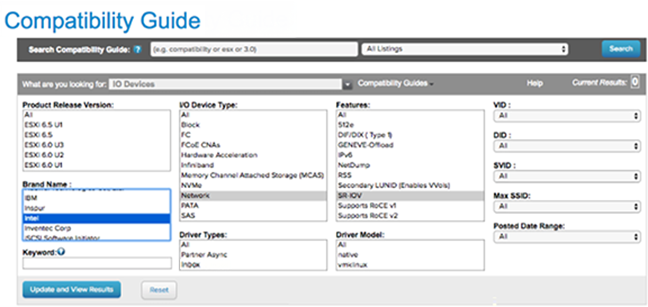
- Go to the specific Arista host, select the Configure tab, and then choose Physical adapters.
Figure 2. Physical Adapters 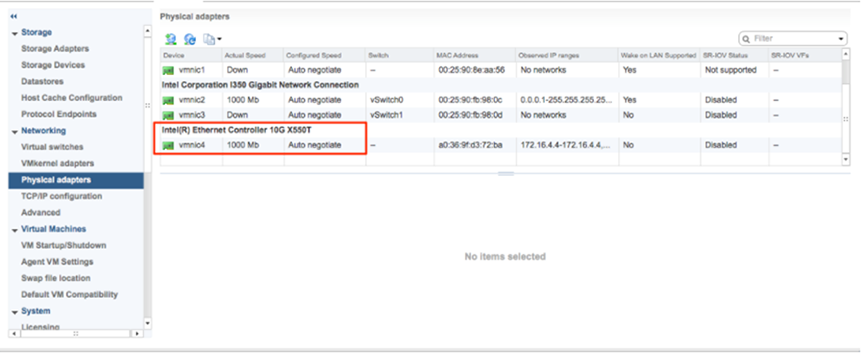
- Select Edit Settings. Change Status to Enabled and specify the number of required virtual functions. This number varies by the type of NIC card.
Figure 3. Edit Settings 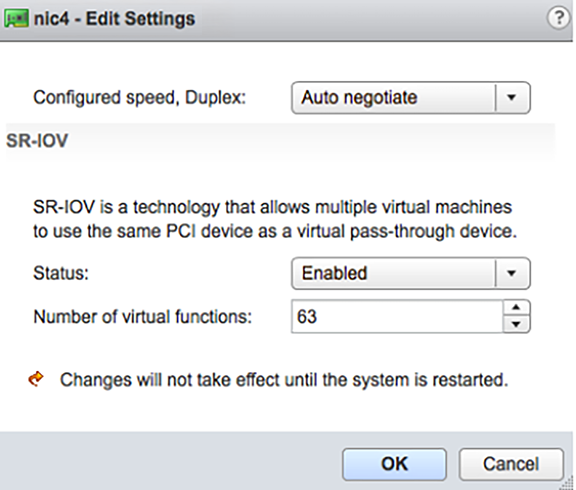
- Reboot the hypervisor.
A successful SR-IOV enablement displays the number of Virtual Functions (VFs) under the specified NIC, following an ESXi reboot.
Figure 4. Virtual Functions List 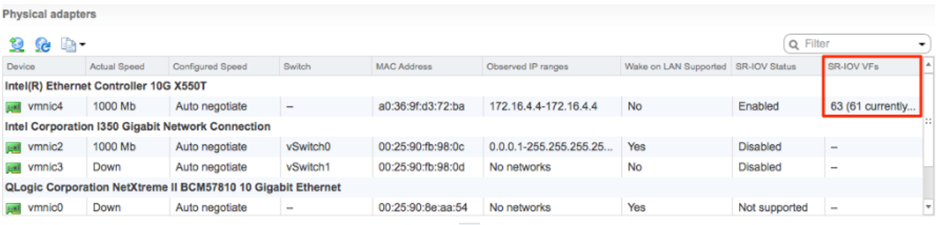 Note: To support VLAN tagging on SR-IOV interfaces, user must configure VLAN ID 4095 (Allow All) on the Port Group connected to the SR-IOV interface. For additional information, see VLAN Configuration.
Install Virtual Edge on ESXi
Ensure to create the cloud-init meta-data and user-data files, then package them into an ISO image file. For steps, see Cloud-init Creation.
To use SR-IOV mode, enable SR-IOV on ESXi. For steps, see Activate SR-IOV on ESXi.
To install Virtual Edge on ESXi:
- Use the vSphere client to deploy an OVF template, and then select the Edge OVA file.
Figure 5. vSphere Web Client 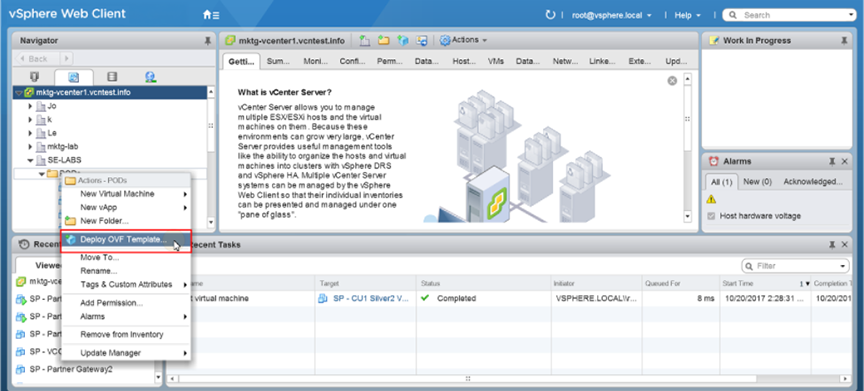
- Select an OVF template from a URL or a Local file.
Figure 6. Deploy OVF Template 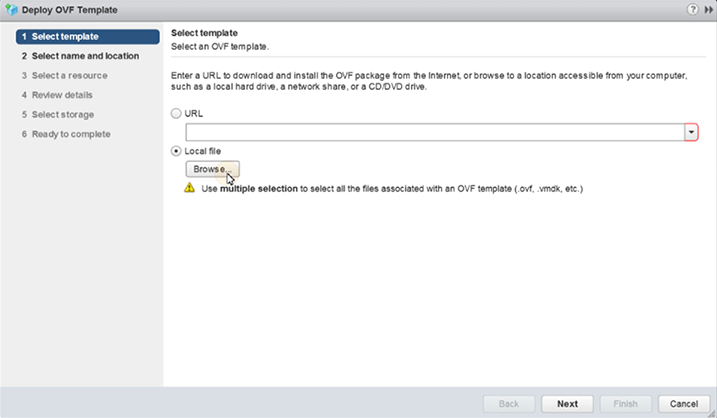
- Verify the template details.
Figure 7. Review Details 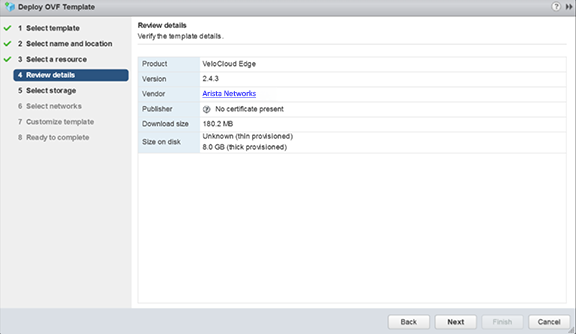
- Select the storage location to store the files for the deployment template.
Figure 8. Select Storage 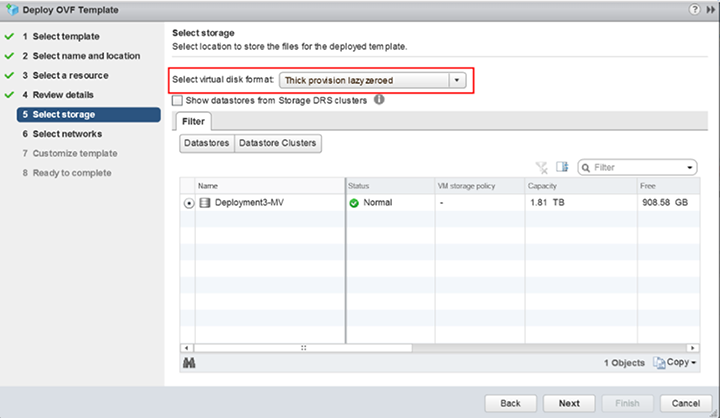
- Configure the networks for each of the interfaces.
Note: Skip this step when using a cloud-init file to provision the Virtual Edge on ESXi.
Figure 9. Select Networks 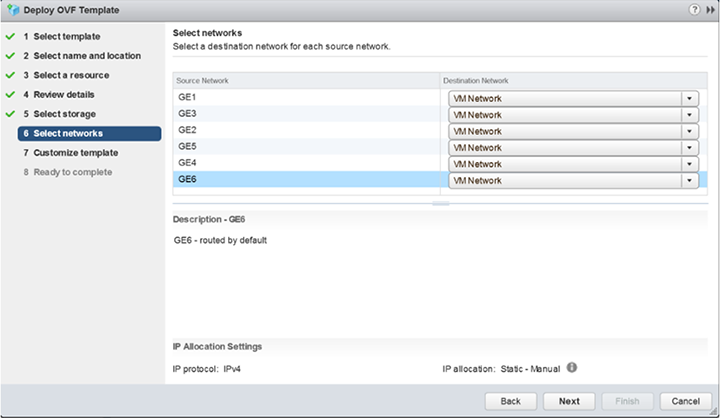
- Customize the template by specifying the deployment properties. The following image highlights:
- From the Orchestrator UI, retrieve the URL/IP Address. Use this address in Step c.
- Create a new Virtual Edge for the Enterprise. After the Edge is created, copy the Activation Key. Use this Activation Key in Step c.
Figure 10. Activation Key 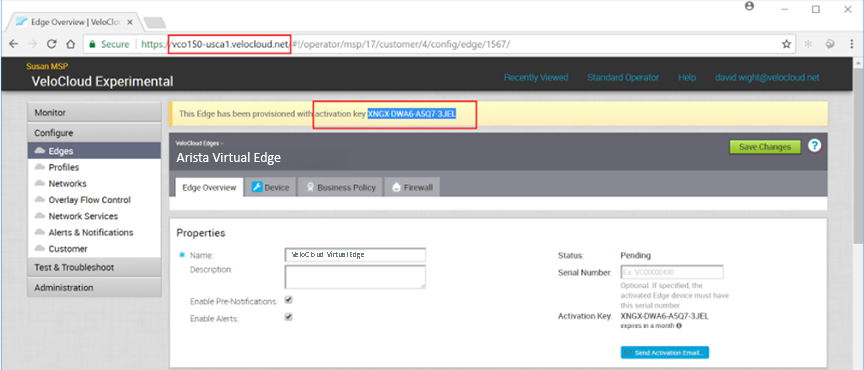
- On the Customize template page shown in the image below, enter the Activation Code and the Orchestrator URL/IP Address into the corresponding fields.
Figure 11. Customize Template 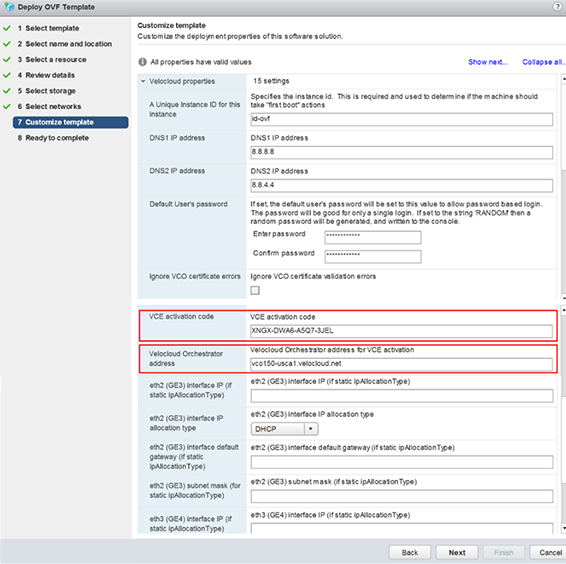
Figure 12. Customize Template (contd..) 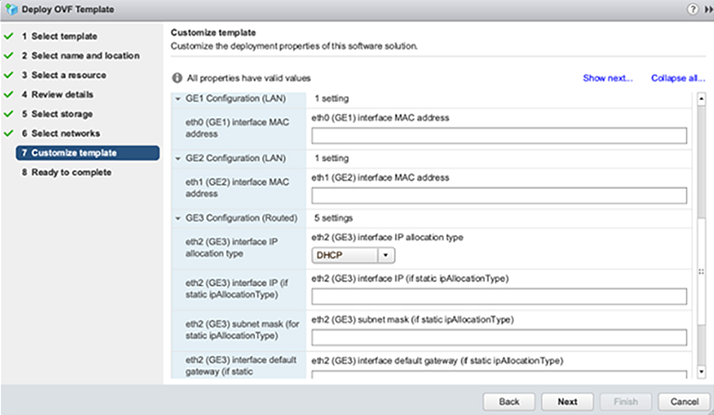
- Review the configuration data.
Figure 13. Review Data 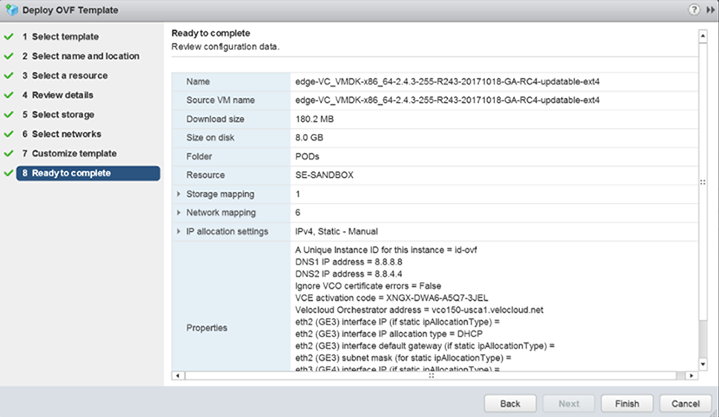
- Turn on the Virtual Edge.
Figure 14. Power On Virtual Edge 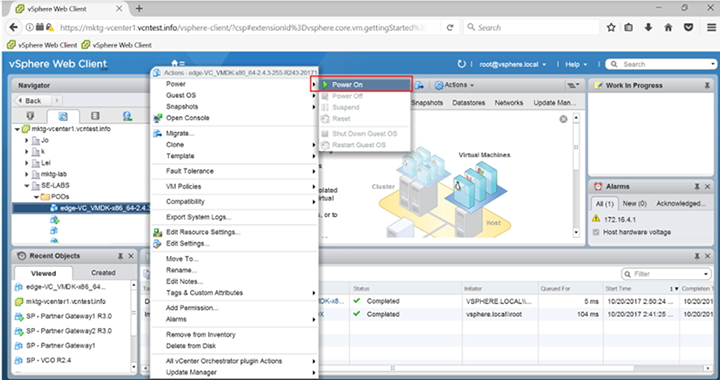 After the Edge powers up, it establishes connectivity to the Orchestrator.