Enterprise Deployment and Operations for Orchestrator
This section provides information about the available options to monitor, backup, and upgrade Enterprise On-Premises deployments in a two-day operation scenario.
- Isolation of the solution- The Arista Cloud Operations team does not have access to apply hotfixes and upgrades.
- Restrictions on change management limit the frequency of patching and upgrades.
- Inadequate or insufficient solution monitoring- This situation may happen due to a lack of personnel capable of managing the infrastructure, resulting in functional issues, slower resolution of problems, and customer dissatisfaction.
This approach always requires a significant investment in people and time to manage, operate, and patch properly. The table below outlines some of the elements that must be considered when managing a system on-premises.
| System | Description | VeloCloud Hosted Responsibility | On-Premises Responsibility |
|---|---|---|---|
| SD-WAN Orchestration | Application QoS and link steering policy | Yes | Yes |
| Security policy for apps and SD-WAN appliances | Yes | Yes | |
| SD-WAN appliance provisioning and troubleshooting | Yes | Yes | |
| Handling of SD-WAN alerting & events | Yes | Yes | |
| Link performance and capacity monitoring | Yes | Yes | |
| Hypervisor | Monitoring / alerting | No | Yes |
| Compute and memory resourcing | No | Yes | |
| Virtual networking and storage | No | Yes | |
| Backup | No | Yes | |
| Replication | No | Yes | |
| Infrastructure | CPU, memory, compute | No | Yes |
| Switching and routing | No | Yes | |
| Monitoring & management systems | No | Yes | |
| Capacity planning | No | Yes | |
| Software upgrades/patching | No | Yes | |
| Troubleshooting application/infrastructure issues | No | Yes | |
| Backup and Infrastructure DR | Backup infrastructure | No | Yes |
| Regular testing of backup regime | No | Yes | |
| DR infrastructure | No | Yes | |
| DR testing | No | Yes |
Two-day operation scenarios for Enterprise On-Premises deployments are explained in the two sections below, respectively (Day One Operations and Day Two Operations).
Day One Operations
Deactivating the Cloud-init on the Orchestrator
The data-source contains two sections: meta-data and user-data. Meta-data includes the instance ID and should not change during the lifetime of the instance, while user-data is a configuration applied on the first boot (for the instance ID in meta-data).
After the first boot up, it is recommended to deactivate the cloud-init file to speed up the Orchestrator boot sequence. To deactivate cloud-init, run the following:
./opt/vc/bin/cloud_init_ctl -d
It is not recommended to purge the cloud-init file with the command apt
purge cloud-init (this procedure does not cause issues in the VeloCloud SD-WAN Controller). Purging the cloud-init file also erases some essential Orchestrator tools and scripts such as upgrade and backup scripts. If the purge command was used, you can restore the files using the following commands:
Configuring the NTP Timezone
The expectation is that the NTP offset is <= 15 milliseconds.
Orchestrator Storage
When the Orchestrator is initially deployed, three partitions are created: /, /store, /store2, /store3 (version 4.0 and onwards). The partitions are created with default sizes. Follow the instructions in Expand Disk Size for guidance in modifying the default sizes to match the design.
Additional Tasks
Day Two Operations
Orchestrator Backup
This section provides the available mechanisms to periodically backup the Orchestrator database to recover from Operator errors or catastrophic failure of both the Active and Standby Orchestrator.
Remember that the Disaster Recovery feature or DR is the preferred recovery method. It provides a Recovery Point Objective of nearly zero, as all configurations on the Active Orchestrator is instantly replicated. For additional details on the Disaster recovery feature, refer to the next section.
Backup Using the Embedded Script
The Orchestrator provides an in-built configuration backup mechanism to periodically Backup the configuration to recover from Operator errors or catastrophic failure of both the Active and Standby Orchestrator. The mechanism is script-driven and is located at /opt/vc/scripts/db_backup.sh.
The script essentially takes a database dump of the configuration data and events, while excluding some of the large monitoring tables during the database dump process. Once the script is executed, backup files are created in the local directory path provided as input to the above script.
The Backup consists of two .gzs files, one containing the database schema definition and the other one containing the actual data without definition. The administrator should ensure that the backup directory location has enough disk space for the Backup.
- Mount a remote location and configure the backup script to it. The remote location should have the same storage as /store if flows are also being Backup.
- Before using the Backup Script, check the Disaster Recovery (DR) replication status from the Orchestrator replication page. They should be in sync, and no errors should be present.
- Additional to this, execute a MySQL query and check the replication lag.
- SHOW SLAVE STATUS \G
- In the above query, look at the field seconds_behind_master. Ideally, it should be zero, but under 10 would be sufficient as well.
- For the large Orchestrators, it is recommended to use the Standby for the Backup script execution. There will be no difference in the Backup that is generated from both Orchestrators.
Caveats- The Script only takes a backup of the configuration; flow stats or events are not included.
- Restoring the configuration requires assistance from the Support/Engineering team.
The Backup consists of two .gzs files, one containing the database schema definition and the other one containing the actual data without definition. The administrator should ensure that the backup directory location has enough disk space for the Backup.
Frequently Asked Questions
- How long does the Script take to run?
The duration of the Backup depends on the scale of the actual customer configuration. Since the monitoring tables are excluded from the Backup operation, it is expected that the configuration Backup operation will complete quickly. For a large Orchestrator with thousands of Edge and lots of historical events, it could take up to an hour, while a smaller Orchestrator should be completed within a few minutes.
- What is the recommended frequency to run the Backup script?
Depending on the size and time it takes to complete the initial backup, the Backup operation frequency can be determined. The Backup operation should be scheduled to run during off-peak hours to reduce the impact on Orchestrator resources.
- What if the root file system doesn't have enough space for the backup?
It is recommended that other mounted volumes are used to store the backup. Note, it is not a best practice to use the root filesystem for the backup.
- How does one verify if the Backup operation completed successfully?
The script
stdoutandstderrshould be sufficient to determine the success or failure of the Backup operation. If the script invocation is automated, the exit code can determine the Backup operation's success or failure. - How is the configuration recovered?
Currently, Arista requires that the customer work with Arista Support to recover the configuration data. Arista Support will help to recover the customer's configuration. Customers should refrain from making any additional configuration changes until the configuration is restored.
- What is the exact impact of executing this Script?
Even though a backup of the configuration should have little impact on performance, there will be an increase in resource utilization for the MySQL process. It is recommended that the Backup be run during off-peak hours.
- Are any configuration changes allowed during the run of the Backup operation?
It is safe to make configuration changes while the Backup operation is running. However, to ensure up-to-date backups, it is recommended that no configuration operations are done while the Backup is running.
- Can the configuration be restored on the original Orchestrator, or does it require a new Orchestrator?
Yes, the configuration can, and ideally should, be restored on the same Orchestrator if it is available. This will ensure that the monitoring data is utilized after the Restore operation is completed. If the original Orchestrator cannot be recovered and the Standby Orchestrator is down, the configuration can be restored on a new Orchestrator. In this instance, the monitoring data will be lost.
- What actions should be taken in case the configuration needs to be restored to a new Orchestrator?
Please contact Arista Support for the recommended set of actions on the new Orchestrator as the steps vary depending on the actual deployment.
- Do Edges have to re-register on the newly restored Orchestrator?
No, Edges are not required to register on the new Orchestrator, as all needed information is preserved as part of the Backup.
Orchestrator Disaster Recovery
The Orchestrator Disaster Recovery (DR) feature prevents the loss of stored data and resumes Orchestrator services in the event of system or network failure. Orchestrator DR involves setting up an Active/Standby Orchestrator pair with data replication and a manually-triggered failover mechanism.
States
- Standalone (no DR configured)
- Active (DR configured, acting as the primary Orchestrator server)
- Standby (DR configured, acting as an inactive replica Orchestrator server)
- Zombie (DR formerly configured and Active, but no longer working as the Active or Standby)
| Phases | VeloCloud Orchestrator A Role | VeloCloud Orchestrator B Role |
|---|---|---|
| Initial | Standalone | Standalone |
| Pairing | Active | Standby |
| Failover | Zombie | Standalone |
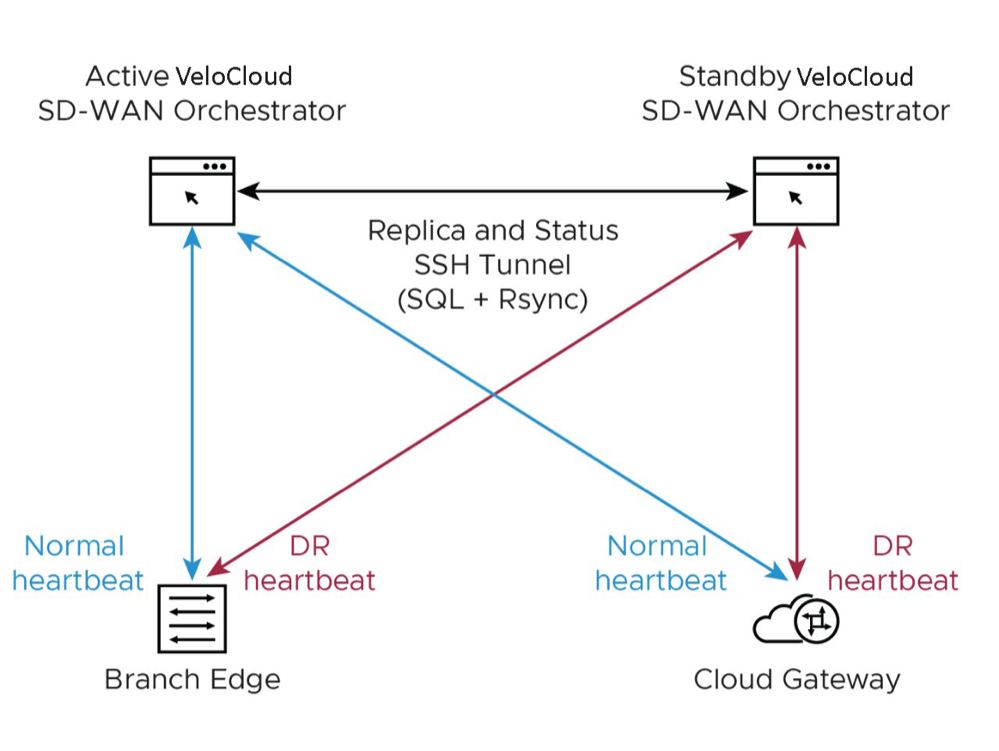
- Locate the Orchestrator DR in a geographically separate datacenter.
- Before promoting a Standby Orchestrator as Active, confirm that the DR replication Status is in Sync. The previously Active Orchestrator will no longer be able to manage the inventory and configuration.
Figure 2. Active Orchestrator 
- If the Standby can communicate with the formerly Active Orchestrator, it will instruct that Orchestrator to enter a Zombie state. In the Zombie state, the Orchestrator communicates with its clients ( SD-WAN Edges, SD-WAN Gateways, UI/API) that it is no longer Active, and they must communicate with the newly promoted Orchestrator.
- If the promoted Standby cannot communicate with the formerly Active Orchestrator, the Operator should, if possible, manually demote the previously Active.
Upgrade Procedure for the Orchestrator
- Provide a screenshot of the replication dashboard of the Orchestrator.
Figure 3. Replication Dashboard 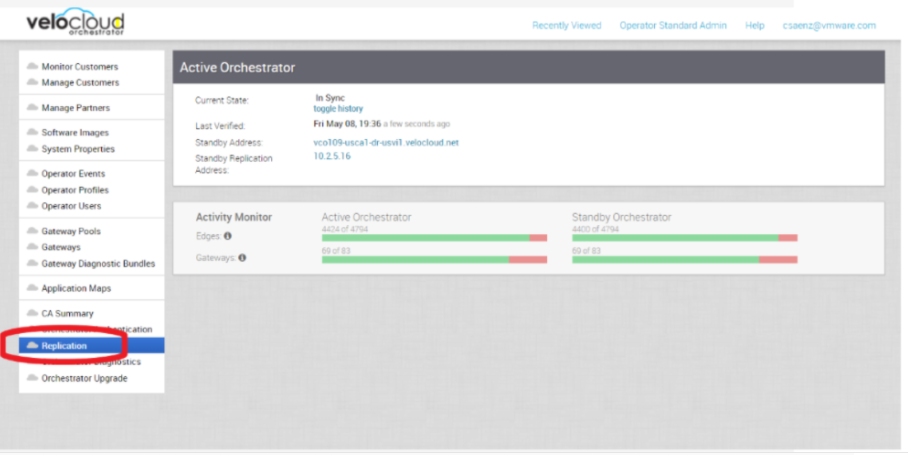
Controller Minor Software Upgrade (Ex. from 3.3.2 P3 to 3.4.4)
The software upgrade file contains Gateway and system updates. Do NOT run apt-get update && apt-get –y upgrade.
Before proceeding with the SD-WAN Controller's upgrade, ensure that the Orchestrator was upgraded before to the same or a higher version.
To upgrade an SD-WAN Controller:
Monitoring
One of the customer's responsibilities on enterprise On-Prem deployments is to monitor the solution. Monitoring gives customer's the visibility required to be one step ahead of possible issues.
SD-WAN Controller Monitoring
You can monitor the status and usage data of Controllers available in the Operator portal.
The procedure is as follows:
- Select the Monitor tab to view the usage data of the selected Controller.
The Monitor tab of the selected Controller displays the following details:
Figure 4. Monitor Controller 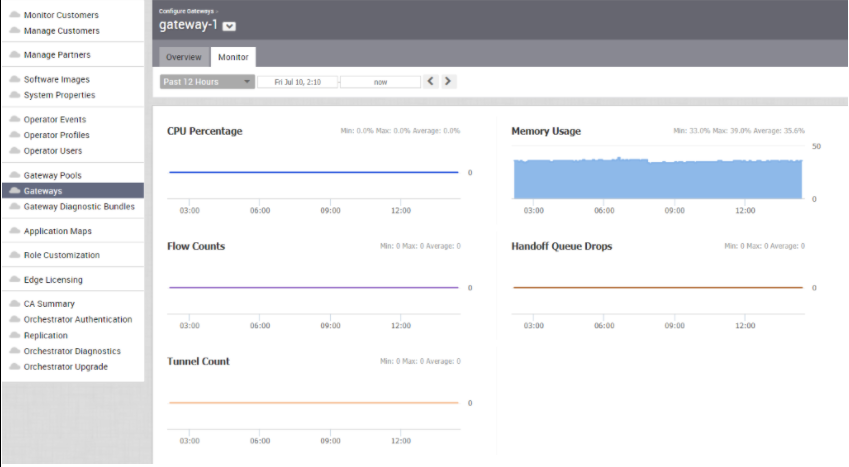
You can choose a specific period to view the Controller details for the selected duration at the top of the page.
The page displays a graphical representation of usage details of the following parameters for the period of selected time duration, along with the minimum, maximum, and average values.
Table 3. Controller Usage Details Usage Description CPU Percentage Percentage of usage of CPU Memory Usage Percentage of usage of memory Flow Counts Count of traffic flow Handoff Queue Drops Count of packets dropped due to queued handoff Tunnel Count Count of tunnel sessions SD-WAN Gateway Controller Recommended Values to Monitor
The following list shows values that should be monitored and their thresholds. The list below is given as a start point, and it is not exhaustive. Some deployments may require assessing additional components such as flows, packet loss, etc.
Whenever a warning threshold is reached, it is recommended to review the current device scale configuration and add additional resources if required. When a critical alarm is triggered, it is crucial to contact Arista Support representatives to check the solution and provide further advice.
Table 4. Service Check Details Service Check Service Check Description Warn Threshold Critical Threshold CPU Load Check System Load. 60 80 Memory Checks the memory utilization buffer, cache, and used memory. 70 80 Tunnels Number of tunnels from connected Edges. 60% of max Scale 80% of max Scale Note: A sudden loss of all tunnels or an abnormal low quantity should also be a concern.
Handoff Drops Due to the busy nature of traffic through a Controller, occasional drops are expected. Consistent drops in specific queues may indicate a capacity problem. Disk Space Current disk utilization 40% Free 20% Free Controller NTP Check for Time offset Offset of 5 Seconds Offset of 10 Seconds
Orchestrator Integration with Monitoring Stacks
The Orchestrator comes with a built-in system metrics monitoring stack, which can attach to an external metrics collector and a time-series database. With the monitoring stack, you can quickly check the health condition and the system load for the Orchestrator.
Before getting started, set up a time-based database and a dashboard/alerting agent. After this is complete, you can enable Telegraf in Orchestrator.
To enable the monitoring stack, run the following command on the orchestrator: sudo /opt/vc/scripts/vco_observability_manager.sh
enable
To check the status of the monitoring stack, run: sudo
/opt/vc/scripts/vco_observability_manager.sh status
sudo /opt/vc/scripts/vco_observability_manager.sh disable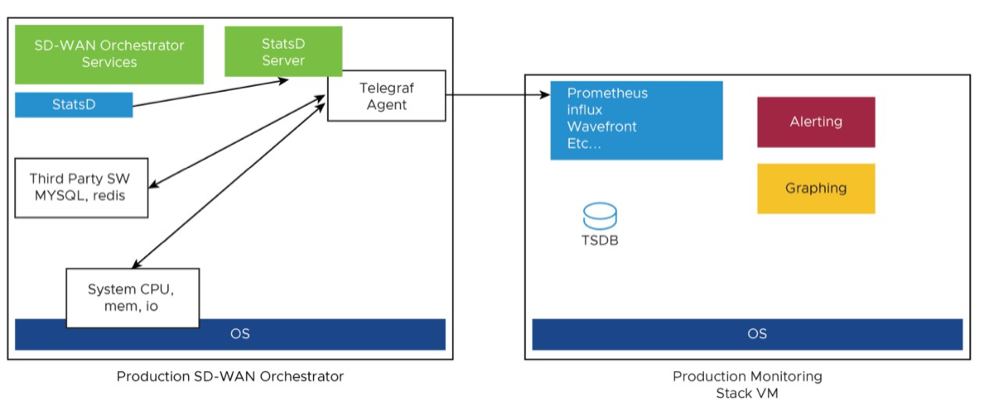
The Metrics Collector Telegraf is used as the Orchestrator system metrics collector with plugins to collect different system metrics. The following metrics are enabled by default.
| Metric Name | Description | Supported in Version |
|---|---|---|
| inputs.cpu | Metrics about CPU usage. | 3.4/4.0 |
| inputs.mem | Metrics about memory usage. | 3.4/4.0 |
| inputs.net | Metrics about network interfaces. | 4.0 |
| inputs.system | Metrics about system load and uptime. | 4.0 |
| inputs.processes | The number of processes grouped by status. | 4.0 |
| inputs.disk | Metrics about disk usage. | 4.0 |
| inputs.diskio | Metrics about disk IO by device. | 4.0 |
| inputs.procstat | CPU and memory usage for specific processes. | 4.0 |
| inputs.nginx | Nginx's basic status information (ngx_http_stub_status_module). | 4.0 |
| inputs.mysql | Statistic data from MySQL server. | 3.4/4.0 |
| inputs.redis | Metrics from one or many redis servers. | 3.4/4.0 |
| inputs.statds | API and system metrics. | 3.4/4.0 (additional metrics are included in 4.0) |
| inputs.filecount | The number and the total size of files in specified directories. | 4.0 |
| inputs.ntpq | Standard NTP query metrics, requires ntpq executable. | 4.0 |
| Inputs.x509_cert | Metrics from a SSL certificate. | 4.0 |
To activate additional metrics or deactivate some enabled metrics, you can edit the Telegraf configuration file on the Orchestrator using the following commands:
sudo vi /etc/telegraf/telegraf.d/system_metrics_input.confsudo systemctl restart telegraf- Time-series Database- A time Series Database can be used to store the system metrics collected by Telegraf. A time-series database (TSDB) is a database optimized for time series data.
- Dashboard and Alerting Agent- allows you to query, visualize, alert, and explore the data stored in the TSDB. The following image provides an example of a dashboard using Telegraph, a TSDB and a dashboard engine, created to monitor the solution.
Figure 6. Dashboard 
Follow the instructions below to setup the time-series database.
- Add the iptables entry to allow for external monitoring systems to access to Telegraf port. The source IP address should be specified for security reasons.
The IP address of the external monitoring system is
191.168.0.200 Add "-A INPUT-p tcp-m tcp--source 191.168.0.200--dport 9273-m comment--comment "allow telegraf port"-j ACCEPT" to /etc/iptables/rules.v4.Figure 7. Adding ports 
- Ensure the
iptablesentry updated.Figure 8. IP Tables 
- Add the time-series database details in the Telegraf configuration. Create an output configuration file. For example, Prometheus uses the following:
/etc/telegraf/telegraf.d/prometheus_out.confFigure 9. Prometheus Example 
Monitor Values and Thresholds
The following list shows a list of values that should be monitored and their thresholds. The list below is given as a starting point, as it is not exhaustive. Some deployments may require assessing additional components such as database transactions, automatic backups, etc.
| Service Check | Service Check Description | Warn Threshold | Critical Threshold |
|---|---|---|---|
| CPU Load | Check System Load – Telegraf input plugin: inputs.cpu. | 60 | 70 |
| Memory | Checks the memory utilization buffer, cache, and used memory – Telegraf input plugin: inputs.memory. | 70 | 80 |
| Disk Usage | Disk Utilization in the different Orchestrator partitions, /, /store, /store2 and /store3 (version 4.0 and onwards) – Telegraf input plugin: inputs.disk (version 4.0 and onwards). | 40% Free | 20% Free |
| MySQL Server | Checks MySQL Connections-Telegraf input plugin: inputs.mysql. | Above 80% of max connection define in mysql.conf(/etc/mysql/my.cnf) | |
| Orchestrator Time | Check for Time offset-Telegraf input plugin: inputs.ntpq (version 4.0 and onwards). | Offset of 5 Seconds | Offset of 10 Seconds |
| Orchestrator SSL Certificate | Checks Certificate Expiration- Telegraf input plugin: inputs.x509_cert (version 4.0 and onwards). | 60 Days | 30 Days |
| Orchestrator Internet (not applicable for MPLS only topologies) | Check for Internet access. | Response time > 5 secs | Response time > 10 secs |
| Orchestrator HTTP | Make sure HTTP on localhost is responding. | The localhost is not responding. | |
| Orchestrator Total Cert Count | Check Total – Example mysql query:
SELECT count(id) FROM VELOCLOUD_EDGE_CERTIFICATE WHERE validFrom <= NOW() AND validTo >=NOW()', 'SELECT count(id) FROM VELOCLOUD_GATEWAY_CERTIFICATE WHERE validFrom <= NOW() AND validTo >=NOW() |
CRL | When Total Cert count exceeds 5000 |
| DR Replication Status | Confirm the Standby Orchestrator is up-to-date. | Review that the DR Orchestrator is no more than 1000 seconds behind the Active Orchestrator.
Seconds_Behind_Master: from mysql command: show slave STATUS\G; |
|
| DR Replication Edge Gateway delta | Confirm that Edges and Gateways can talk to the DR Orchestrator.
Different values between the Active and the Standby Orchestrators can be due to a difference in the timezone in Edges and Gateways. |
The same amount of Edges talking with the Active Orchestrator should be able to reach the Standby Orchestrator. This value can be checked on the "replication" tab or via the API. | |
API Best Practices
Orchestrator powers the management plane in the VeloCloud SD-WAN solution. It offers a broad range of configuration, monitoring, and troubleshooting functionality to service providers and enterprises. The main web service with which users interact to exercise this functionality is called the Orchestrator Portal.
Orchestrator Portal- The Orchestrator Portal allows network administrators (or scripts and applications acting on their behalf) to manage network and device configuration and query the current or historical network and device state. API clients may interact with the Portal via a JSON-RPC interface or a REST-like interface. It is possible to invoke all of the methods described in this document using either interface. There is no Portal functionality for which access is constrained exclusively to either JSON-RPC clients or REST-like ones.
Both interfaces accept exclusively HTTP POST requests. Both also expect that request bodies, contain JSON-formatted content consistent with RFC 2616. Clients are furthermore likely to formally assert where this is the case using the Content-Type request header, e.g., Content-Type: application/json.
Additional information about the VeloCloud SD-WAN API can be found here:
https://code.Arista.com/apis/1000/velocloud-sdwan-vco-api
- Wherever possible, aggregate API calls should be preferred to enterprise-specific ones, for example, a single call to
monitoring/getAggregateEdgeLinkMetricsmay be used to retrieve transport stats across all Edges concurrently. - VeloCloud requests that clients limit the number of API calls in flight at any given time to no more than 2-4. If a user feels there is a compelling reason to parallelize API calls, Arista requests that they contact Arista Support to discuss alternative solutions.
- Arista doesn't recommend polling the API for stats data more frequently than every 10 min. New stats data arrives at the Orchestrator every 5 minutes. Due to jitter in reporting/processing, clients polling every 5 minutes might observe "false-positive" cases where stats aren't reflected in API calls' results. You might get the best result using request intervals of 10 minutes or greater in duration.
- Avoid querying the same information twice.
- Use sleep between APIs.
- For complex software automations, run your scripts and evaluate the CPU/Memory impact. Then adjust as required.
Orchestrator Syslog Configuration
- Portal: The Portal process runs as an internal HTTP server downstream from NGINX. The Portal service handles incoming API requests, either from the Orchestrator web interface or from an HTTP/SDK client, primarily in a synchronous fashion. These requests allow authenticated users to configure, monitor, and manage the various services provided by the Orchestrator.
This log is very useful for AAA activities as it has all actions taken by users in the Orchestrator.
Log files:
/var/log/portal/velocloud.log(Logs all info, warn, and error logs) - Upload: The Upload process runs as an internal HTTP server downstream from NGINX. The Upload service handles incoming requests from Edges and Gateways, either synchronously or asynchronously. These requests primarily consist of activations, heartbeats, flow statistics, link statistics, and routing information sent by Edges and Gateways.
Log files:
/var/log/upload/velocloud.log(Logs all info, warn, and error logs) - Backend: Job runner that primarily runs scheduled or queued jobs. Scheduled jobs consist of cleanup, rollup, or status update activities. Queued jobs consist of processing link and flow statistics.
Log files:
/var/log/backend/velocloud.log(Logs all info, warn, and error logs)
Use the following steps to configure Orchestrator Syslog:
- Change the
enable:falsevalue to true for one or more of the servers. Change the Host IP and port accordingly to your implementation.Figure 10. Modify System Property 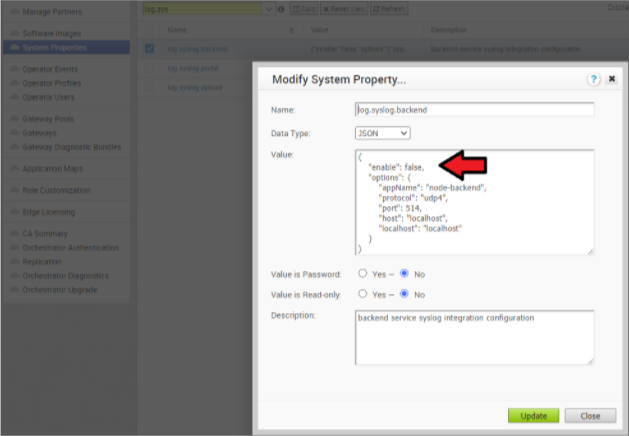
Increasing Storage in the Orchestrator
For detailed instructions to increase the Storage in the Orchestrator, see the topics Install SD-WAN Orchestrator and Expand Disk Size (Arista).
- Ensure the same LVM distribution applies to the Standby Orchestrator.
- It is not recommended to reduce the size of the volumes once increased. Use thin provisioning instead.
- In 3.4, when increasing the disk size, the following percentage/value distribution may be used:
/Volume: This volume is used for the operative system. Production Orchestrators are usually set to 140GBs and have from 40% to 60% usage./storeand/Store2: The proportion applied in production Orchestrators is close to 85% for /Store and 15% for /Store2.
The following guidelines in the table below should be used in the 4.x release and onwards.
| Instance Size | /store | /store2 | /store3 | /var/log |
|---|---|---|---|---|
| Small (5000 Edges) | 2 TB | 500 GB | 8 TB | 100 GB |
| Medium (10000 Edges) | 2 TB | 500 GB | 12 TB | 125 GB |
| Large (15000 Edges) | 2 TB | 500 GB | 16 TB | `150 GB |
Managing Certificates in the Orchestrator
Orchestrator uses a built-in certificate server to manage the overall PKI lifecycle of all Edges and SD-WAN Controllers. X.509 certificates are issued to the devices in the network.
Detailed instructions to configure the CA can be found in the official VeloCloud SD-WAN Operator documentation under "Install Orchestrator" and "Install an SSL Certificate.".
- Management plane TLS 1.2 tunnels between the Orchestrator and Edge SD-WAN Controller.
- Control and Data plane IKEv2/IPsec tunnels between SD-WAN Edges and between Edge and SD-WAN Controller.
Certificate Revocation List
On Controllers with PKI enabled, revoked certificates are stored in a Certificate Revocation List (CRL). If this list grows too long, generally due to an issue with the Orchestrator Certificate Authority, the Controller's performance becomes impacted. The CRL should be less than 4,000 entries long.
vcadmin@vcg1-example:~$ openssl crl -in /etc/vc-public/vco-ca-crl.pem -text | grep 'Serial Number' | wc -l 14 vcadmin@vcg1-example:~Support Interaction
Our Customer Support organization provides 24x7x365 world-class technical assistance and personalized guidance to VeloCloud SD-WAN customers.
- Diagnostic Bundles
While investigating an incident, a diagnostic bundle of the Orchestrator and SD-WAN Controller can be created. The resulting file will assist the Arista Support team to further analyze the events around an issue.
Figure 11. Gateway Diagnostic Bundles 
Figure 12. Request Diagnostic Bundles 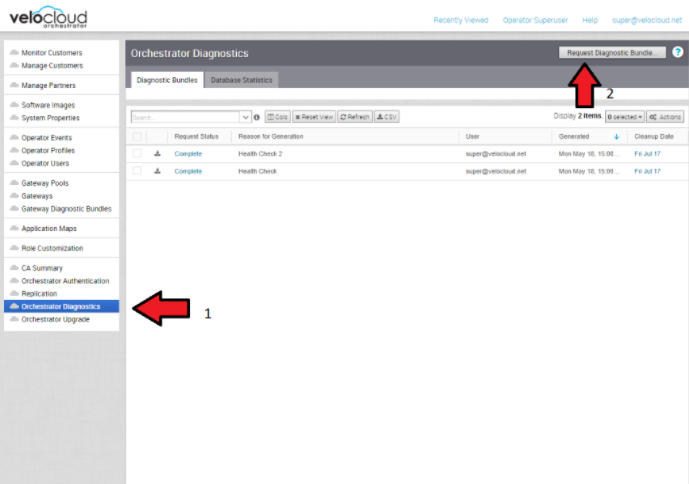
- Share Access with Support
On occasion assistance from Arista Support representatives for the Orchestrator and SD-WAN Controllers may be required.
Some common ways to grant access are:- Remote sessions with Support: The customer would either grant remote control to the SSH jump server or follow the Support representative's instructions.
- Creating an account for the Support team in the Orchestrator. This helps the Support team gather logs without customer interaction.
- Through the Bastion Host: SSH permissions and keys can be configured to allow the Support engineers to access the on-premises Orchestrator and SD-WAN Controller using a Bastion Host.
When contacting Arista SD-WAN Support to assist triaging an issue, include the data described in the table below.
| Required | Suggested |
|---|---|
| Partner Case Number | Issue Start/Stop |
| Partner Return Email/Phone | Impacted Flow SRC/DST IP |
| Orchestrator URL | Impacted Flow SRC/DST Port |
| Customer Name in Orchestrator | Flow Path (E2E, E2GW, Direct) |
| Customer Impact (High/Med/Low) | SD-WAN Gateway Name(s) |
| Edge Name(s) | Link to PCAP in the Orchestrator |
| Link to Diagnostic Bundle in Orchestrator | |
| Short Problem Statement | |
| Analysis & Requested Assistance |