Integrating VMware NSX with DMF
This chapter describes integrating VMware NSX with the DANZ Monitoring Fabric (DMF).
Overview
The DANZ Monitoring Fabric (DMF) allows the integration and monitoring of virtual machines in a VMware NSX fabric deployed in a vSphere environment. The DMF Controller communicates with NSX to retrieve its managed inventory and configures port mirroring sessions for selected virtual machines managed by the NSX fabric.
The policy configuration on the DMF Controller specifies which VMs to monitor and the direction of mirrored traffic (bidirectional, ingress, or egress). NSX Remote L3 SPAN mirror sessions send monitoring traffic via GRE tunneling to a Tunnel Endpoint (TEP) configured in DMF.
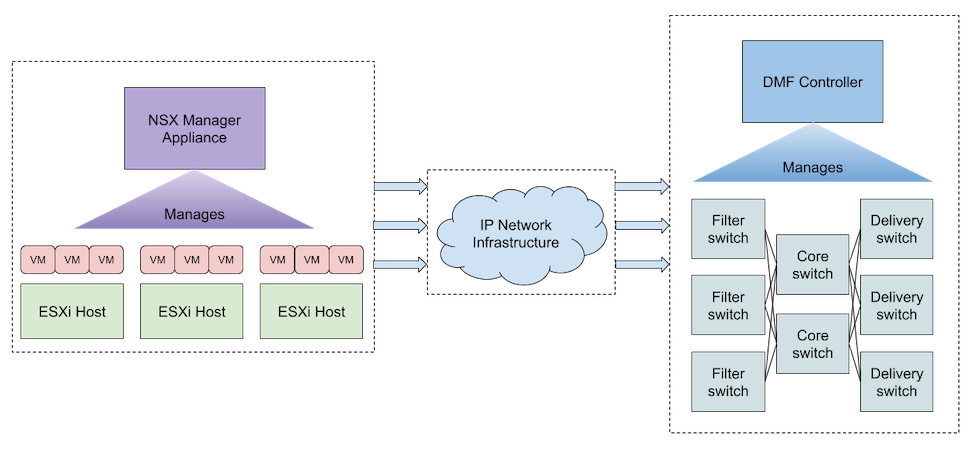
The following figure illustrates a simple DMF-NSX integration configuration where DMF and NSX communicate. DMF monitors traffic from NSX to a TEP configured on the fabric using an L2GRE tunnel via the IP network between the NSX and DMF fabrics.
NSX Compatibility and Requirements
NSX version 4.1 and later is supported.
The user configured in DMF for NSX integration must have sufficient permissions in NSX. The minimum permissions required are:
- Networking: read-only access for Connectivity.
- Inventory: full access for Groups and read-only access for Virtual Machines.
- Troubleshooting: full access for Port Mirroring.
Monitoring a given VM requires:
- Installing VMware Tools on the guest operating system, thus enabling IP address discovery for the VM network adapters.
- Configuring the vCenter compute manager that manages the VM under the NSX instance configuration in DMF.
- The host transport node where the VM resides has a mirror stack VMkernel adapter configured in vCenter. Refer to the Integrating vCenter with DMF using Mirror Stack - vCenter Configuration section for details on configuring the mirror stack on an ESXi host.
- At least one VM network adapter is attached to an NSX logical port.
Instance Configuration
To integrate with NSX, configure an NSX instance in the DMF Controller, enabling communication between NSX and DMF. The NSX hostname or IP address must be reachable from the DMF Controller. If the NSX Manager is a cluster (typically three nodes on separate hypervisor hosts in a production deployment), using a hostname that will resolve to the active node is recommended to maintain the connection in case of a cluster member failure. The user in the NSX integration configuration must have at least the permissions in NSX as outlined in NSX Requirements.
VMware NSX Integration using the CLI
Configure an NSX instance in the DMF Controller:
dmf-controller(config)# nsx instance_name
dmf-controller(config-nsx)# host-name hostname_or_ip
dmf-controller(config-nsx)# username username
dmf-controller(config-nsx)# password password
Optionally, add a description to the NSX instance:
dmf-controller(config-nsx)# description description_of_instance
This configuration is sufficient for some visibility features of the NSX integration. However, vCenter compute manager(s) must also be configured for the NSX instance to allow for monitoring of managed VMs:
dmf-controller(config-nsx)# vcenter-compute-manager vcenter_instance_name
dmf-controller(config-nsx-vcenter-compute-manager)# host-name vcenter_hostname_or_ip
dmf-controller(config-nsx-vcenter-compute-manager)# username username
dmf-controller(config-nsx-vcenter-compute-manager)# password password
To refresh the connection between DMF and NSX, use the sync nsx command, which sends a request to NSX to re-authenticate the connection and to re-fetch the inventory:
dmf-controller# sync nsx instance_name
To use L2GRE tunnels in the integration, enable tunneling in the DMF Controller. For SWL switches, set the match mode to one of the following that is compatible with tunneling: full-match or l3-l4-offset-match. For EOS switches, tunneling will work in any match mode.
dmf-controller(config)# tunneling
Tunneling is an Arista Licensed feature.
Please ensure that you have purchased the license for tunneling before using this feature.
Enter "yes" (or "y") to continue: y
dmf-controller(config)# match-mode tunneling_compatible_mode
Configure tunnel endpoints to allow monitoring from NSX to DMF using an L2GRE tunnel; add a tunnel endpoint to a policy configuration or, optionally, to an NSX integration instance's configuration to define a default tunnel endpoint for this instance.
dmf-controller(config)# tunnel-endpoint tep_name switch fabric_switch fabric_switch_interface ip-address tep_ip mask subnet_mask gateway gateway_ip
For SWL switches, the mask and gateway parameters are optional in the tunnel-endpoint command:
dmf-controller(config)# tunnel-endpoint tep_name switch fabric_switch fabric_switch_interface ip-address tep_ip
To set a default tunnel endpoint for an NSX integration instance, use the following commands:
dmf-controller(config)# nsx instance_name
dmf-controller(config-nsx)# default-tunnel-endpoint tep_name
To remove a default tunnel endpoint for an NSX integration instance, use the following commands:
dmf-controller(config)# nsx instance_name
dmf-controller(config-nsx)# no default-tunnel-endpoint tep_name
preserve-mirror-sessions indicates whether mirroring sessions are preserved for the NSX instance when uninstalling DMF policies configured with it. By default, the flag is false, meaning existing mirroring sessions will automatically be removed if the relevant DMF policies are uninstalled.
Enable preserving mirroring sessions:
dmf-controller(config-nsx)# preserve-mirror-sessions
Disable preserving mirroring sessions (default behavior):
dmf-controller(config-nsx)# no preserve-mirror-sessions
VMware NSX Integration using the GUI
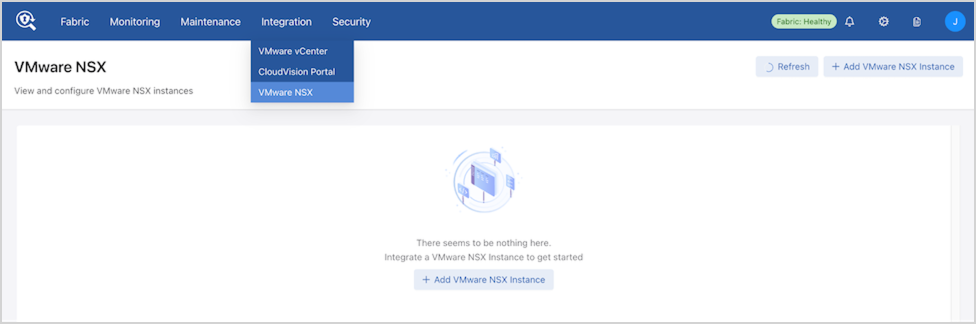
Navigate to .
Select Add VMware NSX Instance to create a new NSX integration instance.
Enter the NSX integration configuration details.
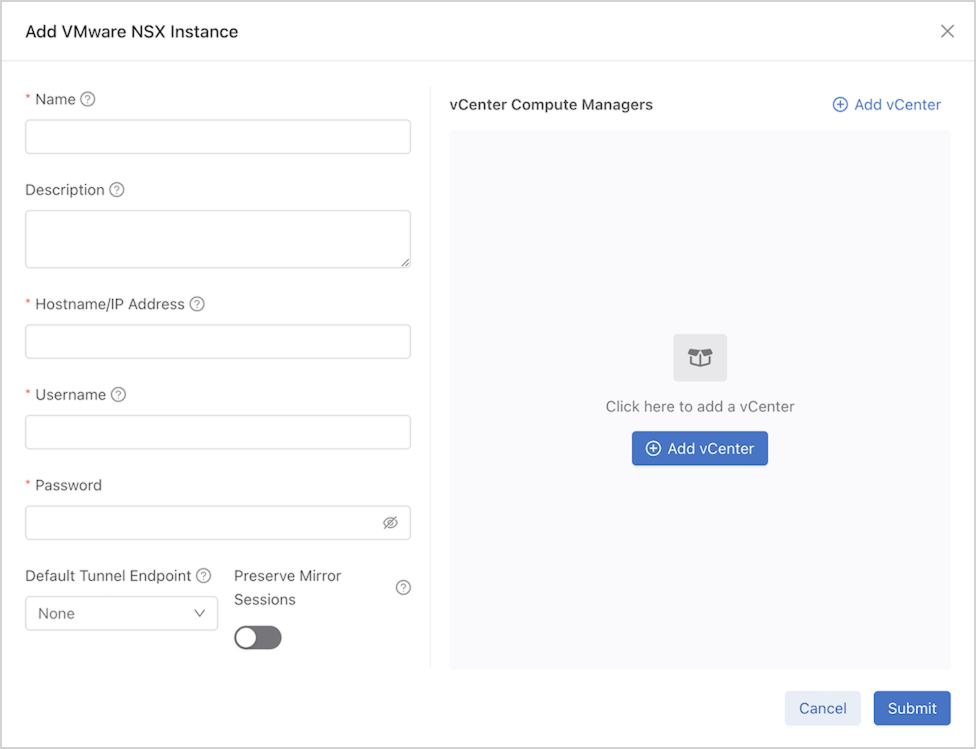
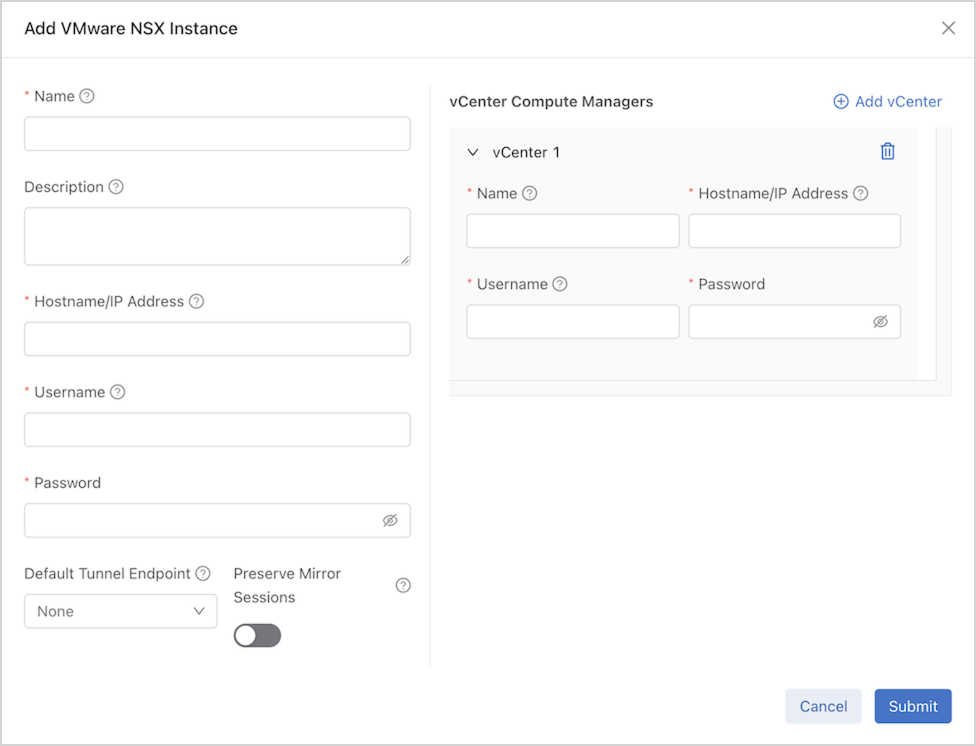
Select Add vCenter to add further configuration details for the vCenter compute manager(s) associated with the NSX Manager.
If there are any warnings or errors with the NSX integration instance, select the tag in the Alerts column to see more details.
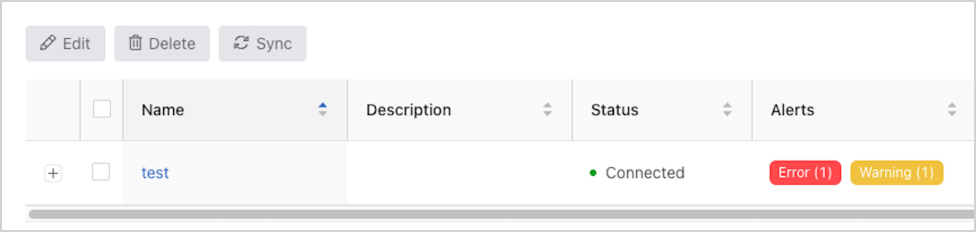
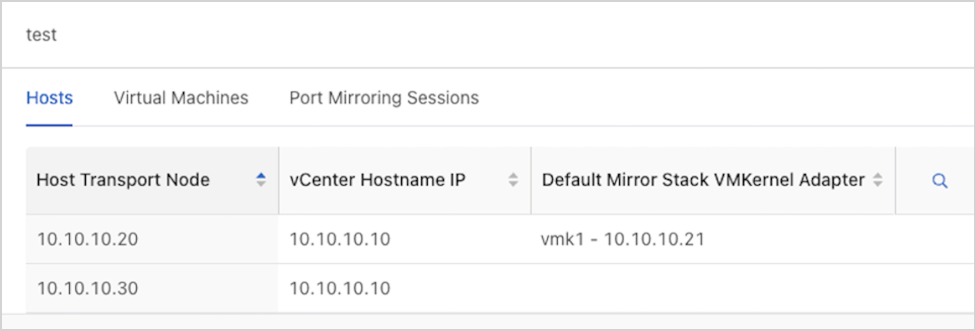
Select the NSX instance under Name to view its inventory details, including the hosts, virtual machines, and port mirroring sessions.
Monitoring Configurations in Policies
DMF uses policies to create, update, or remove the monitoring of NSX virtual machines. Currently, NSX port mirroring using Remote L3 SPAN with GRE is supported.
After enabling NSX integration in a DMF policy (e.g., adding an instance as a traffic source and specifying VMs to monitor), the DMF Controller will automatically create filter and tunnel interfaces, with origination auto-generated. A mirroring session is automatically created in NSX.
Monitoring Configurations in Policies using the CLI
Add an NSX integration instance as a traffic source in a DMF policy:
dmf-controller(config)# policy policy_name
                dmf-controller(config-policy)# filter-nsx instance_name
                dmf-controller(config-policy-nsx)#
To monitor VM traffic, choose from two options:
- Configure a tunnel endpoint as the destination for a VM’s traffic in a DMF policy.
-
Configure a default tunnel endpoint destination for an NSX instance and omit the destination for a VM in a DMF policy.
Both options support an optional mirrored traffic direction. Configure this direction to:
- bidirectional (default when omitted)
- ingress only
- egress only.
Configure the NSX source VMs to mirror traffic to a tunnel endpoint configured in DMF, with an optional direction:
dmf-controller(config-policy-nsx)# vm-name vm_name gre-tunnel-endpoint tep_name [ direction direction ]
Configure the NSX source VMs to mirror traffic to the default tunnel endpoint specified in the NSX instance’s configuration, with an optional direction:
dmf-controller(config-policy-nsx)# vm-name vm_name [ direction direction ]
Example
The following is an example of two DMF policies’ configuration, where testPolicy1 is monitoring bidirectional traffic from VM vm1 in the NSX instance test, to the default tunnel endpoint for the instance, TEP1, and forwarding the traffic to the delivery interface tool1; testPolicy2 is monitoring egress traffic from VM vm2 in the same NSX instance test, to the tunnel endpoint TEP2, and forwarding the traffic to the delivery interface tool2. The vCenter compute manager vcm manages both VMs.
! nsx
nsx test
default-tunnel-endpoint TEP1
hashed-password abc123
host-name test.arista.com
user-name admin
vcenter-compute-manager vcm
hashed-password abc123
host-name 10.10.10.10
user-name このメールアドレスはスパムボットから保護されています。閲覧するにはJavaScriptを有効にする必要があります。
! tunnel-endpoint
tunnel-endpoint TEP1 switch leaf1 ethernet1 ip-address 10.10.10.1
tunnel-endpoint TEP2 switch leaf2 ethernet1 ip-address 10.10.10.2
! policy
policy testPolicy1
action forward
delivery-interface tool1
1 match any
filter-nsx test
!
vm-name vm1
policy testPolicy2
action forward
delivery-interface tool2
1 match any
filter-nsx test
!
vm-name vm2 gre-tunnel-endpoint TEP2 direction egress
To stop monitoring a VM on NSX, remove its configuration from the DMF policy using the following command:
dmf-controller(config-policy-nsx)# no vm-name vm_name
Stop monitoring an NSX instance in a DMF policy and all its VMs:
dmf-controller(config)# policy policy_name
                dmf-controller(config-policy)# no filter-nsx instance_name
To disable integration with an NSX instance, remove its NSX integration instance configuration and remove it from all DMF policies using the following commands:
dmf-controller(config)# no nsx instance_name
                dmf-controller(config)# policy policy_name
                dmf-controller(config-policy)# no filter-nsx instance_name
Monitoring Configurations in Policies using the GUI
- Navigate to .
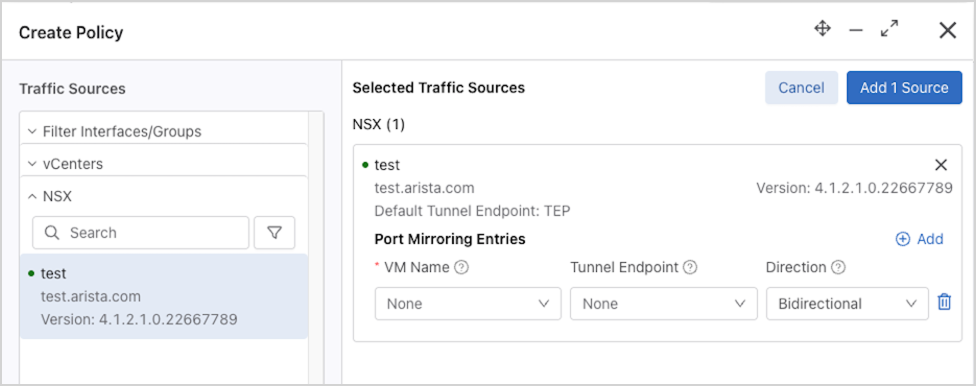
- Select Create Policy and add the NSX instance as a traffic source.
- Use Add to configure monitoring, such as the VM names to monitor, the destination tunnel endpoint, and the mirrored traffic direction. If the tunnel endpoint is omitted for a VM entry, the NSX instance’s default tunnel endpoint is used as the destination.
Policy configuration details related to the NSX integration appear in the policy’s Configuration Details page.
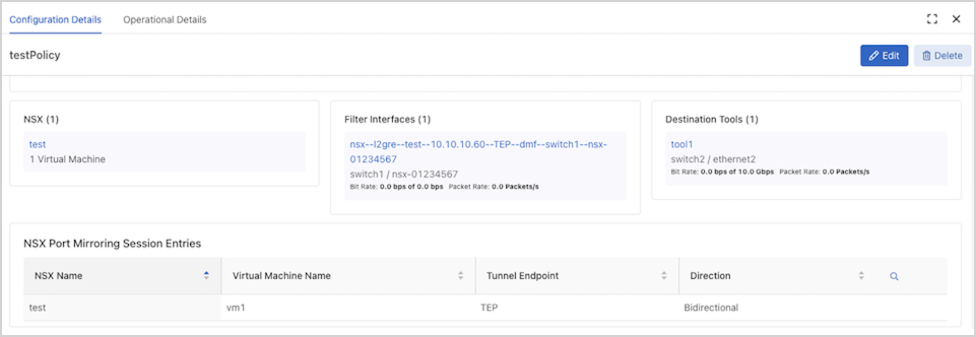
To edit the NSX monitoring configuration in a policy, select 1 Virtual Machine on the Edit Policy page.
Show Commands
After configuring an NSX integration instance, the show nsx
instance_name command displays the configuration and connection status information, including the connection status of all configured vCenter compute managers.
dmf-controller# show nsx test # NSX Hostname State Last Update Time Detail State Version -|----|---------------|---------|------------------------------|----------------------------------------------|------------------| 1 test test.arista.com connected 2025-03-28 22:36:12.975000 UTC connected; connected to compute managers [vcm] 4.1.2.1.0.22667789
The show nsx instance_name detail command displays detailed status information about the integration.
dmf-controller# show nsx test detail ~~~~~~~~~~~~~~~~~~~~~~~~~~ NSX ~~~~~~~~~~~~~~~~~~~~~~~~~~ NSX : test Hostname : test.arista.com State : connected Last Update Time : 2025-03-28 22:36:12.975000 UTC Detail State : connected; connected to compute managers [vcm] Detailed Error Info : Version : 4.1.2.1.0.22667789 Hashed Password : abc123 Username : admin Preserve Mirror Sessions : False
The show nsx instance_name alert and show nsx instance_name error commands display runtime warnings and alerts, and errors, if any.
dmf-controller# show nsx instance_name alert dmf-controller# show nsx instance_name error
all in each show nsx command to see the information for all NSX integration instances on the DMF Controller; for example, show nsx all
alert.The show nsx instance_name compute-manager command displays the vCenter compute managers that have been added to the NSX fabric. This information can be useful when configuring the necessary compute managers under the NSX instance configuration.
dmf-controller# show nsx test compute-manager ~~~~~~~~~~~~ vCenter Compute Managers ~~~~~~~~~~~~ # NSX Display Name Hostname/IP vCenter Version -|----|------------|-------------|---------------| 1 test vcm 10.10.10.10 8.0.2
The show nsx instance_name host command displays the host transport nodes in NSX, as well as the mirror stack VMkernel adapters configured on the transport nodes. The show nsx
instance_name host detail command includes the mirror stack IP routing table entries.
dmf-controller# show nsx test host ~~~~~~~~~~~~~~ Host Transport Nodes ~~~~~~~~~~~~~~ # NSX vCenter Compute Manager Host Transport Node -|----|-----------------------|-------------------| 1 test 10.10.10.10 10.10.10.20 2 test 10.10.10.10 10.10.10.30 ~~~~~~~~~~~~ Mirror Stack VMkernel Adapters ~~~~~~~~~~~~ # NSX Host Transport Node Vmknic Name Vmknic IP Address -|----|-------------------|-----------|-----------------| 1 nsx1 10.10.10.20 vmk1 10.10.10.21 2 nsx1 10.10.10.30 vmk1 10.10.10.31 3 nsx1 10.10.10.30 vmk2 10.10.10.32 ~~~~~~~~~~~~ Mirror Stack IP Route Entries ~~~~~~~~~~~~ # NSX Host Transport Node IP Prefix Vmknic Name -|----|-------------------|----------------|-----------| 1 nsx1 10.10.10.20 192.168.199.0/24 vmk1 2 nsx1 10.10.10.20 192.168.200.0/24 vmk1 3 nsx1 10.10.10.30 0.0.0.0/0 vmk1 4 nsx1 10.10.10.30 192.168.199.0/24 vmk2 5 nsx1 10.10.10.30 192.168.200.0/24 vmk2
show nsx instance_name endpoint command displays the virtual machines in NSX, including their network adapters, IP addresses, and power state. The output displays the current host transport node where the VM resides, and any active mirror session that includes the endpoint.
dmf-controller# show nsx test endpoint
#  NSX  Endpoint Machine Name  Virtual Interface MAC Address                IP Address   Power State Mirror Sessions
--|----|--------|-------------|-----------------|--------------------------|------------|-----------|--------------------------------------------------------------------|
1  test vm1      10.10.10.20   Network adapter 1 00:50:56:00:00:00 (VMware) 10.10.10.50  powered-on  dmf:l2gre:bidirectional:TEP:0123456789abcdef0123456789abcdef01234567
2  test vm1      10.10.10.20   Network adapter 2 00:50:56:00:00:01 (VMware) 10.10.10.51  powered-on  dmf:l2gre:bidirectional:TEP:0123456789abcdef0123456789abcdef01234567
3  test vm2      10.10.10.20   Network adapter 1 00:50:56:00:00:02 (VMware) 10.10.10.52  powered-on
3  test vm3      10.10.10.30   Network adapter 1 00:50:56:00:00:03 (VMware)              powered-off
The show nsx instance_name session command displays the active mirror sessions in NSX:
dmf-controller# show nsx test session
~~~~~~~~~~~~~~~~~~~~~~~~~~~~~~ L2-GRE Mirror Sessions ~~~~~~~~~~~~~~~~~~~~~~~~~~~~~~
# NSX  Src VM Src Direction Tunnel Endpoint Tunnel Dst  Overall Mirror Stack Status
-|----|------|-------------|---------------|-----------|---------------------------|
1 test vm1    bidirectional TEP             10.10.10.40 success
The show nsx instance_name session detail command displays more detailed information about these NSX mirror sessions:
dmf-controller# show nsx test session detail
~~~~~~~~~~~~~~~~~~~~~~~~~~~~~~~~~~~~~~~~~~~~~~~~~~~~~~~~~~~~~~~~~~~~~ L2-GRE Mirror Sessions ~~~~~~~~~~~~~~~~~~~~~~~~~~~~~~~~~~~~~~~~~~~~~~~~~~~~~~~~~~~~~~~~~~~~~
# NSX  Session Name                                                         Src VM Src Direction Tunnel Endpoint Tunnel Dst  GRE Key  Overall Mirror Stack Status
-|----|--------------------------------------------------------------------|------|-------------|---------------|-----------|--------|---------------------------|
1 test dmf:l2gre:bidirectional:TEP:0123456789abcdef0123456789abcdef01234567 vm1    bidirectional TEP             10.10.10.40 32118876 success

~~~~~~~~~~~~~~~~~~~~~~~~~~~~~~~~~~~~~~~~~~~~~~~~~~~ Detailed Mirror Stack Status  ~~~~~~~~~~~~~~~~~~~~~~~~~~~~~~~~~~~~~~~~~~~~~~~~~~~
# NSX  Session Name                                                         Transport Node Mirror Stack Status Mirror Stack VMkernel Adapter Status Status Detail
-|----|--------------------------------------------------------------------|--------------|-------------------|------------------------------------|----------------------------------------|
1 test dmf:l2gre:bidirectional:TEP:0123456789abcdef0123456789abcdef01234567 10.10.10.20    success             success                              Both mirror stack and vmknic are HEALTHY
NSX configuration-related errors can be displayed using the show fabric errors
nsx-error command:
dmf-controller# show fabric errors nsx-error
~~~~~~~~~~~~~~~~~~~~~~~~~~~~~~~~~~~~~~~ NSX related error  ~~~~~~~~~~~~~~~~~~~~~~~~~~~~~~~~~~~~~~~
# NSX Name Error
-|--------|--------------------------------------------------------------------------------------|
1 test     NSX instance test config references a default tunnel endpoint TEP that does not exist.
NSX policy-related errors can be displayed using the show fabric errors
policy-error command:
dmf-controller# show fabric errors policy-error
~~~~~~~~~~~~~~~~~~~~~~~~~~~~~~~ Policy related error ~~~~~~~~~~~~~~~~~~~~~~~~~~~~~~~
# Error                                                                 Policy Name
-|---------------------------------------------------------------------|-----------|
1 NSX instance test entry references a VM vm4 that does not exist.      testPolicy
NSX policy-related warnings can be displayed using the show fabric warnings
policy-warning command:
dmf-controller# show fabric warnings policy-warning
~~~~~~~~~~~~~~~~~~~~~~~~~~~~~ Policy related warning ~~~~~~~~~~~~~~~~~~~~~~~~~~~~~
# Policy Name Warning
-|-----------|-------------------------------------------------------------------|
1 testPolicy  NSX instance test entry references a VM vm3 that is not powered on.
The relevant NSX errors or warnings for a given NSX policy can also be found in the Vendor Integration Alerts table of the show policy
policy_name command:
dmf-controller# show policy testPolicy
Policy Name                            : testPolicy
Config Status                          : active - forward
Runtime Status                         : installed
...
~~~~~~~~~~~~~~~~~~~~~~~~~~~~~ Vendor Integration Alert(s)  ~~~~~~~~~~~~~~~~~~~~~~~~~~~~~
# Priority Vendor Message
-|--------|------|---------------------------------------------------------------------|
1 error    NSX    NSX instance test entry references a VM vm4 that does not exist.
2 warning  NSX    NSX instance test entry references a VM vm3 that is not powered on.
Troubleshooting
- If the expected mirror stack VMkernel adapter information is not being displayed for a host transport node, despite this VMkernel adapter being configured correctly on vCenter, ensure that the vCenter compute manager for the given host transport node is configured under the NSX instance configuration and that DMF has connected successfully to the vCenter.
- If any fabric errors specify a missing mirror session, user action on NSX may be required. From the NSX Manager GUI, navigate to . If the expected mirror session config is present, select the Source entry for the session. Selecting the Failed entry under the Status column will indicate why the mirror session creation failed.
Note: Mirror session creation may initially fail on NSX, but the NSX Manager may recover and successfully create the mirror session later. This fabric error is cleared and the mirror session info is then visible from DMF. If the mirror session config is absent on NSX, delete the NSX monitoring config from the DMF policy and reconfigure it, or delete the policy and recreate it.
Considerations
- Modifying or deleting auto-generated filter interfaces for NSX integration or adding them manually to non-NSX policies will result in undefined behavior.
- Modifying or deleting DMF-managed mirroring profiles, source groups, or destination groups on the NSX manager will result in undefined behavior.
- Currently, a DMF policy can only use one of the NSX or CloudVision integrations as a traffic source.
- Only VM network adapters attached to NSX logical ports can be monitored using the NSX integration. When monitoring a VM with multiple network adapters, some of which are not attached to NSX logical ports, traffic is mirrored only on the network adapters attached to NSX logical ports. vCenter VMs with no network adapters attached to NSX logical ports will not be displayed and must be monitored using the vCenter integration instead.
- Only port mirroring using a mirror stack VMkernel adapter is supported to reduce the impact of mirror sessions on production traffic in the NSX fabric.
- Mirror sessions may not be retained across Controller restart/failover or VM migration (VMware vMotion).
Resources
Refer to Managing DMF Policies and Tunneling Between Data Centers for further information on policies and tunneling.