Preparation
Site Selection
- Temperature and Ventilation: For proper ventilation, install the appliance with ample airflow to the front and back of the appliance. The ambient temperature should not go below 0° or exceed 40°C.
Important:
To prevent the appliance from overheating, do not operate it in an area where the ambient temperature exceeds 40°C (104°F).
Pour empêcher l’interrupteur de surchauffe, ne pas utiliser il dans une zone où la température ambiante est supérieure à 40°C (104°F).
- Airflow direction is front to back.
Figure 1. Air Flow Direction 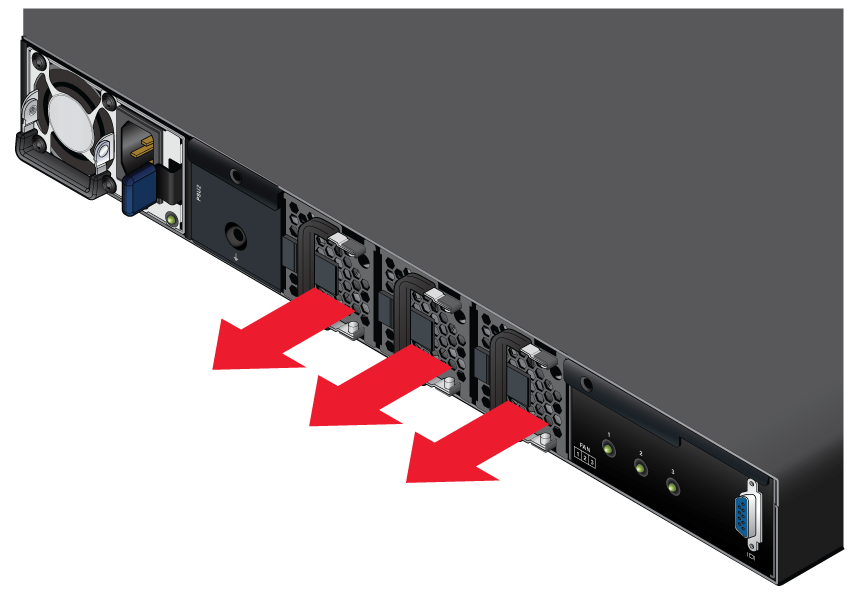
- Rack Space: Install the appliance in a 19" rack or cabinet. The appliance height is 1 RU. The accessory kit provides mounting brackets for the four-post racks.
When mounting the appliance in a partially filled rack, load the rack from bottom to top, with the heaviest equipment at the bottom. Load the appliance at the bottom if it is the only item in the rack.
- Power Requirements: Power requirements vary by appliance and power supply model. Table 3 - Arista VeloCloud SD-WAN Edge Appliances Specifications (Power Input), provides information regarding your specific system.
Two circuits provide redundancy protection. Cabling the Appliance describes power cable requirements.
Note: The handle or label color indicates airflow direction.Important:The power input plug-socket combination must be accessible at all times; it provides the primary method of disconnecting power from the system.
La combinaison de la puissance-prise d’entrée doit être accessible en tout temps ; Il fournit le principal moyen de coupure d’alimentation du système.
- Other Requirements: Select a site where liquids or objects cannot fall onto the equipment, and foreign objects are not drawn into the ventilation holes. Verify these guidelines are met:
- Clearance areas to the front and rear panels allow for unrestricted cabling.
- All front and rear panel indicators can be easily read.
- Power cords can reach from the power outlet to the connector on the rear panel.
Important:
All power connections must be removed to de-energize the unit.
Toutes les connexions d’alimentation doivent être enlevées pour hors tension l’appareil.
Tools and Parts Required for Installation
Each appliance provides an accessory kit that contains parts that are required to install the appliance. In addition to the accessory kit, the following tools and equipment are required to install the appliance:
Four-Post Rack (Tool-less)
No additional equipment required.
Four-Post Rack (Conventional)
- Screws or rack mounting nuts and bolts.
- Screwdriver.
- Four M4 screws are required to attach mounting ears to the device. These are not included.
Accessory kit does not include screws for attaching the appliance to the equipment rack. When installing the appliance into an equipment rack with unthreaded post holes, nuts are also required to secure the appliance to the rack posts.
Electrostatic Discharge (ESD) Precautions
Observe these guidelines to avoid ESD damage when installing or servicing the appliance.
- Assemble or disassemble equipment only in a static-free work area.
- Select a conductive work surface (such as an anti-static mat) to dissipate static charge.
- Wear a conductive wrist strap to dissipate static charge accumulation.
- Minimize handling of assemblies and components.
- Keep replacement parts in their original static-free packaging.
- Remove all plastic, foam, vinyl, paper, and other static-generating materials from the work area.
- Select tools that do not create ESD.