
Cabling the Appliance
This section discusses the following topics:
Connecting Power Cables
You must use an approved power cord compliant with local and national electrical codes or order one from Arista for use with the appliance. Some power cords are shipped with each appliance as part of the accessory kit.
Installation of this equipment must comply with local and national electrical codes. Consult with the appropriate regulatory agencies and inspection authorities to ensure compliance if necessary.
L'installation de cet équipement doit être conforme aux codes électriques locaux et nationaux. Consultez les agences de réglementation et les autorités d'inspection appropriées pour garantir la conformité si nécessaire.
The appliance operates with two installed power supplies. At least one power supply must connect to a power source. Two circuits provide redundancy protection. The Rear Panel displays the location of the power supplies on the appliance's rear panel.
Read all installation instructions before connecting the system to the power source.
Lire toutes les instructions d’installation avant de brancher le système à la source d’alimentation.
- Non-Redundant Configuration: Connect power to either of the two power supplies.
-
Redundant Power Supply Configuration: Connect power to both power supplies.
- Power down the Appliance: Remove all power cords and wires from the power supplies.
This equipment must be grounded. Never defeat the ground conductor.
Cet équipement doit être mis à la terre. Ne jamais modifier le conducteur de terre.
This unit requires overcurrent protection.
Cet appareil requiert une protection contre les surintensités.
AC Power Supplies
The SDE-EDG-4100 and SDE-EDG-5100 network appliances use two hot swappable AC power supplies.
The SDE-EDG-4100 uses two 300w AC power supplies in a 1+1 redundant configuration.
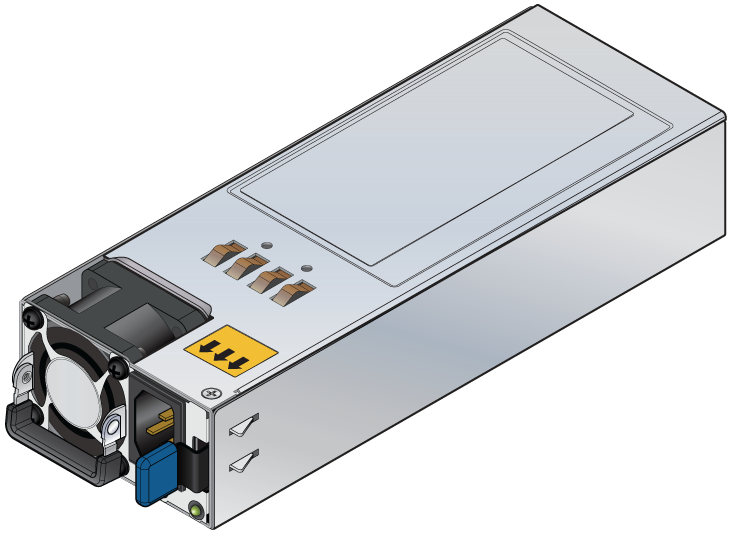
- Do not remove the PSU before unplugging the power cable (power cord).
- For 1+1 redundant system power, only one PSU is allowed to be extracted at a time.
- Do not leave the slot empty when extracting the PSU, the alternative PSU must be inserted immediately for safety purposes.
The SDE-EDG-5100 uses a 550w AC power supplies in a 1+1 redundant configuration.
- Do not remove the PSU before unplugging the power cable (power cord).
- For 1+1 redundant system power, only one PSU is allowed to be extracted at a time.
- Do not leave the slot empty when extracting the PSU, the alternative PSU must be inserted immediately for safety purposes.
Connecting Serial and Management Cables
The accessory kit includes the following cables:
2 - AC power cables
The front panel contains the console, management, and USB ports for most models. The front panel ports display the ports on the front panel of the SDE-EDG-4100 and SDE-EDG-5100 network appliances. The rear panel ports display the ports on the rear panel of the SDE-EDG-4100 and SDE-EDG-5100 network appliances. The front panel and rear panel display all network appliances this guide covers.
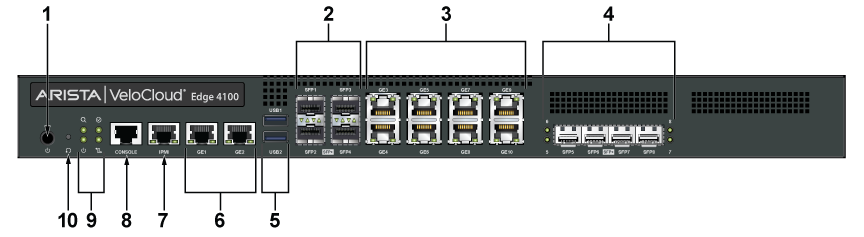
| 1 | Power Button | 2 | 4x10Gb SFP+ Ports (1-4) | 3 | 8x1Gb |
| 4 | 4x10Gb SFP+ Ports (5-8) | 5 | 2x USB 3.0 | 6 | 2 x RJ45 Ethernet Ports |
| 7 | Dedicated IPMI Port | 8 | Console Port | 9 | Status LED's |
| 10 | Reset Pinhole |
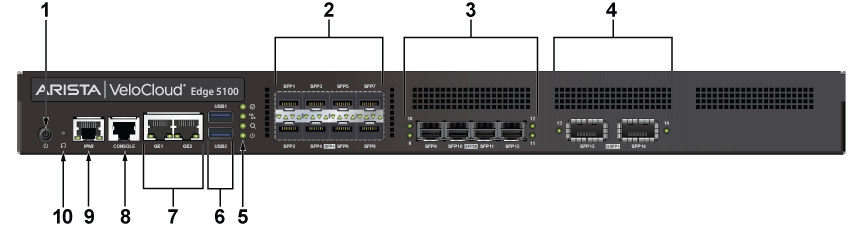
| 1 | Power Button | 2 | 8x10Gb SFP+ Ports | 3 | 4x25Gb SFP28 Ports |
| 4 | 2x40Gb QSFP+ Ports | 5 | 2x USB 3.0 Ports | 6 | 2 x RJ45 Ethernet Ports |
| 7 | Console Port | 8 | Dedicated IPMI Port | 9 | Status LED's |
| 10 | Reset Pinhole |
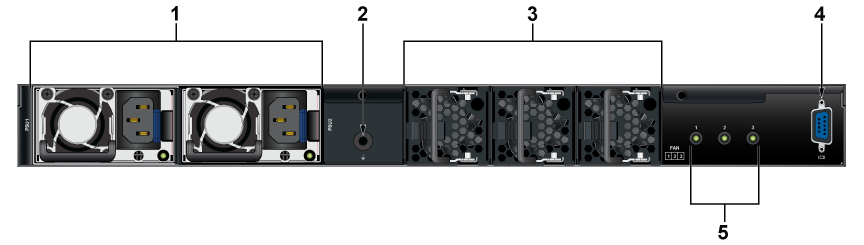
| 1 | 2x AC PSU | 2 | Grounding Lug | 3 | 3x Fans |
| 4 | VGA Display Port | 5 | Fan Status Indicators |
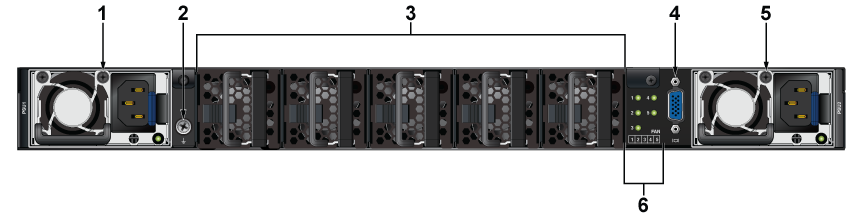
| 1 | AC PSU | 2 | Grounding Lug | 3 | 5x Fans |
| 4 | VGA Display Port | 5 | AC PSU | 6 | Fan Status Indicators |
Excessive bending can damage interface cables, especially optical cables.
Flexion excessive peut endommager les câbles d’interface, notamment des câbles optiques.