打印

Edge-to-Edge Encryption

Starting with the 6.4.0 release, Enterprise Superusers, Enterprise Standard Admin, and Enterprise Network Admin activate or deactivate the encryption for WAN links. This allows users to turn off encryption of user data payloads through VCMP tunnels. This feature applies to both private and public WAN links. This only affects Edge to Edge traffic.

Users can modify the Edge-To-Edge Encryption feature at both Profile and Edge levels. By default, the Edge inherits the encryption settings from the Profile.

Configure encryption through the Interface and Business Policy Rule settings of individual Edges or a Profile. Orchestrator considers both of these configuration methods when sending user data traffic to determine if traffic should be encrypted or unencrypted. For information on how to turn off this feature at Profile and Edge levels, see the topics Edge-to-Edge Encryption at the Profile Level and Edge to Edge Encryption at the Edge Level.

The tables list the various configuration combinations and the resulting encryption states depending on each scenario:
Table 1. Interface
  Scenario 1 Scenario 2 Scenario 3 Scenario 4
Edge 1 (Sender) Interface: Encrypted Interface: Unencrypted Interface: Encrypted Interface: Unencrypted
Biz Policy: Encrypted Biz Policy: Encrypted Biz Policy: Encrypted Biz Policy: Encrypted
Edge 2 (Receiver) Interface: Encrypted Interface: Encrypted Interface: Unencrypted Interface: Unencrypted
Biz Policy: Encrypted Biz Policy: Encrypted Biz Policy: Encrypted Biz Policy: Encrypted
Result Encrypted Encrypted Encrypted Unencrypted


Table 2. Business Policy
  Scenario 1 Scenario 2 Scenario 3 Scenario 4
Edge 1 (Sender) Interface: Encrypted Interface: Encrypted Interface: Unencrypted Interface: Unencrypted
Biz Policy: Encrypted Biz Policy: Unencrypted Biz Policy: Encrypted Biz Policy: Unencrypted
Edge 2 (Receiver) Interface: Any Interface: Any Interface: Encrypted Interface: Unencrypted
Biz Policy: Any Biz Policy: Any Biz Policy: Any Biz Policy: Any
Result Encrypted Unencrypted Encrypted Unencrypted

Edge-to-Edge Encryption at the Profile Level


The Edge to Edge Encryption feature activates by default. Users can deactivate the encryption from either the Device settings screen or the Business Policy screen by following these steps:


Profile - Device
  1. In the SD-WAN service of the Enterprise portal, go to Configure > Profiles . The Profiles page displays the existing Profiles.
  2. Select the link to a Profile or select the View link in the Device column of the Profile. Alternatively, users can select a Profile and select Modify to configure the Profile. The configuration options for the selected Profile display on the Device tab.
  3. Under the Connectivity category, select Interfaces. The Edge models available in the selected Profile display.
  4. Select an Edge model to view the interfaces available in the Edge.
  5. Select the WAN interface to modify the encryption setting.
    The following screen appears:
    Figure 1. Virtual Edge
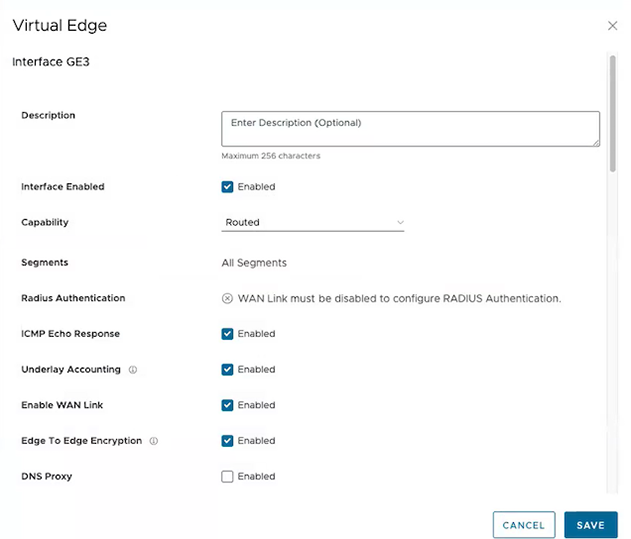
  6. By default, Orchestrator activates the Edge to Edge Encryption option. Clear the checkbox to turn off this feature. This results in Edge to Edge communication transmitting without SD-WAN encryption. A warning message displays.
  7. Select Save.
  8. On the Device settings screen, select Save Changes.

    Check the status on the Monitor > Events screen. A new event Configuration applied appears for all the Edges associated with the Profile.

    Users can also check the status on the Monitor > Events screen, by applying the Edge-to-Edge Encryption filter.

Edge to Edge Encryption at the Edge Level

Edges inherit the Edge to Edge Encryption feature from the Profile. Users can modify the encryption from either the Device settings screen or the Business Policy screen by following these steps:
  1. In the SD-WAN service of the Enterprise portal, go to Configure > Edges .
  2. Select the link to an Edge or select the View link in the Device column. The configuration options for the selected Edge display on the Device tab.
  3. Under the Connectivity section, expand Interfaces. Different types of interfaces available for the selected Edge are displayed.
  4. Select the link to the WAN interface to modify the encryption setting.
    The following screen appears:
    Figure 2. Virtual Edge
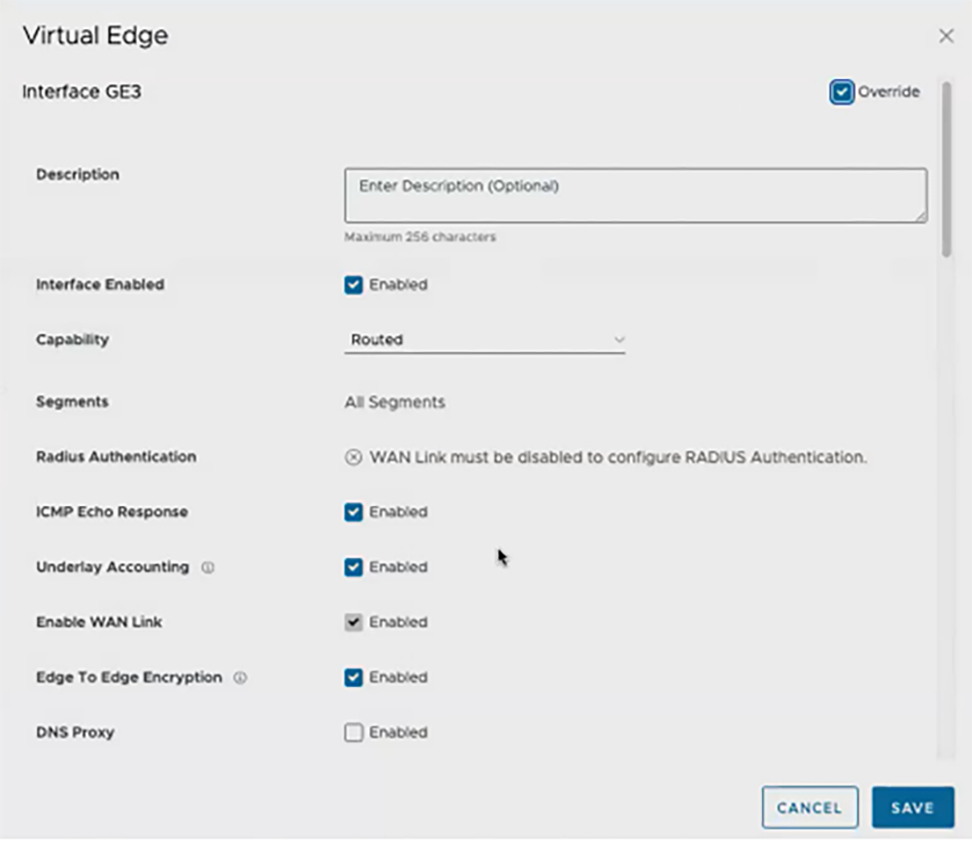
  5. Select Override to override all the Profile level configurations.
    Note: The encryption between two Edges can only be deactivated when both Edges support this feature.
  6. Select Edge To Edge Encryption.
  7. Select Save.
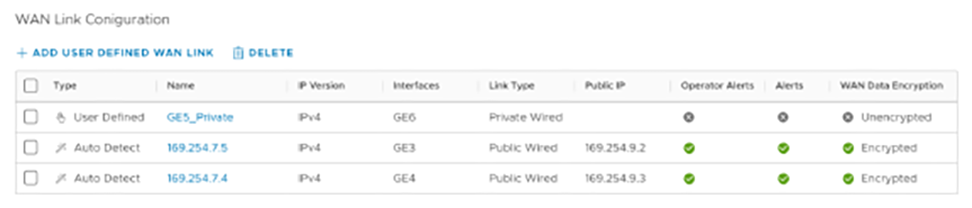
  8. The 6.4.0 release displays a new column, WAN Data Encryption, in the WAN Link Configuration section. This column displays the encryption state of the WAN links.
    Figure 3. WAN Link Configuration
  9. On the Device settings screen, select Save Changes. A warning message display with notification of the Edge service disruption. Select Accept.

Edge - Business Policy

  1. Select the link to an Edge, and then select the Business Policy tab. Alternatively, users can select the View link in the Biz. Pol column of the Edge.
  2. The existing pre-defined business policy rules display.
    Figure 4. Configure Business Policy
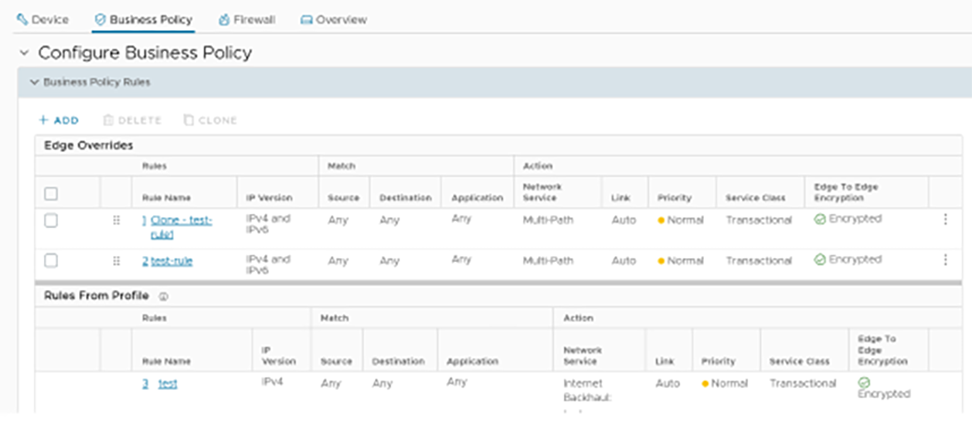
  3. Beginning with the 6.4.0 release, a new Edge To Edge Encryption column displays the default state for the business policy rules. The state can be Encrypted, Unencrypted, or N/A.
    Note: N/A displays for direct business policy rules where tunnel encryption never applies.
  4. Users can deactivate this feature for certain business policy rules with encrypted traffic. Select the Business Policy rule, and go to the Action tab.
    Figure 5. Edit Rule
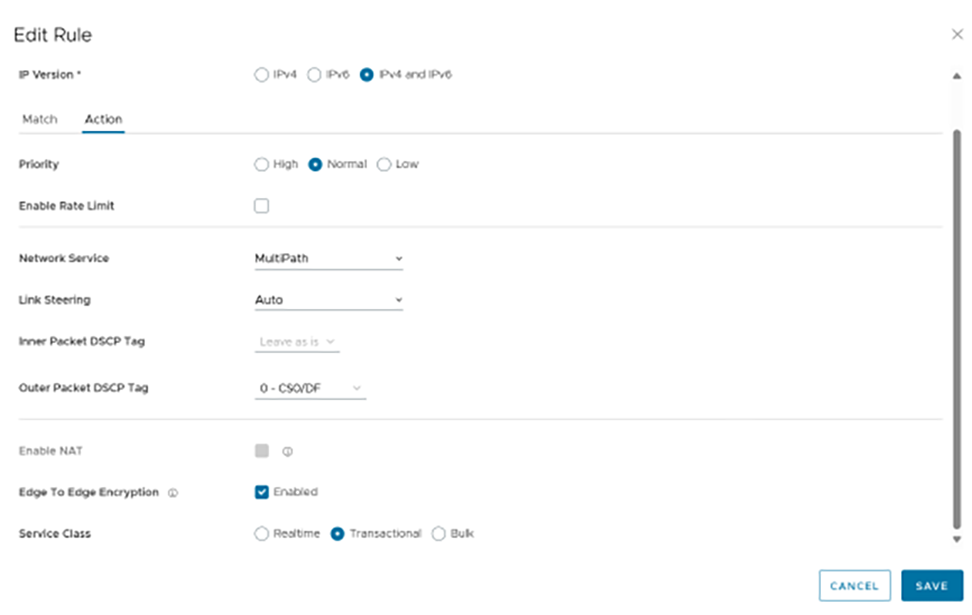
  5. Deselect Edge To Edge Encryption, and then select Save. This causes any application traffic that matches the modified business policy rule to send unencrypted traffic.

    For additional information, see the topic Configure Business Policies.

..