
Security Advisory 0101
Date: July 9, 2024
| Revision | Date | Changes |
|---|---|---|
| 1.0 | July 9, 2024 | Initial release |
| 1.1 | Dec 23, 2024 | Update Vulnerability Assessment for EAP and accounting, Update fixed EOS release |
The CVE-ID tracking this issue: CVE-2024-3596
CVSSv3.1 Base Score: 9.0
(CVSS:3.1/AV:N/AC:H/PR:N/UI:N/S:C/C:H/I:H/A:H/E:P/RL:O/RC:C/CR:H/IR:H/AR:H)
Common Weakness Enumeration: CWE-924: Improper Enforcement of Message Integrity During Transmission in a Communication Channel
This vulnerability is being tracked by BUG1130020 (EOS) and BUG960295 (all other products)
Description
Arista Networks is providing this security update in response to the following publicly disclosed security vulnerability related to the RADIUS protocol. This vulnerability is a result of a design flaw in the RADIUS protocol. It allows a skilled attacker who can read and modify RADIUS packets in the network to forge responses from the RADIUS server to the client. In this way the attacker can cause any user to be authenticated and can give almost any authorization to any user.
Vulnerability Assessment
Affected Software and Platforms
EOS Products
- The following EOS products running versions 4.34.0F and older are affected:
- 710/710X Series
- 720D Series
- 720XP/722XPM Series
- 750X Series
- 7010 Series
- 7010X Series
- 7020R Series
- 7130 Series running EOS
- 7150 Series
- 7160 Series
- 7170 Series
- 7050X/X2/X3/X4 Series
- 7060X/X2/X4/X5/X6 Series
- 7250X Series
- 7260X/X3 Series
- 7280E/R/R2/R3/R4 Series
- 7300X/X3 Series
- 7320X Series
- 7358X4 Series
- 7368X4 Series
- 7388X5 Series
- 7500E/R/R2/R3 Series
- 7800R3/R4 Series
- 7700R4 Series
- AWE 5000 Series
- AWE 7200R Series
- CloudEOS
- cEOS-lab
- vEOS-lab
WI-FI Access Points
(RADIUS without RadSec)
- Arista Wireless Access Points
Cloudvision Products
- CloudVision CUE, virtual appliance or physical appliance
- CloudVision Portal, virtual appliance or physical appliance
Arista 7130 Systems running MOS
- Arista 7130 Systems running MOS
DMF/CCF/MCD
- Arista Converged Cloud Fabric, DANZ Monitoring Fabric, and Multi-Cloud Director
(Formerly Big Switch Nodes for BCF and BMF)
Arista Edge Threat Management - Arista NG Firewall
- Arista Edge Threat Management - Arista NG Firewall
Unaffected Platforms
- CloudVision CUE cloud service delivery (RADIUS is not used in this product)
- CloudVision eXchange, virtual or physical appliance (Connections are secured through TLS)
- CloudVision as-a-Service (RADIUS is not supported in this product)
- CloudVision AGNI - Cloud service delivery (RADIUS is always used over TLS in this product)
- CloudVision AGNI - Virtual or physical appliance (RADIUS is always used over TLS in this product)
- Arista Network Detection and Response (NDR) Security Platform (Formerly Awake NDR) (RADIUS is not used in this product)
- Arista Edge Threat Management - Arista Micro Edge (Formerly Untangle) (RADIUS is not used in this product)
- Arista NetVisor OS, Arista NetVisor UNUM, and Insight Analytics (Formerly Pluribus) (RADIUS is not used in this product)
- VeloCloud Orchestrator (Formerly VeloCloud Orchestrator by Broadcom) (RADIUS is not used in this product)
- VeloCloud Gateway (Formerly VeloCloud Gateway by Broadcom) (RADIUS is not used in this product)
- VeloCloud Edge (Formerly VeloCloud Edge by Broadcom) (RADIUS is only used for 802.1X authentication which is not affected by the vulnerability)
Required Configuration for Exploitation
- RADIUS is configured.
- RADIUS is configured without using RadSec (RADIUS over TLS).
- RADIUS is used for non-EAP authentication (RADIUS PAP/CHAP/MS-CHAP) or standard RADIUS authorization (Access-Request/Accept/Reject).
- RADIUS is not configured
- RADIUS is used with RadSec
- RADIUS is used exclusively for EAP-based 802.1X authentication (EAPOL or MAC-based 802.1X), or only used for CoA/Disconnect (CoA/DM) or accounting (i.e., not used for non-EAP authentication or standard authorization decisions).
Arista EOS-based products
EOS is affected if RADIUS is configured as the authentication or authorization provider without RadSec.
To confirm if this is the case, multiple conditions must be met:
First, EOS is affected if it is configured to use RADIUS for authentication or authorization. The following are examples of configuration where RADIUS is enabled for authentication or authorization:
aaa authentication login <console|default> group radius
aaa authentication login <console|default> group RAD-GRP*
aaa authorization commands all default group radius
aaa authorization exec default group RAD-GRP*
* where RAD-GRP is a group of radius servers configured using the “aaa group server [name]” command
Next, if EOS has the above configuration, it is affected if RadSec is not enabled. The following show command shows a RADIUS server that is not using RadSec:
switch>show radius
RADIUS server             : 5.4.3.2, authentication port 1812, accounting port 1813
             Messages sent:          0
         Messages received:          0
         Requests accepted:          0
         Requests rejected:          0
          Requests timeout:          0
A RADIUS server that is using RadSec will have an SSL profile associated with it, for example:
switch>show radius
RADIUS server             : 1.2.3.4, TLS port 2083
SSL profile               : foobar
             Messages sent:          0
         Messages received:          0
         Requests accepted:          0
         Requests rejected:          0
          Requests timeout:          0
In this case, the configuration is not vulnerable since it is using RadSec. The portions that indicate this have been highlighted in yellow.
Arista Wireless Access Points
Wireless AP’s are affected if they are using RADIUS and RadSec is not enabled. In the following screenshots, RadSec is enabled, so the configuration is not vulnerable. If the RadSec boxes are not checked but RADIUS is being used, then it is vulnerable.
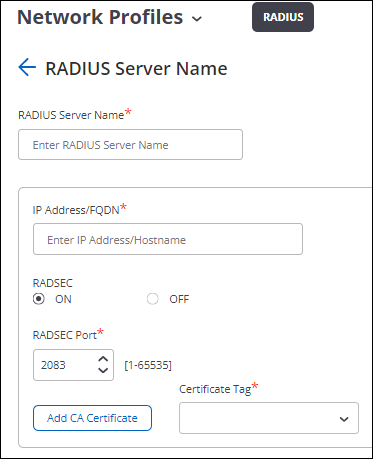
In the above screenshot, “RADSEC” is “ON”, so not vulnerable. If the “OFF” circle is selected, then it is vulnerable.
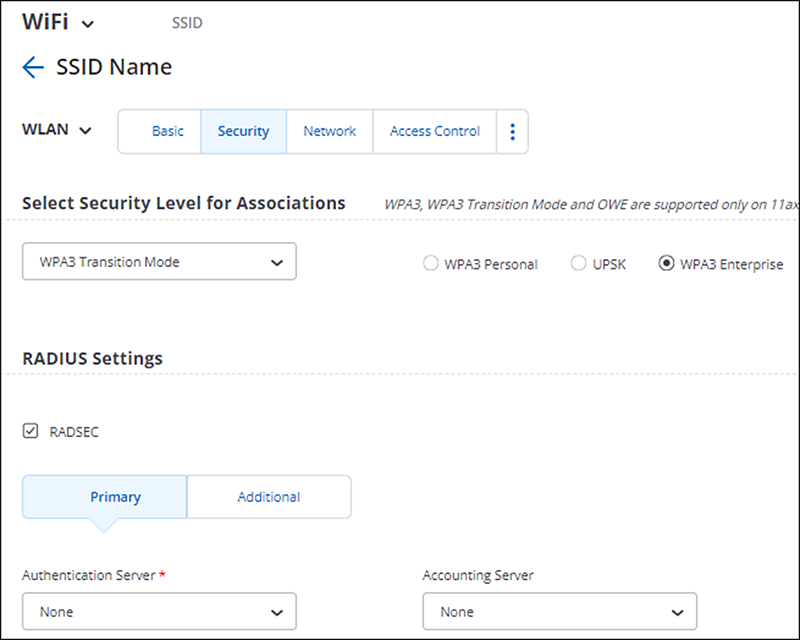
In the above screenshot, the RADSEC box is checked, so it is not vulnerable. If it is unchecked, then it is vulnerable.
Arista DMF/CCF/MCD
DMF and related products are affected if RADIUS is configured as the authentication or authorization provider, for example with this configuration:
analytics-1(config)# radius server host 192.168.17.101 key admin
analytics-1(config)# aaa authentication login default group radius local
Cloudvision products
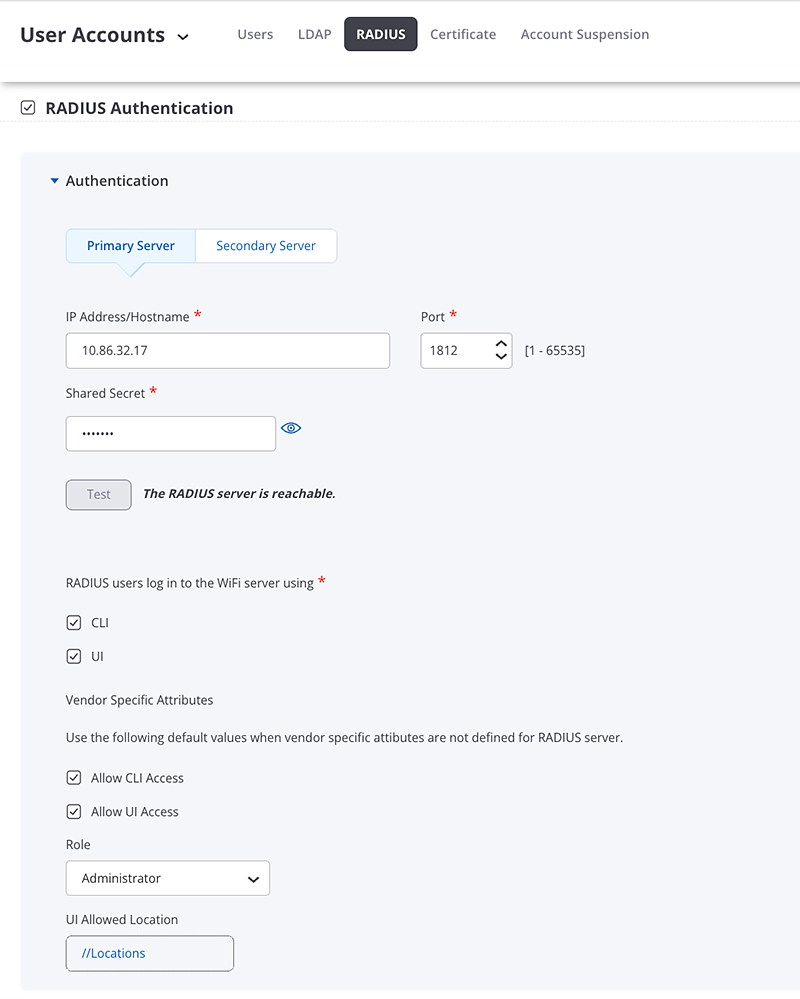
CloudVision CUE, virtual appliance or physical appliance
CloudVision CUE On-Prem is affected if RADIUS is being used as in the below screenshot.
CloudVision Portal On-Prem
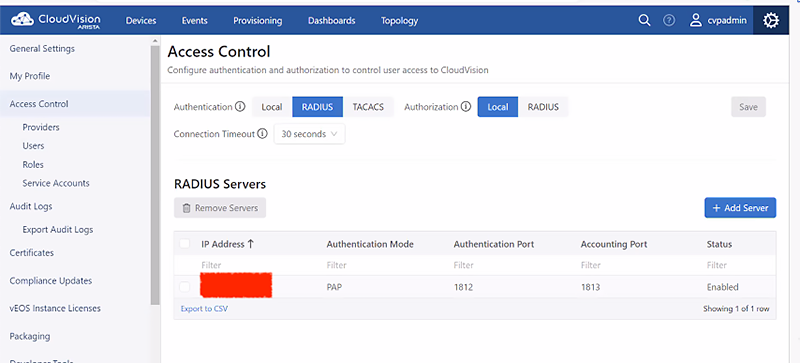
CloudVision Portal is affected if RADIUS is being used as in the below screenshot.
Arista 7130 Systems running MOS
MOS is affected if RADIUS is configured as the authentication or authorization provider, for example with this configuration:
hostname(config)#radius-server host 192.0.2.1 key 7 15060E1F10232523796166
hostname(config)#aaa authentication login default group radius local
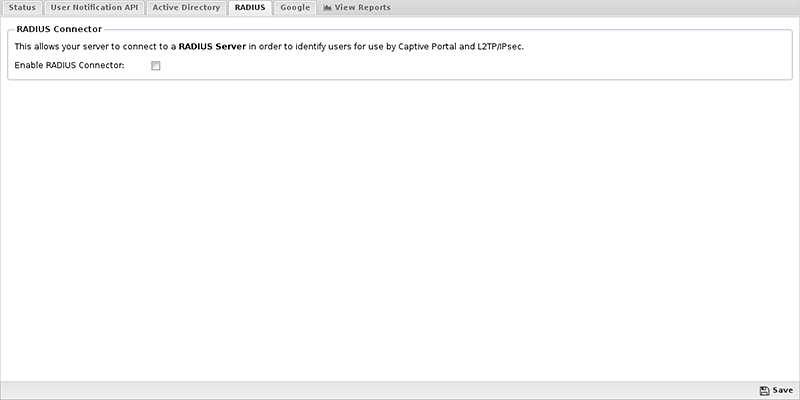
Arista Edge Threat Management - Arista NG Firewall
NG Firewall is affected if RADIUS is configured as the authentication or authorization provider, for example if the “Enable RADIUS Connector” box is checked:
Indicators of Compromise
Successful exploitation of this vulnerability can allow an attacker to authenticate or give authorization to any user. Any logs that indicate unexpected authentication or authorization can be used as an indicator of compromise.
Mitigation
- If the use of RADIUS is desired for authorization or non-EAP authentication, use RadSec if available on that product.
- If RadSec is not available, and RADIUS is not a requirement, use a different authentication provider such as TACACS+. TACACS+ should be run inside a secure transport such as an SSH Tunnel.
- If RADIUS is a requirement and RadSec is not available, the network should be secured to prevent unauthorized users from snooping network traffic. For example, networking equipment should be physically secured and all RADIUS traffic should use a dedicated management VLAN.
Specific configuration for affected products is listed in the following sections:
Arista EOS-based products (versions 4.26.2+)
In EOS versions 4.26.2+, RADIUS over TLS is supported. The workaround is to enable it for each RADIUS server configured using the following configuration:
radius-server host <hostname/IP> tls [ssl-profile <profile-name>]
For more information about configuring RADIUS over TLS on EOS see EOS 4.26.2F TOI: RADIUS over TLS
Arista EOS-based products (versions < 4.26.2)
In EOS versions before 4.26.2, RadSec is not supported. Please review the above mitigations for alternative options.
Arista Wireless Access Points
Please see Enable RadSec for information on how to configure RadSec for WiFi AP’s.
Arista DMF/CCF/MCD
DMF and related products do not support RadSec. Please review the above mitigations for alternative options.
For more information about TACACS+ in Arista DMF products see DANZ Monitoring Fabric Deployment Guide.
Cloudvision products
CloudVision CUE, virtual appliance or physical appliance
CloudVision CUE On-Prem does not support RadSec. Please review the above mitigations for alternative options.
CloudVision Portal On-Prem
CloudVision Portal On-Prem does not support RadSec. Please review the above mitigations for alternative options.
Arista 7130 Systems running MOS
MOS does not support RadSec. Please review the above mitigations for alternative options.
Arista Edge Threat Management - Arista NG Firewall
NGFW does not support RadSec. Please review the above mitigations for alternative options. Alternate methods for directory connector can be found here: https://wiki.edge.arista.com/index.php?title=Directory_Connector
Resolution
CVE-2024-3596 has been fixed in the following product releases:
- 4.34.1F and later releases
For all other products and releases, please review the mitigation section for solutions.
References
For More Information
If you require further assistance, or if you have any further questions regarding this security notice, please contact the Arista Networks Technical Assistance Center (TAC) by one of the following methods:
Open a Service Request
Contact information needed to open a new service request may be found at:
https://www.arista.com/en/support/customer-support