
Deployment Strategy
The following is a simple guide on what tools are available in the Orchestrator, how to use the tools, and how to activate EFS to start inspecting traffic.
- Day 0 Plan
- Run Reports:
- Running a Report for the entire VeloCloud SD-WAN network or even a single Edge can give you a quick glimpse of the types of traffic patterns and the corresponding percentage of the total traffic.
- To run a Report, see the topic Monitor Enterprise Reports in the Arista VeloCloud Administration Guide. The report displays the Enterprise Traffic Distribution as shown below.
Figure 1. Enterprise Traffic Distribution 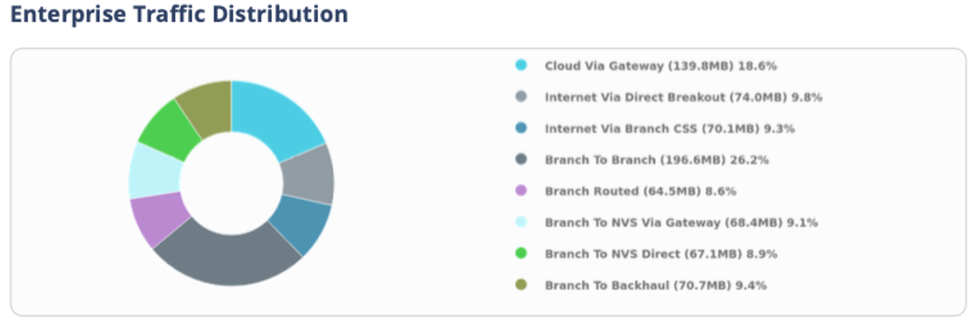
- Investigate Edge Utilization
Note: To speed up the following process, contact your Arista representative to get the Edge utilization metrics of your entire VeloCloud SD-WAN network.
- Analyzing key utilization metrics such as CPU and memory usage, throughput, and flow count can help you make informed decisions about whether and how to deploy EFS. These metrics can provide insights into your current infrastructure usage and help you identify potential bottlenecks.
- To view the CPU, memory usage, and flow counts, go to . Select the Edge you are investigating and go to System.
Figure 2. Monitor Edges 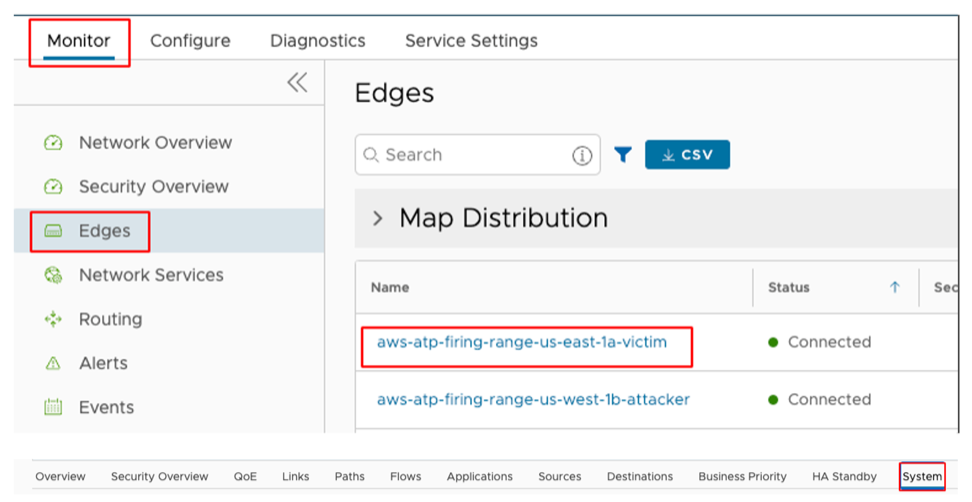
- Select a time range for analysis based on the type of Enterprise and the desired sample size. For example, a one-month time range may be sufficient for a small business, while a full year may be necessary for a large corporation.
Figure 3. Selecting Time Range 
- The most important metrics for planning are CPU, Memory, Flow Count, and Over Capacity Drops. Specifically, the maximum and average values. It is important to cross-check the flow counts with the Arista VeloCloud SD-WAN Edge platform specifications.
Figure 4. Monitor Edge Metrics 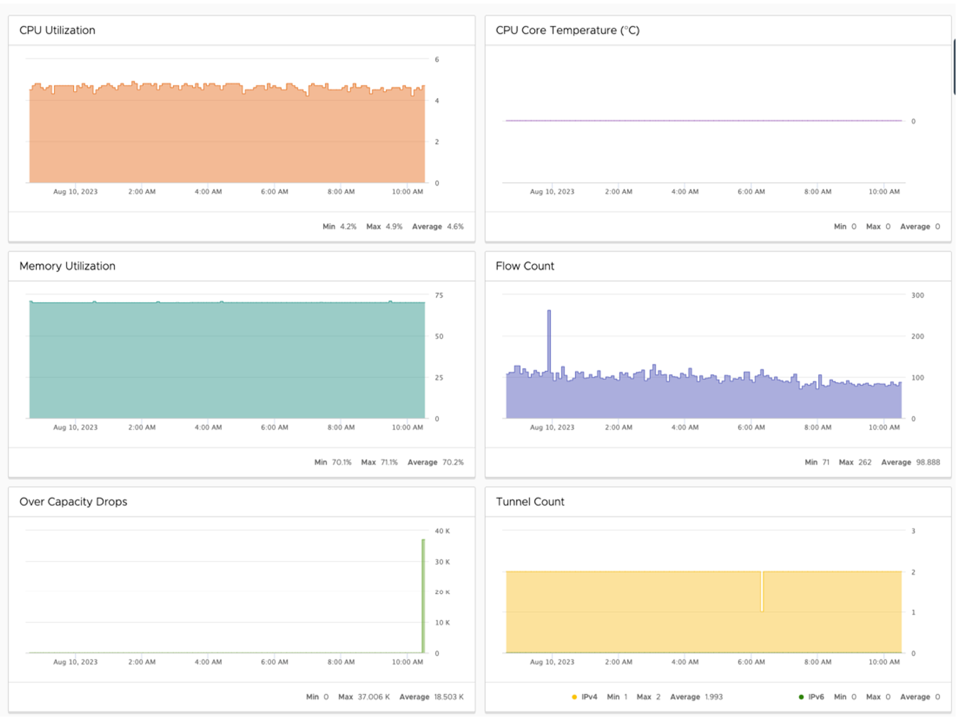
- To view Average Throughput, select the Links tab.
Figure 5. Links Tab 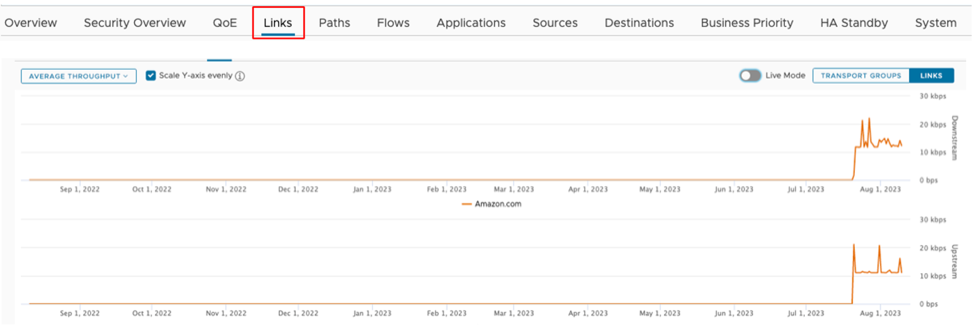
- Make sure to cross-check these numbers with the Arista VeloCloud SD-WAN Edge platform specifications.
Adequate planning is essential for a smooth deployment. Now that you have investigated the branch site using the above tools, you can now develop a deployment strategy. Your strategy can be as simple as inspecting all traffic, assuming the branch has capacity, or gradually adding inspection to traffic and monitoring.
- Run Reports:
- Day 1 Deploy: Activate EFS
Note: Enhanced Firewall Services (EFS) is a licensed feature. EFS will only show up in a properly licensed environment.CAUTION: Activating or deactivating EFS may cause a disruption in network traffic.
- Go to . Select the Profile or Edge you want to configure and select the Firewall tab. Make sure the Enhanced Firewall Services toggle is set to "On".
Figure 6. Configure Enhanced Firewall Services 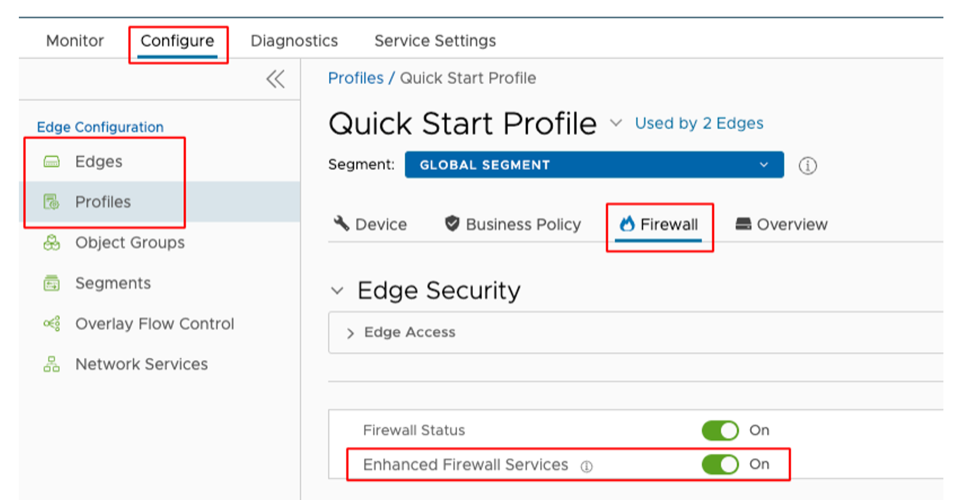
- Go to Firewall Rules and select an ALLOW firewall rule you would want EFS to inspect.
Figure 7. Firewall Rules 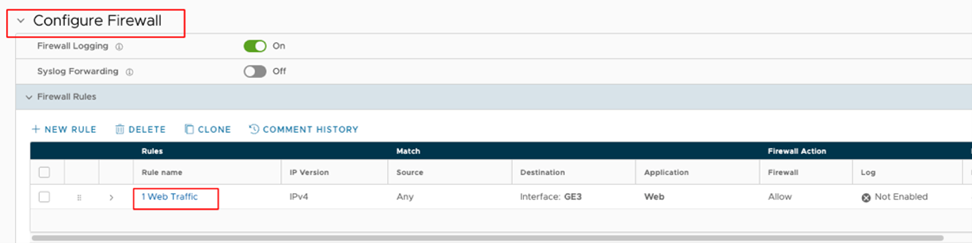
- Select the Rule link that you want to inspect and go to the IDS/IPS section. Select Enable check box and then configure the following options as required:
Figure 8. IDS/IPS 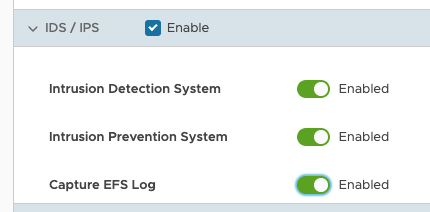
- Intrusion Detection System: Enable this option if you want for malicious traffic to be allowed but alerted.
- Intrusion Prevention System: Enable this option if you want EFS to alert and prevent malicious traffic.
- Capture EFS Log: Enable this option to log any traffic that is seen as malicious by the EFS.
- Go to . Select the Profile or Edge you want to configure and select the Firewall tab. Make sure the Enhanced Firewall Services toggle is set to "On".
- Day N Maintain: Now that EFS has been deployed it is important to monitor your network for malicious activity. Integrating with a SIEM solution and/or monitoring the Security Overview dashboard can notify you of malicious events. The Security Overview dashboard offers a holistic view of your Enterprise's threat landscape, allowing you to quickly react to attacks.
- Go to .
Figure 9. Monitor Security Overview 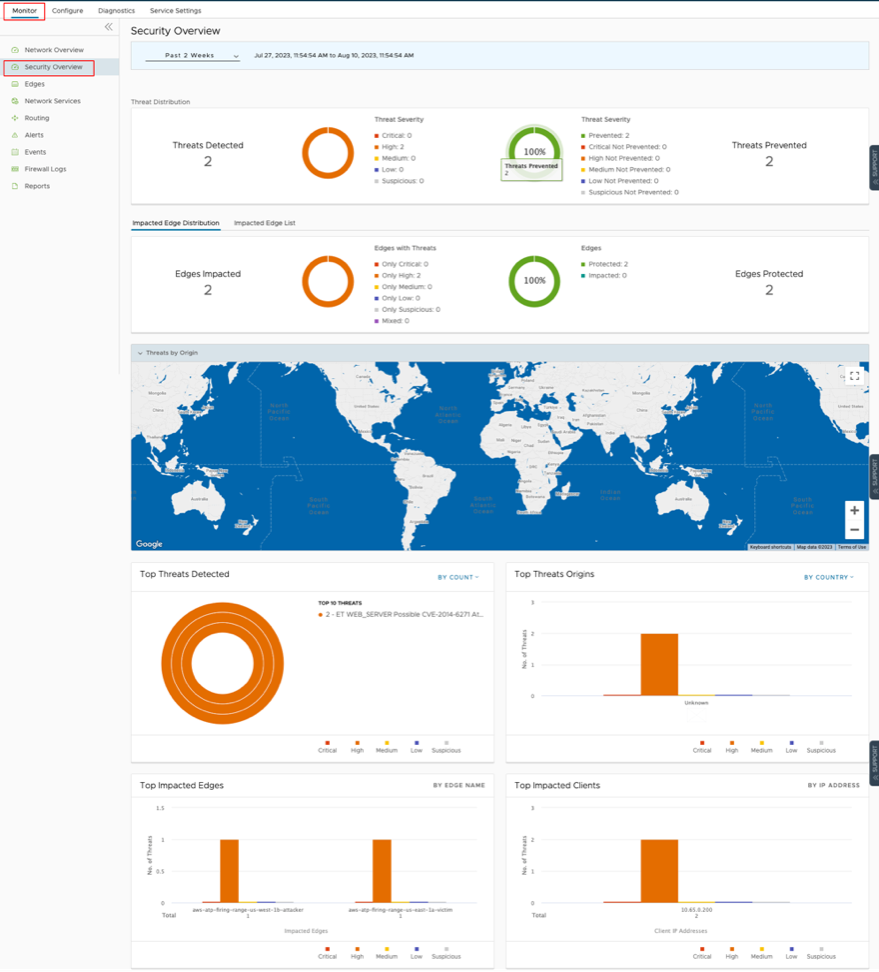
- If you want to investigate a single Edge. On this dashboard, select Impacted Edge List. Select an Edge, and then select Security Overview.
Figure 10. Impacted Edge List 
Figure 11. Security Overview 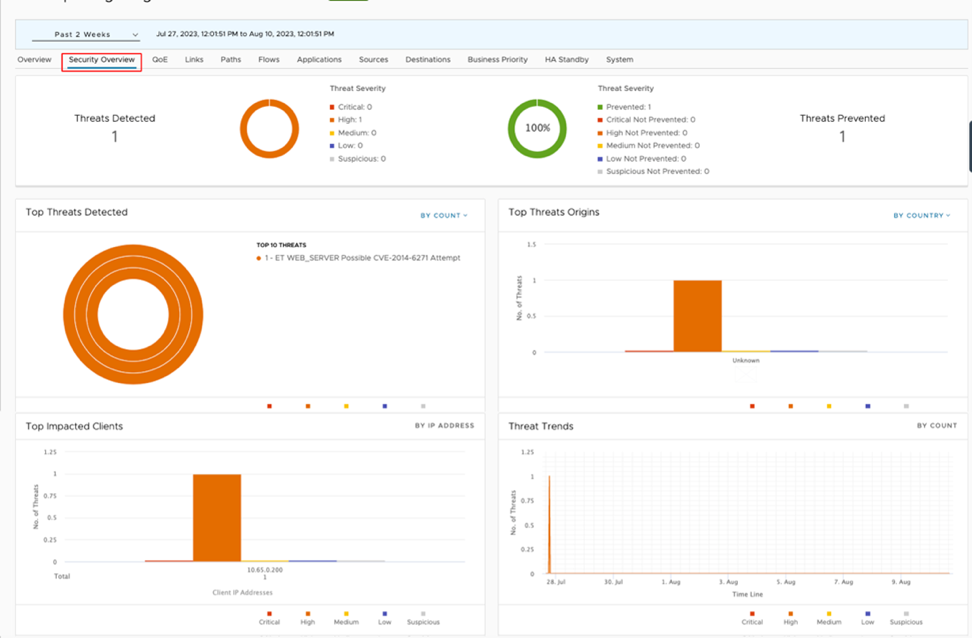
- Go to .
False Positive Workarounds
A False Positive, with regards to IDS/IPS, is a situation where legitimate traffic is being blocked/flagged by the IDS/IPS.
If you believe that the IDS/IPS might be incorrectly blocking legitimate traffic, follow the steps outlined below, starting from granular approaches and moving to more broad solutions, to resolve the problem.
In all cases, submit a support ticket outlining the type of traffic being dropped and the Signature ID that the traffic is hitting. To collect the appropriate data to submit in your support ticket, refer to the Firewall logs or your logging infrastructure that is collecting your syslogs.
If you use the Orchestrator-hosted logging, navigate to and find the suspected traffic. From these logs, gather the Source IP, Destination IP, Application, and Signature ID and add that to your support ticket.
- Method 1: Create a More Targeted Firewall Rule Above the Offending Firewall Rule:The most specific solution is to create a more targeted firewall rule above the offending firewall rule by performing the following steps:
- Navigate to and filter the log entries to match the incorrectly blocked traffic. Note the Source/Destination IP/Port, Protocol, and Application. You will use that information to create a new firewall rule. Also note the Rule and Edge Name.
- Under the Configure tab, navigate to the Edges view and select the affected Edge.
- Navigate to the Firewall tab and expand the Firewall Rules area.
- Select + New Rule and create a more specific rule based on the data you collected from the logs. Make sure to not activate IDS/IPS and then select Create.
- Select the firewall rule you just created and drag it to right above the offending firewall rule.
- Select Save Changes.
- Verify the change is working as intended and the traffic is not being blocked.
- Method 2: Deactivate EFS at the Rule level: To further limit the scope of change you can select the offending rule and deactivate EFS at the firewall rule level. To deactivate EFS at the Rule level:
- Navigate to and select the appropriate log entry. From the Rule and Edge columns, note the Rule name and the Edge name.
- Under the Configure tab, navigate to the Edges view and select the affected Edge.
- Navigate to the Firewall tab and expand the Firewall Rules area.
- Find the offending Rule and select it. If the Rule is under the Rules From Profile area then you will need to navigate to the Profile and edit the rule from there. The steps to edit the rule at the Profile level are same as editing the rule at the Edge level.
- After selecting the Rule, scroll down to the IDS/IPS section. From the IDS/IPS section you can deactivate both IDS/IPS or you can just deactivate IPS.
- To deactivate both IPS and IDS, unselect the Enable check box.
- To deactivate only the IPS, toggle the Enable button next to Intrusion Prevention System.
- Verify the change is working as intended and the traffic is not being blocked.
- Method 3: Deactivate EFS at the Edge level: If the issue is isolated at a single branch, then to limit the scope of changes, it might be best to deactivate EFS on the affected Edge. To deactivate EFS at the Edge level:
- Navigate to and select the appropriate Edge to deactivate EFS.
- Navigate to the Firewall tab.
- In the Enhanced Firewall Services area, select the Override check box and then toggle the Enhanced Firewall Services button to Off.
- Verify the change is working as intended and the traffic is not being blocked.
- Method 4: Deactivate EFS at the Profile level: If the issue is seen across several branches, then it might be prudent to deactivate EFS at the Profile level. To deactivate EFS at the Profile level:
- Navigate to and select the Profile that covers the desired Edges.
- From the Profile view, select the Firewall tab.
- Toggle the Enhanced Firewall Services button to Off.
- Verify the change is working as intended and the traffic is not being blocked.