
User Management - Enterprise
As an Enterprise Superuser, follow the steps below to access the User Management screen:
- Select the Global Settings service.
The User Management screen appears by default.
Figure 1. User Management 
Users
To access the Users tab:
- From the left menu, select User Management. The Users tab displays by default.
Figure 2. Users Tab 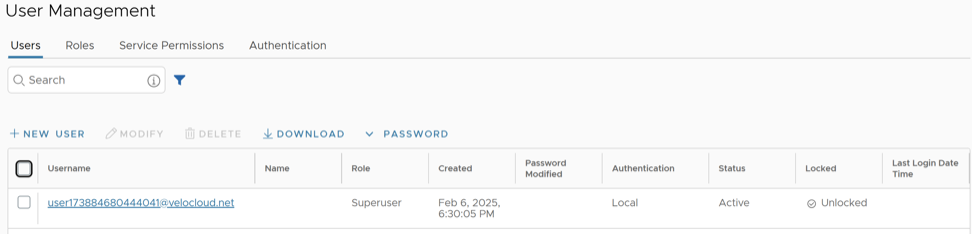
Add New User
- Select New User.
Figure 3. New User 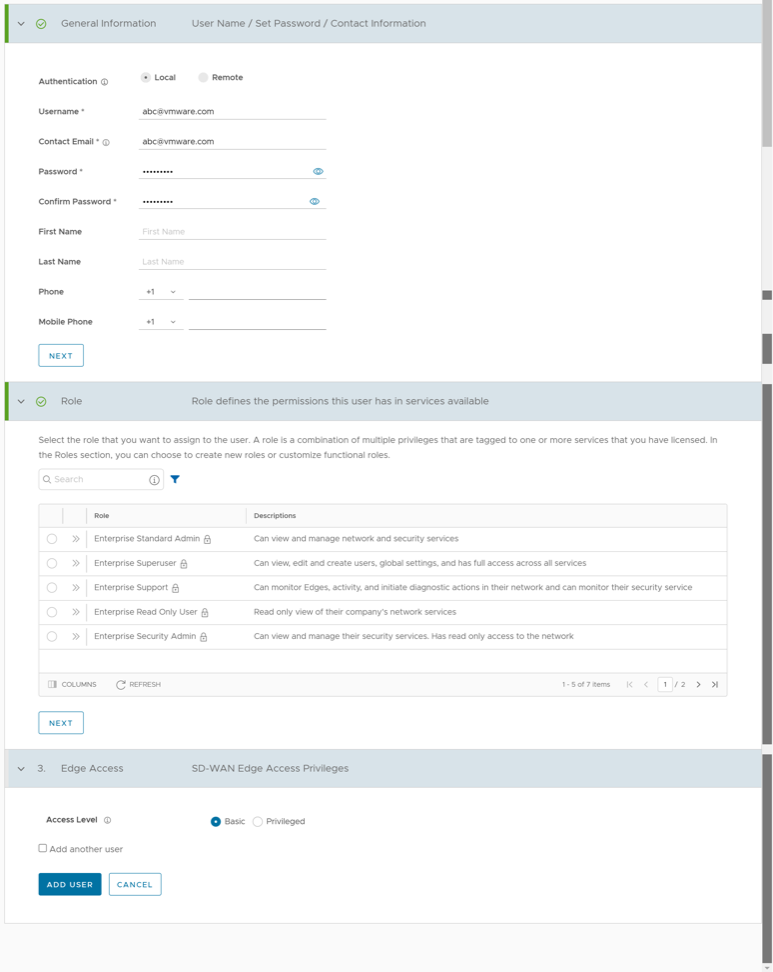
API Tokens
- For Enterprise Read-Only users and MSP Business Specialist users, token-based authentication is not activated.
- Enterprise Superuser should manually delete inactive Identity Provider (IdP) users from the Orchestrator to prevent unauthorized access via API Token.
Users can create, revoke, and download the tokens based on their roles.
To manage the API tokens:
- Select a user and select Modify, or select the link to the username. Go to the API Tokens section.
Figure 4. API Tokens 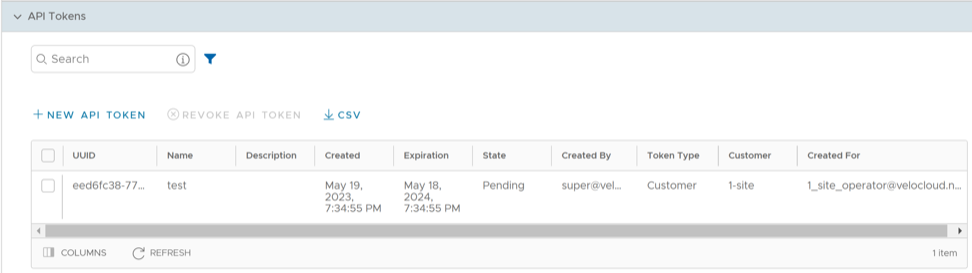
- Select New API Token.
Figure 5. New Token 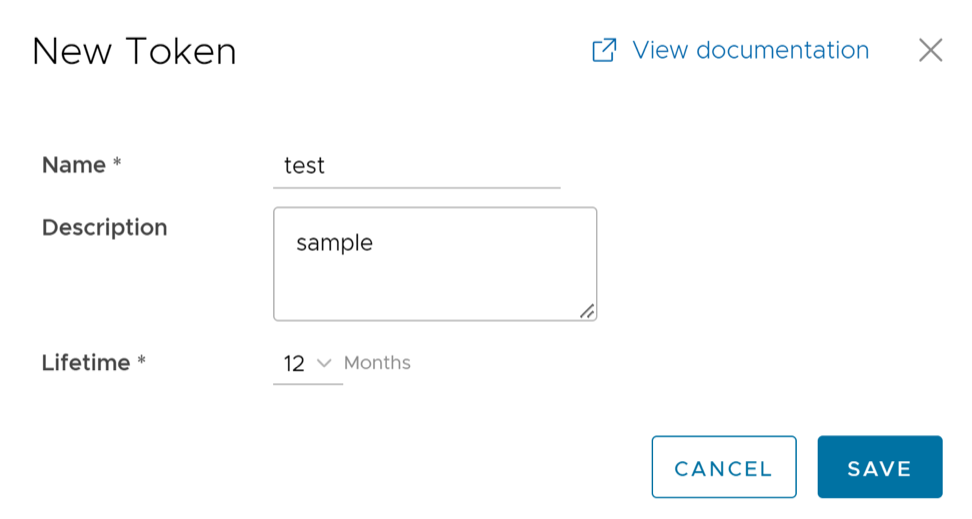
Roles
The Orchestrator consists of two role types.
- Privileges – Privileges are a set of roles relevant to a functionality. You can tag a privilege with one or more of the following services: SD-WAN and Global Settings. Users require privileges to carry out business processes. For example, a Customer Support role in SD-WAN is a privilege required by an SD-WAN user to perform various support activities. Every service defines such privileges based on its supported business functionality.
- Roles – The privileges from various categories can be grouped to form a role. By default, the following roles are available for a Customer:
Table 5. Roles and Services Role SD-WAN Service Global Settings Service Enterprise Standard Admin SD-WAN Enterprise Admin Global Settings Enterprise Admin Enterprise Superuser SD-WAN Enterprise Superuser Global Settings Enterprise Superuser Enterprise Support SD-WAN Enterprise Support Global Settings Enterprise Support Enterprise Read Only User SD-WAN Enterprise Read Only Global Settings Enterprise Read Only Enterprise Security Admin SD-WAN Security Enterprise Admin Global Settings Enterprise Admin Enterprise Security Read Only SD-WAN Security Enterprise Read Only Global Settings Enterprise Read Only Enterprise Network Admin SD-WAN Enterprise Admin Global Settings Enterprise Admin If required, you can customize the privileges of these roles. For additional information, see Service Permissions.
As a Customer, you can view the list of existing standard roles and their corresponding descriptions. You can add, edit, clone, or delete a new role. However, you cannot edit or delete a default role.
- In the Enterprise portal, on the Global Navigation bar, expand the Enterprise Applications drop-down menu.
- Select the Global Settings service.
- From the left menu, select User Management, then select the Roles tab. The following screen appears:
Figure 6. Roles Tab 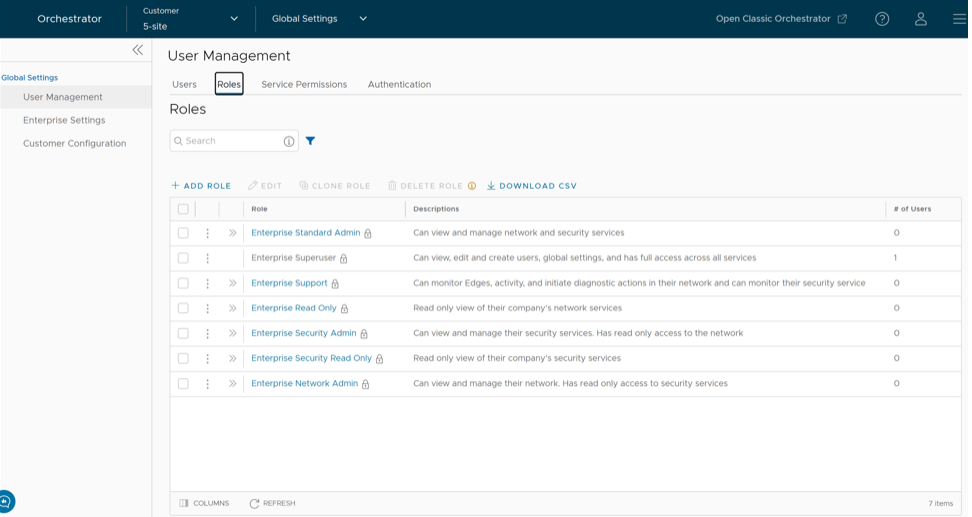
- On the Roles screen, you can perform the following activities:
Table 6. Roles Tab - Options and Descriptions Option Description Add Role Creates a new custom role. For additional information, see Add Role. Edit Allows you to edit only the custom roles. You cannot edit the default roles. Also, you cannot edit or view the settings of a Superuser. Clone Role Creates a new custom role by cloning the selected role's settings. You cannot clone the settings of a Superuser. Delete Role Deletes the selected role. You cannot delete the default roles. You can delete only custom composite roles. Ensure that you have removed all the users associated with the selected role before deleting the role. Download CSV Downloads the details of user roles into a file in CSV format. Note: You can also access the Edit, Clone Role, and Delete Role options from the vertical ellipsis of the selected Role. - Select the Open icon >> displayed before the Role link, to view additional details about the selected Role, as shown below:
Figure 7. Role Details 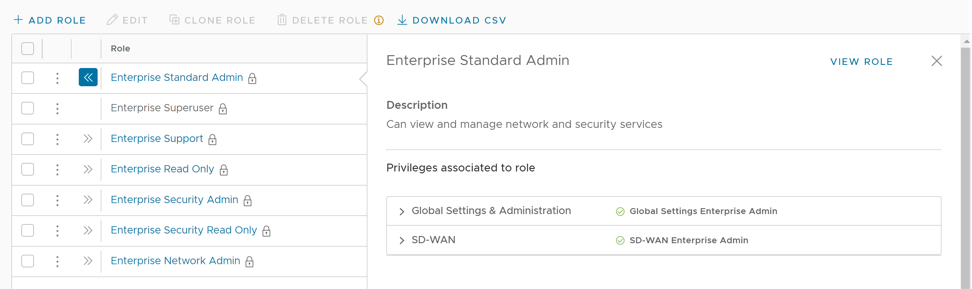
- Select the View Role link to view the privileges associated with the selected role for the activated services.
Note: By default, only the Global Settings and Administration service are activated for a Customer. Only an Operator can activate an additional service.
- The following are the other options available in the Roles tab:
Table 7. Additional Options and Descriptions Option Description Search Enter a search term to search for the matching text across the table. Use the advanced search option to refine your search results. Columns Select the columns to be displayed or hidden on the page. Refresh Select to refresh the page and display the most current data.
Add Role
- Select Add Role.
Figure 8. Add Role 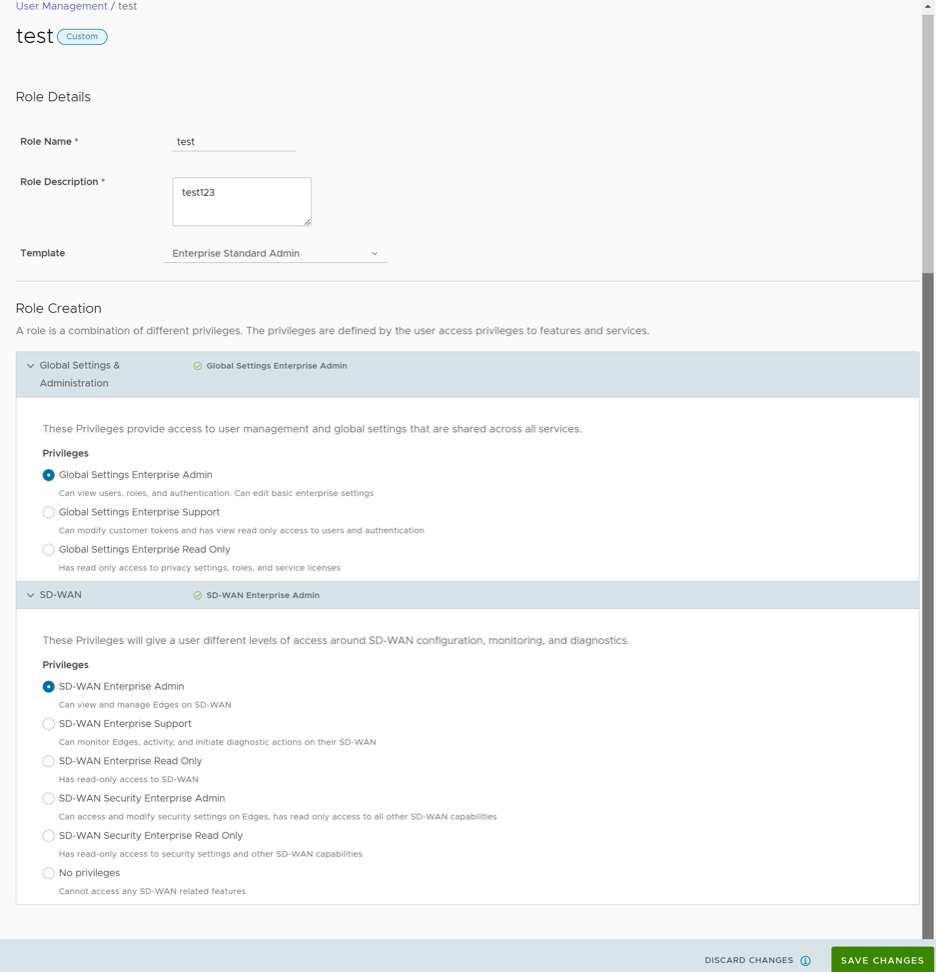
Service Permissions
Service Permissions allow an Administrator to granularly define actions (Read, Create, Update, and Delete) assigned to each Privilege (such as Cloud Security Service and Customer Segment configuration) within a Privilege Bundle.
- Starting from the 5.1.0 release, Role Customization is renamed as Service Permissions.
- To activate this feature, an Operator must navigate to , and then select the Role Customization checkbox.
You can customize roles by modifying the service permissions assigned to each role. You can customize both default roles and new roles. Roles are created based on the selected default role. Operator, Partner, and Enterprise roles are defined separately. So, there are default roles for each level, such as Operator Superuser, Partner Standard Admin, and Enterprise Support.
When customizing a role, you must select both the user level and the role. Typically, Operator roles have more privileges by default than Partners or Enterprise Customers. When creating a user, you must assign a role. Any change to a specific role's privileges takes effect immediately for all users assigned to that role. Role customizations only apply to one role at a time. For example, changes to Operator Standard Admin roles do not get applied to Enterprise Standard Admin roles.
For additional information, refer to the topic Roles.
- Customizations made at the Enterprise level take precedence over those at the Partner or Operator level.
- Customizations made at the Partner level take precedence over those at the Operator level.
- Only when no customizations are made at the Partner or Enterprise level are the Operator's customizations applied globally to all users in the Orchestrator.
- In the Enterprise portal, on the Global Navigation bar, expand the Enterprise Applications drop-down menu.
- Select the Global Settings service.
- From the left menu, select User Management, then select the Service Permissions tab. The following screen appears:
Figure 9. Service Permissions Tab 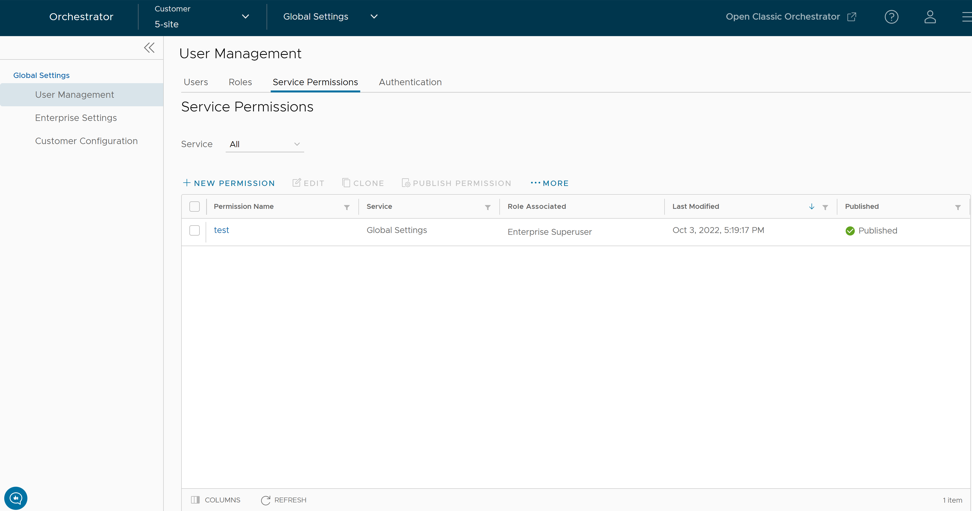
- On the Service Permissions screen, you can perform the following activities:
Table 9. Service Permissions Tab - Options and Descriptions Option Description Service Select the service from the drop-down menu. The available services are: - All
- Global Settings
- SD-WAN
Each service comprises a set of related grouped permissions. Custom service permissions, if any, associated with the selected service are displayed. By default, all custom service permissions are displayed.
New Permission Allows you to create a new set of privileges. The newly created permission is displayed in the table. For additional information, see the topic New Permission. Edit Allows you to edit the settings of the selected permission. You can also select the Permission Name to edit the settings. Clone Allows you to create a copy of the selected permission. Publish Permission Applies the customization available in the selected package to the existing permission. This option modifies the privileges only at the current level. If there are customizations available at the Operator level or a lower level for the same role, then the lower level takes precedence. For example, customizations defined by an Enterprise Superuser take precedence over customizations defined by an Operator Superuser. More Allows you to select from the following additional options: - Delete: Deletes the selected permission. You cannot delete a permission if it is already in use.
Note: A permission can only be deleted if it is in draft mode. The Delete option is deactivated for a published permission. If you want to delete a published permission, you must reset it to the system default, which puts it in draft mode and activates the Delete option for the permission.
- Download JSON: Downloads the list of permissions into a file in JSON format.
- Upload Permission: Allows you to upload a JSON file of a customized permission.
- Unpublish Permissions: Allows you to unpublish the selected permission, changing it to a 'Draft' state. You can modify the permission and save it again, which changes it to the "Published" state.
- The table displays the following columns:
Table 10. Service Permissions Column - Options and Descripitons Option Description Permission Name Displays the newly created permission. Service Displays the service of the new permission. Scope Displays the scope of the new permission. Role Associated Displays the associated roles using the same Privilege Bundle. Last Modified Displays the date and time when the permission was last modified. Published Displays either "Published" or "Draft" depending on the state of the permission. - The following are the other options available on the Service Permissions tab:
Table 11. Additional Options and Descriptions Option Description Columns Select and select the columns to be displayed or hidden on the page. Refresh Select to refresh the page and to display the most current data.
- The Orchestrator does not support customization of multiple privilege bundles.
- Service Permissions are version dependent, and a service permission created on an Orchestrator using an earlier software release will not be compatible with an Orchestrator using a later release. For example, a service permission created on an Orchestrator that is running Release 3.4.x does not work properly if the Orchestrator is upgraded to a 4.x Release. Additionally, a service permission created on an Orchestrator running Release 3.4.x does not function properly when the Orchestrator is upgraded to a 4.x.x Release. In such cases, the user must review and recreate the service permission for the newer release to ensure proper enforcement of all roles.
New Permission
To add a new permission, perform the following steps:
- Select New Permission. The following screen appears:
Figure 10. New Permission 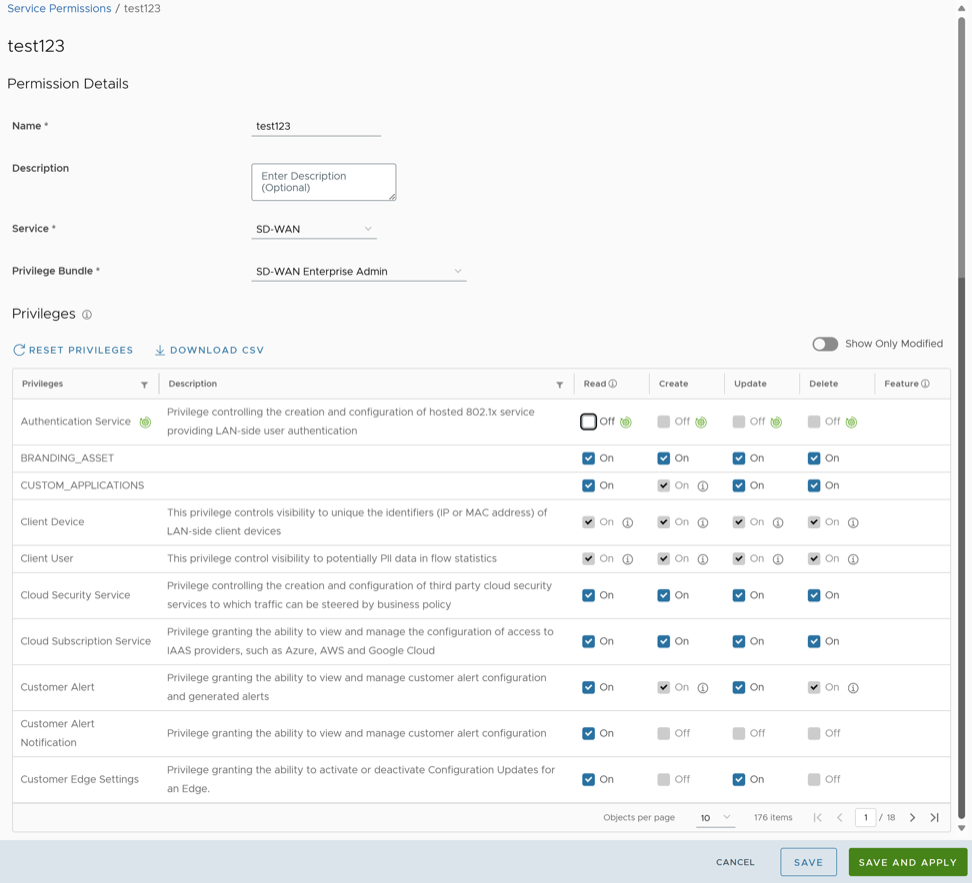
List of User Privileges
This section lists all the user privileges available in the Enterprise portal.
- Allow Privilege – Do the privileges have allow access?
- Deny Privilege – Do the privileges have deny access?
- Customizable – Is the privilege available for customization on the Service Permissions tab, along with the Create, Read, Update, and Delete customizations?
| Navigation Path in the Enterprise Portal | Name of the Tab | Elements in the Tab | Name of the Privilege | Description | Allow Privilege | Deny Privilege | Customizable |
|---|---|---|---|---|---|---|---|
| Overview | |||||||
| Read Edge | Grants the ability to view and manage Edge objects and their properties in general | Yes | No | No | |||
| Top Applications
Top Categories Top Operating Systems Top Sources |
Read Edge | Grants the ability to view and manage Edge objects and their properties in general | Yes | No | No | ||
| View Flow Stats | Grants the ability to view collected flow statistics | Yes | Yes | Yes | |||
| Sources | Read Edge | Grants the ability to view and manage Edge objects and their properties in general | Yes | No | No | ||
| View Edge Sources | Grants the ability to view the Monitor Edge Sources tab | Yes | Yes | Yes | |||
| Devices | View User Identifiable Flow Stats | Grants the ability to view potentially user identifiable flow source attributes | Yes | Yes | Yes | ||
| Create Client Device | Controls visibility to unique identifiers (IP or MAC address) of LAN-side client devices | Yes | No | No | |||
| Read Client Device | |||||||
| Change Hostname | Update Client Device | ||||||
| Delete Client Device | |||||||
| Manage Client Device | |||||||
| Operating Systems | Create Client User | Controls visibility to potentially Personal Identifiable Information(PII) in flow statistics | Yes | No | No | ||
| Read Client User | |||||||
| Update Client User | |||||||
| Delete Client User | |||||||
| Manage Client User | |||||||
| Applications Sources Destinations | Read Edge | Grants the ability to view and manage Edge objects and their properties in general | Yes | No | No | ||
| View Flow Stats | Grants the ability to view collected flow statistics | Yes | Yes | Yes | |||
| Events from this Edge | Read Customer Event | Grants the ability to view customer-level events | Yes | No | No | ||
| Remote Actions | Read Remote Actions | Grants access to view and execute remote actions | No | Yes | Yes | ||
| Remote Actions Generate Diagnostic Bundle Remote Diagnostics | Read Diagnostics | Controls creation of and access to diagnostics bundles, both Edge and Gateway. Combine with Edge and Gateway privileges to control access to each type individually | Yes | Yes | Yes | ||
| Generate Diagnostic Bundle | Create Diagnostic Bundle | No | Yes | Yes | |||
| Remote Diagnostics | Read Remote Diagnostics | Privilege granting access to view and execute remote diagnostics | No | Yes | Yes | ||
| Monitor | Edges | Read Edge | Grants the ability to view and manage Edge objects and their properties in general | Yes | No | No | |
| Edge Cluster | Read Edge Cluster | Controls the ability to create and configure Edge Clusters | No | Yes | Yes | ||
| Network Services | Read Network Service | Grants the ability to view and manage services with the Network Services configuration block | Yes | No | No | ||
| Non SD-WAN Destinations via Gateway Non SD-WAN Destinations via Edge | Read Customer Event | Grants the ability to view customer level events | Yes | No | No | ||
| Non SD-WAN Destinations via Gateway Non SD-WAN Destinations via Edge | Read Non SD-WAN Destination via Gateway | Grants the ability to view and manage Non SD-WAN Destinations via Gateway and Non SD-WAN Destinations via Edge | No | Yes | Yes | ||
| BGP Gateway Neighbor State | Read Network Service | Grants the ability to view and manage services with the Network Services configuration block | Yes | No | No | ||
| BGP Edge Neighbor State | Read Edge | Grants the ability to view and manage Edge objects and their properties in general | Yes | No | No | ||
| Edge VNFs | Read VNF Network Service | Grants the ability to manage VNF Network Services | No | Yes | Yes | ||
| Edge Cluster | Read Edge Cluster | Controls the ability to create and configure Edge Clusters | No | Yes | Yes | ||
| Routing | Read Network Addressing | Grants the ability to view and manage address block configuration in the legacy Network profile mode | Yes | No | No | ||
| Read Edge | Grants the ability to view and manage Edge objects and their properties in general | Yes | No | No | |||
| View Customer Routing | Grants the ability to view the customer Routing | Yes | No | No | |||
| Alerts | Create Customer Alert | Grants the ability to view and manage customer alert configuration and generated alerts | Yes | No | No | ||
| Read Customer Alert | Yes | Yes | |||||
| Update Customer Alert | |||||||
| Delete Customer Alert | No | No | |||||
| Manage Customer Alert | |||||||
| Events | Create Customer Event | Grants the ability to view customer level events | Yes | No | No | ||
| Read Customer Event | |||||||
| Update Customer Event | |||||||
| Delete Customer Event | |||||||
| Manage Customer Event | |||||||
| Reports | Update Customer | Grants the ability to view and manage Customers, from the Partner or Operator level | Yes | Yes | Yes | ||
| Read Customer | No | No | |||||
| Firewall | Firewall Logging | View Firewall Logs | Grants the ability to view collected firewall logs | Yes | Yes | Yes | |
| Read Edge | Grants the ability to view and manage Edge objects and their properties in general | Yes | No | No | |||
| Read Customer Event | Grants the ability to view customer level events | Yes | No | No | |||
| Edge Overview | Edge Overview | Controls the ability to view or modify Edge overview page | No | Yes | Yes | ||
| Properties | Create Edge Overview Properties | Controls the ability to view or change items within the properties section of the Edge overview page | No | Yes | Yes | ||
| Read Edge Overview Properties | No | No | |||||
| Update Edge Overview Properties | Yes | Yes | |||||
| Delete Edge Overview Properties | |||||||
| Name | Read Edge Overview Properties Name | Controls the ability to view or change Edge name on the Edge overview page | No | Yes | Yes | ||
| Update Edge Overview Properties Name | |||||||
| Description | Read Edge Overview Properties Description | Controls the ability to view or change Edge description on the Edge overview page | No | Yes | Yes | ||
| Update Edge Overview Properties Description | |||||||
| Enable Alerts | Read Edge Overview Properties Enable Alerts | Controls the ability to view or change Edge alert configuration on the Edge overview page | No | Yes | Yes | ||
| Update Edge Overview Properties Enable Alerts | |||||||
| Authentication Mode | Read Edge Overview Properties Auth Mode | Controls the ability to view or change Edge PKI configuration on the Edge overview page | No | Yes | Yes | ||
| Update Edge Overview Properties Auth Mode | |||||||
| Read Customer PKI | Grants the ability to view and manage enterprise PKI settings | Yes | No | No | |||
| Update Customer PKI | |||||||
| Serial Number | Read Edge Overview Properties Serial Number | Controls the ability to view or change Edge serial number, prior to activation, on the Edge overview page | No | Yes | Yes | ||
| Update Edge Overview Properties Serial Number | |||||||
| Generate New Activation Key | Read Edge Overview Properties Activation Expiration | Controls the ability to view or change the activation key expiration period on the Edge overview page | No | Yes | Yes | ||
| Update Edge Overview Properties Activation Expiration | |||||||
| Send Activation Email button | Create Edge Overview Properties Activation Email | Controls the ability to generate an activation email on the Edge overview page | No | Yes | Yes | ||
| Read Edge Overview Properties Activation Email | |||||||
| Local Credentials | Read Overview Properties Local Credentials | Grants the ability to view and configure Edge local credentials | No | Yes | Yes | ||
| Update Overview Properties Local Credentials | |||||||
| View | Read Edge | Grants the ability to view and manage Edge objects and their properties in general | Yes | No | No | ||
| Update Edge | |||||||
| Read Customer Keys | Grants the ability to view and manage enterprise security keys such as Edge administrator credentials and IPsec keys | Yes | Yes | Yes | |||
| Update Customer Keys | |||||||
| License | Read License | Grants the ability to view and manage Edge licensing | Yes | Yes | Yes | ||
| Update License | |||||||
| Profile | Create Edge Overview Profile | Controls visibility and control of Edges assigned profile on the Edge overview page | No | Yes | Yes | ||
| Read Edge Overview Profile | No | No | |||||
| Update Edge Overview Profile | Yes | Yes | |||||
| Delete Edge Overview Profile | |||||||
| RMA Reactivation | Create Edge | Grants the ability to view and manage Edge objects and their properties in general | Yes | Yes | Yes | ||
| Device | |||||||
| Authentication Settings | Create Edge Device Authentication Settings | Controls the ability to view or change Edge Device Authentication Settings | No | Yes | Yes | ||
| Read Edge Device Authentication Settings | |||||||
| Update Edge Device Authentication Settings | |||||||
| Delete Edge Device Authentication Settings | |||||||
| DNS Settings | Update Edge Device DNS Settings | Controls the ability to view or change Edge Device DNS Settings | No | Yes | Yes | ||
| Netflow Settings | Create Edge Device Netflow Settings | Controls the ability to view or change Edge Device Netflow Settings | No | Yes | Yes | ||
| Read Edge Device Netflow Settings | |||||||
| Update Edge Device Netflow Settings | |||||||
| Delete Edge Device Netflow Settings | |||||||
| LAN-Side NAT Rules | Update Edge Device LAN-Side NAT Rules | Controls the ability to view or change Edge Device LAN-Side NAT Rules | No | Yes | Yes | ||
| Voice Quality Monitoring Settings | Read Edge Device VQM Settings | Controls the ability to view or change Edge Device VQM Settings | No | Yes | Yes | ||
| Update Edge Device VQM Settings | |||||||
| Syslog Settings | Read Edge Device Syslog Settings | Controls the ability to view or change Edge Device Syslog Settings | No | Yes | Yes | ||
| Update Edge Device Syslog Settings | |||||||
| Static Route Settings | Update Edge Device Static Route Settings | Controls the ability to view or change Edge Device Static Route Settings | No | Yes | Yes | ||
| ICMP Probes | Read Edge Device ICMP Probes | Controls the ability to view or change Edge Device ICMP Probes | No | Yes | Yes | ||
| Update Edge Device ICMP Probes | |||||||
| ICMP Responders | Read Edge Device ICMP Responders | Controls the ability to view or change Edge Device ICMP Responders | No | Yes | Yes | ||
| Update Edge Device ICMP Responders | |||||||
| VRRP Settings | Update Edge Device VRRP Settings | Controls the ability to view or change Edge Device VRRP Settings | No | Yes | Yes | ||
| Cloud VPN | Read Edge Device Cloud VPN | Controls the ability to view or change Edge Device Cloud VPN | No | Yes | Yes | ||
| Update Edge Device Cloud VPN | |||||||
| BFD Rules | Update Edge Device BFD Rules | Controls the ability to view or change Edge Device BFD Rules | No | Yes | Yes | ||
| BGP Settings | Read Edge Device BGP Settings | Controls the ability to view or change Edge Device BGP Settings | No | Yes | Yes | ||
| Update Edge Device BGP Settings | |||||||
| Multicast Settings | Read Edge Device Multicast Settings | Controls the ability to view or change Edge Device Multicast Settings | No | Yes | Yes | ||
| Update Edge Device Multicast Settings | |||||||
| Cloud Security Service | Read Edge Device Cloud Security Service | Controls the ability to view or change Edge Device Cloud Security Service | No | Yes | Yes | ||
| Update Edge Device Cloud Security Service | |||||||
| Gateway Handoff Assignment | Update Edge Device Gateway Handoff Assignment | Controls the ability to view or change Edge Device Gateway Handoff Assignment | No | Yes | Yes | ||
| High Availability | Create Edge Device High Availability | Controls the ability to view or change Edge Device High Availability | No | Yes | Yes | ||
| Read Edge Device High Availability | |||||||
| Update Edge Device High Availability | |||||||
| Delete Edge Device High Availability | |||||||
| Enable HA Standby Pair | Grants the ability to configure standby HA | No | Yes | Yes | |||
| Enable HA Cluster | Grants the ability to configure HA Clustering | No | Yes | Yes | |||
| Enable HA VRRP Pair | Grants the ability to configure VRRP HA | No | Yes | Yes | |||
| Configure VLAN | Read Edge Device Settings | Controls the ability to view or change Edge Device Settings | No | Yes | Yes | ||
| Management IP | Read Edge Device Management IP | Controls the ability to view or change Edge Device Management IP | No | Yes | Yes | ||
| Update Edge Device Management IP | |||||||
| Device Settings | Create Edge Device Settings | Controls the ability to view or change Edge Device Settings | No | Yes | Yes | ||
| Read Edge Device Settings | |||||||
| Update Edge Device Settings | |||||||
| Delete Edge Device Settings | |||||||
| Interface Settings | Update Edge Device Interface Settings | Controls the ability to view or change Edge Device Interface Settings | No | Yes | Yes | ||
| WAN Settings | Update Edge Device WAN Settings | Controls the ability to view or change Edge Device WAN Settings | No | Yes | Yes | ||
| Security VNF | Update Edge Device Security VNF | Controls the ability to view or change Edge Device Security VNF | No | Yes | Yes | ||
| Wi-Fi Radio Settings | Create Edge Device Wi-Fi Settings | Controls the ability to view or change Edge Device Wi-Fi Settings | No | Yes | Yes | ||
| Read Edge Device Wi-Fi Settings | |||||||
| Update Edge Device Wi-Fi Settings | |||||||
| Delete Edge Device Wi-Fi Settings | |||||||
| Multi-Source QoS | Read Edge Device Cloud VPN QoS Settings | Controls the ability to view or change Edge Device Cloud VPN QoS Settings | No | Yes | Yes | ||
| Update Edge Device Cloud VPN QoS Settings | |||||||
| TACACS Settings | Create Network Service | Grants the ability to view and manage services with the Network Services configuration block | Yes | Yes | Yes | ||
| Read Network Service | No | No | |||||
| Update Network Service | Yes | Yes | |||||
| Delete Network Service | |||||||
| Create Customer Keys | Grants the ability to view and manage enterprise security keys such as Edge administrator credentials and IPsec keys | Yes | Yes | Yes | |||
| Read Customer Keys | |||||||
| Update Customer Keys | |||||||
| Delete Customer Keys | |||||||
| Manage Customer Keys | No | No | |||||
| L2 Settings | Update Edge Device L2 Settings | Controls the ability to view or change Edge Device L2 Settings | No | Yes | Yes | ||
| SNMP Settings | Create Edge Device SNMP Settings | Controls the ability to view or change Edge Device SNMP Settings | No | Yes | Yes | ||
| Read Edge Device SNMP Settings | |||||||
| Update Edge Device SNMP Settings | |||||||
| Delete Edge Device SNMP Settings | |||||||
| NTP | Read Edge Device NTP Settings | Controls the ability to view or change Edge Device NTP Settings | No | Yes | Yes | ||
| Update Edge Device NTP Settings | |||||||
| Visibility Mode | Update Edge Device Config Visibility Mode | Controls the ability to view or change Edge Device Config Visibility Mode | No | Yes | Yes | ||
| Analytics Settings | Read Edge | Grants the ability to view and manage Edge objects and their properties in general | Yes | No | No | ||
| Update Edge | |||||||
| Business Policy | Edge Business Policy | Controls the ability to view or change Edge business policy page | No | Yes | Yes | ||
| SD-WAN Overlay Rate Limit | Read Edge Business Policy Rate Limit | Controls the ability to read and update the rate limiting business policy feature | No | Yes | Yes | ||
| Update Edge Business Policy Rate Limit | |||||||
| SD-WAN Overlay Rate Limit SD-WAN Traffic Class and Weight Mapping | Read Edge | Grants the ability to view and manage Edge objects and their properties in general | Yes | No | No | ||
| Read Customer Profile | Grants the ability to view and edit enterprise configuration profiles | Yes | Yes | Yes | |||
| Firewall | Edge Firewall | Controls the ability to view or change Edge firewall page | No | Yes | Yes | ||
| Firewall Logging Syslog Forwarding Stateful Firewall | Configure Edge Firewall Logging | Grants the ability to configure Edge's level firewall logging | No | Yes | Yes | ||
| Read Edge | Grants the ability to view and manage Edge objects and their properties in general | Yes | No | No | |||
| Syslog Forwarding | View Syslog Forwarding | Grants the ability to see Syslog forwarding | No | Yes | Yes | ||
| Read Edge | Grants the ability to view and manage Edge objects and their properties in general | Yes | No | No | |||
| Stateful Firewall Settings, Network and Flood Protection Settings, Edge Access | Create Edge Firewall Edge Access | Privilege granting or denying visibility and control of an Edge Stateful Firewall Settings, Network and Flood Protection Settings, and Edge Access on the Edge firewall page | No | Yes | Yes | ||
| Read Edge Firewall Edge Access | |||||||
| Update Edge Firewall Edge Access | |||||||
| Delete Edge Firewall Edge Access | |||||||
| Events from this Edge | Read Customer Event | Grants the ability to view customer level events | Yes | No | No | ||
| Remote Actions | Read Remote Actions | Privilege granting access to view and execute remote actions | No | Yes | Yes | ||
| Remote Actions Generate Diagnostic Bundle Remote Diagnostics | Read Diagnostics | Controls the creation of and access to diagnostics bundles, both Edge and Gateway. Combine with Edge and Gateway privileges to control access to each type individually | Yes | Yes | Yes | ||
| Generate Diagnostic Bundle | Create Diagnostic Bundle | No | Yes | Yes | |||
| Remote Diagnostics | Read Remote Diagnostics | Grants the access to view and execute remote diagnostics | No | Yes | Yes | ||
| Profile Overview | Profile Overview | Controls the ability to view or change profile overview page | No | Yes | Yes | ||
| Description | Create Profile Overview Description | Controls the ability to view or change Profile Overview Description | No | Yes | Yes | ||
| Read Profile Overview Description | No | No | |||||
| Update Profile Overview Description | Yes | Yes | |||||
| Delete Profile Overview Description | |||||||
| Local Credentials | Read Overview Properties Local Credentials | Grants the ability to view and configure Edge local credentials | No | Yes | Yes | ||
| Update Overview Properties Local Credentials | |||||||
| Device | |||||||
| Authentication Settings | Create Profile Device Authentication Settings | Controls the ability to view or change Profile Device Authentication Settings | No | Yes | Yes | ||
| Read Profile Device Authentication Settings | |||||||
| Update Profile Device Authentication Settings | |||||||
| Delete Profile Device Authentication Settings | |||||||
| DNS Settings | Update Profile Device DNS Settings | Controls the ability to view or change Profile Device DNS Settings | No | Yes | Yes | ||
| Netflow Settings | Create Profile Device Netflow Settings | Controls the ability to view or change Profile Device Netflow Settings | No | Yes | Yes | ||
| Read Profile Device Netflow Settings | |||||||
| Update Profile Device Netflow Settings | |||||||
| Delete Profile Device Netflow Settings | |||||||
| LAN-Side NAT Rules | Update Profile Device LAN-Side NAT Rules | Controls the ability to view or change Profile Device LAN-Side NAT Rules | No | Yes | Yes | ||
| Voice Quality Monitoring Settings | Read Profile Device VQM Settings | Controls the ability to view or change Profile Device VQM Settings | No | Yes | Yes | ||
| Update Profile Device VQM Settings | |||||||
| Syslog Settings | Read Profile Device Syslog Settings | Controls the ability to view or change Profile Device Syslog Settings | No | Yes | Yes | ||
| Update Profile Device Syslog Settings | |||||||
| Cloud VPN | Read Profile Device Cloud VPN | Controls the ability to view or change Profile Device Cloud VPN | No | Yes | Yes | ||
| Update Profile Device Cloud VPN | |||||||
| BFD Rules | Update Profile Device BFD Rules | Controls the ability to view or change Profile Device BFD Rules | No | Yes | Yes | ||
| OSPF Areas | Read Profile Device OSPF Settings | Controls the ability to view or change Profile Device OSPF Settings | No | Yes | Yes | ||
| Update Profile Device OSPF Settings | |||||||
| BGP Settings | Read Profile Device BGP Settings | Controls the ability to view or change Profile Device BGP Settings | No | Yes | Yes | ||
| Update Profile Device BGP Settings | |||||||
| Multicast Settings | Read Profile Device Multicast Settings | Controls the ability to view or change Profile Device Multicast Settings | No | Yes | Yes | ||
| Update Profile Device Multicast Settings | |||||||
| Cloud Security Service | Read Profile Device Cloud Security Service | Controls the ability to view or change Profile Device Cloud Security Service | No | Yes | Yes | ||
| Update Profile Device Cloud Security Service | |||||||
| Gateway Handoff Assignment | Update Profile Device Gateway Handoff Assignment | Controls the ability to view or change Profile Device Gateway Handoff Assignment | No | Yes | Yes | ||
| Configure VLAN | Read Profile Device Settings | Controls ability to view or change Profile Device Settings | No | Yes | Yes | ||
| Management IP | Read Profile Device Management IP | Controls ability to view or change Profile Device Management IP | No | Yes | Yes | ||
| Update Profile Device Management IP | |||||||
| Device Settings | Create Profile Device Settings | Controls ability to view or change Profile Device Settings | No | Yes | Yes | ||
| Read Profile Device Settings | |||||||
| Update Profile Device Settings | |||||||
| Delete Profile Device Settings | |||||||
| Interface Settings | Update Profile Device Interface Settings | Controls the ability to view or change Profile Device Interface Settings | No | Yes | Yes | ||
| Wi-Fi Radio Settings | Create Profile Device Wi-Fi Settings | Controls the ability to view or change Profile Device Wi-Fi Settings | No | Yes | Yes | ||
| Read Profile Device Wi-Fi Settings | |||||||
| Update Profile Device Wi-Fi Settings | |||||||
| Delete Profile Device Wi-Fi Settings | |||||||
| L2 Settings | Update Profile Device L2 Settings | Controls the ability to view or change Profile Device L2 Settings | No | Yes | Yes | ||
| Multi-Source QoS | Read Profile Device Cloud VPN QoS Settings | Controls the ability to view or change Profile Device Cloud VPN QoS Settings | No | Yes | Yes | ||
| Update Profile Device Cloud VPN QoS Settings | |||||||
| SNMP Settings | Create Profile Device SNMP Settings | Controls the ability to view or change Profile Device SNMP Settings | No | Yes | Yes | ||
| Read Profile Device SNMP Settings | |||||||
| Update Profile Device SNMP Settings | |||||||
| Delete Profile Device SNMP Settings | |||||||
| NTP | Read Profile Device NTP Settings | Controls the ability to view or change Profile Device NTP Settings | No | Yes | Yes | ||
| Update Profile Device NTP Settings | |||||||
| Visibility Mode | Update Profile Device Config Visibility Mode | Controls the ability to view or change Profile Device Config Visibility Mode | No | Yes | Yes | ||
| Analytics Settings | Read Profile Device Analytics Settings | Controls the ability to view or change Profile Device Analytics Settings | No | Yes | Yes | ||
| Update Profile Device Analytics Settings | |||||||
| Create Profile Device Network Settings | Controls the ability to view or change Profile Device Network Settings | No | Yes | Yes | |||
| Read Profile Device Network Settings | |||||||
| Update Profile Device Network Settings | |||||||
| Delete Profile Device Network Settings | |||||||
| Business Policy | Profile Business Policy | Controls the ability to view or change profile business policy page | No | Yes | Yes | ||
| SD-WAN Overlay Rate Limit | Read Profile Business Policy Rate Limit | Controls the ability the ability to read and update the rate limiting business policy feature | No | Yes | Yes | ||
| Update Profile Business Policy Rate Limit | |||||||
| Firewall Logging Syslog Forwarding Stateful Firewall | Configure Profile Firewall Logging | Grants the ability to configure profile level firewall logging | No | Yes | Yes | ||
| Read Edge | Grants the ability to view and manage Edge objects and their properties in general | Yes | No | No | |||
| Read Edge | Grants the ability to view and manage Edge objects and their properties in general | Yes | No | No | |||
| Stateful Firewall Settings Network & Flood Protection Settings Edge Access | Create Edge Firewall Edge Access | Controls visibility and control of Stateful Firewall Settings, Network & Flood Protection Settings, and Edge Access on the profile firewall page | No | Yes | Yes | ||
| Read Edge Firewall Edge Access | No | No | |||||
| Update Edge Firewall Edge Access | Yes | Yes | |||||
| Delete Edge Firewall Edge Access | |||||||
| Configure | Edges | Create Edge | Grants the ability to view and manage Edge objects and their properties in general | Yes | Yes | Yes | |
| Read Edge | No | No | |||||
| Update Edge | |||||||
| Delete Edge | Yes | Yes | |||||
| Manage Edge | No | No | |||||
| Read Customer Profile | Grants the ability to view and edit enterprise configuration profiles | Yes | Yes | Yes | |||
| New Edge | Authentication | Create Customer PKI | Grants the ability to view and manage enterprise PKI settings | Yes | No | No | |
| Select Edge/Edges | Local Credentials | Read Overview Properties Local Credentials | Grants the ability to view and configure Edge local credentials | No | Yes | Yes | |
| Update Overview Properties Local Credentials | |||||||
| Select Edge/Edges | Assign Profile | Assign Edge Profile | Grants the ability to assign profiles to Edges | No | Yes | Yes | |
| Select Edge/Edges | Update Pre-Notifications | Update Edge Overview Properties Enable Alerts | Controls ability to view or change Edge alert configuration on the Edge overview page | No | Yes | Yes | |
| Select Edge/Edges | Assign Edge License | ||||||
| Select Edge/Edges | Update Customer Alerts | ||||||
| Edge Cluster | Read Edge Cluster | Grants the ability to view Edge clusters | No | Yes | Yes | ||
| Create Cloud Edge | Create DMZ Gateway | Grants the ability to create DMZ Gateways | No | Yes | Yes | ||
| Profiles | Create Customer Profile | Grants the ability to view and edit enterprise configuration profiles | Yes | Yes | Yes | ||
| Read Customer Profile | |||||||
| Update Customer Profile | |||||||
| Delete Customer Profile | |||||||
| Manage Customer Profile | No | No | |||||
| Duplicate Profile | Duplicate Customer Profile | Grants the ability to edit duplicate customer level profiles | No | Yes | Yes | ||
| Create Profile | Grants access to view and manage profiles at any level | No | Yes | Yes | |||
| Read Profile | |||||||
| Update Profile | |||||||
| Delete Profile | |||||||
| Object Groups | Create Object Group | Grants the ability to manage Object Group | Yes | Yes | Yes | ||
| Read Object Group | |||||||
| Update Object Group | |||||||
| Delete Object Group | |||||||
| Manage Object Group | No | No | |||||
| Read Customer Profile | Grants the ability to view and edit enterprise configuration profiles | Yes | Yes | Yes | |||
| Segments/Networks | Create Network Addressing | Grants the ability to view and manage address block configuration in the legacy Network profile mode | Yes | Yes | Yes | ||
| Read Network Addressing | No | No | |||||
| Update Network Addressing | Yes | Yes | |||||
| Delete Network Addressing | |||||||
| Manage Network Addressing | No | No | |||||
| Create Customer Segment | Grants the ability to view and manage the creation of segments and their assignment to configuration profiles | No | Yes | Yes | |||
| Read Customer Segment | |||||||
| Update Customer Segment | |||||||
| Delete Customer Segment | |||||||
| Overlay Flow Control | Create Overlay Flow Control | Grants the ability to view and manage data and configuration presented on the Overlay Flow Control page | No | Yes | Yes | ||
| Read Overlay Flow Control | |||||||
| Update Overlay Flow Control | |||||||
| Delete Overlay Flow Control | |||||||
| Read Customer Profile | Grants the ability to view and edit enterprise configuration profiles | Yes | Yes | Yes | |||
| Update Customer Profile | |||||||
| Network Services | Create Network Service | Grants the ability to view and manage services with the Network Services configuration block | Yes | Yes | Yes | ||
| Read Network Service | No | No | |||||
| Update Network Service | Yes | Yes | |||||
| Delete Network Service | |||||||
| Manage Network Service | No | No | |||||
| Create Customer Keys | Grants the ability to view and manage enterprise security keys such as Edge administrator credentials and IPsec keys | Yes | Yes | Yes | |||
| Read Customer Keys | |||||||
| Update Customer Keys | |||||||
| Read Customer Profile | Grants the ability to view and edit enterprise configuration profiles | Yes | Yes | Yes | |||
| Edge Cluster | Create Edge Cluster | Controls the ability to create and configure Edge Clusters | No | Yes | Yes | ||
| Read Edge Cluster | |||||||
| Update Edge Cluster | |||||||
| Delete Edge Cluster | |||||||
| Cloud VPN Hubs | Create VPN Hub Network Service | Grants the ability to manage VPN Hubs as Network Services | No | Yes | Yes | ||
| Read VPN Hub Network Service | |||||||
| Update VPN Hub Network Service | |||||||
| Delete VPN Hub Network Service | |||||||
| Non SD-WAN Destinations via Gateway Non SD-WAN Destinations via Edge | Create Non SD-WAN Destination via Gateway | Grants the ability to view and manage Non SD-WAN Destinations via Gateway and Non SD-WAN Destinations via Edge | No | Yes | Yes | ||
| Read Non SD-WAN Destination via Gateway | |||||||
| Update Non SD-WAN Destination via Gateway | |||||||
| Delete Non SD-WAN Destination via Gateway | |||||||
| Cloud Security Service | Create Cloud Security Service | Controls creation and configuration of third party cloud security services to which the traffic can be steered by business policy | No | Yes | Yes | ||
| Read Cloud Security Service | |||||||
| Update Cloud Security Service | |||||||
| Delete Cloud Security Service | |||||||
| VNFs | Create VNF Network Service | Grants the ability to manage VNF Network Services | No | Yes | Yes | ||
| Read VNF Network Service | |||||||
| Update VNF Network Service | |||||||
| Delete VNF Network Service | |||||||
| VNF Licenses | Create VNF License Network Service | Grants the ability to manage VNF licenses with Network Services | No | Yes | Yes | ||
| Read VNF License Network Service | |||||||
| Update VNF License Network Service | |||||||
| Delete VNF License Network Service | |||||||
| DNS Services | Create DNS Network Service | Controls the ability to create and configure DNS services for use in profiles | No | Yes | Yes | ||
| Read DNS Network Service | |||||||
| Update DNS Network Service | |||||||
| Delete DNS Network Service | |||||||
| Private Network Names | Create Private Network Name Network Service | Grants the ability to manage Private Network Name with Network Services | No | Yes | Yes | ||
| Read Private Network Name Network Service | |||||||
| Update Private Network Name Network Service | |||||||
| Delete Private Network Name Network Service | |||||||
| Authentication Services | Create Authentication Service | Controls the creation and configuration of hosted 802.1x service providing LAN-side user authentication | No | Yes | Yes | ||
| Read Authentication Service | |||||||
| Update Authentication Service | |||||||
| Delete Authentication Service | |||||||
| TACACS Services | Create Network Service | Grants the ability to view and manage services with the Network Services configuration block | Yes | Yes | Yes | ||
| Read Network Service | No | No | |||||
| Update Network Service | Yes | Yes | |||||
| Delete Network Service | |||||||
| Create Customer Keys | Grants the ability to view and manage enterprise security keys such as Edge administrator credentials and IPsec keys | Yes | Yes | Yes | |||
| Read Customer Keys | |||||||
| Update Customer Keys | |||||||
| Delete Customer Keys | |||||||
| Manage Customer Keys | No | No | |||||
| Cloud Subscriptions | Create Cloud Subscription Service | Grants the ability to view and manage the configuration of access to IAAS providers, such as Azure, AWS and Google Cloud | No | Yes | Yes | ||
| Read Cloud Subscription Service | |||||||
| Update Cloud Subscription Service | |||||||
| Delete Cloud Subscription Service | |||||||
| Alerts & Notifications | Read Customer Alert Notification | Grants the ability to view and manage customer alert configuration | No | Yes | Yes | ||
| Create Customer Alert | Grants the ability to view and manage customer alert configuration and generated alerts | Yes | No | No | |||
| Read Customer Alert | Yes | Yes | |||||
| Update Customer Alert | |||||||
| Delete Customer Alert | No | No | |||||
| Manage Customer Alert | |||||||
| SMS Alert | Update Customer SMS Alert | Grants the ability to configure SMS alerts at the customer level | No | Yes | Yes | ||
| Customer | Update Enterprise | Grants the ability to view and manage Customers, from the Partner or Operator level | Yes | Yes | Yes | ||
| Other Settings | Read User Agreement | Privilege granting access to configure the customer user agreement feature | Yes | No | No | ||
| Update User Agreement | |||||||
| Test & Troubleshoot | Read Diagnostics | Controls creation of and access to diagnostics bundles, both Edge and Gateway. Combine with Edge and Gateway privileges to control access to each type individually | Yes | Yes | Yes | ||
| Remote Diagnostics | Create Remote Diagnostics | Grants access to view and execute remote diagnostics | No | No | No | ||
| Read Remote Diagnostics | Yes | Yes | |||||
| Update Remote Diagnostics | No | No | |||||
| Delete Remote Diagnostics | |||||||
| Manage Remote Diagnostics | Yes | Yes | |||||
| Gateway | Remote Cloud Traffic Routing | No | Yes | Yes | |||
| Reset USB Modem | Remote Reset USB Modem | Grants the ability to execute the Edge USB modem reset remote action | No | Yes | Yes | ||
| Scan for nearby Wi-Fi | Remote Scan for Wi-Fi Access Points | Grants the ability to execute the Edge Wi-Fi scan remote action | No | Yes | Yes | ||
| VPN Test | Remote VPN Test | Grants the ability to execute the Edge VPN test remote action | No | Yes | Yes | ||
| Remote Actions | Create Remote Actions | Grants access to view and execute remote actions | No | Yes | Yes | ||
| Read Remote Actions | |||||||
| Update Remote Actions | |||||||
| Delete Remote Actions | |||||||
| Shutdown Edge | Grants the ability to execute the Edge shutdown remote action | No | Yes | Yes | |||
| Deactivate Edge | Grants the ability to execute the deactivate Edge remote action | No | Yes | Yes | |||
| Diagnostic Bundles/Packet Capture | 404 resource not found page | Create Diagnostics | Controls creation of and access to diagnostics bundles, both Edge and Gateway. Combine with Edge and Gateway privileges to control access to each type individually | Yes | Yes | Yes | |
| Read Diagnostics | |||||||
| Update Diagnostics | |||||||
| Delete Diagnostics | |||||||
| Manage Diagnostics | No | No | |||||
| Request Diagnostic Bundle | Create Diagnostic Bundle | Grants the ability to view and request Diagnostic bundles as part of remote diagnostics functionality | No | Yes | Yes | ||
| Diagnostic Bundles/Packet Capture | 404 resource not found page | Read Diagnostic Bundle | |||||
| Update Diagnostic Bundle | |||||||
| Delete Diagnostic Bundle | Delete Diagnostic Bundle | ||||||
| Request PCAP Bundle | Create PCAP Bundle | Grants the ability to view and request PCAP bundles as part of remote diagnostics functionality | No | Yes | Yes | ||
| Diagnostic Bundles/Packet Capture | 404 resource not found page | Read PCAP Bundle | |||||
| Update PCAP Bundle | No | No | |||||
| Delete PCAP Bundle | Yes | Yes | |||||
| Diagnostic Bundles/Packet Capture | 404 resource not found page | Manage PCAP Bundle | |||||
| Download Diagnostic Bundle | Download Edge Diagnostics | Grants the ability to download Edge Diagnostics | No | Yes | Yes | ||
| Administration | |||||||
| System Settings | Read Customer Delegation | Grants the ability to view and manage the delegation of privileges from the customer to Partners or the Operator | Yes | Yes | Yes | ||
| General Information | General Information | Read Customer General Information | Controls visibility and control of Customer General Information on the System Settings General Information page | No | Yes | Yes | |
| Update Customer General Information | |||||||
| Default Edge Authentication | Read Customer PKI | Grants the ability to view and manage enterprise PKI settings | Yes | No | No | ||
| Update Customer PKI | |||||||
| Edge Configuration | Read Customer Edge Settings | Controls visibility and control of Customer Edge Settings on the System Settings General Information page | No | Yes | Yes | ||
| Update Customer Edge Settings | |||||||
| Privacy Settings | Read Customer Privacy Settings | Controls visibility and control of Customer Privacy Settings on the System Settings General Information page | No | Yes | Yes | ||
| Update Customer Privacy Settings | |||||||
| Update Customer User | Grants the ability to view and manage Customer administrators | Yes | Yes | Yes | |||
| Contact Information | Read System Settings Contact Info | Controls visibility and control of System Settings Contact Info on the System Settings General Information page | No | Yes | Yes | ||
| Update System Settings Contact Info | |||||||
| Authentication | Create Customer Authentication | Grants the ability to view and manage customer authentication mode, for example SSO, Radius or Native | Yes | Yes | Yes | ||
| Read Customer Authentication | |||||||
| Update Customer Authentication | |||||||
| Delete Customer Authentication | |||||||
| Manage Customer Authentication | |||||||
| API Tokens | Read Customer Token | Grants the ability to view and manage authentication tokens at the Customer level | Yes | No | No | ||
| Update Customer Token | |||||||
| Administrators | Create Customer User | Grants the ability to view and manage Customer administrators | Yes | Yes | Yes | ||
| Read Customer User | |||||||
| Update Customer User | |||||||
| Delete Customer User | |||||||
| Manage Customer User | No | No | |||||
| Select Enterprise User | API Tokens | Create Customer Token | Grants the ability to view and manage authentication tokens at the Customer level | Yes | No | No | |
| Read Customer Token | |||||||
| Update Customer Token | |||||||
| Delete Customer Token | |||||||
| Manage Customer Token | |||||||
| Service Permissions | Create Service Permissions Package | Grants access to manage Service Permissions packages | Yes | No | No | ||
| Read Service Permissions Package | |||||||
| Update Service Permissions Package | |||||||
| Delete Service Permissions Package | |||||||
| Manage Service Permissions Package | |||||||
| Edge Licensing | Create License | Grants the ability to view and manage Edge licensing | Yes | No | No | ||
| Read License | Yes | Yes | |||||
| Update License | |||||||
| Delete License | No | No | |||||
| Manage License | |||||||
| VeloCloud Support Access Role | Create Customer Delegation | Grants the ability to view and manage the delegation of privileges from the customer to Partners or the Operator | Yes | Yes | Yes | ||
| Read Customer Delegation | |||||||
| Update Customer Delegation | |||||||
| Delete Customer Delegation | |||||||
| Manage Customer Delegation | No | No |
When the corresponding user privilege is denied, the Orchestrator window displays the 404 resource not found error.
| Navigation Path in the Enterprise Portal | Name of the Tab | Name of the Privilege | Description |
|---|---|---|---|
| Overview | Assign Edge Profile | Grants the ability to assign a Profile to Edges | |
| Firewall | Configure Edge Firewall Logging | Grants the ability to configure Edge level firewall logging | |
| Firewall | Configure Profile Firewall Logging | Grants the ability to configure Profile level firewall logging | |
| Deactivate Edge | Grants the ability to reset the device configuration to its factory default state | ||
| Enforce PCI Compliance | Deny PCI Operations | Denies access to sensitive Customer data including PCAPs, etc., on the Edges and Gateways, for all users. | |
| Download Edge Diagnostics | Grants the ability to download Edge Diagnostics | ||
| s | Download Gateway Diagnostics | Grants the ability to download Gateway Diagnostics | |
| Duplicate | Duplicate Customer Profile | Grants the ability to edit duplicate customer level Profiles | |
| Segments drop-down menu | Edit Tab Segments | Grants the ability to edit within the Segments tab | |
| Device | Enable HA Cluster | Grants the ability to configure HA Clustering | |
| Device | Enable HA Active/Standby Pair | Grants the ability to configure active/standby HA | |
| Device | Enable HA VRRP Pair | Grants the ability to configure VRRP HA | |
| Clear ARP Cache | Remote Clear ARP Cache | Grants the ability to clear the ARP cache for a given interface | |
| Cloud Traffic Routing (drop-down menu) | Remote Cloud Traffic Routing | Grants the ability to route cloud traffic remotely | |
| DNS/DHCP Service Restart | Remote DNS/DHCP Restart | Grants the ability to restart the DNS/DHCP service | |
| Flush Flows | Remote Flush Flows | Grants the ability to flush the Flow table, causing user traffic to be re-classified | |
| Flush NAT | Remote Flush NAT | Grants the ability to flush the NAT table | |
| LTE Switch SIM Slot
Note: This is for 610-LTE and 710 5G devices only.
|
Remote LTE Switch SIM Slot | Grants the ability to activate the SIM Switchover feature. After the test is successful, you can check the status from | |
| List Paths | Remote List Paths | Grants the ability to view the list of active paths between local WAN links and each peer | |
| List current IKE Child SAs | Remote List current IKE Child SAs | Grants the ability to use filters to view the exact Child SAs you want to see | |
| List current IKE SAs | Remote List Current IKE SAs | Grants the ability to use filters to view the exact SAs you want to see | |
| MIBs for Edge | Remote MIBS for Edge | Grants the ability to dump Edge MIBs | |
| NAT Table Dump | Remote NAT Table Dump | Grants the ability to view the contents of the NAT table | |
| Remote Rebalance Hub Cluster | Grants the ability to either redistribute Spokes in Hub Cluster or redistribute Spokes excluding this Hub | ||
| Reset USB Modem | Remote Reset USB Modem | Grants the ability to execute the Edge USB modem reset remote action | |
| Scan for Wi-Fi Access Points | Remote Scan for Wi-Fi Access Points | Grants the ability to scan the Wi-Fi functionality for the VeloCloud Edge | |
| System Information | Remote System Information | Grants the ability to view system information such as system load, recent WAN stability statistics, monitoring services | |
| VPN Test | Remote VPN Test | Grants the ability to execute the Edge VPN test remote action | |
| WAN Link Bandwidth Test | Remote WAN link Bandwidth Test | Grants the ability to re-test the bandwidth of a WAN link | |
| Shutdown Edge | Grants the ability to execute the Edge shutdown remote action | ||
| Update Customer SMS Alert | Grants the ability to configure SMS alerts at the customer level | ||
| Top Sources | View Edge Sources | Grants the ability to view Monitor Edge Sources tab | |
| Firewall Logging | View Firewall Logs | Grants the ability to view collected firewall logs | |
| Top Sources | View Flow Stats | Grants the ability to view collected flow statistics | |
| Firewall Logs | View Profile Firewall Logging | Grants the ability to view the details of firewall logs originating from Arista VeloCloud Edges | |
| Firewall | View Stateful Firewall | Grants the ability to view collected flow statistics | |
| View Syslog Forwarding | Grants the ability to view logs that are forwarded to a configured syslog collector | ||
| Gateways | View Tab Gateway List | Grants the ability to view the Gateway list tab | |
| Operator Profiles | View Tab Operator Profile | Grants the ability to view and configure settings within the Operator Profile menu tab | |
| Top Sources | View User Identifiable Flow Stats | Grants the ability to view potentially user-identifiable flow source attributes. |
Authentication
To access the Authentication tab:
- From the left menu, select User Management, then select the Authentication tab. The following screen appears:
Figure 11. Authentication Tab 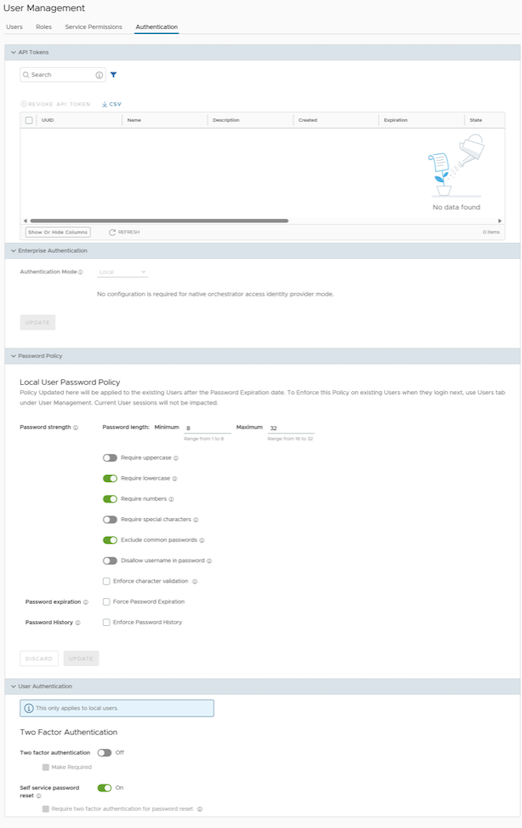
- Enterprise Authentication:
- Select one of the following Authentication modes:
- Local: This is the default option and requires no additional configuration.
- Single Sign-On: Single Sign-On (SSO) is a session and user authentication service that allows users to log in to multiple applications and websites with a single set of credentials. Integrating an SSO service with Orchestrator enables Orchestrator to authenticate users from OpenID Connect (OIDC)-based Identity Providers (IdPs).
- For information on configuring Single Sign-On for Enterprise Users, see Enterprise Settings.
To enable Single Sign On (SSO) for Orchestrator, enter the Orchestrator application details in the Identity Provider (IdP). Global Settings- Enterprise Authentication each of the following links for step-by-step instructions to configure the following supported IdPs:Configure the following options for Single Sign-on authentication mode.
Figure 12. Enterprise Authentication 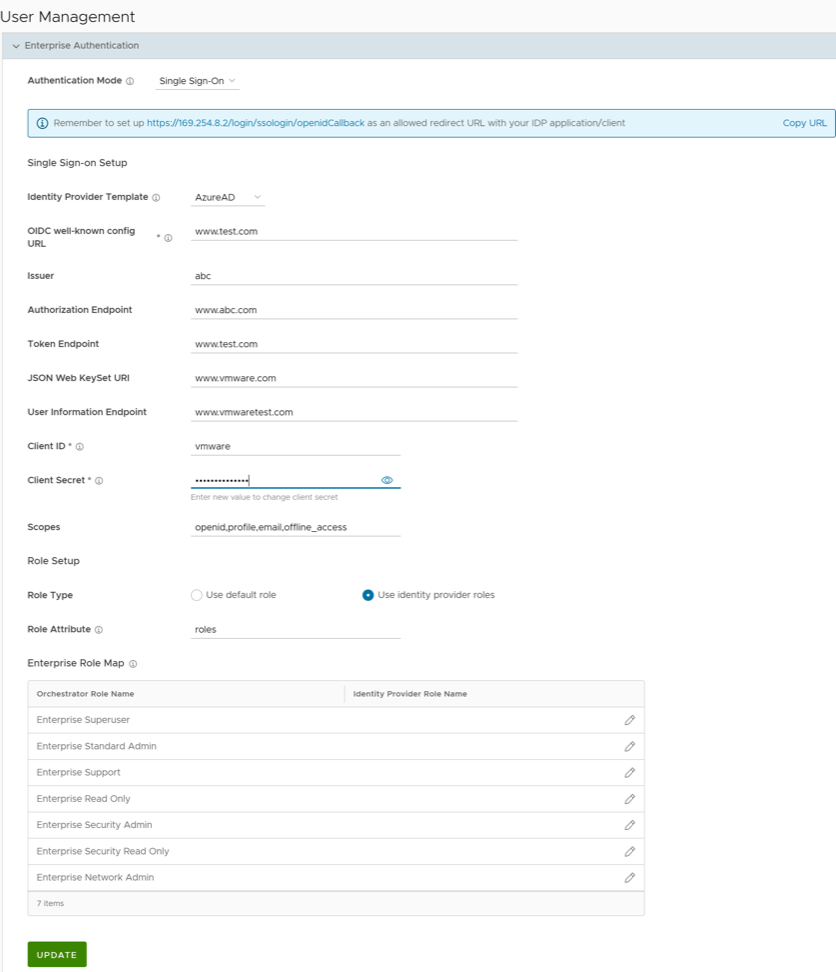
Table 17. Enterprise Authentication - Options and Descriptions Option Description Identity Provider Template From the drop-down menu, select your preferred Identity Provider (IdP) configured for Single Sign On. This pre-populates fields specific to your IdP. Note: Users can also manually configure your own IdPs by selecting Others from the drop-down menu.OIDC well-known config URL Enter the OpenID Connect (OIDC) configuration URL for your IdP. For example, the URL format for Okta will be: https://{oauth-provider-url}/.well-known/openid-configuration. Issuer This field is auto-populated based on your selected IdP. Authorization Endpoint This field is auto-populated based on your selected IdP. Token Endpoint This field is auto-populated based on your selected IdP. JSON Web KeySet URI This field is auto-populated based on your selected IdP. User Information Endpoint This field is auto-populated based on your selected IdP. Client ID Enter the client identifier provided by your IdP. Client Secret Enter the client secret code provided by your IdP, which the client uses to exchange an authorization code for a token. Scopes This field is auto-populated based on your selected IdP. Role Type Select one of the following two options: - Use the default role
- Use identity provider roles
Note: When using IdP-provided roles, it is necessary to map each possible role defined in the IdP to one or more predefined VCO roles. Use this option if there are subsets of users that need fewer permissions. Otherwise, use the "default role" option so that all users who sign in via SSO have that role.Role Attribute Enter the name of the attribute set in the IdP to return roles. Enterprise Role Map Map the IdP-provided roles to each of the Enterprise user roles. Select Update to save the entered values. The SSO authentication setup is complete in the Orchestrator.
- Select one of the following Authentication modes:
- Password Policy: Starting from the Release 6.4.0, Enterprise Superusers can set their own password policies directly from the Authentication screen. This section appears when the Authentication Mode is set to Local.
Figure 13. Password Policy 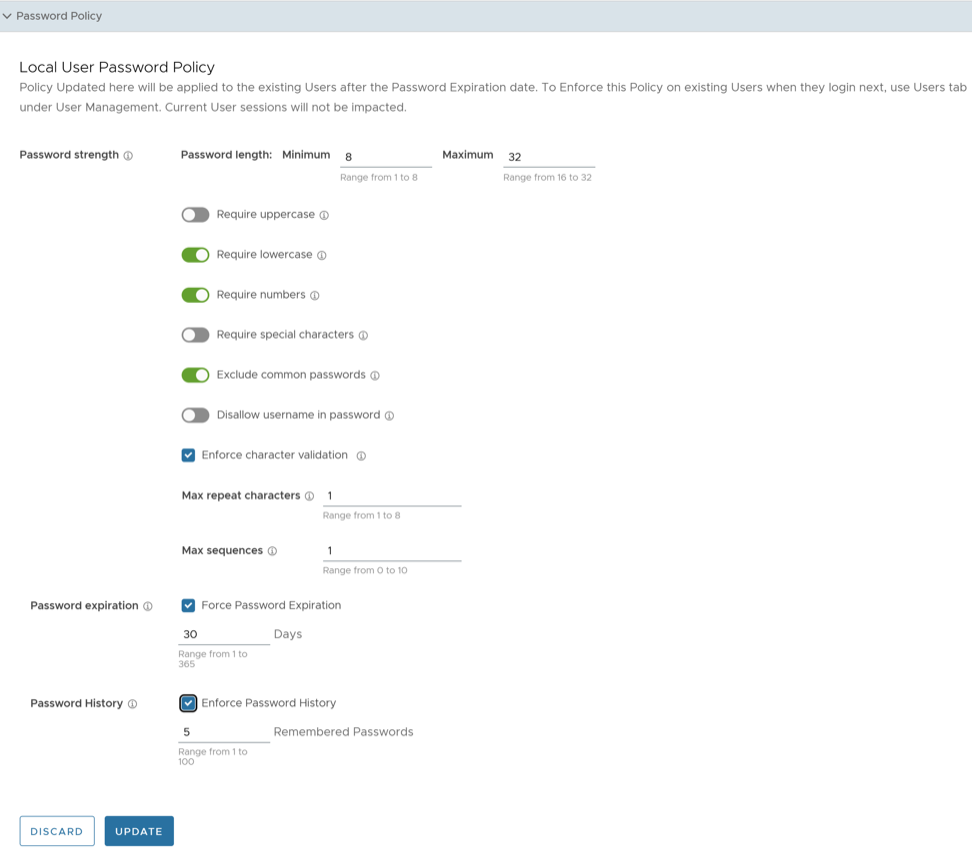
Time-Based One Time Passcode (TOTP)
Release 7.0.0 introduces a new feature, the Time-based One-Time Passcode (TOTP) mechanism, for Two Factor Authentication (2FA). This feature replaces the current text-based 2FA mechanism (SMS) and mandates all future 2FA to use TOTP. Arista recommends selecting the TOTP authentication because it is more secure than the SMS-based authentication.
When a user enables TOTP under , the Orchestrator prompts all users who log in to either enroll (if not already enrolled) or provide the TOTP to complete authentication.
The procedure below explains the enrollment flow.
- After enabling the TOTP, re-login to the VeloCloud Orchestrator.
The following screen appears if the user has not completed the TOTP enrollment.
Figure 14. TOTP Enrollment 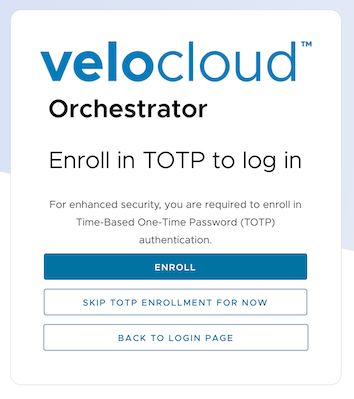
- Enroll: Perform the below steps.
- Select Verify.
Figure 15. Setup the Authenticator App 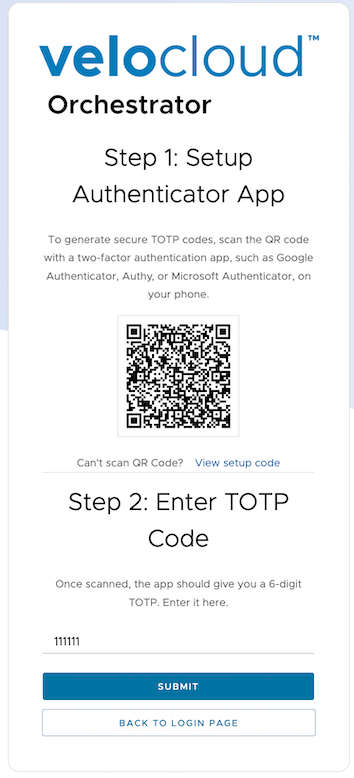
- Enter the new TOTP generated on the authenticator application, and then select Submit.
Figure 16. Enter TOTP 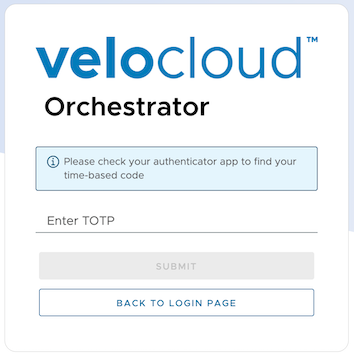 Note: The Authenticator application generates a new TOTP every 30 seconds.
- Select Verify.
Resetting a TOTP
Configure Azure Active Directory for Single Sign On
- Log in to your Microsoft Azure account as an Admin user. The Microsoft Azure home screen appears.
- To create a new application:
- Search and select the Azure Active Directory service.
Figure 17. Microsoft Azure 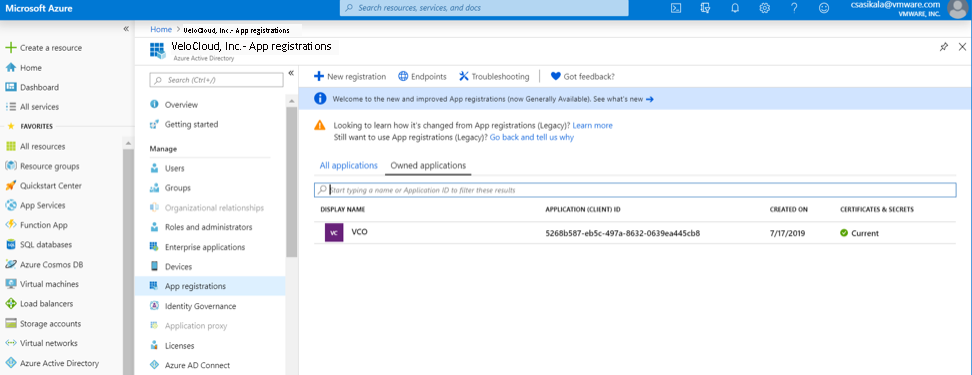
- Go to . The Register an application screen appears.
Figure 18. Register an Application 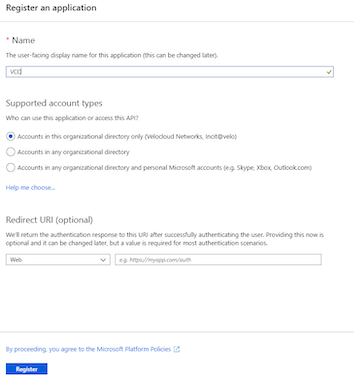
- Go to . The Add a client secret screen appears.
Figure 19. Add a Client Secret 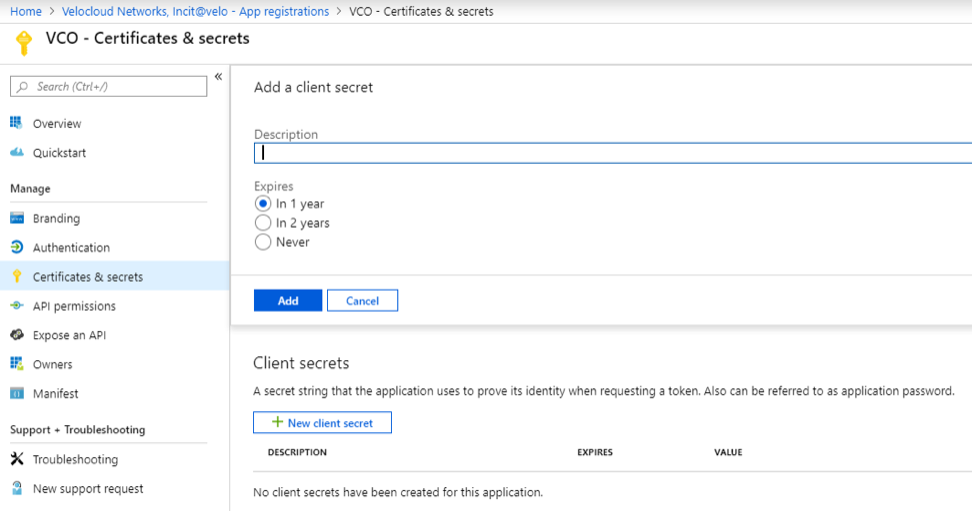
- To configure permissions for your Orchestrator application, select your Orchestrator application and go to . The Request API permissions screen appears.
Figure 20. API Permissions 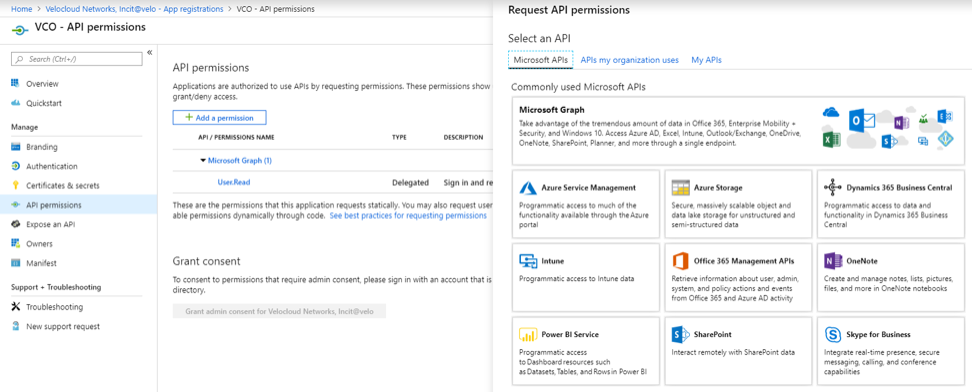
- To add and save roles in the manifest, select your Orchestrator application and from the application Overview screen, select Manifest. A web-based manifest editor opens, allowing you to edit the manifest within the portal. Optionally, you can select Download to edit the manifest locally, and then use Upload to reapply it to your application.
Figure 21. Manifest Screen Options 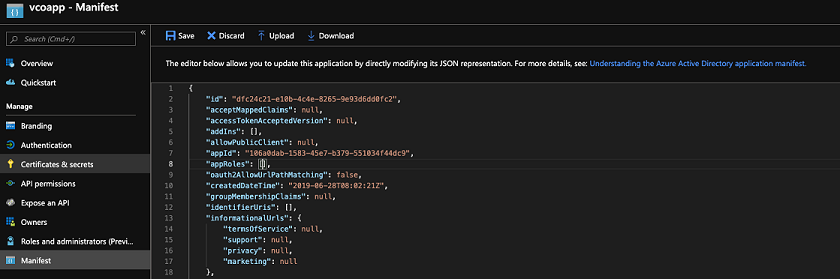
- In the manifest, search for the appRoles array and add one or more role objects as shown in the following example, and select Save.
Note: The value property from appRoles must be added to the Identity Provider Role Name column of the Role Map table, located on the Authentication tab, in order to map the roles correctly.Example: Sample role objects
{ "allowedMemberTypes": [ "User" ], "description": "Standard Administrator who will have sufficient privilege to manage resource", "displayName": "Standard Admin", "id": "18fcaa1a-853f-426d-9a25-ddd7ca7145c1", "isEnabled": true, "lang": null, "origin": "Application", "value": "standard" }, { "allowedMemberTypes": [ "User" ], "description": "Super Admin who will have the full privilege on Orchestrator", "displayName": "Super Admin", "id": "cd1d0438-56c8-4c22-adc5-2dcfbf6dee75", "isEnabled": true, "lang": null, "origin": "Application", "value": "superuser" }Note: Make sure to set id to a newly generated Global Unique Identifier (GUID) value. You can generate GUID values online using web-based tools (for example, https://www.guidgen.com/), or by running the following commands:- Linux/OSX - uuidgen
- Windows - powershell [guid]::NewGuid()
Figure 22. Manifest 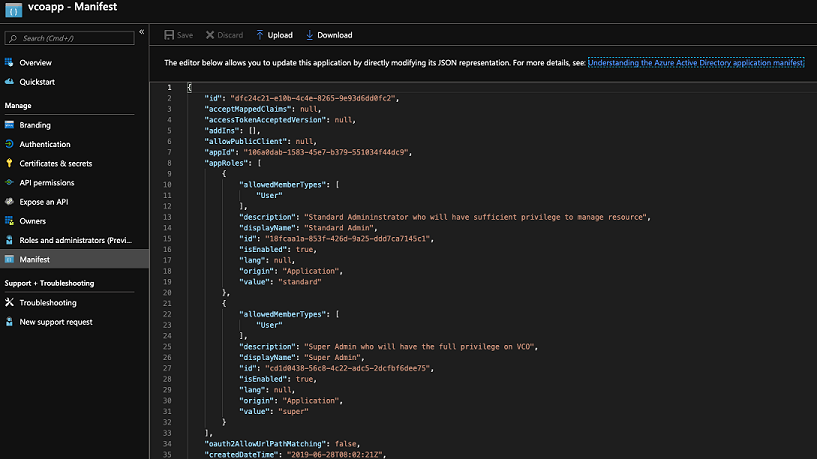
Roles are manually set up in the Orchestrator and must match the ones configured in the Microsoft Azure portal.
Figure 23. App Roles 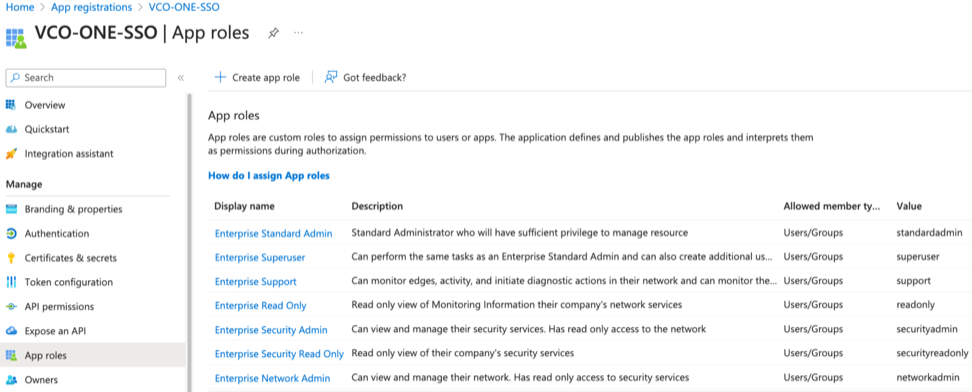
- Search and select the Azure Active Directory service.
- To assign groups and users to your Orchestrator application:
- Go to .
- Search and select your Orchestrator application.
- Select Users and groups and assign users and groups to the application.
- Select Submit. You have completed setting up an OIDC-based application in Azure AD for SSO.
Configure Okta for Single Sign On
- To create a new application:
- In the upper navigation bar, select . The Add Application screen appears.
Figure 24. Add Application 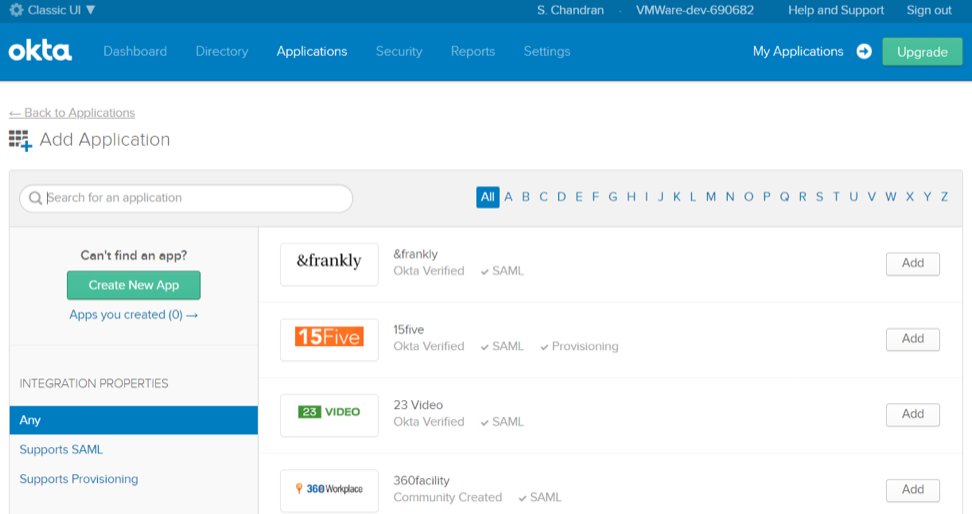
- Select OpenID Connect as the Sign on method then select Create.
The Create OpenID Connect Integration screen appears.
Figure 25. Create OpenID Connect Integration 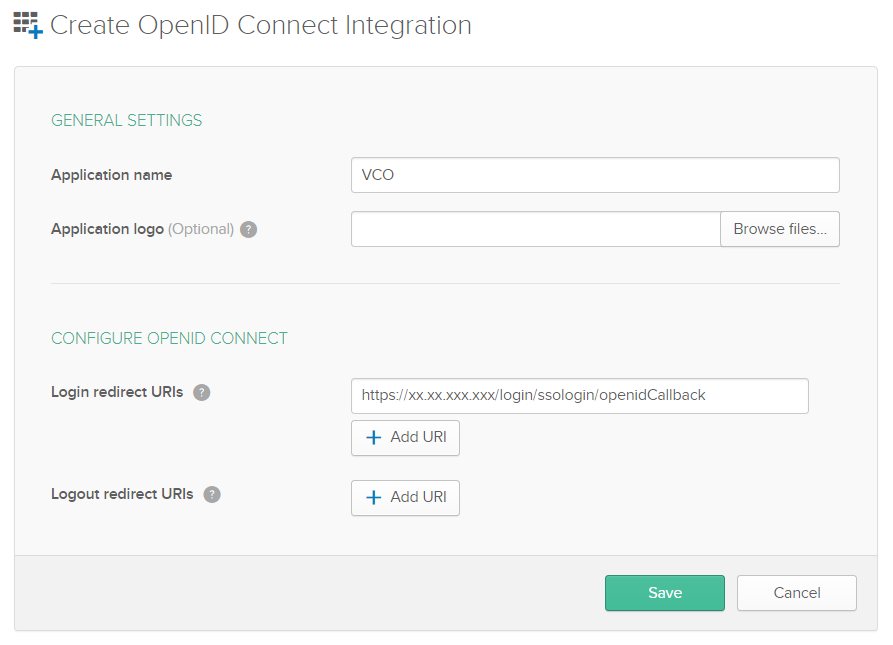
- On the General tab, select Edit then select Refresh Token for Allowed grant types. Now, select Save. Note down the Client Credentials (Client ID and Client Secret) to be used during the SSO configuration in the Orchestrator.
Figure 26. General Tab 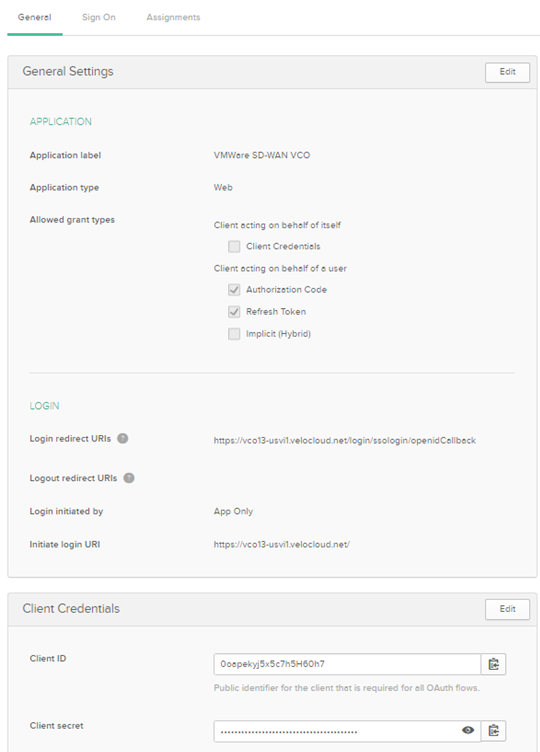
- Select Save.
The application is set up in IDP. You can assign user groups and users to your Orchestrator application.
Figure 27. Sign On Tab 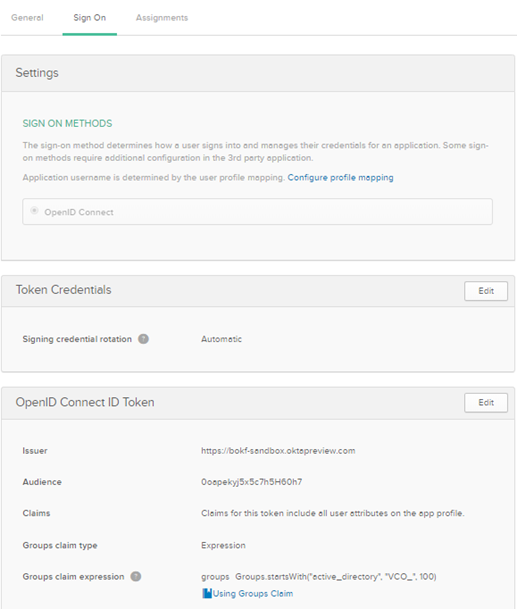
- In the upper navigation bar, select . The Add Application screen appears.
- To assign groups and users to your Orchestrator application:
- Select Assign next to available user groups or users you want to assign the Orchestrator application, and select Done. The users or user groups assigned to the Orchestrator application are displayed.
Figure 28. Assignments Tab 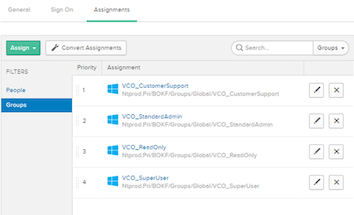
You have completed setting up an OIDC-based application in Okta for SSO.
- Select Assign next to available user groups or users you want to assign the Orchestrator application, and select Done. The users or user groups assigned to the Orchestrator application are displayed.
Configure OneLogin for Single Sign On
- Log in to your OneLogin account as an Admin user. The OneLogin home screen appears.
- To create a new application:
- In the Find Applications text box, search for “OpenId Connect” or “oidc”, then select the OpenId Connect (OIDC) app. The Add OpenId Connect (OIDC) screen appears.
Figure 29. Add OpenID Connect (OIDC) 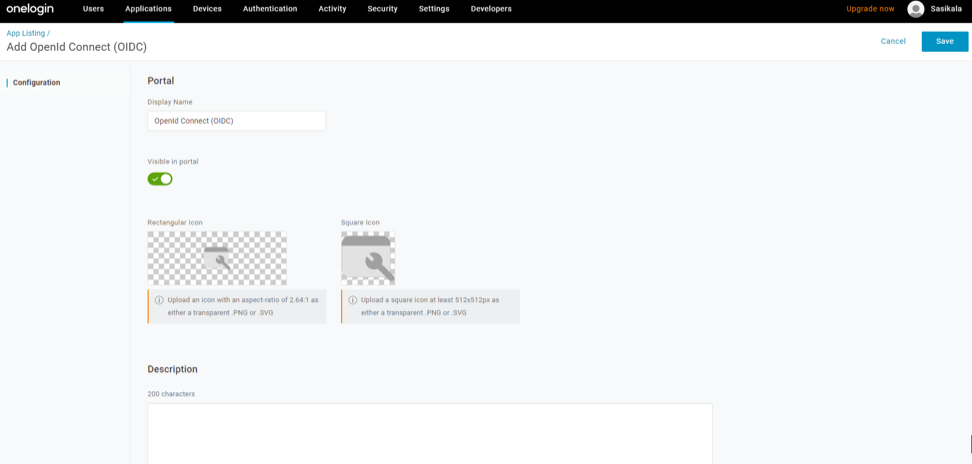
- On the Configuration tab, enter the Login URL (auto-login URL for SSO) and the Redirect URI that Orchestrator uses as the callback endpoint, and select Save.
- Login URL- The login URL will be in this format:
https://<Orchestrator URL>/<Domain>/ login/doEnterpriseSsoLogin. Where, <Domain> is the domain name of your Enterprise that you must have already set up to enable SSO authentication for the Orchestrator. You can get the Domain name from the page. - Redirect URI's- The Orchestrator redirect URL will be in this format:
https://<Orchestrator
URL>/login/ssologin/openidCallback
. In the Orchestrator application, at the bottom of the Authentication screen, you can find the redirect URL link.
Figure 30. Configuration Settings 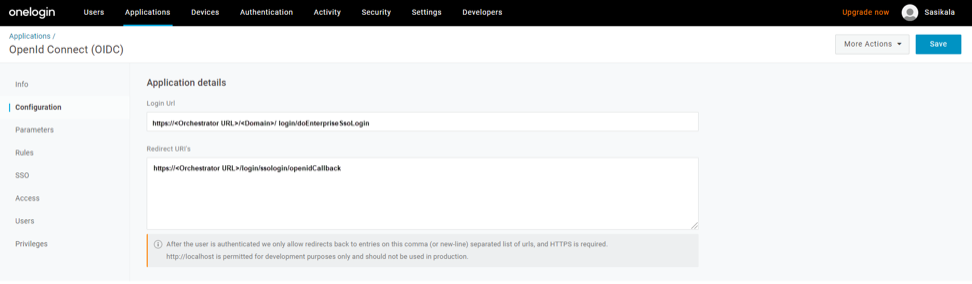
- Login URL- The login URL will be in this format:
- On the Parameters tab, under OpenId Connect (OIDC), double select Groups. The Edit Field Groups pop-up appears.
Figure 31. Edit Field Groups 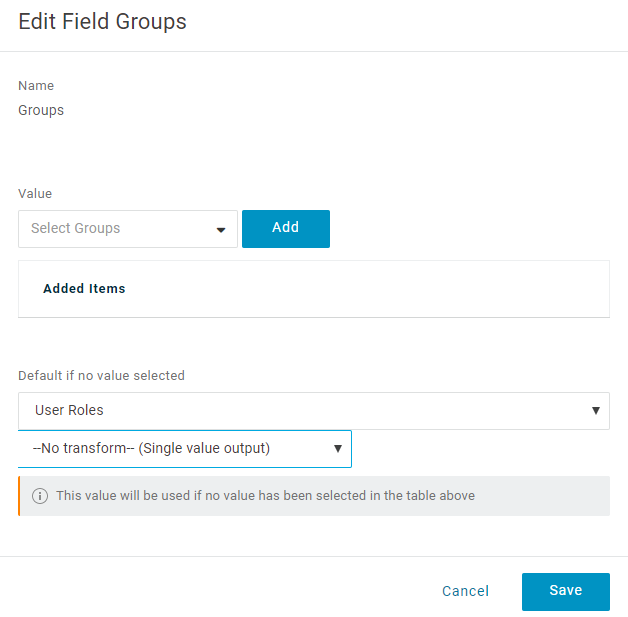
- From the Authentication Method drop-down menu, select POST as the Token Endpoint and select Save. Note down the Client Credentials (Client ID and Client Secret) to be used during the SSO configuration in the Orchestrator.
Figure 32. SSO Settings 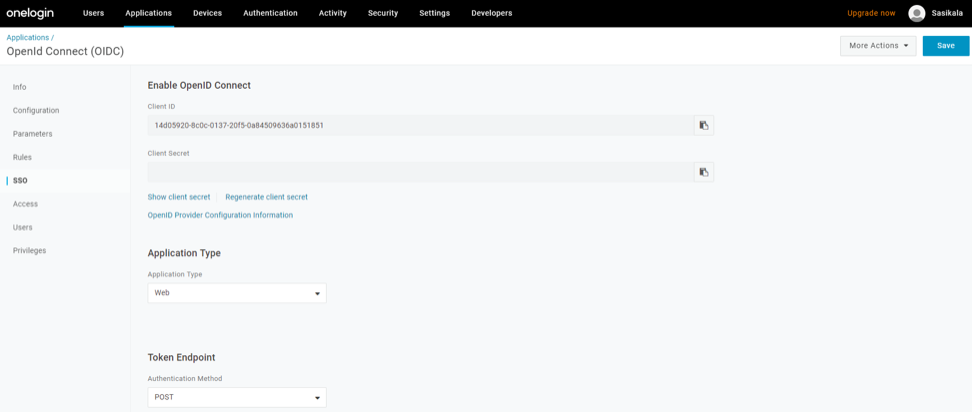
- On the Access tab, choose the roles that will be allowed to login and select Save.
Figure 33. Access Settings 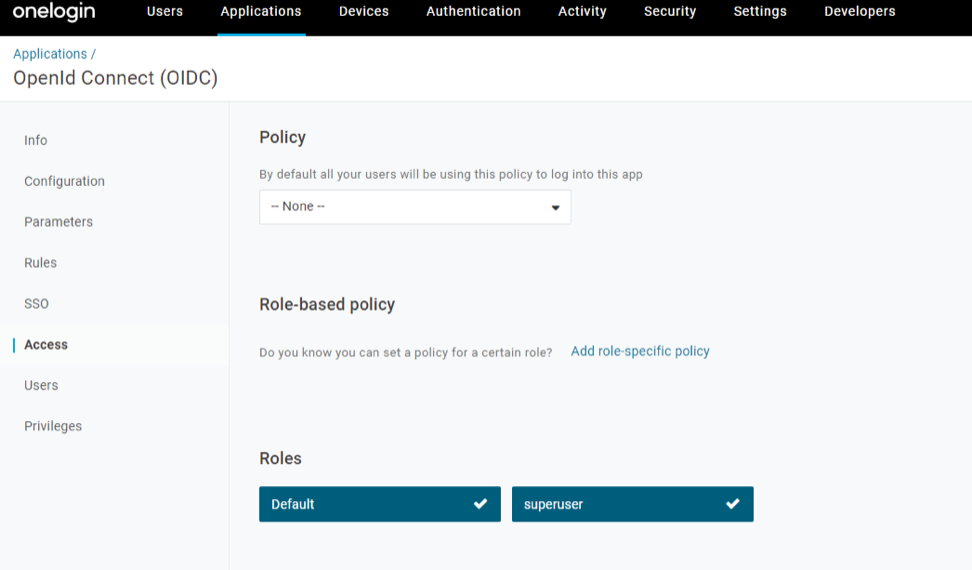
- In the Find Applications text box, search for “OpenId Connect” or “oidc”, then select the OpenId Connect (OIDC) app. The Add OpenId Connect (OIDC) screen appears.
- To add roles and users to your Orchestrator application:
- Select Users and select a user.
- On the Application tab, from the Roles drop-down menu, on the left, select a role to be mapped to the user.
- Select Save Users. You have completed setting up an OIDC-based application in OneLogin for SSO.
Configure PingIdentity for Single Sign On
- To create a new application:
- In the upper navigation bar, select My Applications.
Figure 34. My Applications Tab 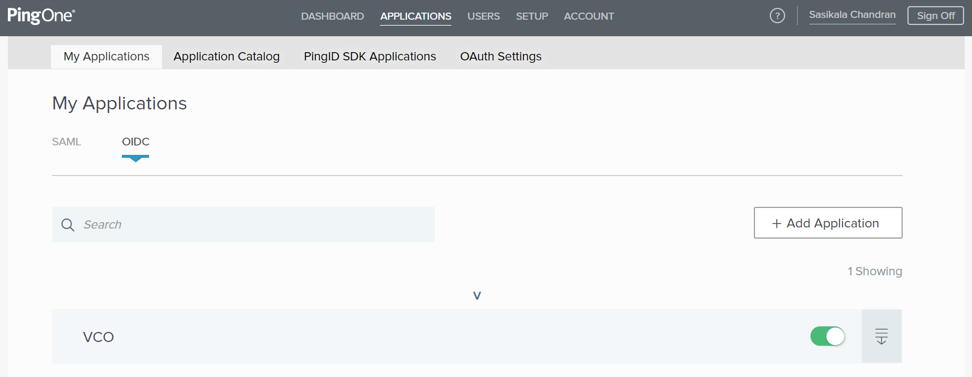
- On the My Applications tab, select OIDC , then select Add Application. The Add OIDC Application pop-up window appears.
Figure 35. Add OIDC Application 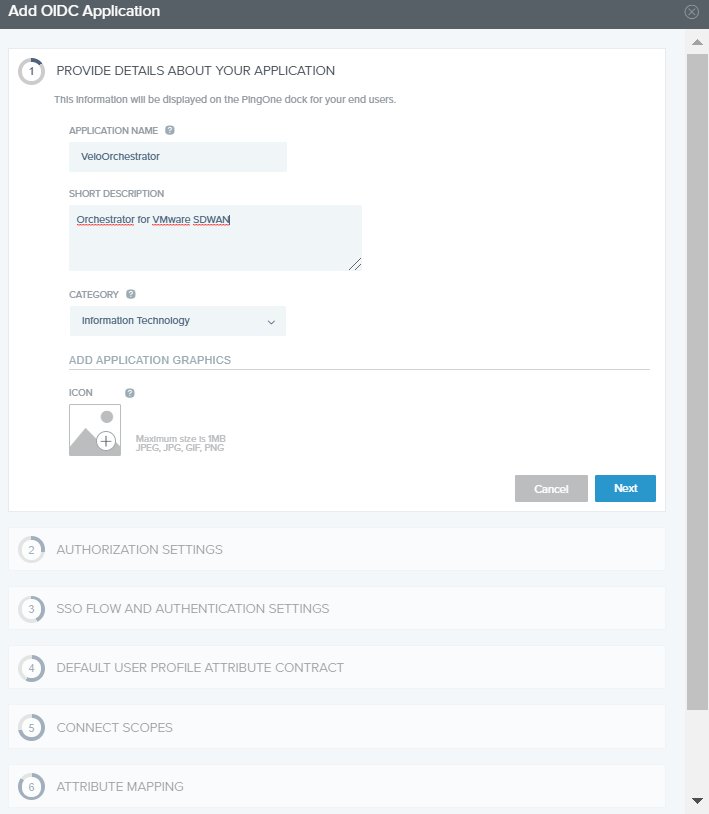
You have completed setting up an OIDC-based application in PingOne for SSO. - In the upper navigation bar, select My Applications.