
Monitor Gateways using Telegraf
Telegraf is a plugin-driven server agent used for collecting and sending metrics and events from systems. You can configure Telegraf to collect the counters and statistics from an Input plugin and to send the data to an Output plugin.
To integrate Telegraf with Gateways to collect and export the counters to a third party plugin, see Configure Telegraf Integration.
Configure Telegraf Integration
Telegraf is a plugin-driven server agent for collecting and sending metrics and events from systems.
The Input plugin is /etc/telegraf/vcg_metrics.py, a file that contains the counters to be added. The Output plugin can be either Wavefront or Prometheus.
Telegraf collects the metrics from the declared Inputs and sends the details to the declared Outputs.
The integration of Telegraf sends the data from the Gateways to the output plugins and you can view the details in the dashboards in visual format.
The following image shows an example output displayed in wavefront dashboard. The Graph illustrates Enterprise level information of flow count, NAT count, route count, and throughput details.

For the list of the counters that are exported by the input plugin script /etc/telegraf/vcg_metrics.py, see Supported Counters.
Configure Telegraf as Syslog Receiver
You can configure Telegraf to receive Syslog settings from Gateways.
To configure Telegraf as syslog receiver:
- In the Overview tab, scroll down to the Syslog Settings section and configure Loopback IP address as the syslog receiver.
Figure 2. Syslog Settings 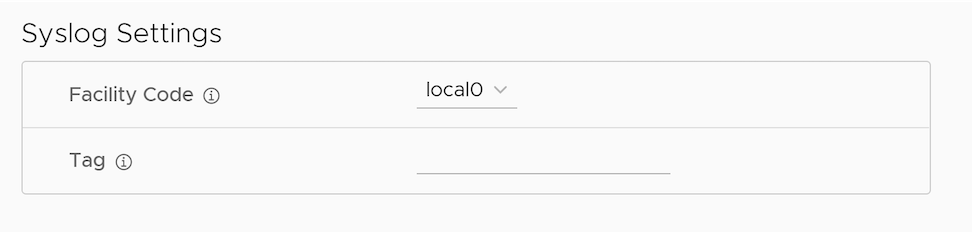
Supported Counters
After integrating Telegraf to an Gateway, you can collect the counters from the configured Input and export the data to the Output plugin.
The following table lists the supported Counters that can exported from an Gateway.
| Counter Name | Description | Availability | Minimum Supported SD-WAN Version |
|---|---|---|---|
| number_of_edges | Number of Edges connected to the Gateway. | Global | 4.3.0 |
| number_of_tunnels | Number of tunnels associated with the Gateway. | Global | 4.3.0 |
| IPv4, IPv6 | 4.5.0 | ||
| number_of_routes | Number of routes installed in the Gateway. | Global | 4.3.0 |
| number_of_flows | Total number of active flows in the Gateway. | Global | 4.3.0 |
| active_NAT_entries | Number of active NAT entries per peer. | Global | 4.3.0 |
| free_NAT_entries | Number of free shared memory entries assigned for NAT. | Global | 4.3.0 |
| stale_NAT_entries | Number of stale NAT entries in the system. This tracks only the stale entries due to ref count leak. | Global | 4.3.0 |
| stale_tunnel_entries | Number of stale tunnel entries in the Gateway. | Global | 4.3.0 |
| stale_peer_objects | Number of stale peer objects in the Gateway. | Global | 4.3.0 |
| stale_flow_entries | Number of stale flow entries in the Gateway. | Global | 4.3.0 |
| sched_drop | Packets dropped in scheduler due to the bandwidth limit. | Global | 4.3.0 |
| flow_drop | Packets dropped due to flow lookup failure and flow creation failure. | Global | 4.3.0 |
| route_drop | Packets dropped due to route lookup failure and route sanity failure. Routing control packets which are dropped due to exceptions are also accounted. | Global | 4.3.0 |
| nat_drop | Packets dropped due to NAT lookup failure and NAT creation failure. | Global | 4.3.0 |
| over_capacity_drop | Packets dropped due to internal handoff queue limit drops and low packet buffers in the system. | Global | 4.3.0 |
| vcmp_drop | VCMP control and data packet dropped due to VCMP sanity checks and exceptions. | Global | 4.3.0 |
| invalid_pkt_drop | Packets dropped due to invalid checksum, TTL, and invalid packet size. | Global | 4.3.0 |
| misc_drop | Packets dropped due to other errors and exceptions. | Global | 4.3.0 |
| num_nsd_paths_up/down | Number of NSD tunnels in UP/DOWN state in the Gateway. | Global | 4.3.0 |
| num_paths_INITIAL | Number of tunnels in INITIAL state.
INITIAL state indicates that the Edge just initiated a tunnel request to the Gateway. |
Global | 4.3.0 |
| IPv4, IPv6 | 4.5.0 | ||
| num_paths_MEASURING_TX_BW
num_paths_MEASURING_RX_BW |
After initiating a tunnel request, tx and rx bandwidth will be measured for the tunnels from Edge to Gateway before moving to STABLE state. The number of tunnels for which tx and rx bandwidth is measured is tracked under the respective counters. | Global | 4.3.0 |
| IPv4, IPv6 | 4.5.0 | ||
| num_paths_STABLE | Number of tunnels in STABLE state.
STABLE state indicates that the tunnel is established between Edge and Gateway and the tunnel is stable. To find the percentage of stable tunnels, multiply the number of stable tunnels by 100 and then divide that value by total number of tunnels. |
Global | 4.3.0 |
| IPv4, IPv6 | 4.5.0 | ||
| num_paths_UNSTABLE | Number of tunnels in UNSTABLE state.
If the loss, latency and jitter values exceed the defined threshold, the tunnel moves to UNSTABLE state. To find the percentage of unstable tunnels, multiply the number of unstable tunnels by 100 and then divide that value by total number of tunnels. |
Global | 4.3.0 |
| IPv4, IPv6 | 4.5.0 | ||
| num_paths_QUIET | If no packets are received in the path for a defined time interval, path transitions to QUIET state and the number of such paths are tracked here. | Global | 4.3.0 |
| IPv4, IPv6 | 4.5.0 | ||
| nat_cnt | Number of active NAT entries per Enterprise. | Per Enterprise | 4.3.0 |
| route_cnt | Number of route entries installed in the Gateway per Enterprise. | Per Enterprise | 4.3.0 |
| flow_cnt | Total number of active flows per Enterprise. | Per Enterprise | 4.3.0 |
| tx_packets | Number of packets transmitted from the Gateway. | Per Enterprise, | 4.3.0 |
| Per Edge Tunnel | 5.0.1 | ||
| Per Non SD-WAN Destination | 4.5.0 | ||
| tx_bytes | Number of bytes transmitted from the Gateway. | Per Enterprise | 4.3.0 |
| Per Edge Tunnel | 5.0.1 | ||
| Per Interface | 5.0.1 | ||
| Per Non SD-WAN Destination | 4.5.0 | ||
| tx_errors | Number of packets dropped at TX due to packet errors. | Per Non SD-WAN Destination | 5.1.0 |
| rx_packets | Number of packets received by the Gateway. | Per Enterprise | 4.3.0 |
| Per Non SD-WAN Destination | 4.5.0 | ||
| Per Edge Tunnel | 5.0.1 | ||
| rx_bytes | Number of bytes received by the Gateway. | Per Enterprise | 4.3.0 |
| Per Non SD-WAN Destination | 4.5.0 | ||
| Per Edge Tunnel | 5.0.1 | ||
| Per Interface | 5.0.1 | ||
| rx_errors | Number of packets dropped at RX due to packet errors. | Per Non SD-WAN Destination | 5.1.0 |
| vc_queue_<queue_name>_len | Number of packets enqueued in each handoff queues listed in Capacity of Gateway Components. | Global | 4.3.0 |
| vc_queue_<queue_name>_drop | Number of drops in each handoff queues listed in Capacity of Gateway Components. | Global | 4.3.0 |
| vc_queue_<queue_name>_wmark | Maximum number of packets enqueued in the respective queue at any point in time. | Global | 4.5.1 |
| vc_queue_<queue_name>_wmark_1min | Maximum number of packets enqueued in the respective queue in the last one minute. | Global | 4.5.1 |
| vc_queue_<queue_name>_wmark_5min | Maximum number of packets enqueued in the respective queue in the last 5 minutes. | Global | 4.5.1 |
| dpdk_mbuf_pending | Number of buffers that are already processed and waiting to be freed. | Global | 4.3.0 |
| dpdk_mbuf_locked_fail | Number of times the GET buffer operation fails while retrieving a buffer from the locked pool. | Global | 4.3.0 |
| dpdk_mbuf_locked_free | Number of free buffers present in the locked pool. | Global | 4.3.0 |
| dpdk_mbuf_pool_free | Number of free buffers. | Global | 4.3.0 |
| nombuf | Total number of RX mbuf allocation failures. | Global | 4.3.0 |
| mbuf_low | Number of times the mbuf_low threshold is reached. | Global | 4.3.0 |
| net_sch.pkt_cnt | Number of buffers used by Net Scheduler. | Global | 4.3.0 |
| link_sch.pkt_cnt | Number of buffers used by Link Scheduler. | Global | 4.3.0 |
| link_sch_cosq.pkt_cnt | Number of buffers used by Link Cos Scheduler. | Global | 4.3.0 |
| mp.rt_pkts_stored | Number of buffers used by VCMP retransmit store. | Global | 4.3.0 |
| mp.reseq_qlen | Number of buffers used for VCMP resequencing. | Global | 4.3.0 |
| mp.jitter_pkt_bufs | Number of buffers used for VCMP jitter management. | Global | 4.3.0 |
| ipfrag.current_cnt | Number of buffers allocated for storing fragmented packets. | Global | 4.3.0 |
| crypto_drop | Number of packet drops observed due to crypto failures. | Global | 4.3.0 |
| frag_drop | Packet dropped due to fragmentation related issues. | Global | 4.3.0 |
| link_drop | Number of packet drops observed due to link specific issues. | Global | 4.3.0 |
| nat_over_capacity_drop | NAT over capacity drops due to port assignment failures. | Global | 4.3.0 |
| interface_over_capacity_drop | Packets dropped at the interface level due to over-capacity. | Global | 4.3.0 |
| misc_over_capacity_drop | Packets dropped due to internal handoff queue limit drops and due to low packet buffers in the system. | Global | 4.3.0 |
| <tx/rx>_pktsize_0_63 | Number of packets with size 0-63 bytes transmitted/received in a Gateway. | Per Interface | 4.5.0 |
| <tx/rx>_pktsize_64_127 | Number of packets with size 64-127 bytes transmitted/received in a Gateway. | Per Interface | 4.5.0 |
| <tx/rx>_pktsize_128_255 | Number of packets with size 128-255 bytes transmitted/received in a Gateway. | Per Interface | 4.5.0 |
| <tx/rx>_pktsize_256_511 | Number of packets with size 256-511 bytes transmitted/received in a Gateway. | Per Interface | 4.5.0 |
| <tx/rx>_pktsize_512_1023 | Number of packets with size 512-1023 bytes transmitted/received in a Gateway. | Per Interface | 4.5.0 |
| <tx/rx>_pktsize_1024_1499 | Number of packets with size 1024-1499 bytes transmitted/received in a Gateway. | Per Interface | 4.5.0 |
| <tx/rx>_pktsize_1500 | Number of packets with size above 1500 bytes transmitted/received in a Gateway. | Per Interface | 4.5.0 |
| over_capacity_status | Indicates if a Gateway is running into over-capacity state due to internal handoff queue limit drops and low packet buffers in the system. | Global | 5.1.0 |
| auto_rate_limit_drop | Packets dropped on Gateway due to auto rate-limit to restore Gateway from over capacity condition. | Global | 5.2.0 |
| red_factor | Rate limit factor set on VCMP peers based on RED applied. | Per Edge Tunnel | 5.2.0 |
| capacity_metric_edge_count_value | Number of Edges connected to the Gateway. | Global | 5.2.0 |
| capacity_metric_edge_count_warning_threshold | Recommended threshold value (1500) for setting warning alerts based on the Edge count. | Global | 5.2.0 |
| capacity_metric_edge_count_critical_threshold | Recommended threshold value (2000) for setting critical alerts based on the Edge count. | Global | 5.2.0 |
| capacity_metric_tunnel_count_value | Number of tunnels associated with the Gateway. | Global | 5.2.0 |
| capacity_metric_tunnel_count_warning_threshold | Recommended threshold value (2625) for setting warning alerts based on the tunnel count. | Global | 5.2.0 |
| capacity_metric_tunnel_count_critical_threshold | Recommended threshold value (3500) for setting critical alerts based on the tunnel count. | Global | 5.2.0 |
| capacity_metric_pki_enabled_tunnel_count_value | Number of tunnels (with certificate) associated with the Gateway. | Global | 5.2.0 |
| capacity_metric_pki_enabled_tunnel_count _warning_threshold | Recommended threshold value (1875) for setting warning alerts based on the count of tunnels with certificate. | Global | 5.2.0 |
| capacity_metric_pki_enabled_tunnel_count _critical_threshold | Recommended threshold value (2250) for setting critical alerts based on the count of tunnels with certificate. | Global | 5.2.0 |
| capacity_metric_flow_count_value | Number of flows in the Gateway. | Global | 5.2.0 |
| capacity_metric_flow_count_warning_threshold | Recommended threshold value (475410) for setting warning alerts based on the flow count. | Global | 5.2.0 |
| capacity_metric_flow_count_critical_threshold | Recommended threshold value (713115) for setting critical alerts based on the flow count. | Global | 5.2.0 |
| capacity_metric_nat_count_value | Number of NAT entries in the Gateway. | Global | 5.2.0 |
| capacity_metric_nat_count_warning_threshold | Recommended threshold value (475410) for setting warning alerts based on the NAT count. | Global | 5.2.0 |
| capacity_metric_nat_count_critical_threshold | Recommended threshold value (713115) for setting critical alerts based on the NAT count. | Global | 5.2.0 |
| capacity_metric_pktq_wmark_value | Number of packet queue watermark in the Gateway. | Global | 5.2.0 |
| capacity_metric_pktq_wmark_warning_threshold | Recommended threshold value (2000) for setting warning alerts based on the packet queue watermark count. | Global | 5.2.0 |
| capacity_metric_pktq_wmark_critical_threshold | Recommended threshold value (6000) for setting critical alerts based on the packet queue watermark count. | Global | 5.2.0 |
| capacity_metric_pkt_drop_value | Number of packet drops in the Gateway. | Global | 5.2.0 |
| capacity_metric_pkt_drop_warning_threshold | Recommended threshold value (500) for setting warning alerts based on the packet drops. | Global | 5.2.0 |
| capacity_metric_pkt_drop_critical_threshold | Recommended threshold value (2000) for setting critical alerts based on the packet drops. | Global | 5.2.0 |
| dpdk_xstats_<interface name>_tx_pps_<histogram bin counter range> | Histogram counters to monitor Gateway utilization based on egress packets per second.
For packets per second (pps) monitoring, the defined histogram bin counter ranges are:
|
Per DPDK Interface | 6.0.0 |
| dpdk_xstats_<interface name>_rx_pps_<histogram bin counter range> | Histogram counters to monitor Gateway utilization based on ingress packets per second. | Per DPDK Interface | 6.0.0 |
| dpdk_xstats_<interface name>_tx_mbps_<histogram bin counter range> | Histogram counters to monitor Gateway utilization based on egress throughput usage.
For Megabits per second (Mbps) throughput monitoring, the defined histogram bin counter ranges are:
|
Per DPDK Interface | 6.0.0 |
| dpdk_xstats_<interface name>_rx_mbps_<histogram bin counter range> | Histogram counters to monitor Gateway utilization based on ingress throughput usage. | Per DPDK Interface | 6.0.0 |