
Configure Customers
After creating a Customer, configure the feature options and settings that the Customer can access. You can choose the settings the Customer can modify. Only an Operator user can configure Customer settings.
When you create a new Customer, you are redirected to the Customer Configuration page, where you can configure the Customer settings. You can also navigate to the Customer Configuration page by following the steps below:
- From the left menu,Customer Configuration. The following screen appears:
Figure 1. Global Settings- Customer Configuration 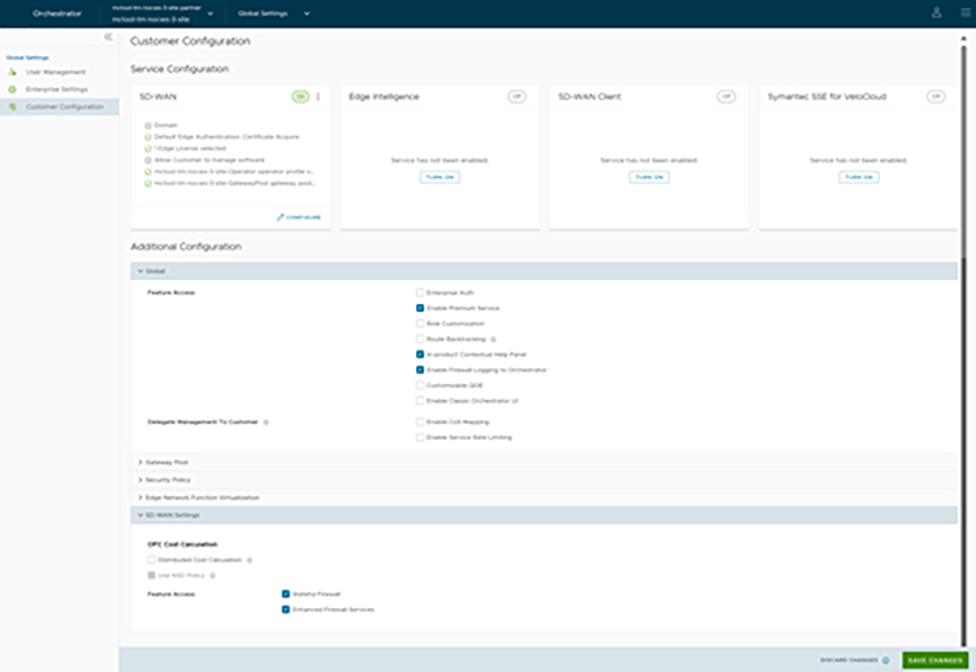
- You can also use the Configure option present at the bottom right corner of the tile to configure the respective service. The tile displays the configuration summary.
Note: When you select Turn off option, a pop-up window appears asking for your confirmation. Select the check box andTurn Off Service.
- Selecting the Configure option displays the following pop-up window.
Figure 2. SD-WAN Configuration 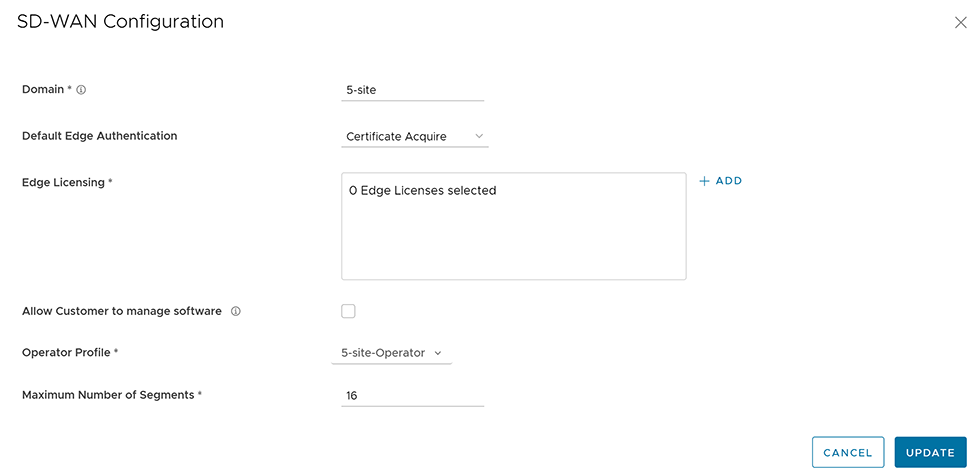
- Selecting the Configure option displays the following pop-up window.
Configure Partner Handoff
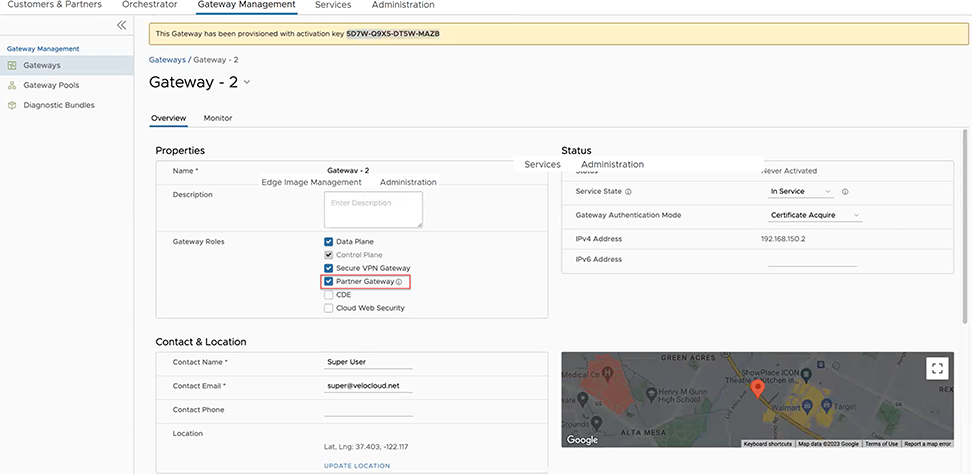
You can configure a Gateway to hand off to Partners. The Gateway acts as a Partner Gateway that enables you to configure the Hand off Interface, Static Routes, BGP, and other settings.
To configure the Handoff settings, perform the following steps:
- In the Configure Hand Off area, configure the following options:
Figure 4. Configure Partner Hand Off 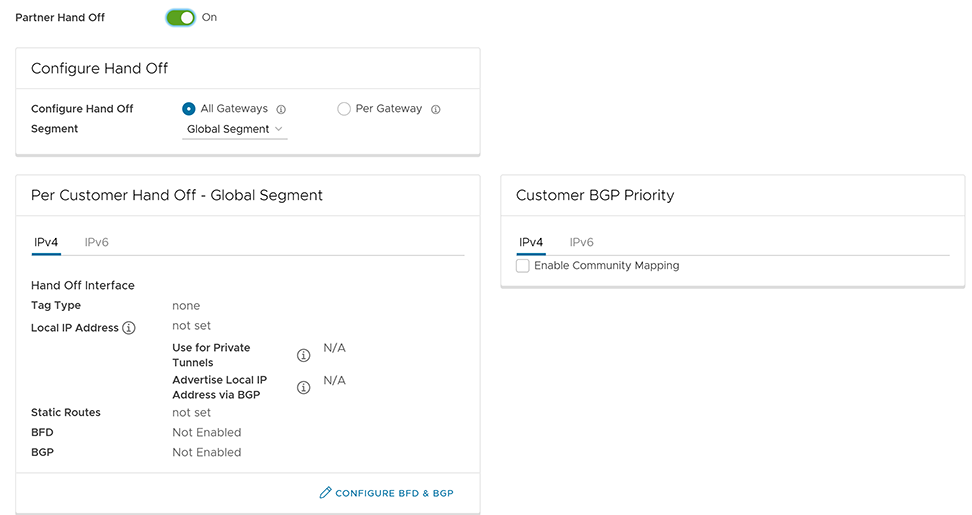
Table 3. Partner Handoff Option Descriptions Option Description Configure Hand Off By default, the hand off configuration is applied to all the Gateways. If you want to configure a specific Gateway, choose Per Gateway, and then select the Gateway from the drop-down list. Segment By default, Global Segment is selected, which means that the hand off configuration is applied to all the segments. If you want to configure a specific segment, select the segment from the drop-down menu. Hand Off Interface This section displays the values that are configured on the Configure BGP and BFD page. Customer BGP Priority Select the check box and configure the Community Mapping details. - At the bottom of the Per Customer Hand Off – Global Segment area, select the Configure BFD & BGP link, as shown in the image below:
Figure 5. Per Customer Hand Off – Global Segment 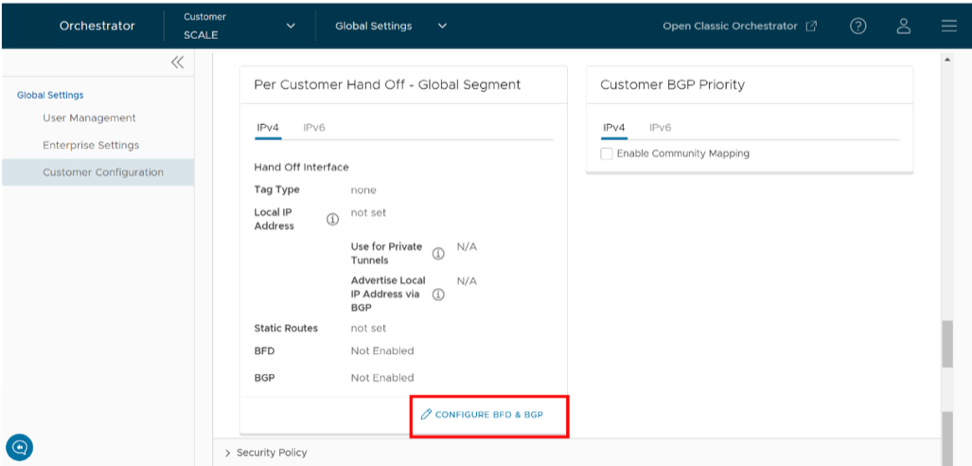 The Configure BGP and BFD screen appears:
Figure 6. Configure BFD and BGP 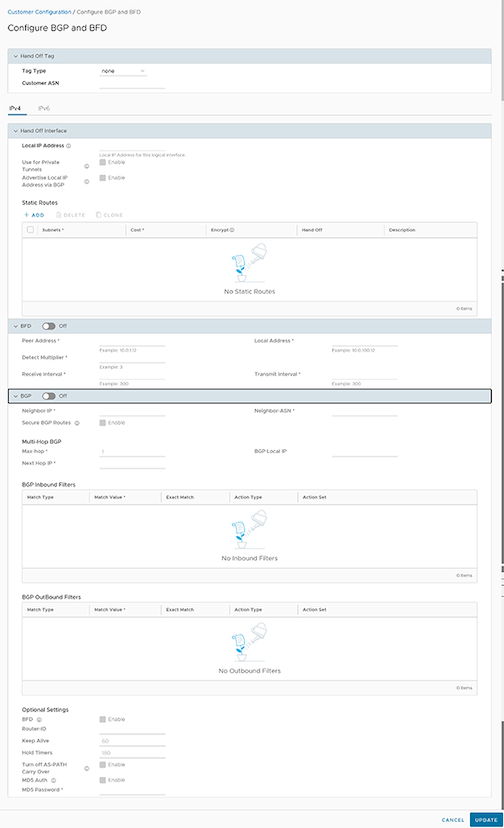
- Expand the General & Hand Off Tag section and turn the BGP option to the On position.
Figure 7. General & Hand Off Tag 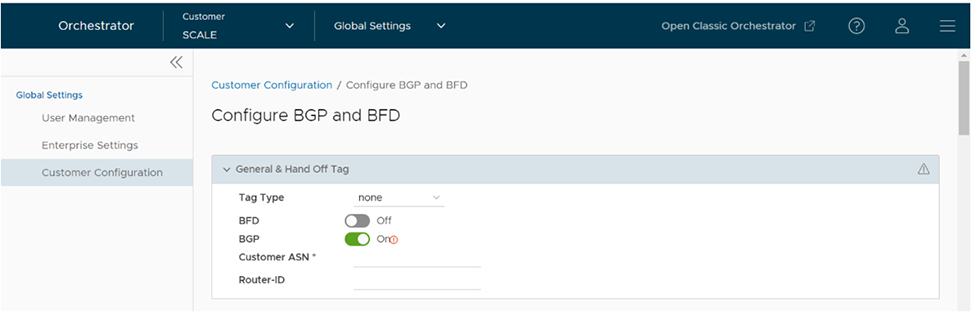
Route Summarization
Route Summarization is introduced in the 5.2 release. For an overview, use case, and black hole routing details for Route Summarization, see the section Route Summarization in the Arista SD-WAN Administration Guide. For Route Summarization configuration details, follow the steps below:
- Scroll down to the Route Summarization area in the BGP section.
Figure 8. Route Summarization 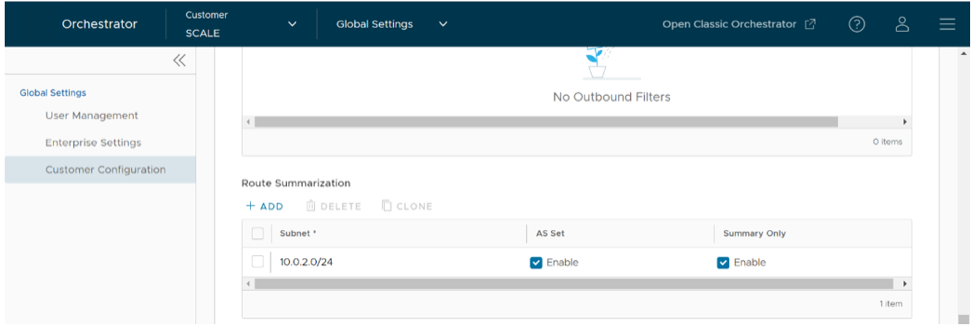
Configure Distributed Cost Calculation
- All the Edges and Gateways must use software version 3.4.0 or later.
- The software image associated with the Operator Profile must use version 3.4.0 or later.
By default, the Orchestrator is actively involved in learning the dynamic routes. VeloCloud SD-WAN Edges and Gateways rely on the Orchestrator to calculate initial route preferences and return them to the Edge and Gateway. The Distributed Cost Calculation feature enables you to distribute the route cost calculation to the Edges and Gateways. Only an Operator user can configure Customer settings, including Distributed Cost Calculation.
Anybody experiencing an issue with Orchestrator based route calculation must enable Distributed Cost Calculation.
- If the Orchestrator is under a high load, the route convergence time is significantly high (for example, as much as 40 seconds for 2000+ routes), as the Orchestrator takes that time to calculate the preference for all the synchronized routes and returns those preferences to the Edges and Gateways.
- Using the Orchestrator for route calculation means that new dynamic routes learned while the Orchestrator was unreachable are not advertised until the Orchestrator becomes reachable again.
When a customer enterprise uses Distributed Cost Calculation, the Orchestrator is no longer actively involved in the route preference calculation and instead routes are properly inserted in order by the Edge and Gateway instantly upon learning them and then convey these preferences to the Orchestrator.
- Minimizes the impact on route learning when an Orchestrator is unreachable.
- Route convergence time is reduced from minutes to seconds in large networks with thousands of dynamic routes.
- Network delays are significantly reduced.
- Provides instantaneous Data Plane convergence.
- Supports enhanced re-ordering and pinning of routes on the Overlay Flow Control.
- Provides an option to refresh routes in the Overlay Flow Control page. Whenever there is a change in the Overlay Flow Control policy, the Refresh Routes option applies the changes to the existing routes immediately, without the need to restart the Edge or Gateway.
- All the local dynamic routes are refreshed, and the preference and advertise action of these routes are updated. This updated information is advertised to the Gateway, Orchestrator, and eventually across the Enterprise. The customer's network needs to completely rebuild the route table, which for most customer deployments will take less than 5 seconds. A large scale customer deployment (like 100,000+ routes) may take up to 2 minutes. During the time the route table is being rebuilt, customer traffic for all sites is impacted.
- Any existing flow using these routes can potentially be affected due to the change in the routing entries.
To configure Distributed Cost Calculation for a customer:
- In the Enterprise portal, go to .
Figure 9. Distributed Cost Calculation 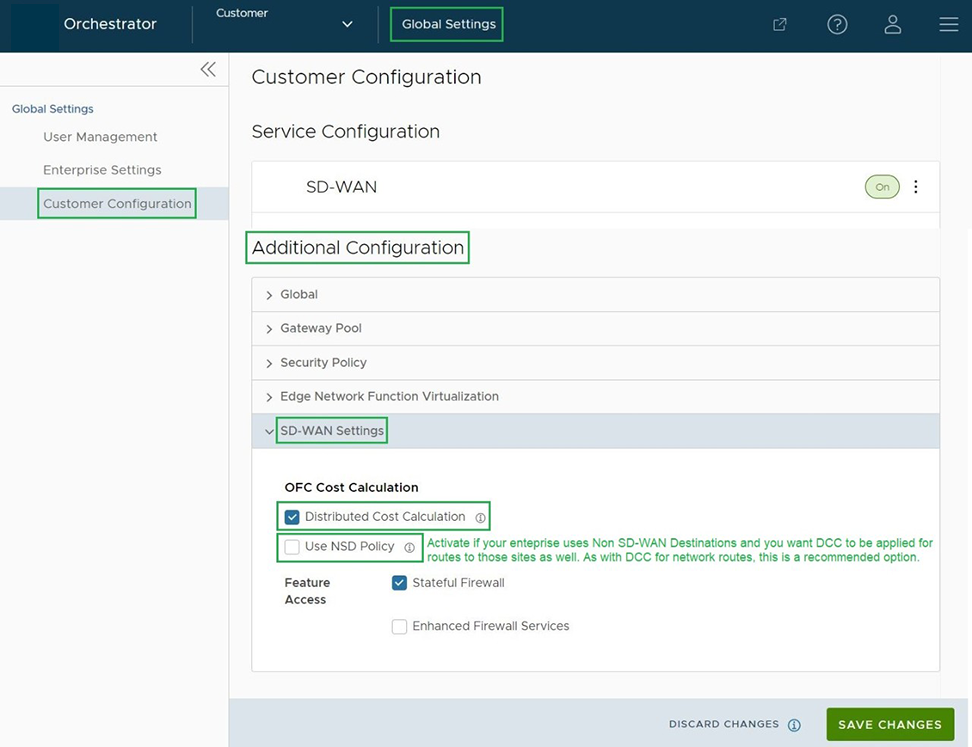
Once Distributed Cost Calculation is activated, all the dynamic routes are assigned with new preferences and advertise action based on the Distributed Cost Calculation and the new information is propagated across the Enterprise Network.
The Orchestrator is no longer actively involved in the route preference calculation and instead the routes are properly inserted in order by the Edge and Gateway instantly upon learning them and then these preferences are conveyed to the Orchestrator.
The Overlay Flow Control policy is sent to Edges and Gateways in Control Plane Configuration updates. Edges and Gateways send the routes with computed cost and advertise action to the Orchestrator. Edges and Gateways handle the order of the routes based on the cost and route attributes.
To view a summary of all the routes in your network, select in the SD-WAN service of the Enterprise portal. You can view the routes and advertise action in the Overlay Flow Control page. For more information, see the topic Overlay Flow Control in the Arista VeloCloud SD-WAN Administration Guide.
Configure Path Calculation with Multiple DSCP Labels per Flow
An Edge classifies a traffic flow based on the first packets in the flow. You can create business policies with application based on Differentiated Service Code Point (DSCP) and with different DSCP markings to determine the flow treatment.
Business Policy and QoS marking determine the flow treatment. Once the flow is classified, an entry with five tuple information of the flow is created in the flow cache table. Subsequent packets in the flow will use the five-tuple lookup against the flow cache table.
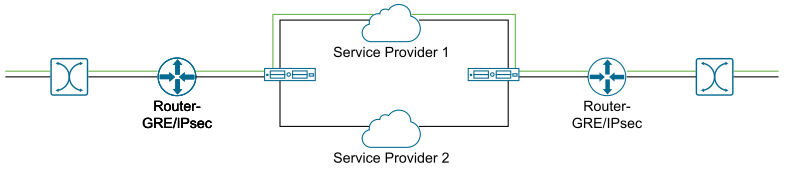
The impact of multiplexing end user flows into a single tunnel creates polarization of flow forwarding using the five tuples of flow cache table, which results in WAN links not being utilized.
The Path Calculation with Multiple DSCP Labels per Flow allows the DSCP value to be included, in addition to the five tuples, as part of the flow cache table lookup. Use the path calculation with multiple DSCP tags when the original user traffic is encapsulated in another tunnel like GRE or IPsec, and DSCP labels are preserved in the new IP header. This option enables path calculation for a single flow with multiple DSCP labels, which consists of same source and destination IP addresses, and offers path differentiations based on the DSCP labels in the flow.
When you enable the Multiple-DSCP tags per Flow Path Calculation, the Edges can differentiate the traffic flows based on the DSCP marked labels.
To enable Multiple-DSCP tags per Flow Path Calculation, perform the following steps:
While configuring the business policy for an Edge, you can choose to match a DSCP label for an application. For more information, see the topic Configure Business Policy Rule in the Arista VeloCloud SD-WAN Administration Guide.
When traffic arrives at the Edge, if the traffic flow matches with the selected application and DSCP tag, then the corresponding action is performed.
You can create more business policies with different DSCP labels to match with different traffic flows and apply different treatments for those flows.
- The path calculation with multiple DSCP labels per Flow is not applicable for the Gateways. You can enable this option only for Edge-to-Edge tunnels, where Edge-to-Edge can be any of the following:
- Edge-to-Edge through Hub
- Spoke-to-Hub
- Dynamic Branch-to-Branch
- The path calculation with multiple DSCP labels per Flow is intended only for GRE or IPSec traffic. The direct Internet traffic does not carry multiple DSCP labels within a single flow.
- After you enable the path calculation option, when the traffic flow consists of packets with same five-tuple information but different DSCP markings, LAN side NAT might not work as expected.