
Diagnostic Bundles for Edges
Diagnostic bundles allow Operator users to collect all the configuration files and log files into a consolidated Zipped file. The data available in the diagnostic bundles can be used for debugging purposes.
- In the SD-WAN service of the Enterprise portal, select the Diagnostics tab.
- Select Diagnostic Bundles to request the following bundles:
- Request PCAP Bundle – The Packet Capture bundle is a collection of the packet data of the network. Operators, Standard Admins and Customer Support can request PCAP bundles. For additional information, see Request Packet Capture Bundle.
- Request Diagnostic Bundle – The Diagnostic bundle is a collection of all the configuration and logs from a specific Edge. Only Operators can request Diagnostic bundles. For additional information, see Request Diagnostic Bundle.
Note: The Request Diagnostic Bundle option is available only for an Operator user. If you are a Partner user or an Enterprise user, you can request for a PCAP Bundle.
The generated bundles are displayed in the Diagnostic Bundles window.
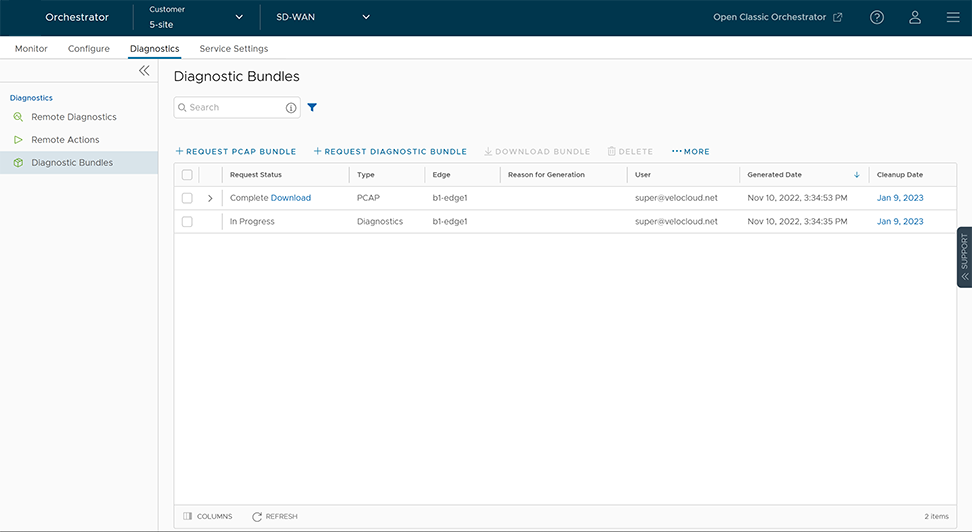
To download the details of generated bundles, select . The details are downloaded in a CSV file.
Request Packet Capture Bundle
The Packet Capture bundle collects the packets data of a network. These files are used in analyzing the network characteristics. You can use the data for debugging an Edge device.
- In the SD-WAN Service of the Enterprise portal, select the Diagnostics tab.
- Select .
- In the Request PCAP Bundle window that appears, configure the following:
Figure 2. Request Packet Capture Configuration 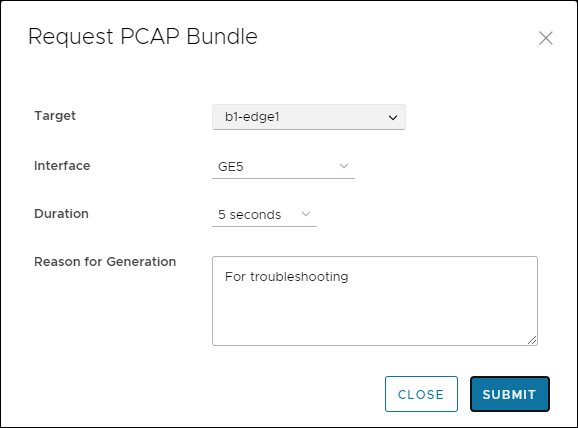
Table 1. Request Packet Capture Options Option Description Target Choose the target Edge from the drop-down list. The packets are collected from the selected Edge. Interface Choose an Interface or a VLAN from the drop-down list. The packets are collected on the selected Interface. Duration Choose the time in seconds. The packets are collected for the selected duration. Reason for Generation Optionally, you can enter your reason for generating the bundle.
The window displays the details of the bundle being generated, along with the status.
Packet Capture for Edges Configured for High Availability
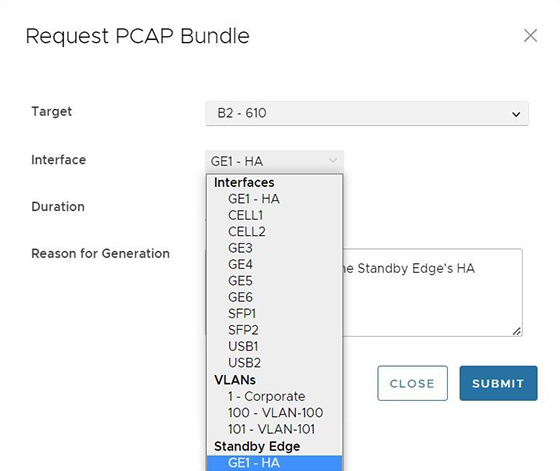
In Release 5.2.0 and later, a user can request a packet capture for the Standby Edge's HA interface, the interface that connects the Standby Edge to the Active Edge. This option appears at the bottom of the menu and reads: Standby Edge, and then lists the HA interface.
Request Diagnostic Bundle
A Diagnostic bundle is a collection of configuration files, logs, and related events from a specific Edge.
- In the SD-WAN Service of the Enterprise portal, select the Diagnostics tab.
- Select .
- In the Request Diagnostic Bundle window, configure the following:
Figure 4. Request Diagnostic Bundle 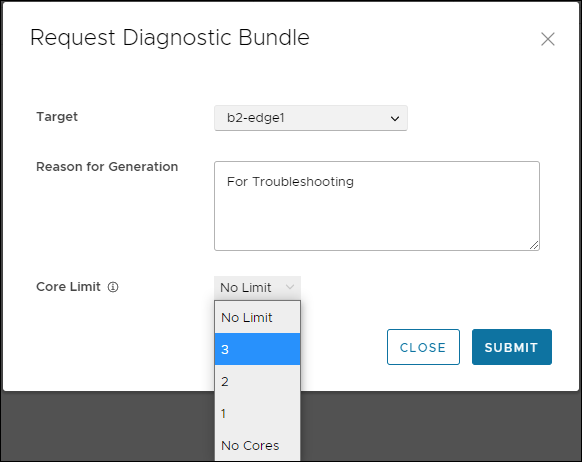
Table 2. Request Diagnostic Bundle Options Option Description Target Select the target Edge from the drop-down list. The data is collected from the selected Edge. Reason for Generation Optionally, you can enter your reason for generating the bundle. Core Limit Select a Core Limit value from the drop-down, which is used to reduce the size of the uploaded bundle when the Internet connectivity is experiencing issues. The Diagnostic Bundles window displays the details of the bundle being generated, along with the status.
Download Diagnostic Bundle
- In the Diagnostic Bundles window, select the Complete link or select the bundle and select Download Bundle. The bundle is downloaded as a ZIP file.
- For troubleshooting purpose, you can send the downloaded bundle to an Arista Support representative for debugging the data.
Delete Diagnostic Bundle
- To change the cleanup date, select the link to the cleanup date or choose the bundle and select .
- In the Update Cleanup Date window, choose the date on which the selected bundle should be deleted.
- If you want to retain the bundle, select the Keep Forever option, so that the bundle does not get deleted automatically.
- To delete a bundle manually, select the bundle and select Delete.