Remote Actions

You can perform actions like Restarting services, Rebooting, or deactivating an Edge remotely, from the Enterprise portal.


Note: You can perform the remote actions only on Edge that are in Connected state.
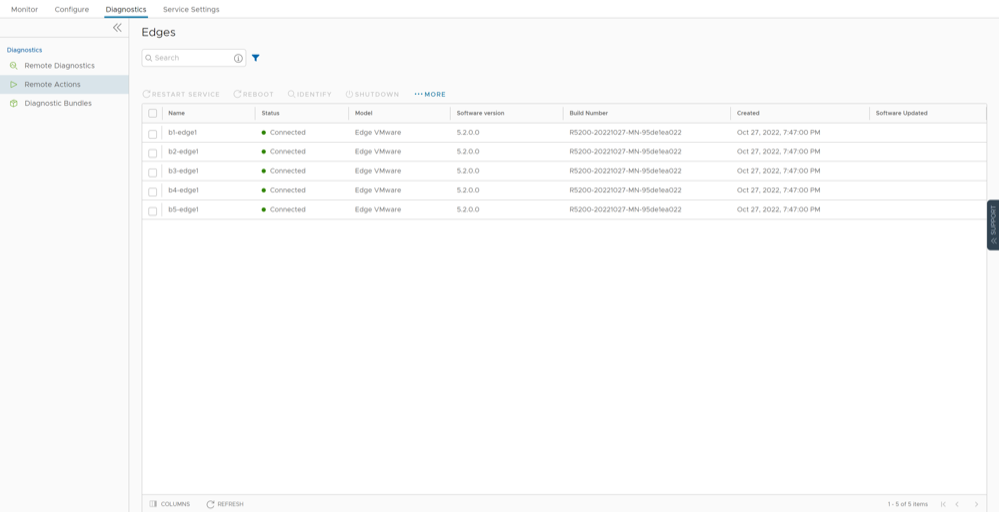
  1. In the SD-WAN service of the Enterprise portal, you can perform remote actions from the Diagnostics > Remote Actions > Edges navigation path.
    Figure 1. Remote Actions
  2. Select an Edge and perform any of the following remote actions:
    Table 1. Remote Actions- Options and Descriptions
    Action Description
    Restart Service Restarts the SD-WAN services on the selected Edge.
    Reboot Reboots the selected Edge.
    Identify Randomly flashlights on the selected Edge to identify the device.
    Shutdown Powers off the selected Edge. To restore the Edge, you must remove the power cable, and then plug it back into the Edge.
    Deactivate Resets the device configuration to its factory default state.
    Force HA Failover Forces HA Failover. This option is available only when the Edge is configured with High Availability and the state is HA ready.
  3. You can also perform the remote actions for an Edge using the Shortcuts option available in the Configure > Edges or Monitor > Edges pages.
  4. Select the Shortcuts > Remote Actions and perform any of the actions listed in the above table.
    Note: The actions may take up to a minute to run on the device.