
CloudVision Software Lifecycle
- CloudVision Portal (CVP) – software deployed on-premises
- CloudVision Appliance Software (CVA) – software deployed on the CloudVision hardware appliance
- CloudVision as-a-Service (cloud service) – referred to in this document for EOS and Streaming Agent support only
The Software Release Policy and Lifecycle defines the various phases of development and support to guide customers in transitioning to newer versions of the product based on the milestones in the lifecycle. Arista Networks will support each major software release train of CloudVision Portal and the CloudVision Appliance Software for up to 24 months from the general availability date for a particular train. The following diagram depicts the release phases and the Arista TAC support mapping across this timeline.
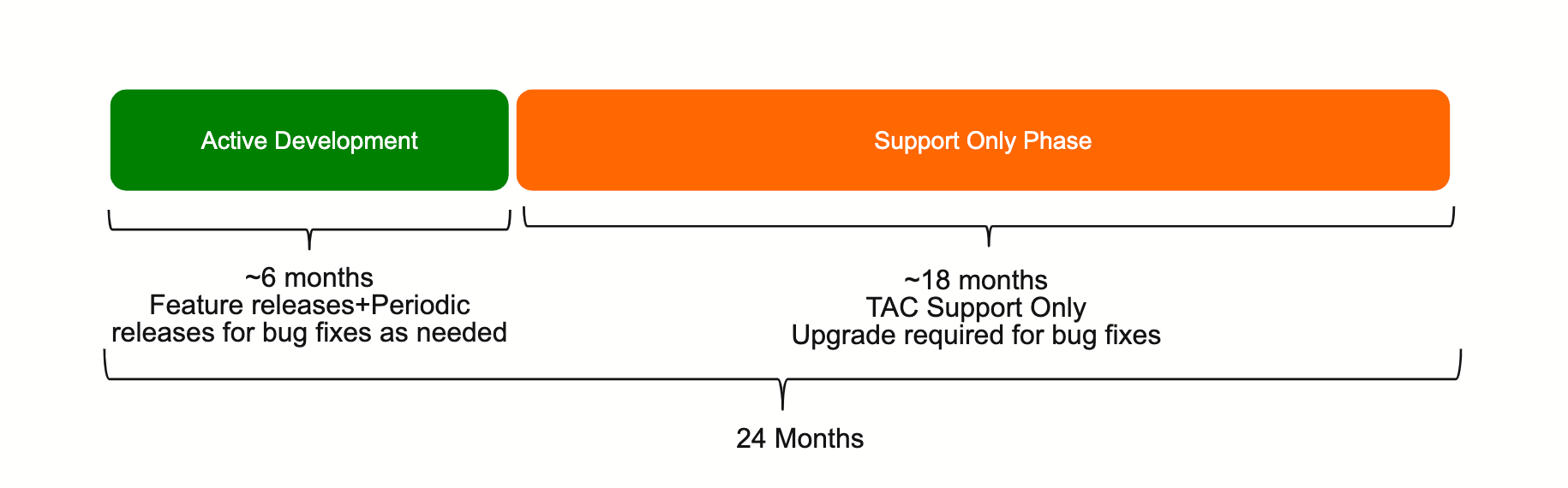
- Major release with new features and functionality
- Active maintenance releases for bug fixes as needed
- TAC support available
- Ongoing TAC support
- Software upgrade required for bug fixes
The following table depicts the CloudVision Portal release support matrix, including the timelines for each major software train (based on the 24 month life cycle policy) and includes the current state of support for each train.
|
CVP Release |
Current Status |
Initial Release Date |
End of Support |
|---|---|---|---|
|
2026.3 |
Active Development |
5-Oct-2026 |
5-Oct-2028 |
|
2026.2 |
Active Development |
30-June-2026 |
30-June-2028 |
|
2026.1 |
Support Only |
30-Mar-2026 |
30-Mar-2028 |
|
2025.3 |
Support Only |
13-Oct-2025 |
13-Oct-2027 |
|
2025.2 |
Support Only |
4-Jul-2025 |
4-Jul-2027 |
|
2025.1 |
Support Only |
31-March-2025 |
31-March-2027 |
| 2024.3 and earlier release trains are End of Support | |||
| Last Updated: October 21, 2026 Note: Future dates are for planning purposes and are subject to change. |
CV-CUE Software Life Cycle
The CV-CUE solution features the Arista Wi-Fi management software for cloud and on-premises deployments. This policy is applicable to on-premises deployments.
The Software Release Policy and Lifecycle defines the various phases of development and support to guide customers in transitioning to newer versions of the product based on the milestones in the lifecycle. Arista Networks will support each major software release train of CV-CUE on-premises up to 24 months from the general availability date for a particular train. The following diagram depicts the release phases and the Arista TAC support mapping across this timeline.
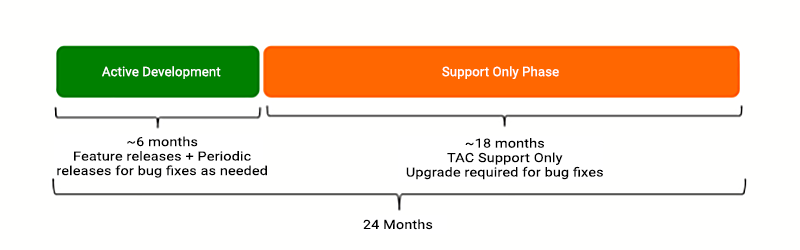
- Major release with new features and functionality
- Active maintenance releases for bug fixes as needed
- TAC support available
- Ongoing TAC support
- Software upgrade required for bug fixes
The following table depicts the CV-CUE on-premises release support matrix, including the timelines for each major software train (based on the 24 month life cycle policy) and includes the current state of support for each train. The CV-CUE software release is effectively integrated within the CVP release train and remains aligned with the CVP release process. Refer Access Point Software Support for supported AP releases.
|
CVP Release |
Current Status |
Initial Release Date |
End of Support |
|---|---|---|---|
|
2026.3 |
Active Development |
5-Oct-2026 |
5-Oct-2028 |
|
2026.2 |
Active Development |
30-June-2026 |
30-June-2028 |
|
2026.1 |
Support Only |
30-Mar-2026 |
30-Mar-2028 |
|
2025.3 |
Support Only |
13-Oct-2025 |
13-Oct-2027 |
|
2025.2 |
Support Only |
4-Jul-2025 |
4-Jul-2027 |
|
2025.1 |
Support Only |
31-March-2025 |
31-March-2027 |
| 2024.3 and earlier release trains are End of Support | |||
| Last Updated: October 22, 2026 Note: Future dates are for planning purposes and are subject to change. |
*CVP releases will always support AP platforms in accordance with the AP platform’s announced EOL policy.
CloudVision Hardware Appliance Lifecycle
The following table depicts the CloudVision Appliance Software (CVA) release support matrix, including the timelines for each major software train (based on the 24 month lifecycle policy) and includes the current state of support for each train.
|
CVA Release |
Current Status |
Initial Release Date |
End of Support |
|---|---|---|---|
|
7.1 |
Active Development |
Aug-2025 |
Aug-2027 |
|
7.0 |
Support Only |
Nov-2024 |
Nov-2026 |
| 6.0 and earlier release trains are End of Support | |||
For assistance with software upgrades, please refer to the CloudVision Appliance Quick Start Guides: DCA-250-CV DCA-300-CV DCA-350E-CV or contact Arista Networks Support by emailing 该邮件地址已受到反垃圾邮件插件保护。要显示它需要在浏览器中启用 JavaScript。.
CloudVision Virtual Appliance (CloudVision Sensor) Lifecycle
The following table depicts the CloudVision Virtual Appliance Software (CloudVision Sensor) release support matrix, including the timelines for each major software train (based on the 24-month lifecycle policy) and includes the current state of support for each train.
|
Sensor Release |
Current Status |
Initial Release Date |
End of Support |
|---|---|---|---|
|
1.4.0 |
Active Development |
April 2026 |
March 2028 |
|
1.3.0 |
Support Only |
December 2025 |
November 2027 |
|
1.2.0 |
Support Only |
September 2025 |
August 2027 |
|
1.1.0 |
Support Only |
March 2025 |
February 2027 |
|
1.0 and earlier release trains are End of Support |
|||
For assistance with upgrading CloudVision Sensor, please refer to the CloudVision Sensor Release Notes on the CloudVision Software Downloads page or contact Arista Networks Support by emailing: 该邮件地址已受到反垃圾邮件插件保护。要显示它需要在浏览器中启用 JavaScript。.
EOS Support Lifecycle in CloudVision
(On-Premises and Cloud Service)
Each CloudVision on-premises release has a minimum and maximum supported EOS release, as specified in the release notes. This also applies to CloudVision as-a-Service.
When an EOS train goes end of support, we do not explicitly remove support from CloudVision, however we stop testing newer CloudVision releases against that EOS train. While most CloudVision features will likely continue to work against the now unsupported EOS train, that support is best effort. Upgrading the EOS devices through CloudVision to reach a supported EOS release is supported, and is the recommended path.
To assist with customer migration of EOS on devices, CloudVision supports an EOS train for at least 12 months after the train’s end-of-support date, as reflected in this table.
The Expected End of Support in CloudVision dates provide guidance for CloudVision as-a-Service and on-premises releases.
For more information on EOS lifecycle information, please refer to: EOS Life Cycle Policy
|
EOS Release |
Current Status |
EOS End of Support |
End of Support in CloudVision |
|---|---|---|---|
|
4.29+ |
Supported |
October 2025 and beyond |
TBD |
|
4.28 |
Supported |
April 2025* |
June 2028 |
|
4.27 and older |
Not Supported |
September 2024 |
April 2026 |
| * denotes extended EOS support for selected platforms Last Updated: June 18, 2026 Note: Expected End of Support dates are provided as a guide. End of Support notices will be published six months prior to an official End of Support for an EOS release within CloudVision. |
The Expected End of Support in CloudVision dates provide guidance for CloudVision as-a-Service and on-premises releases. For more information on EOS lifecycle information, please refer to: EOS Life Cycle Policy.
Streaming Agent (TerminAttr) Support Lifecycle in CloudVision
Each CloudVision on-premises release has a minimum supported TerminAttr version, as specified in the release notes. This also applies to CloudVision as-a-Service.
We set the minimum supported TerminAttr to minimize the need for customers running EOS trains that are still actively supported from having to install a TerminAttr extension. For devices running EOS trains that are past their end of support date, but are still supported by CloudVision, a TerminAttr extension may be required. A TerminAttr extension may also be required for devices running EOS trains whose support has been extended past the normal 3 year period for specific hardware platforms.
When a TerminAttr release goes end-of-support, we do not explicitly remove support from CloudVision, however we stop testing newer CloudVision releases against that TerminAttr release. While most CloudVision features will likely continue to work against the now unsupported TerminAttr train, that support is best effort. In rare cases the CloudVision Service may not be able to continue to support a given TerminAttr release once it is out of support, and the device will lose connectivity at that point. Upgrading the TerminAttr version CloudVision to reach a supported TerminAttr release is supported, and is the recommended path.
The Expected End of Support in CloudVision dates provide guidance for CloudVision as-a-Service and on-premises releases.
|
TerminAttr Release |
Current Status |
Final Supported CloudVision On-Prem Release |
End of Support in the CloudVision Service |
|---|---|---|---|
|
v1.31+ |
Supported |
TBD |
TBD |
|
v1.30 |
Supported |
2026.2 |
Dec 2026 |
|
v1.29 |
Supported |
2026.2 |
Dec 2026 |
|
v1.28 |
Supported |
2026.2 |
Dec 2026 |
|
v1.27 and older |
Not Supported |
2026.1 |
July 2026 |
Revisions for CV-CUE release process
The following table depicts the latest supported Access Point (AP) release for each CVP release. Refer Wi-Fi Access Point Software Life Cycle Policy for AP Software Life Cycle Policy.
|
CVP Release |
Current Status |
Initial Release Date |
End of Support |
Supported Wi-Fi AP release up to and including |
|---|---|---|---|---|
|
2026.3 |
Active Development |
5-Oct-2026 |
5-Oct-2028 |
22.1.x |
|
2026.2 |
Active Development |
30-June-2026 |
30-June-2028 |
22.0.x |
|
2026.1 |
Active Development |
30-Mar-2026 |
30-Mar-2028 |
21.1.x |
|
2025.3 |
Support Only |
13-Oct-2025 |
13-Oct-2027 |
20.x |
|
2025.2 |
Support Only |
04-Jul-2025 |
04-Jul-2027 |
19.x |
|
2025.1 |
Support Only |
31-Mar-2025 |
31-Mar-2027 |
18.x |
| 2024.3 and earlier release trains are End of Support | ||||
| Last Updated: October 22, 2026 Note: Future dates are for planning purposes and are subject to change. |
*CVP releases will always support AP platforms in accordance with the AP platform’s announced EOL policy.