
Orchestrator Upgrade with New Orchestrator UI
This section discusses the prerequisites and steps required to upgrade a Orchestrator. Orchestrator allows you to configure and send a banner message about an upcoming Orchestrator upgrade. The banner is displayed to users the next time they login to the Orchestrator. You can customize the banner message and visibility for the users.
To upgrade a Orchestrator, perform the following steps:
- Configure Orchestrator Upgrade Announcement>
- Prepare Orchestrator Upgrade
- Complete Orchestrator Upgrade
Configure Orchestrator Upgrade Announcement
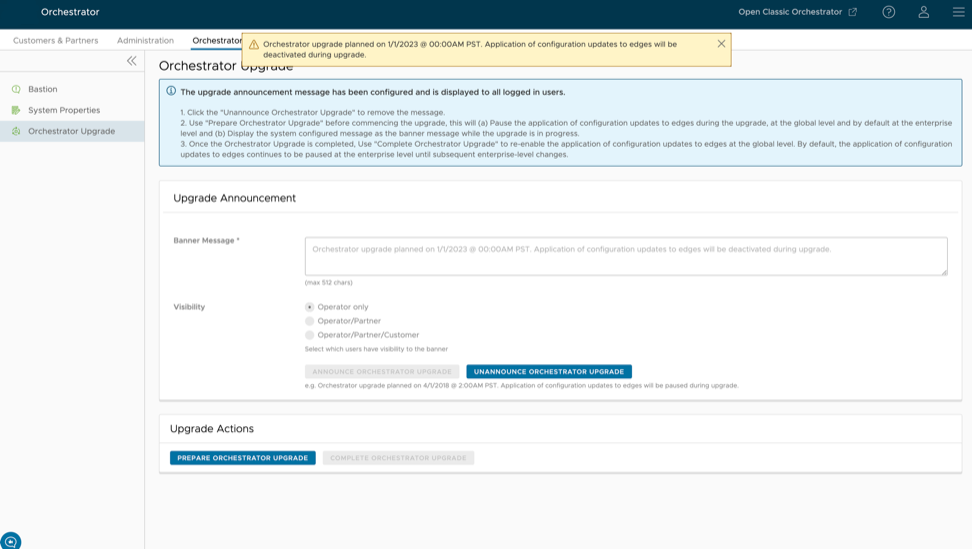
The Upgrade Announcement area enables you to configure and send a message about an upcoming upgrade. To send an Orchestrator Upgrade announcement, perform the following steps:
- In the Operator portal, select the Orchestrator tab, and go to Orchestrator Upgrade in the left navigation pane. The Orchestrator Upgrade screen appears.
Figure 1. Orchestrator Upgrade Screen 
Prepare Orchestrator Upgrade
After you have configured the Orchestrator upgrade banner message and visibility for the users, select the Prepare Orchestrator Upgrade button. This pauses the application of the configuration updates of Edges during the upgrade, at the global level and by default at the enterprise level. It displays the system configured message as the banner message while the upgrade is in progress.
Contact the Arista Support team to prepare for the Orchestrator upgrade.
Complete Orchestrator Upgrade

dpkg -l|grep vcoWhen you are logged in as an Operator, you can confirm if the same version displays by selecting the Help icon at the top right corner of the page.