
Virtual Edge Deployment
The Virtual Edge is available as a virtual machine that can be installed on standard hypervisors. This section discusses the prerequisites and the installation procedure for deploying a Virtual Edge on KVM and VMware ESXi hypervisors.
Deployment Prerequisites for Virtual Edge
Discusses the requirements for Virtual Edge deployment.
Virtual Edge Requirements
- Supports 2, 4, 8, and 10 vCPU assignment.
Table 1. Virtual Edge Requirements 2 vCPU 4v CPU 8 vCPU 10 vCPU Minimum Memory (DRAM) 8 GB 16 GB 32 GB 32 GB Minimum Storage (Virtual Disk) 8 GB 8 GB 16 GB 16 GB - AES-NI CPU capability must be passed to the Virtual Edge appliance.
- Up to 8 vNICs (default is GE1 and GE2 LAN ports, and GE3-GE8 WAN ports).
| NIC Chipset | Hardware | Specification |
|---|---|---|
| Intel 82599/82599ES | HP DL380G9 | http://www.hp.com/hpinfo/newsroom/press_kits/2014/ComputeEra/HP_ProLiantDL380_DataSheet.pdf |
| Intel X710/XL710 | Dell PowerEdge R640 | https://www.dell.com/en-us/work/shop/povw/poweredge-r640
|
| Intel X710/XL710 | Supermicro SYS-6018U-TRTP+ | https://www.supermicro.com/en/products/system/1U/6018/SYS-6018U-TRTP_.cfm
|
| Hardware Manufacturer | Firmware Version | Host Driver for Ubuntu 16.04/18.04 | Host Driver for ESXi 6.7 |
|---|---|---|---|
| Dual Port Intel Corporation Ethernet Controller XL710 for 40GbE QSFP+ | 6.80 | 2.7.11 | 1.7.17 |
| Dual Port Intel Corporation Ethernet Controller X710 for 10GbE SFP+ | 6.80 | 2.7.11 | 1.7.17 |
| Quad Port Intel Corporation Ethernet Controller X710 for 10GbE SFP+ | 6.80 | 2.7.11 | 1.7.17 |
Supported Operating Systems
- Ubuntu 16.04
- VMware vSphere ESXi 6.7, and from version 4.3 and above VMware vSphere ESXi 6.7 and 7.0
Firewall/NAT Requirements
- The Firewall must allow outbound traffic from the Virtual Edge to TCP/443 (for communication with the SASE Orchestrator).
- The Firewall must allow traffic outbound to Internet on ports UDP/2426 (VCMP).
CPU Flags Requirements
For detailed information about CPU flags requirements to deploy Virtual Edge, see Special Considerations for Virtual Edge Deployment.
Special Considerations for Virtual Edge Deployment
- The SD-WAN Edge is a latency-sensitive application. Refer to the Arista Documentation to adjust the Virtual Machine (VM) as a latency-sensitive application.
- Recommended Host settings:
- BIOS settings to achieve highest performance:
- CPUs at 2.0 GHz or higher
- Enable Intel Virtualization Technology (Intel VT)
- Deactivate Hyper-threading
- Virtual Edge supports paravirtualized vNIC VMXNET 3 and passthrough vNIC SR-IOV:
- When using VMXNET3, deactivate SR-IOV on host BIOS and ESXi
- When using SR-IOV, enable SR-IOV on host BIOS and ESXi
- To enable SR-IOV on Arista and KVM, see:
- KVM- Activate SR-IOV on KVM
- Arista- Activate SR-IOV on Arista
- Deactivate power savings on CPU BIOS for maximum performance
- Activate CPU turbo
- CPU must support the AES-NI, SSSE3, SSE4, RDTSC, RDSEED, RDRAND instruction sets
- Recommend reserving 2 cores for Hypervisor workloads
For example, for a 10-core CPU system, recommend running one 8-core virtual edge or two 4-core virtual edge and reserve 2 cores for Hypervisor processes.
- For a dual socket host system, make sure the hypervisor is assigning network adapters, memory and CPU resources that are within the same socket (NUMA) boundary as the vCPUs assigned.
- BIOS settings to achieve highest performance:
- Recommended VM settings:
- CPU should be set to '100% reserved'
- CPU shares should be set to High
- Memory should be set to ‘100% reserved’
- Latency sensitivity should be set to High
- The default username for the SD-WAN Edge SSH console is root.
Cloud-init Creation
Cloud-init is a Linux package responsible for handling early initialization of instances. If available in the distributions, it allows for configuration of many common parameters of the instance directly after installation. This creates a fully functional instance that is configured based on a series of inputs. The cloud-init config is composed of two main configuration files, the metadata file and the user-data file. The meta-data contains the network configuration for the Edge, and the user-data contains the Edge Software configuration. The cloud-init file provides information that identifies the instance of the Virtual Edge being installed.
Cloud-init's behavior can be configured via user-data. User-data can be given by the user at the time of launching the instance. This is typically done by attaching a secondary disk in ISO format that cloud-init will look for at first boot time. This disk contains all early configuration data that will be applied at that time.
The Virtual Edge supports cloud-init and all essential configurations packaged in an ISO image.
Create the Cloud-init Metadata and User-data Files
- Create the meta-data file that contains the instance:
name.instance-id: vedge1local-hostname: vedge1 - Add the network-interfaces section, shown below, to specify the WAN configuration. By default, all SD-WAN Edge WAN interfaces are configured for DHCP. Multiple interfaces can be specified.
root@ubuntu# cat meta-data instance-id: Virtual-Edge local-hostname: Virtual-Edge network-interfaces: GE1: mac_address: 52:54:00:79:19:3d GE2: mac_address: 52:54:00:67:a2:53 GE3: type: static ipaddr: 11.32.33.1 mac_address: 52:54:00:e4:a4:3d netmask: 255.255.255.0 gateway: 11.32.33.254 GE4: type: static ipaddr: 11.32.34.1 mac_address: 52:54:00:14:e5:bd netmask: 255.255.255.0 gateway: 11.32.34.254 - Create the user-data file. This file contains three main modules: Orchestrator, Activation Code, and Ignore Certificates Errors.
Table 4. Modules and Descriptions Module Description vco IP Address/URL of the Orchestrator. activation_code Activation code for the Virtual Edge. The activation code is generated while creating an Edge instance on the Orchestrator. vco_ignore_cert_errors Option to verify or ignore any certificate validity errors. The activation code is generated while creating an Edge instance on the Orchestrator.
Important: There is no default password in SD-WAN Edge image. The password must be provided in cloud-config:#cloud-config password: passw0rd chpasswd: { expire: False } ssh_pwauth: True velocloud: vce: vco: 10.32.0.3 activation_code: F54F-GG4S-XGFI vco_ignore_cert_errors: true
Create the ISO File
Once you have completed your files, they need to be packaged into an ISO image. This ISO image is used as a virtual configuration CD with the virtual machine. This ISO image (called seed.iso in the example below), is created with the following command on Linux system:
genisoimage -output seed.iso -volid cidata -joliet -rock user-data meta-data network-dataIncluding the network-interfaces section is optional. If the section is not present, the DHCP option is used by default.
Once the ISO image is generated, transfer the image to a datastore on the host machine.
Install Virtual Edge on KVM
Describes how to install and activate the Virtual Edge on KVM using a cloud-init config file.
To run the Virtual Edge on KVM using the libvirt:
Activate SR-IOV on KVM
- Intel 82599/82599ES
- Intel X710/XL710
- Before using the Intel X710/XL710 cards in SR-IOV mode on KVM, make sure the supported Firmware and Driver versions specified in the Deployment Prerequisites for Virtual Edge section are installed correctly.
- SR-IOV mode is not supported if the KVM Virtual Edge is deployed with a High-Availability topology. For High-Availability deployments, ensure that SR-IOV is not enabled for that KVM Edge pair.
To enable the SR-IOV mode on KVM, perform the following steps.
Validating SR-IOV (Optional)
You can quickly verify if your host machine has SR-IOV enabled by using the following command:
lspci | grep -i EthernetVerify if you have Virtual Functions:
01:10.0 Ethernet controller: Intel Corporation 82599 Ethernet Controller Virtual Function(rev 01)Install Virtual Edge on KVM
Describes how to install and activate the Virtual Edge on KVM using a cloud-init config file.
To run the Virtual Edge on KVM using the libvirt:
Activate SR-IOV on Arista
- Intel 82599/82599ES
- Intel X710/XL710
Enabling SR-IOV on Arista is an optional configuration.
To activate SR-IOV on Arista:
- Make sure that your NIC card supports SR-IOV. Check the Hardware Compatibility List (HCL) at Arista Documentation.
- Brand Name: Intel
- I/O Device Type: Network
- Features: SR-IOV
Figure 1. Compatibility Guide 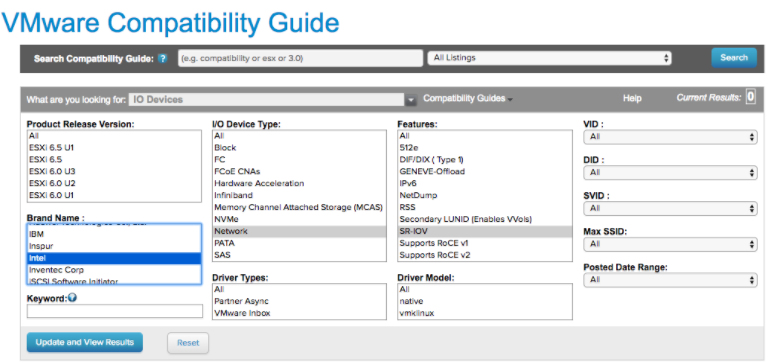
The following KB article provides details of how to enable SR-IOV on the supported NIC: Enable SR-IOV on the supported NIC.
- Once you have a support NIC card, go to the specific host, select the Configure tab, and then choose Physical adapters.
Figure 2. Physical adapters 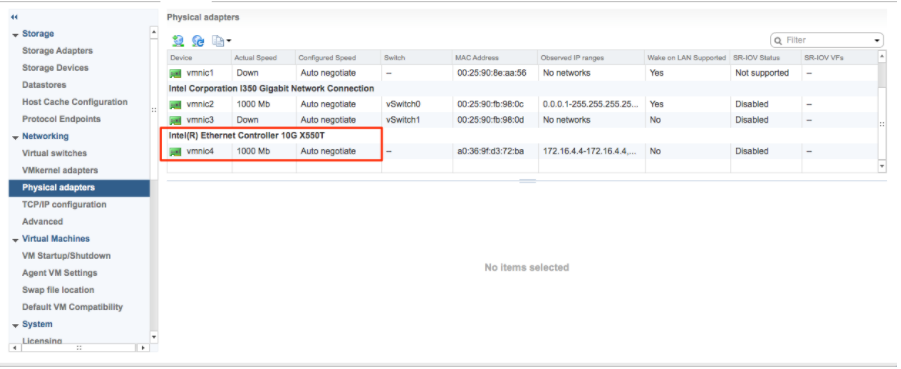
- Reboot the hypervisor.
Figure 3. Reboot Hypervisor 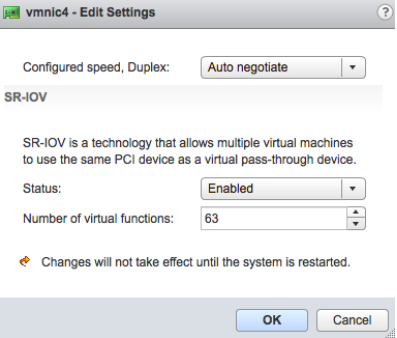
- If SR-IOV is successfully enabled, the number of Virtual Functions (VFs) will show under the particular NIC after ESXi reboots.
Figure 4. SR-IOV VFs 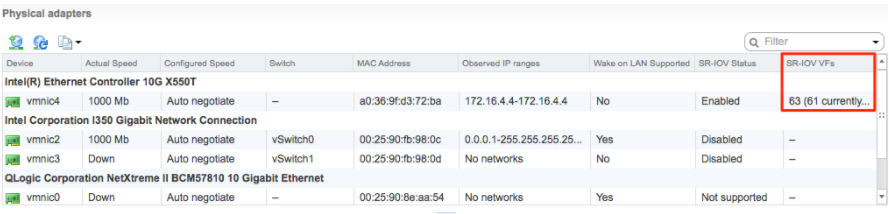 Note: To support VLAN tagging on SR-IOV interfaces, user must configure VLAN ID 4095 (Allow All) on the Port Group connected to the SR-IOV interface. For additional information, see VLAN Configuration.
Install Virtual Edge on VMware ESXi
Describes how to install Virtual Edge on VMware ESXi.
If you decide to use SR-IOV mode, enable SR-IOV on Arista. For steps, see Activate SR-IOV on Arista.
To install Virtual Edge on VMware ESXi:
- Use the vSphere client to deploy an OVF template, and then select the Edge OVA file.
Figure 5. vSphere Web Client 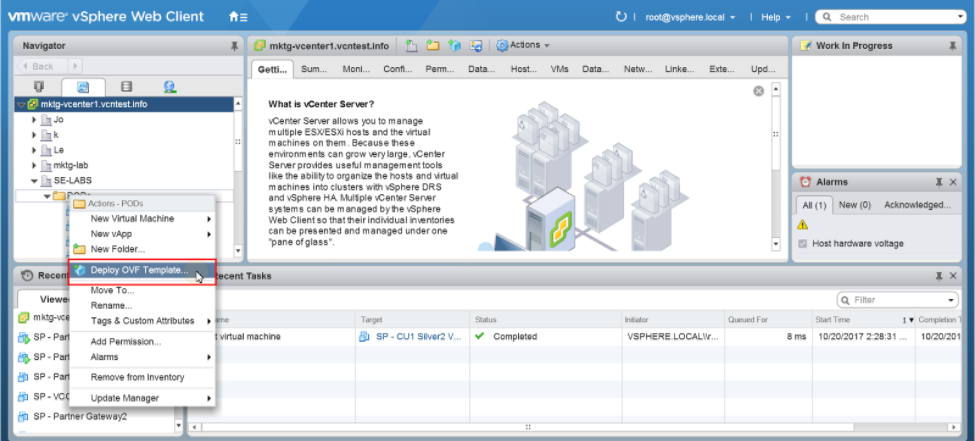
- Select an OVF template from an URL or Local file.
Figure 6. Select Template 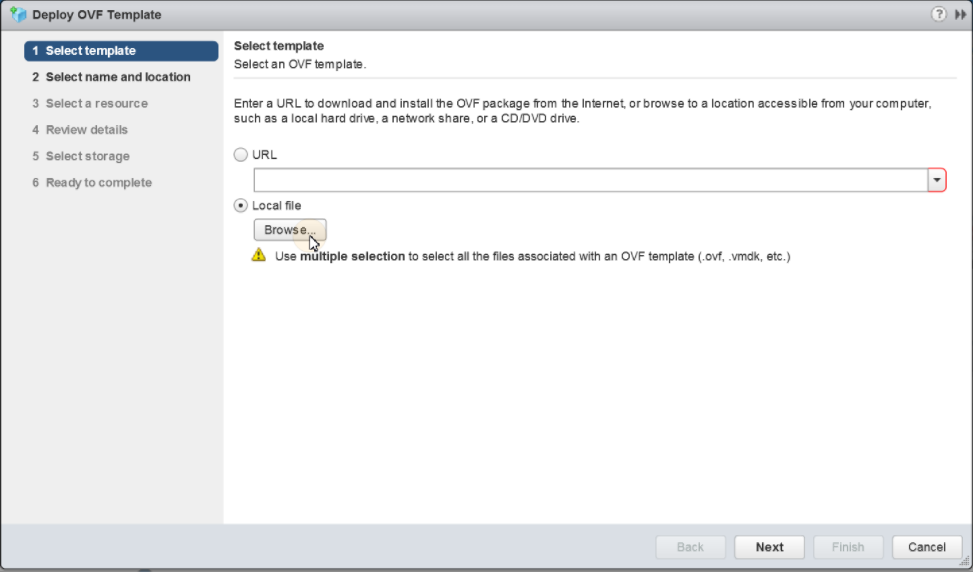
- Verify the template details.
Figure 7. Review Template Details 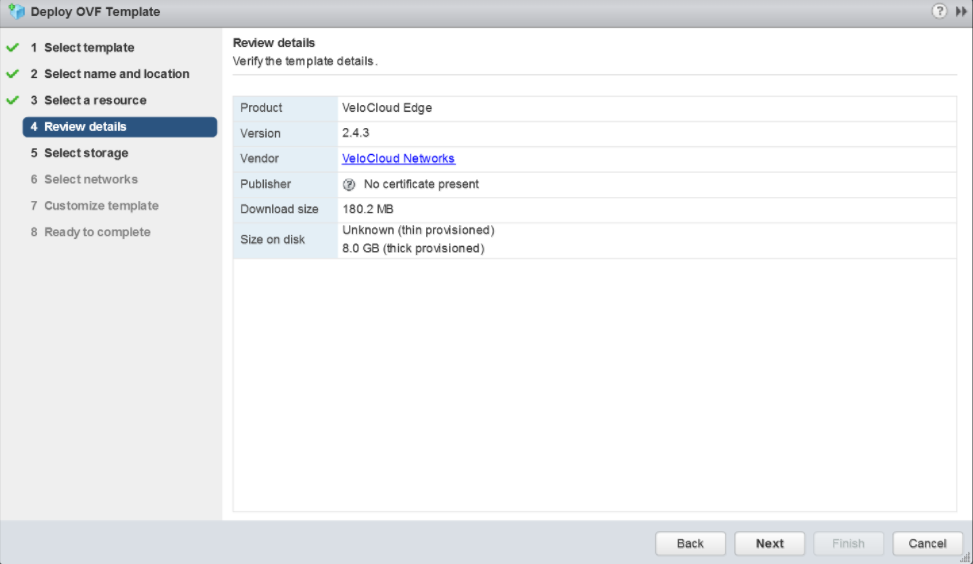
- Select the storage location to store the files for the deployment template.
Figure 8. Select Storage 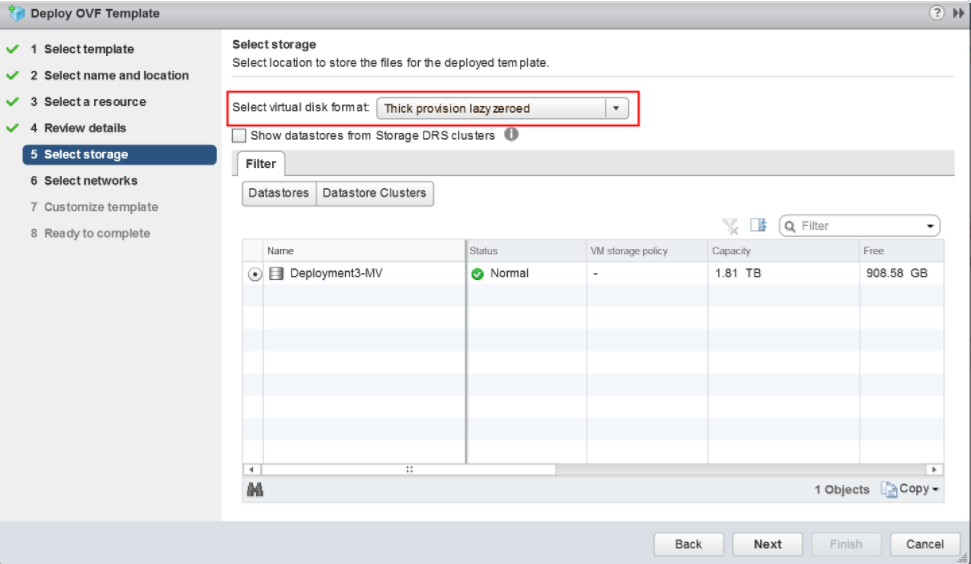
- Configure the networks for each of the interfaces.
Note: Skip this step if you are using a cloud-init file to provision the Virtual Edge on ESXi.
Figure 9. Select Networks 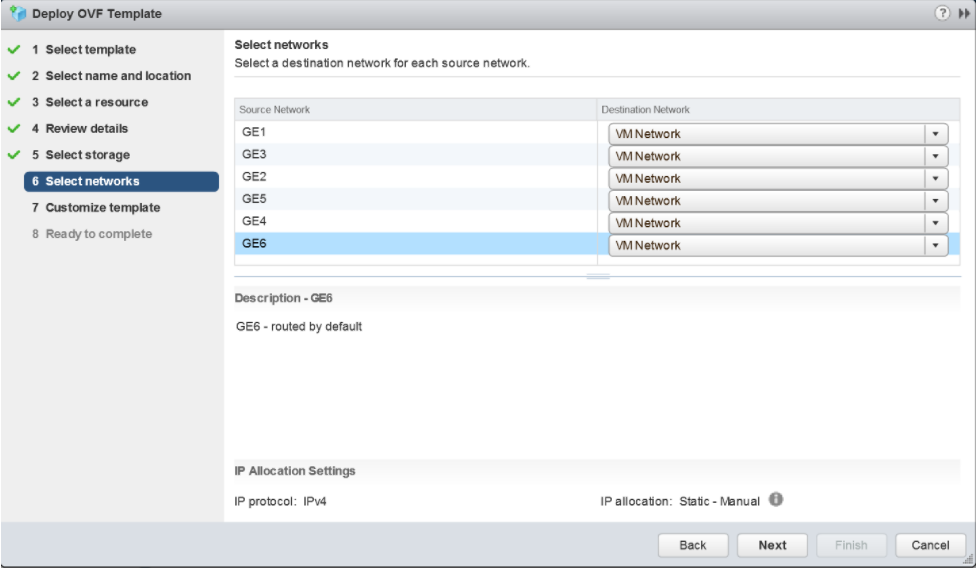
- Customize the template by specifying the deployment properties. The following image highlights:
- From the Orchestrator UI, retrieve the URL/IP Address. You will need this address for Step c below.
- Create a new Virtual Edge for the Enterprise. Once the Edge is created, copy the Activation Key. You will need the Activation Key for Step c" below.
Figure 10. Activation Key 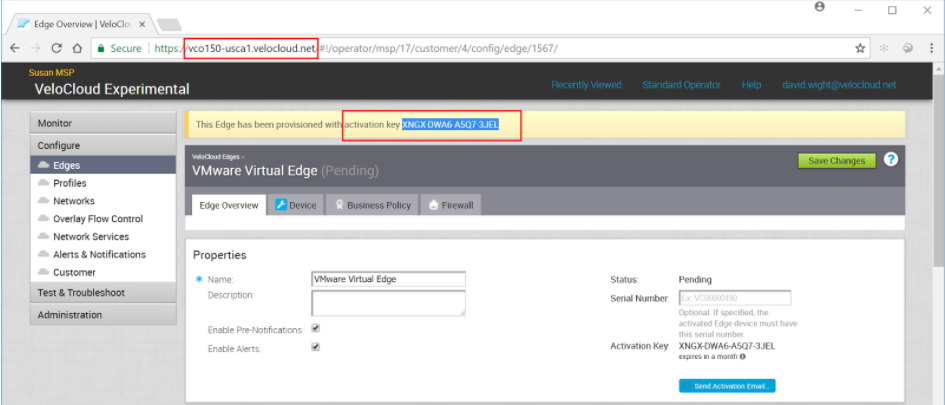
- On the customize template page shown in the image below, type in the Activation Code that you retrieved in Step b above, and the Orchestrator URL/IP Address retrieved in Step a above, into the corresponding fields.
Figure 11. Customize Template 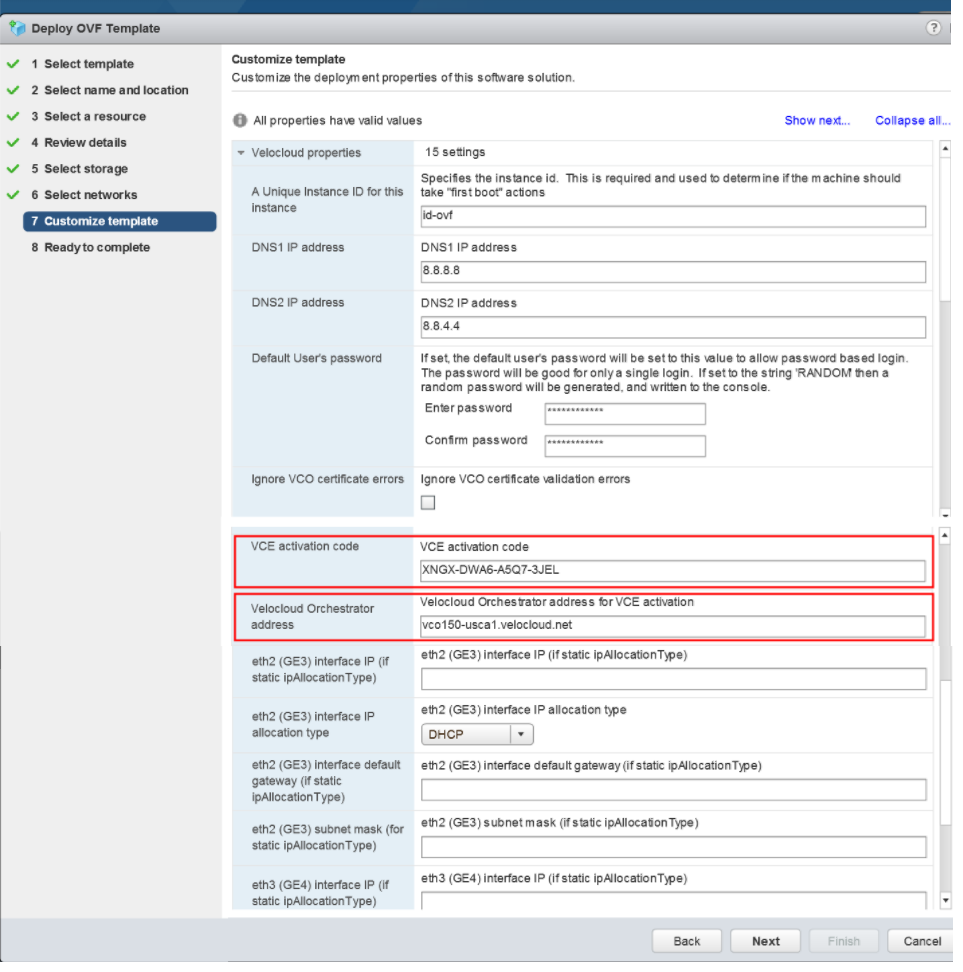
Figure 12. Customize Template (contd.) 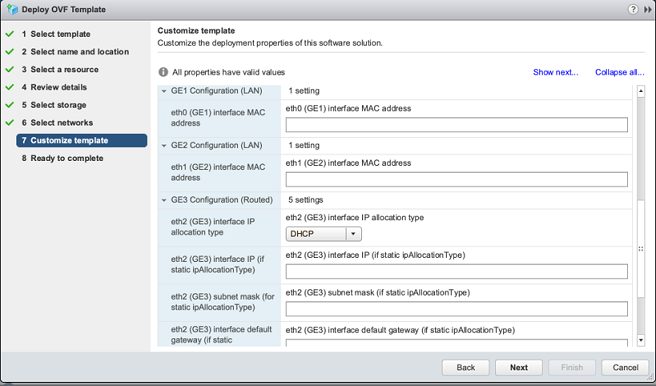
- Review the configuration data.
Figure 13. Review Configuration Data 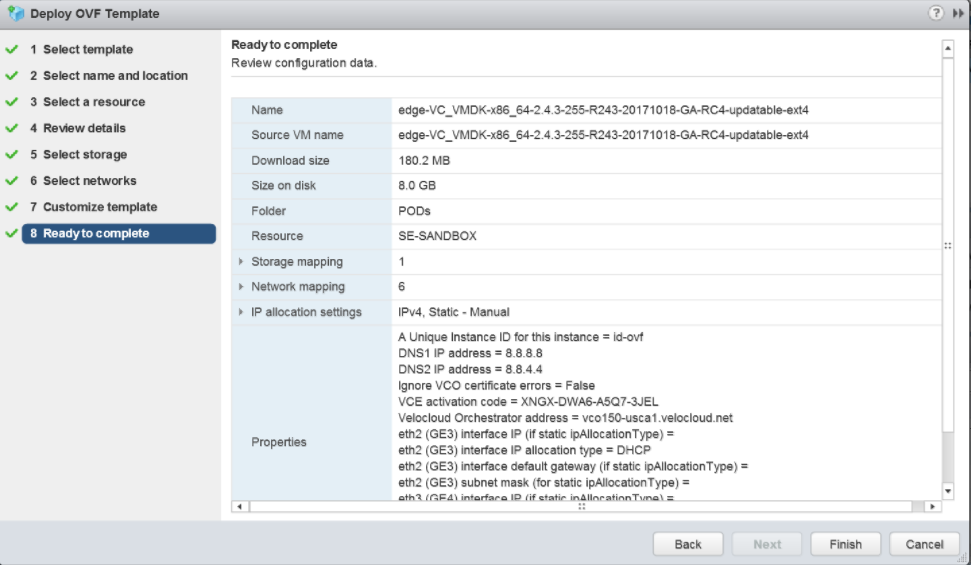
- Power on the Virtual Edge.
Figure 14. Power On Virtual Edge 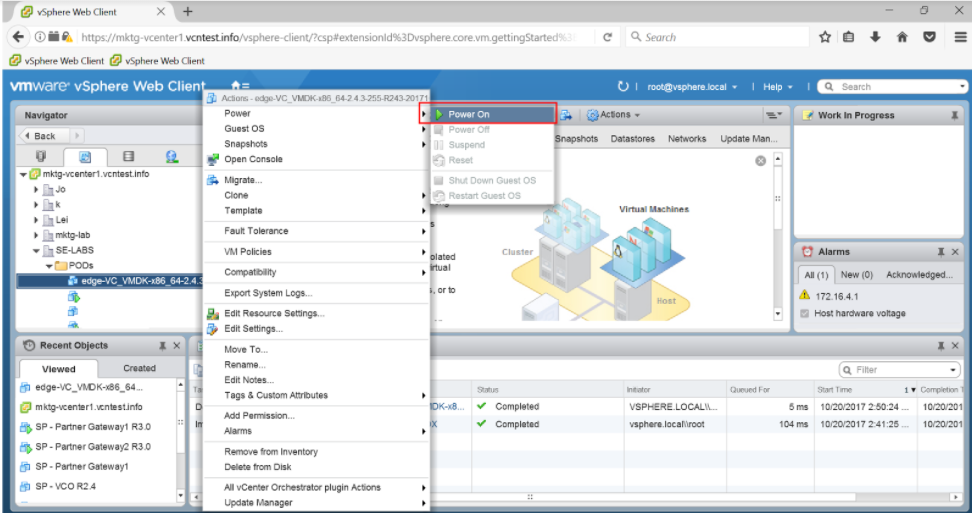 Once the Edge powers up, it establishes connectivity to the Orchestrator.