
Monitor Customers
As an Operator user, monitor the status ofCustomers and the Edges connected to the system.
Log in to the VeloCloud Edge Cloud Orchestrator as an Operator user. In the SD-WAN service of the Operator portal, select .
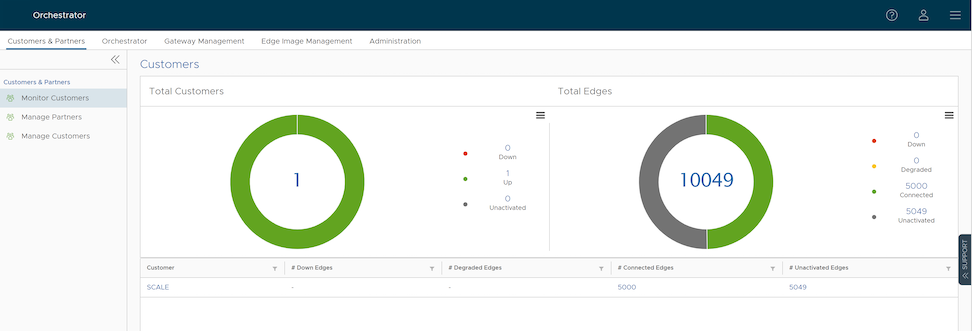
The Customers page displays the following details:
Total Customers
- Customers managed by the Operator.
- Number of Customers that are UP, DOWN, and UNACTIVATED. Select the number to view the corresponding Customer details in the bottom panel.
- In the bottom panel, select the Customer name to navigate to the Enterprise portal, where the user can view and configure other settings corresponding to the selected customer. For additional information, see the VeloCloud SD-WAN Administration Guide.
Total Edges
- Edges associated with the Customers.
- Number of Edges that are DOWN, DEGRADED, CONNECTED, and UNACTIVATED. Select the number to view the corresponding details of the Edges in the bottom panel.
- In the bottom panel, place the mouse pointer on the Down Arrow displayed next to the number of Edges, to view the details of each Edge. Select the Edge name link to navigate to the Enterprise Monitoring portal, where the user can view more details for the selected Edge. For additional information, see the VeloCloud SD-WAN Administration Guide.
Note: Orchestrator does not provide an option for auto refresh. The user must refresh the window manually to view the current data.