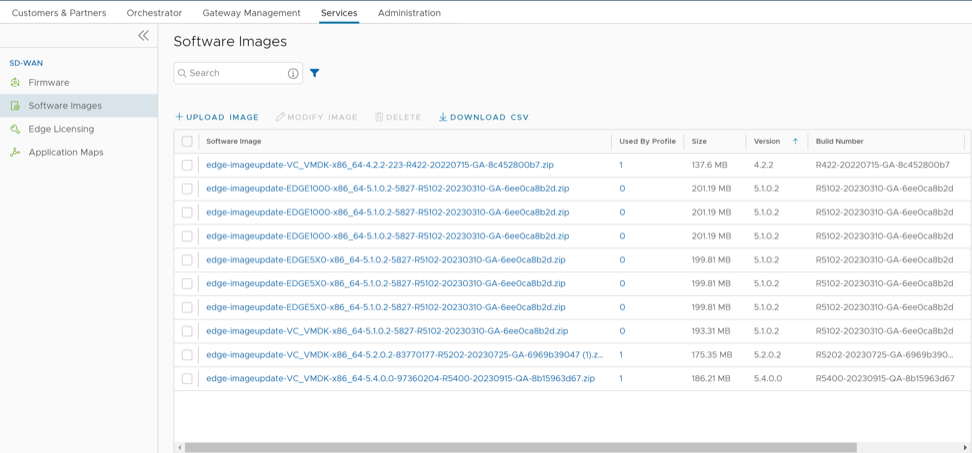
The Orchestrator portal allows Operator Super Users and Operator Standard Admins to manage the Software Images for the associatedEdges.
As an Operator Super User, you can upload a new software image, modify the existing software images, and delete a software image associated with the Edges.
To upload a new software image, in the Operator portal, select Services, then select Software.
Figure 1. Manage Software Images
Select Upload Image and select an Image file, in ZIP format, to upload from your local storage. The Orchestrator validates the package and uploads it to the portal. You can upload multiple Software Images to the portal.
The uploaded packages display in the Software Images page.
To modify an uploaded software image, select the link to the image name. Or select the image, and then select Modify Image. The Modify Image appears.
You can update the Name and Description of the software image package, if needed.
Select Deprecated to deprecate the software image then select OK. Orchestrator flags the deprecated software image and it appears on the Software Images page.
Note: Once deprecated, the image does not appear in the list of available software images or versions to assign to Operator Profiles, or Customers or Edges.
Note: The existing Operator Profiles with a deprecated image also flag to notify the user that the software version of the profile contains a deprecated software image.
To delete a package from the portal, select the image then select Delete.
To upgrade the Edges within an Enterprise with a specific Software Image, see Manage Operator Profiles.