
Create a Jump Host Instance
Creating a Jump Host (JH) instance is an optional step for the Edge deployment. However, to locally manage the virtual Edge, you must deploy a JH and assign an Elastic IP to it. To SSH to an Edge over a private network using a JH, create a JH (Linux instance) in VPC with one interface in the Public subnet (for Internet connectivity with EIP), and the other interface in the management subnet.
Ensure you have an AliCloud account and login information.
To create a JH instance on the ECS console, perform the following steps.
- Log on to the ECS console.
- In the left-side navigation pane, select .
- On the Instances page, select Create Instance. The Custom Launch purchase page appears.
- Set up Basic Configurations by performing the following steps.
- Select a storage space. By default, a 40 GiB Ultra Cloud Disk is selected.
Figure 1. Configuring the Image 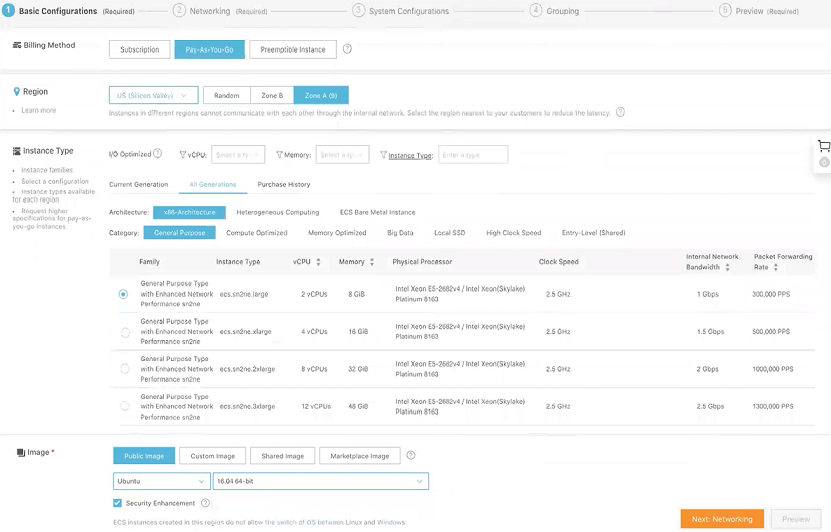
- Select a storage space. By default, a 40 GiB Ultra Cloud Disk is selected.
- Select Next: Networking to set up the networking and security group configuration.
- Add an Elastic Network Interface (ENI). You can skip this step if the selected instance type does not support ENI.
Figure 2. Adding an ENI 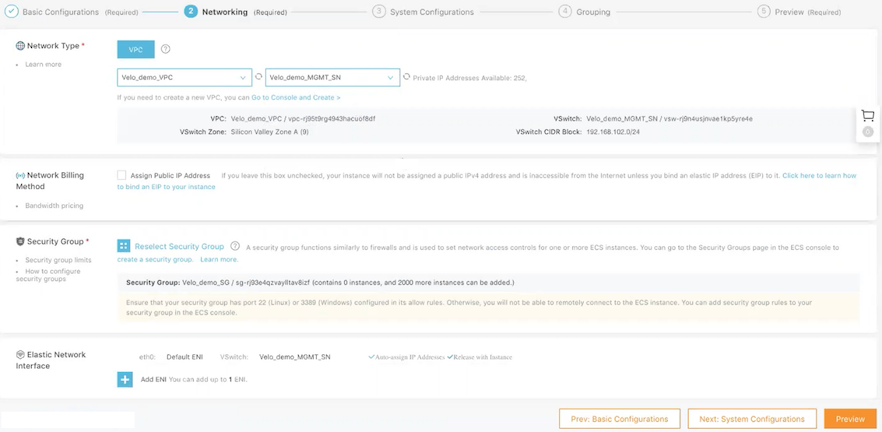
- Add an Elastic Network Interface (ENI). You can skip this step if the selected instance type does not support ENI.
- Select Next: System Configurations.
- In the Instance Name text box, enter a unique name for the JH instance.
Figure 3. Adding Logon Credentials 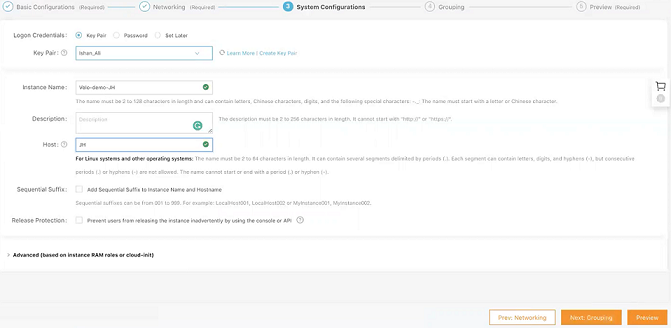
- In the Instance Name text box, enter a unique name for the JH instance.
- Select Next: Grouping and set options as needed.
- Select Next: Preview and confirm the selected configuration. You can also select the edit icon to modify the configurations.
- Read and confirm Terms of Service, and then select Create Instance.
- Select Console to return to the ECS console. Select the refresh button to check if the JH instance is created. If the newly created JH instance is in a Running status, then the instance is created successfully.