
Create an Elastic Network Interface

An Elastic Network Interface (ENI) is a virtual network interface that can be attached to an ECS instance in a VPC. This topic describes how to create an ENI in the ECS console.
  1. Log on to the ECS console.
  2. In the left-side navigation pane, select Network & Security to display Network Interfaces.
  3. Select Create ENI to display Create ENI page.
    Figure 1. Creating ENI
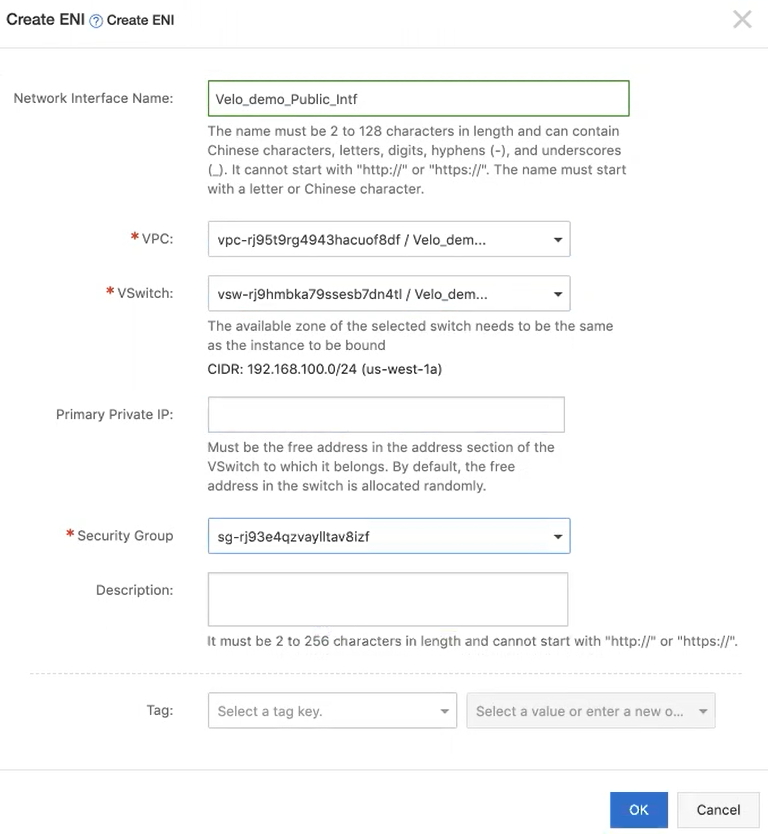
  4. Provide the following configuration details:
    1. In Network Interface Name, enter a unique name for the ENI.
    2. From the VPC menu, select the same VPC associated with the instance to which you want the ENI to be bound. When you attach an ENI to an instance, they must be in the same VPC.
      Note: After creating an ENI, you cannot change the VPC.
    3. From the VSwitch menu, select the VSwitch to bind to the ENI. When you attach an ENI to an instance, they must be in the same zone, but they do not have to be in the same VSwitch.
      Note: After creating an ENI, you cannot change the VSwitch.
    4. From the Security Group menu, select your security group in the selected VPC.
  5. Select OK.
  6. On the Network Interfaces page, select Refresh to view the newly created ENI instance.