
Security Advisory 0191 .CSAF
Date: October 6, 2026
| Revision | Date | Changes |
|---|---|---|
| 1.0 | October 6, 2026 | Initial release |
The CVE-ID tracking this issue: CVE-2026-102156
CVSSv3.1 Base Score: 6.8 (CVSS:3.1/AV:N/AC:H/PR:N/UI:N/S:C/C:H/I:N/A:N)
CVSSv4.0 Base Score: 6.9 (CVSS:4.0/AV:N/AC:H/AT:N/PR:N/UI:N/VC:N/VI:N/VA:N/SC:H/SI:N/SA:N)
Common Weakness Enumeration: CWE-74: Improper Neutralization of Special Elements in Output Used by a Downstream Component ('Injection')
This vulnerability is being tracked by BUG 1731907
Description
The CVE covered in this advisory affects only CloudVision-CUE on-premises. CV-CUE is Arista’s Wi-Fi management service and, in on-premises deployments, is hosted as a service on the CloudVision Portal on-premises platform. Customers running CV-CUE services should review the affected versions to assess their impact.
Improper neutralization of Lightweight Directory Access Protocol (LDAP) authentication input may allow an unauthenticated network attacker, under high-complexity conditions, to inject queries against the configured directory service.
This issue was discovered internally by Arista, and the company is not aware of any malicious exploitation of this vulnerability in customer networks.
Vulnerability Assessment
Platform and Software Applicability Note
To determine actual exposure, operators should first check their software versions against the "Affected Software" list below. If your software release is not listed, your deployment is not vulnerable, regardless of the hardware platform in use.
Affected Software
CloudVision Portal Versions
- 2026.2.0
- All prior releases back to 2021.2.0
Affected Platforms
- CloudVision CUE on-premises, virtual appliance or physical appliance (Note: packaged as part of CloudVision Portal on-premises software)
- Arista EOS-based products:
- 710 Series
- 720D Series
- 720XP/722XPM Series
- 750X Series
- 7010TX Series
- 7020R/R4 Series
- 7130 Series running EOS
- 7170 Series
- 7050X3/X4 Series
- 7060X/X2/X4/X5/X6 Series
- 7260X/X3 Series
- 7280R/R2/R3/R4 Series
- 7300X/X3 Series
- 7320X Series
- 7358X4 Series
- 7368X4 Series
- 7388X5 Series
- 7500R/R2/R3 Series
- 7800R3/R4 Series
- 7700R4 Series
- AWE 5000 Series
- AWE 7200R Series
- ZTX-7200 Series
- CloudEOS
- cEOS-lab
- vEOS-lab
- CloudVision eXchange, virtual or physical appliance
- Wi-Fi Access Points
- CloudVision CUE cloud service delivery
- CloudVision Portal, virtual appliance or physical appliance
- CloudVision Appliance Software
- CloudVision as-a-Service
- CloudVision AGNI - Cloud service delivery
- CloudVision AGNI - Virtual or physical appliance
- Arista 7130 Systems running MOS
- Arista Converged Cloud Fabric (formerly Big Switch BCF)
- DANZ Monitoring Fabric (DMF) - Controller Appliance
- DANZ Monitoring Fabric (DMF) - Analytics Node Appliance
- DANZ Monitoring Fabric (DMF) - Recorder Node Appliance
- DANZ Monitoring Fabric (DMF) - Service Node Appliance
- Arista Multi Cloud Director (formerly Big Switch MCD)
- Arista Network Detection and Response (NDR) Security Platform (Formerly Awake NDR)
- Arista Edge Threat Management - Arista NG Firewall and Arista Micro Edge (Formerly Untangle)
- Arista NetVisor OS, Arista NetVisor UNUM, and Insight Analytics (Formerly Pluribus)
- VeloCloud Orchestrator (Formerly VeloCloud Orchestrator by Broadcom)
- VeloCloud Gateway (Formerly VeloCloud Gateway by Broadcom)
- VeloCloud Edge (Formerly VeloCloud Edge by Broadcom)
Required Configuration for Exploitation
- CV-CUE backend (wifimanager) must be enabled and running.
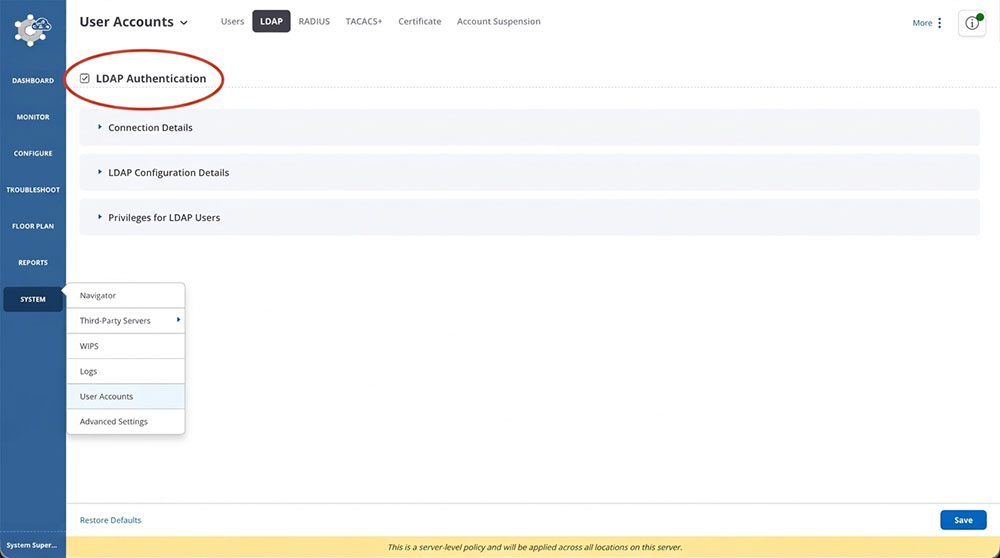
- LDAP authentication must be enabled for the User Accounts.
Here is an example of the command to inspect the status of wifimanager:
[root@]# cvpi status wifimanager
Executing command. This may take some time...
Completed 1/1 discovered actions
primary components total:1 running:1 disabled:0
Here is an example screenshot of the “LDAP Authentication” configuration option enabled:
Indicators of Compromise
There is no direct indicator of compromise for this issue. Please contact support if suspicious activity patterns are found in the system, as mentioned below.
Repeated entries containing “ldapsearch return value [49]” in the ldap.log file (inside log folder /opt/wibhu/spectraguard/log) may indicate attempted exploitation. Log folder can be found with following commands, when run from CVP shell.
[root@]# nerdctl exec -it wifimanager -- bash
[root@]# cd /opt/wibhu/spectraguard/log
These messages can be found with the following grep command, when run from the CV-CUE shell:
grep -r --include="ldap.log" "ldapsearch return value \[49\]" /
Mitigation
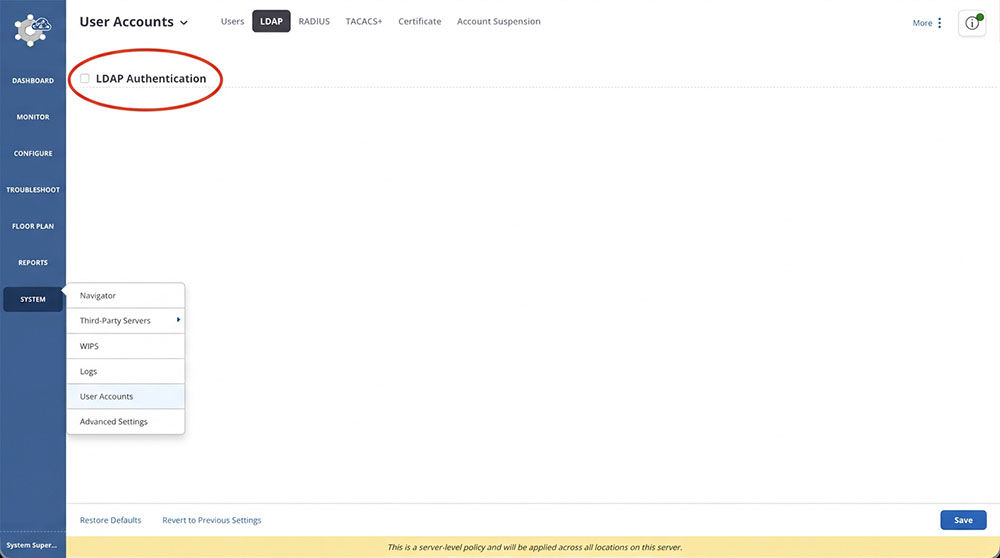
The recommended mitigation is to disable LDAP Authentication. Prior to implementing this, please ensure that an alternative authentication mechanism is properly configured and verified, as disabling LDAP authentication will prevent LDAP-dependent users from accessing or managing CV-CUE, which may render the management service unavailable to them.
Here is an example screenshot of the “LDAP Authentication” configuration option:
Resolution
The recommended resolution is to upgrade to a remediated software version at your earliest convenience. Arista recommends customers move to the latest version of each release that contains all the fixes listed below. For more information about upgrading see CloudVision Users Manual: Upgrade.
- 2026.2.1 and later releases
Hotfix
No hotfix available for those vulnerabilities
For More Information
If you require further assistance, or if you have any further questions regarding this security notice, please contact the Arista Networks Technical Assistance Center (TAC) by one of the following methods:
Open a Service Request
Contact information needed to open a new service request may be found at:
https://www.arista.com/en/support/customer-support