
Security Advisory 0201
Date: October 23, 2026
| Revision | Date | Changes |
|---|---|---|
| 1.0 | October 23, 2026 | Initial release |
| 1.1 | October 26, 2026 | Updated some mitigation details and added more Streaming Telemetry Agent fixed versions |
| 1.2 | October 29, 2026 | Further clarifications and additional release versions provided |
| 1.3 | November 4, 2026 | Further clarifications and additional release versions provided |
| 1.4 | November 13, 2026 | Update CVP node mitigation script, and add other details and additional fixed versions |
The CVE-ID tracking this issue: CVE-2026-111943
CVSSv3.1 Base Score: Not yet available (see note below)
CVSSv4.0 Base Score: Not yet available (see note below)
Common Weakness Enumeration: CWE-299 Improper Check for Certificate Revocation
This vulnerability is being tracked by BUG 2045311(CVP), BUG 2045936(Wi-Fi AP), BUG 2051061(EOS), BUG 2045523(Streaming Telemetry Agent), BUG 2045770(VeloCloud), BUG 2047171(DMF)
Note: Arista is not the CVE owner for this but estimates the score and vector as 9.2 / 10 (CVSS:4.0/AV:N/AC:L/AT:P/PR:N/UI:N/VC:H/VI:H/VA:H/SC:N/SI:N/SA:N)
Description
This security advisory is in response to the eMudhra Intermediate CA key compromise. This issue exposes affected systems to Man in the Middle (MitM) attacks. There are multiple CVEs tracking this issue. As of the time of this publication, CVE-2026-111943 is the only CVE, applicable to components used in Arista software products. This vulnerability applies to any software that verifies an X.509 certificate using a trust store that implicitly trusts any of the compromised CA certificates.
More information about the specific events that led to this CVE and this advisory can be found on this public web page: https://emudhra.we-have-a-problem.com/
Arista Engineering and PSIRT teams are comprehensively reviewing all product lines to identify the products that may be affected by this vulnerability. Arista will continue to update this advisory with possible mitigations and fixed software releases as soon as they are available.
Vulnerability Assessment
Platform and Software Applicability Note
To determine actual exposure, operators should first check their software versions against the "Affected Software" list below. If your software release is not listed, your deployment is not vulnerable, regardless of the hardware platform in use.
Affected Software
- 4.36.3M and below releases in the 4.36.x train
- 4.35.7M and below releases in the 4.35.x train
- 4.34.9M and below releases in the 4.34.x train
- 4.33.11M and below releases in the 4.33.x train
- All releases in the 4.32.x train
- All releases in the 4.31.x train
- All releases in the 4.30.x train
- All releases in the 4.29.x train
- 4.28.14M and below releases in the 4.28.x train
- All releases in all trains prior to 4.28
- v1.46.2 and below releases in the v1.46 train
- All releases in the v1.45 train
- All releases in the v1.44 train
- v1.43.10 and below releases in the v1.43 train
- All releases in the v1.42 train
- All releases in the v1.41 train
- v1.40.14 and below releases in the v1.40 train
- All releases in the v1.39 train
- All releases in the v1.38 train
- v1.37.14 and below releases in the v1.37 train
- All releases in the v1.36 train
- All releases in the v1.35 train
- v1.34.14 and below releases in the v1.34 train
- All releases in the v1.33 train
- All releases in the v1.32 train
- v1.31.17 and below releases in the v1.31 train
- All releases in all trains prior to v1.31
- 2026.3.0.1 and below releases in the 2026.3.x train
- 2026.2.2 and below releases in the 2026.2.x train
- 2026.1.4 and below releases in the 2026.1.x train
- All releases in all trains prior to 2026.1.x
- 7.2.0 and below releases in the 7.2.x train
- 7.1.1 and below releases in the 7.1.x train
- 7.0.1 and below releases in the 7.0.x train
- All releases in all trains prior to 7.0.x
- 1.4.3 and below releases in the 1.4.3 train
- All releases in all trains prior to 1.4
- 21.6.0M -8 and below releases in 21.X train
- 22.1.3F and below releases in 22.1.X train
- 22.3.0F-18 and below releases in 22.3.X train
- All releases in all trains prior to 21.X
- 8.10.1 and below releases in the 8.10.x train
- 8.9.1 and below releases in the 8.9.x train
- 8.8.1 and below releases in the 8.8.x train
- 8.7.3 and below releases in the 8.7.x train
- 8.6.3 and below releases in the 8.6.x train
- All releases in all trains prior to 8.5.x
- 6.2.5 and below releases in the 6.2.x train
- All releases in all trains prior to 6.2.x
- P-2026.3.0 and below releases in 2026.3.X train
- P-2026.2.0 and below releases in 2026.2.X train
- P-2025.2.2 and below releases in 2025.2.X train
- P-2024.4.1 and below releases in 2024.4.X train
- 7.0.0.0 (20260630) and below in the 7.0.0 train
- 6.4.4.0 (20260929) and below in the 6.4.x train
- 6.2.0.1 (20250513) and below in the 6.2.0 train
- 6.1.6.0 (20260917) and below in the 6.1.x train
- 5.2.7.0 (20260712) and below in the 5.2.x train
- 7.0.0.0 (20260630) and below in the 7.0.0 train
- 6.4.4.0 (20260929) and below in the 6.4.x train
- 6.2.0.1 (20250513) and below in the 6.2.0 train
- 6.1.6.0 (20260917) and below in the 6.1.x train
- 5.2.7.0 (20260712) and below in the 5.2.x train
- 6.4.2.12 and below releases in the 6.4.2 train
- 6.1.3.10 and below releases in the 6.1.3 train
- 5.2.3.18 and below releases in the 5.2.3 train
- NGFW 17.5.0 and prior
- All releases versioned as 5.2.0 and above and less than 5.4.12
Affected Platforms
- Arista EOS-based products:
- 710 Series
- 720D Series
- 720XP/722XPM Series
- 750X Series
- 7010TX Series
- 7020R/R4 Series
- 7130 Series running EOS
- 7170 Series
- 7050X3/X4 Series
- 7060X/X2/X4/X5/X6 Series
- 7260X/X3 Series
- 7280R/R2/R3/R4 Series
- 7300X/X3 Series
- 7320X Series
- 7358X4 Series
- 7368X4 Series
- 7388X5 Series
- 7500R/R2/R3 Series
- 7800R3/R4 Series
- 7700R4 Series
- AWE 5000 Series
- AWE 7200R Series
- ZTX-7200 Series
- CloudEOS
- cEOS-lab
- vEOS-lab
- Wi-Fi Access Points
- CloudVision Portal on-premises, virtual appliance or physical appliance (including the CV-CUE on premises software)
- CloudVision Sensor
- CloudVision Appliance Software
- CloudVision AGNI - Cloud service delivery
- CloudVision AGNI - Virtual or physical appliance
- Arista Converged Cloud Fabric (formerly Big Switch BCF)
- DANZ Monitoring Fabric (DMF) - Controller Appliance
- DANZ Monitoring Fabric (DMF) - Analytics Node Appliance
- DANZ Monitoring Fabric (DMF) - Recorder Node Appliance
- DANZ Monitoring Fabric (DMF) - Service Node Appliance
- Arista Network Detection and Response (NDR) Security Platform (Formerly Awake NDR)
- NDR nucleus
- NDR sensors (the ava switch sensor is deployed inside of EOS)
- NDR analyst portal
- Arista Edge Threat Management - Arista NG Firewall and Arista Micro Edge (Formerly Untangle)
- VeloCloud Orchestrator (Formerly VeloCloud Orchestrator by Broadcom)
- VeloCloud Gateway (Formerly VeloCloud Gateway by Broadcom)
- VeloCloud Edge (Formerly VeloCloud Edge by Broadcom)
- Arista EOS-based products:
- CloudVision eXchange, virtual or physical appliance
- CloudVision as-a-Service (CVaaS)
- CloudVision CUE cloud service delivery
- Arista NetVisor OS, Arista NetVisor UNUM, and Insight Analytics (Formerly Pluribus)
- Multi Cloud Director (formerly Big Switch MCD)
Required Configuration for Exploitation
EOS
Features which establish an outgoing TLS connection from the EOS switch to external servers are at risk for being impacted by this vulnerability. Select features are assessed below. Other features are being evaluated and will be updated over time.
- Streaming Telemetry Agent (TerminAttr): TerminAttr, when used to establish a connection to CloudVision as-a-Service, is impacted by this issue if no CA root of trust is specified.
- This is specified as the second argument to either certs or token-secure in the cvauth parameter when TerminAttr is configured.
- Example impacted configuration parameters which are colored in red in the below example:
- -cvauth=token-secure,/mnt/flash/token.json
- -cvauth=certs,/mnt/flash/cert.pem,/mnt/flash/key.pem
switch> show running-configuration | section TerminAttr
daemon TerminAttr
   exec /usr/bin/TerminAttr -cvaddr=apiserver.arista.io:443 -cvcompression=gzip -cvvrf=management -taillogs
-cvauth=token-secure,/mnt/flash/token.json
   no shutdown
switch> show running-configuration | section TerminAttr
daemon TerminAttr
   exec /usr/bin/TerminAttr -cvaddr=apiserver.arista.io:443 -cvcompression=gzip -cvvrf=management -taillogs
-cvauth=certs,/mnt/flash/cert.pem,/mnt/flash/key.pem
   no shutdown
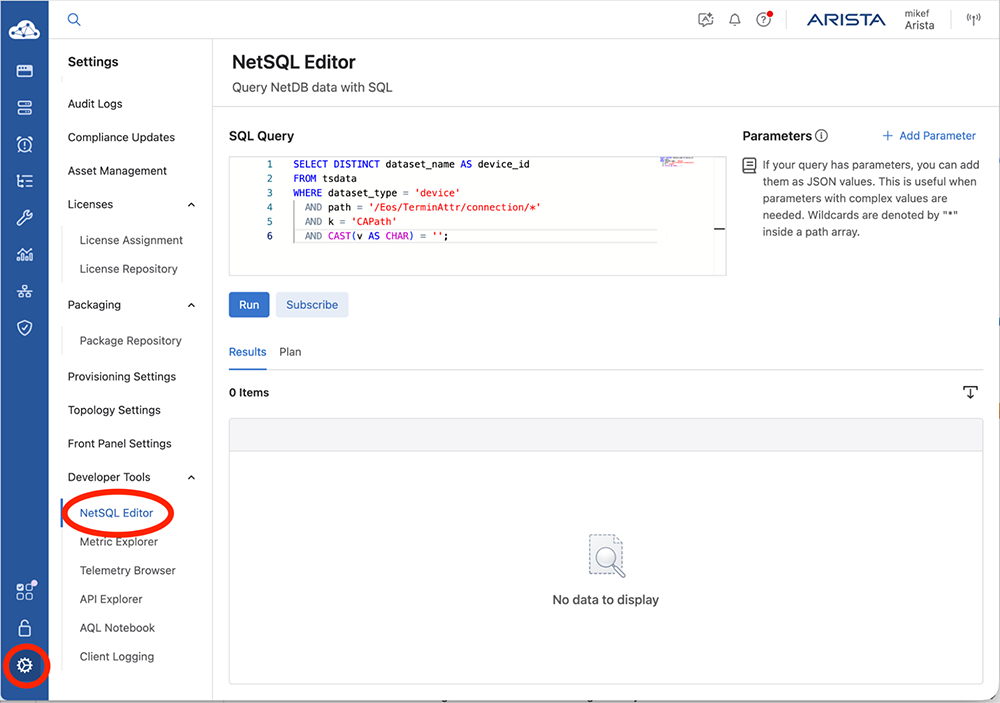
- Most EOS devices streaming to CloudVision as-a-Service (CVaaS) are impacted, while most EOS devices streaming to CloudVision Portal (on-premises) are not expected to be impacted. To verify which devices are impacted using CloudVision go to Settings -> NetSQL Editor and run the following SQL query:
SELECT DISTINCT dataset_name AS device_id
FROM tsdata
WHERE dataset_type = 'device'
 AND path = '/Eos/TerminAttr/connection/*'
 AND k = 'CAPath'
 AND CAST(v AS CHAR) = '';
- In addition custom scripting which uses utilities included in EOS such as curl and wget will be impacted by this unless those utilities are specifically configured to not use the default EOS trust bundle.
- CLI “copy” command - this command does not verify remote peers so there is no impact here.
- OpenConfig
- CloudVision Exchange / Media Control Services (MCS)
- TACACS+ over TLS
- RADsec (RADIUS over TLS)
- Syslog over TLS
- STUN
- Automatic Certificate Management (implementing RFC 7030 compliant EST)
- SensorClient
- NTS (NTP over TLS)
- LDAPS (LDAP over TLS)
CloudVision Portal
Features which establish an outgoing TLS connection from the CloudVision Portal to external servers are at risk for being impacted by this vulnerability. Select features are assessed below. Other features are being evaluated and will be updated over time.
- Authentication and certificate services:
- LDAPS
- RADIUS over TLS (RadSec)
- HTTPS requests to OIDC identity providers and SAML metadata endpoints
- External certificate-management services such as Venafi
- Downloads and Arista services:
- Image Repository Image Upload and Download, when CloudVision reaches out to the arista.com software downloads site
- Compliance Dashboard, when CloudVision reaches out to the arista.com AlertBase for updates for bug-advisory retrieval and validation
- Notifications and data exports:
- HTTPS webhooks
- Alerter
- syslog over TLS
- Sensor and data-source integrations: TLS connections to configured external and 3rd party systems including but not limited to:
- CloudVision AGNI
- MSS integrations, including Palo Alto Networks, CMDB/IPAM, etc
- DANZ Monitoring Fabric (DMF)
- F5 BIG-IP
- OpenStack
- VMware vCenter
- Cisco ISE
- HPE ClearPass
- ServiceNow
- Bizzdesign
- Helix integrations
- Other outgoing sensor and data-source integrations
- Script Executor
- Customer scripts and utilities: Outbound HTTPS or other TLS connections made by scripts that use the system provided trust store.
CV Sensor
Specific impacted features are being evaluated at this time.
CV-CUE
Specific impacted features are being evaluated at this time.
WiFi Access Points
- Connections from the AP to the CV-CUE controller
An AP can be made to trust a connection to a CV-CUE server through a proxy using a certificate issued by a compromised CA.
APs connect to a CV-CUE controller via a proxy server using discovery settings obtained through DHCP option 43 or the configuration CLI. If these settings direct the AP to a malicious server utilizing a certificate signed by a compromised CA, the AP will trust that server, as its trust store for AP-to-proxy connections includes the root of the compromised CA.
No other features are impacted.
DMF, CCF, and CloudVision Appliance Software (CVA)
Features which establish an outgoing TLS connection from DMF, CCF, or CVA to external servers and which use the public CA trust bundle are at risk for being impacted by this vulnerability. The features listed below have to be manually triggered by an administrator. Note that features that require configuration of specific CA authorities (ex., Syslog over TLS) are not affected.
The following DMF, CCF, and CVA features establish an outgoing TLS connection and are known to be impacted:
- Appliance image import or upgrade from HTTPS, including copy https://… image://… and cluster image copy. Certificate verification is on by default. Image-signature checks remain a separate safeguard against unsigned installation.
- HTTPS file and configuration imports: copy https://… file://… and copy https://… running-config. The latter can apply downloaded configuration.
- Admin snapshot fetch from HTTPS: /snapshot/fetch verifies the server by default and stores the fetched snapshot. Applying a snapshot requires a separate action.
- Support and diagnostics upload: upload support and diagnose upload support verify the HTTPS control service and HTTPS bundle-upload destinations. The default control service is Diagus; automatic support upload is off unless enabled.
The following DMF and CVA feature establish an outgoing TLS connection and are known to be impacted:
- CLI exports to HTTPS, such as copying a file, configuration, snapshot, or support bundle to an HTTPS destination, and verifying the destination using public CA trust.
The following CCF features establish an outgoing TLS connection and are known to be impacted:
- copy https://… snapshot://… uses default certificate verification.
- install package https://…, backed by the admin copy-install action, downloads a .deb with default verification and then installs it.
The following CVA features establish an outgoing TLS connection and are known to be impacted:
- Application package import: copy https://… package://<name> verifies HTTPS by default. Package signature and checksum checks also default to enabled; the test rejected an unsigned package despite accepting the forged HTTPS peer.
- Provisioning userdata import: copy https://… userdata://<name> verifies HTTPS by default.
CloudVision AGNI - Virtual or physical appliance
Specific impacted features are being evaluated at this time.
VeloCloud Edge
- Management connections to the VeloCloud Orchestrator
- Download services for Advanced Threat Protection
VeloCloud Gateway
- Management connections to the VeloCloud Orchestrator
VeloCloud Orchestrator
- Outbound connections from the VeloCloud Orchestrator may be affected
Arista Edge Threat Management - Arista NG Firewall and Arista Micro Edge (Formerly Untangle)
Specific impacted features are being evaluated at this time.
Arista Network Detection and Response (NDR) Security Platform (Formerly Awake NDR)
Specific impacted features are being evaluated at this time.
Indicators of Compromise
There are no known reliable indicators of compromise for this vulnerability. Please contact support if there are any questions or if any suspicious behavior is identified.
Mitigation
EOS
The recommendation is to ultimately upgrade to the latest version of EOS with a fix as soon as it is available.
If any custom scripts have been deployed on EOS that initiate outbound connections (using, for example, curl, wget, Python urllib, Go net/http, and possibly others) to anywhere beyond trusted network boundaries, these still remain vulnerable in the meantime. In this case, as a stop-gap measure to untrust the compromised CA certificates, the following shell commands can be run with superuser privileges.
The below mitigation script only needs to be run if custom scripts or programs which use the default trust store are running on an EOS device. This is not a normal scenario.
switch>enable
switch#config
switch(config)#event-handler sa_0201_fix
switch(config-handler-sa_0201_fix)#trigger on-boot
switch(config-handler-sa_0201_fix)#trigger on-config disabled
switch(config-handler-sa_0201_fix)#action bash
Enter Multi-line Action. Type 'EOF' on its own line to end.
d=/etc/pki/ca-trust/source/blocklist; [ -d $d ] || d=/etc/pki/ca-trust/source/blacklist
trust extract --overwrite --format=pem-bundle \
  --filter='pkcs11:object=Comodo%20AAA%20Services%20root;type=cert' \
  $d/Comodo_AAA_Services_root.pem &&
openssl x509 -in $d/Comodo_AAA_Services_root.pem \
  -out $d/Comodo_AAA_Services_root.pem \
  -trustout -addreject anyExtendedKeyUsage &&
trust extract --overwrite --format=pem-bundle \
 --filter='pkcs11:object=emSign%20ECC%20Root%20CA%20-%20G3;type=cert' \
  $d/emSign_ECC_Root_CA_-_G3.pem &&
openssl x509 -in $d/emSign_ECC_Root_CA_-_G3.pem \
  -out $d/emSign_ECC_Root_CA_-_G3.pem \
  -trustout -addreject anyExtendedKeyUsage &&
update-ca-trust &&
kill -9 $(pidof TerminAttr)

EOF
switch(config-handler-sa_0201_fix)#exit
switch(config)#reload
System configuration has been modified. Save? [yes/no/cancel/diff]:yes
Copy completed successfully.
Proceed with reload? [confirm]y
This mitigation is saved to the system configuration and will persist across system reboots.
WARNING: While the risk is low that the reachability to legitimate non-Arista TLS endpoints may be negatively impacted by this mitigation, some risk nevertheless remains. Employing this mitigation may result in failing TLS handshakes for connections where there is still a reliance on a verification path anchored at one of these root CA certificates. If it is determined that such a compromise is not acceptable, then the event handler can be deleted from the configuration, and the switch reloaded.
Streaming Telemetry Agent (TerminAttr)
No mitigations are available. Please upgrade to a fixed release when possible.
CloudVision Portal
All commands must be run as root.
Applies to CVP 2025.1.x, 2025.2.x, 2025.3.x, 2026.1.x, 2026.2.x and 2026.3.x.
1. Sanitize the Host System CA Bundle on Every CVP Node
- Back up the current policy and configuration on each CVP node.
This block prints the backup location; later steps do not depend on its variables or shell settings.
bash -euo pipefail <<'EOF' umask 077 cvp_ca_backup=/data/cvpi/mitigation/emudhra-$(date -u +%Y%m%dT%H%M%SZ) mkdir -p "$cvp_ca_backup" cvpi status all | tee "$cvp_ca_backup/status-before.txt" tar -C / -czf "$cvp_ca_backup/host-policy-before.tgz" etc/pki/ca-trust/source tar -C / -czf "$cvp_ca_backup/helm-before.tgz" cvpi/conf/helm tar -C / -czf "$cvp_ca_backup/manifests-before.tgz" cvpi/conf/kubernetes cp -L /etc/pki/tls/certs/ca-bundle.crt "$cvp_ca_backup/host-before.pem" printf 'Backups saved in: %s\n' "$cvp_ca_backup" EOF - Update the host trust store on each CVP node
d=/etc/pki/ca-trust/source/blocklist
trust extract --overwrite --format=pem-bundle \
  --filter='pkcs11:object=Comodo%20AAA%20Services%20root;type=cert' \
  $d/Comodo_AAA_Services_root.pem &&
openssl x509 -in $d/Comodo_AAA_Services_root.pem \
  -out $d/Comodo_AAA_Services_root.pem \
  -trustout -addreject anyExtendedKeyUsage &&
trust extract --overwrite --format=pem-bundle \
  --filter='pkcs11:object=emSign%20ECC%20Root%20CA%20-%20G3;type=cert' \
  $d/emSign_ECC_Root_CA_-_G3.pem &&
openssl x509 -in $d/emSign_ECC_Root_CA_-_G3.pem \
  -out $d/emSign_ECC_Root_CA_-_G3.pem \
  -trustout -addreject anyExtendedKeyUsage &&
update-ca-trust && echo "ok"
The sequence must finish with ok.
- Confirm both blocklist files are present and nonempty on each CVP node
d=/etc/pki/ca-trust/source/blocklist
ls -lh "$d/Comodo_AAA_Services_root.pem" "$d/emSign_ECC_Root_CA_-_G3.pem"
2. Recreate the CloudVision shared CA Bundle and Secrets
- Verify customer-uploaded CAs.
Export the uploaded trusted certificates from CVP's certificate-management page, refer to the associated helpcenter docs for your release:- Settings Manage Certificates 2025.1
- Settings Manage Certificates 2025.2
- Settings Manage Certificates 2025.3
- Settings Manage Certificates 2026.1
- Settings Manage Certificates 2026.2
- Settings Manage Certificates 2026.3
Make sure it is as expected and does not contain any eMudhra certs. Apply the same review to any custom CA added to the system.
- Regenerate the CA bundles
After removing any affected uploaded certificates, run these commands on the primary CVP node.
They preserve the existing policy for including system CA certificates and retain the remaining uploaded trusted certificates.
On CVP 2025.1.x, run:
cvpi stop certs && cvpi start certs
On CVP 2025.2.x, 2025.3.x, 2026.1.x, 2026.2.x, and 2026.3.x run:
cvpi reset-init-state create-trusted-certs-bundle
cvpi init create-trusted-certs-bundle
3. Edit application deployments
After completing sections 1 and 2, run the entire block below on every CVP node. You must first download the mitigation script from Emudhra-edit-deployments-v2.sh and place it in /data/cvpi/mitigation/sa201-emudhra-edit-deployments-v2.sh. The script below will verify the file when it runs.
The script configures applications to use the CA bundle regenerated in section 2.
bash -euo pipefail <<'EOF'
umask 077

for host in \
    dv-g3b-emudhra.we-have-a-problem.com \
    dv-g3b-aaa-emudhra.we-have-a-problem.com
do
    status=0
    verify=$(curl --silent --max-time 20 --output /dev/null \
        --write-out '%{ssl_verify_result}' "https://$host/") || status=$?
    if [[ $status != 60 || $verify != 20 ]]; then
        printf 'ERROR: unexpected TLS result for %s: curl=%s verify=%s\n' \
            "$host" "$status" "$verify" >&2
        exit 1
    fi
    printf 'PASS: curl rejected %s\n' "$host"
done

echo '42e8999319893238358a6a7f276bc73da82dabc1c3af6b89f73dec63cdb973de  /data/cvpi/mitigation/sa201-emudhra-edit-deployments-v2.sh' \
    | sha256sum -c - &&
chmod 0700 /data/cvpi/mitigation/sa201-emudhra-edit-deployments-v2.sh
EOF
This requires sa201-emudhra-edit-deployments-v2.sh: OK message with no errors before continuing.
- Validate the edits on each node without changing installed sources:
bash /data/cvpi/mitigation/sa201-emudhra-edit-deployments-v2.sh --dry-run
Expected final output, after the validation messages:
Dry run passed; rerun with --apply to install changes.
- Apply the edits on each node:
bash /data/cvpi/mitigation/sa201-emudhra-edit-deployments-v2.sh --apply
Expected final output when all eight files need edits (the backup directory suffix varies):
Backups: /data/cvpi/mitigation/emudhra-deployments-XXXXXX
Applied section 3 to 8 files.
The file count is lower if some files already contain the edits.
If the edits are already installed, either command ends with:
Section 3 is already applied; no files changed.
Require the expected output with no errors on every node before continuing to section 4.
4. Re-render Manifests Through CVPI
Render from the primary node after installing edits on every node.
cvpi config all
5. Test CA rejection before restarting
Run the entire block below on the primary node.
It reads the regenerated CA bundle and verifies it rejects the affected hosts using OpenSSL.
The script below will attempt 2 compromised hosts that should fail to connect and www.arista.com that should connect successfully:
bash -euo pipefail <<'EOF'
umask 077
export LC_ALL=C
cvp_ca_control_host=www.arista.com
cvp_ca_namespace=default
cvp_ca_check_dir=$(mktemp -d /tmp/cvp-ca-check.XXXXXX)
cvp_ca_bundle="$cvp_ca_check_dir/shared.pem"
printf 'Check files: %s\n\n' "$cvp_ca_check_dir"

cvp_ca_version=$(cvpi version)
cvp_ca_file_auth=false
if [[ $cvp_ca_version =~ cvpi\ version\ 2025\.1\.[0-9]+(\.[0-9]+)*(-[^[:space:]]+)?([[:space:]]|$) ]]; then
    cvp_ca_file_auth=true
elif [[ $cvp_ca_version =~ cvpi\ version\ (2025\.[23])\.[0-9]+(\.[0-9]+)*(-[^[:space:]]+)?([[:space:]]|$) ]]; then
    :
elif [[ $cvp_ca_version =~ cvpi\ version\ (2026\.[123])\.[0-9]+(\.[0-9]+)*(-[^[:space:]]+)?([[:space:]]|$) ]]; then
    :
else
    printf 'ERROR: unsupported release\n' >&2
    exit 1
fi

cvp_ca_dummy_header=$(printf '%s' '{"alg":"HS256","typ":"JWT"}' \
  | base64 | tr -d '=\n' | tr '+/' '-_')
cvp_ca_dummy_claims=$(printf '%s' '{"sub":"DUMMY-MITIGATION-PROBE"}' \
  | base64 | tr -d '=\n' | tr '+/' '-_')
CVP_CA_DUMMY_TOKEN="$cvp_ca_dummy_header.$cvp_ca_dummy_claims.DUMMY_SIGNATURE"

cvp_ca_failed=0
for cvp_ca_host in \
  dv-g3b-emudhra.we-have-a-problem.com \
  dv-g3b-aaa-emudhra.we-have-a-problem.com \
  "$cvp_ca_control_host"
do
  cvp_ca_log="$cvp_ca_log_dir/$cvp_ca_host.log"
  cvp_ca_status=0
  if [[ $cvp_ca_file_auth == true ]]; then
    kubectl -n "$cvp_ca_namespace" exec daemonset/apiserver \
      -c aeris-apiserver -- env \
      GRPC_GO_LOG_SEVERITY_LEVEL=info GRPC_GO_LOG_VERBOSITY_LEVEL=2 \
      CVP_CA_DUMMY_TOKEN="$CVP_CA_DUMMY_TOKEN" \
      sh -ceu '
        umask 077
        cvp_ca_token_file=$(mktemp /tmp/cvp-ca-dummy-token.XXXXXX)
        cleanup() {
            rm -f -- "$cvp_ca_token_file"
            test ! -e "$cvp_ca_token_file"
            printf "PASS: temporary dummy token removed\n"
        }
        trap cleanup EXIT
        trap "exit 130" INT
        trap "exit 143" TERM
        printf "%s" "$CVP_CA_DUMMY_TOKEN" > "$cvp_ca_token_file"
        test "$(stat -c %a "$cvp_ca_token_file")" = 600
        cvp_ca_status=0
        timeout 12 /usr/bin/aeris apish \
            --auth="session-token,$cvp_ca_token_file" \
            --apiserver="$1:443" get -d cvp-ca-probe -p /tls-proof \
            || cvp_ca_status=$?
        exit "$cvp_ca_status"
      ' sh "$cvp_ca_host" > "$cvp_ca_log" 2>&1 || cvp_ca_status=$?
  else
    kubectl -n "$cvp_ca_namespace" exec daemonset/apiserver \
    -c aeris-apiserver -- env \
    GRPC_GO_LOG_SEVERITY_LEVEL=info GRPC_GO_LOG_VERBOSITY_LEVEL=2 \
    CVP_CA_DUMMY_TOKEN="$CVP_CA_DUMMY_TOKEN" \
    timeout 12 /usr/bin/aeris apish \
    --auth=session-token-env,CVP_CA_DUMMY_TOKEN \
    --apiserver="$cvp_ca_host:443" get -d cvp-ca-probe -p /tls-proof \
    > "$cvp_ca_log" 2>&1 || cvp_ca_status=$?
  fi
  printf 'Go probe exit status for %s: %s\n' "$cvp_ca_host" "$cvp_ca_status"
  if [[ $cvp_ca_file_auth == true ]] && \
      ! grep -qxF 'PASS: temporary dummy token removed' "$cvp_ca_log"; then
    printf 'FAIL: temporary dummy-token cleanup unverified\n'
    cvp_ca_failed=1
  fi
  if grep -qE 'error reading server preface: http2:|missing selected ALPN property|received unexpected content-type' "$cvp_ca_log"; then
    if [ "$cvp_ca_host" = "$cvp_ca_control_host" ]; then
      printf 'PASS: verified %s\n' "$cvp_ca_host"
    else
      printf 'FAIL: did not reject %s\n' "$cvp_ca_host"
      cvp_ca_failed=1
    fi
  elif grep -qF 'x509: certificate signed by unknown authority' "$cvp_ca_log"; then
    if [ "$cvp_ca_host" = "$cvp_ca_control_host" ]; then
      printf 'FAIL: rejected %s\n' "$cvp_ca_host"
      cvp_ca_failed=1
    else
      printf 'PASS: rejected %s\n' "$cvp_ca_host"
    fi
  else
    printf 'FAIL: inconclusive TLS result for %s\n' "$cvp_ca_host"
    cvp_ca_failed=1
  fi
  printf 'Full log: %s\n\n' "$cvp_ca_log"
done
test "$cvp_ca_failed" -eq 0
printf 'All Go TLS checks passed.\n'
EOF
The PASS lines must show the following:
PASS: rejected dv-g3b-emudhra.we-have-a-problem.com
PASS: rejected dv-g3b-aaa-emudhra.we-have-a-problem.com
PASS: verified www.arista.com
All CA checks passed.
Continue only when All CA checks passed. appears.
6. Restart Apps
From the primary node, run a full CVPI stop/start and wait for health. This broader restart interrupts CVP services across the cluster. Wait for cvpi stop all to complete successfully before running cvpi start all.
bash -euo pipefail <<'EOF'
cvpi stop all
cvpi start all
until cvpi status all; do
  sleep 30
done
EOF
7. External CA mitigation
A customer using External CA(Venafi) backed by impacted CA can run following steps to recover:
- Change impacted CA on Venafi and perform re-configure External CA on CV as explained here - Settings Rotate Certificates
- Wait for a minimum of 2 hours for the cleanup logic to trigger on CV which would remove the old CA from CV.
- SSH to CVP and restart service-camanager app by running the command cvpi stop service-camanager && cvpi start service-camanager. This would force sync the CAs between CV and streaming devices, removing old/stale CAs from the devices.
- Finally, run the command from CVP /cvpi/bin/nginx-app.sh cert-reload which reloads nginx forcing switches to reconnect with CV.
8. Verify TLS after restart and check configured integrations
Run this entire block on the primary node.
It runs this representative check with the deployed Go verifier after the new trust settings are active. kubectl exec selects a pod from the apiserver DaemonSet and runs the probe in its aeris-apiserver container. The dummy token enables verified TLS without a real CVP credential or a client certificate.
The script below will attempt 2 compromised hosts that should fail to connect and www.arista.com that should connect successfully:
bash -euo pipefail <<'EOF'
umask 077
cvp_ca_control_host=www.arista.com
cvp_ca_namespace=default
cvp_ca_log_dir=$(mktemp -d /tmp/cvp-go-tls.XXXXXX)
printf 'Full logs: %s\n\n' "$cvp_ca_log_dir"

cvp_ca_version=$(cvpi version)
cvp_ca_file_auth=false
if [[ $cvp_ca_version =~ cvpi\ version\ 2025\.1\.[0-9]+(\.[0-9]+)*(-[^[:space:]]+)?([[:space:]]|$) ]]; then
    cvp_ca_file_auth=true
elif [[ $cvp_ca_version =~ cvpi\ version\ (2025\.[23])\.[0-9]+(\.[0-9]+)*(-[^[:space:]]+)?([[:space:]]|$) ]]; then
    :
elif [[ $cvp_ca_version =~ cvpi\ version\ (2026\.[123])\.[0-9]+(\.[0-9]+)*(-[^[:space:]]+)?([[:space:]]|$) ]]; then
    :
else
    printf 'ERROR: unsupported release\n' >&2
    exit 1
fi

cvp_ca_dummy_header=$(printf '%s' '{"alg":"HS256","typ":"JWT"}' \
  | base64 | tr -d '=\n' | tr '+/' '-_')
cvp_ca_dummy_claims=$(printf '%s' '{"sub":"DUMMY-MITIGATION-PROBE"}' \
  | base64 | tr -d '=\n' | tr '+/' '-_')
CVP_CA_DUMMY_TOKEN="$cvp_ca_dummy_header.$cvp_ca_dummy_claims.DUMMY_SIGNATURE"

cvp_ca_failed=0
for cvp_ca_host in \
  dv-g3b-emudhra.we-have-a-problem.com \
  dv-g3b-aaa-emudhra.we-have-a-problem.com \
  "$cvp_ca_control_host"
do
  cvp_ca_log="$cvp_ca_log_dir/$cvp_ca_host.log"
  cvp_ca_status=0
  if [[ $cvp_ca_file_auth == true ]]; then
    kubectl -n "$cvp_ca_namespace" exec daemonset/apiserver \
      -c aeris-apiserver -- env \
      GRPC_GO_LOG_SEVERITY_LEVEL=info GRPC_GO_LOG_VERBOSITY_LEVEL=2 \
      CVP_CA_DUMMY_TOKEN="$CVP_CA_DUMMY_TOKEN" \
      sh -ceu '
        umask 077
        cvp_ca_token_file=$(mktemp /tmp/cvp-ca-dummy-token.XXXXXX)
        cleanup() {
            rm -f -- "$cvp_ca_token_file"
            test ! -e "$cvp_ca_token_file"
            printf "PASS: temporary dummy token removed\n"
        }
        trap cleanup EXIT
        trap "exit 130" INT
        trap "exit 143" TERM
        printf "%s" "$CVP_CA_DUMMY_TOKEN" > "$cvp_ca_token_file"
        test "$(stat -c %a "$cvp_ca_token_file")" = 600
        cvp_ca_status=0
        timeout 12 /usr/bin/aeris apish \
            --auth="session-token,$cvp_ca_token_file" \
            --apiserver="$1:443" get -d cvp-ca-probe -p /tls-proof \
            || cvp_ca_status=$?
        exit "$cvp_ca_status"
      ' sh "$cvp_ca_host" > "$cvp_ca_log" 2>&1 || cvp_ca_status=$?
  else
    kubectl -n "$cvp_ca_namespace" exec daemonset/apiserver \
    -c aeris-apiserver -- env \
    GRPC_GO_LOG_SEVERITY_LEVEL=info GRPC_GO_LOG_VERBOSITY_LEVEL=2 \
    CVP_CA_DUMMY_TOKEN="$CVP_CA_DUMMY_TOKEN" \
    timeout 12 /usr/bin/aeris apish \
    --auth=session-token-env,CVP_CA_DUMMY_TOKEN \
    --apiserver="$cvp_ca_host:443" get -d cvp-ca-probe -p /tls-proof \
    > "$cvp_ca_log" 2>&1 || cvp_ca_status=$?
  fi
  printf 'Go probe exit status for %s: %s\n' "$cvp_ca_host" "$cvp_ca_status"
  if [[ $cvp_ca_file_auth == true ]] && \
      ! grep -qxF 'PASS: temporary dummy token removed' "$cvp_ca_log"; then
    printf 'FAIL: temporary dummy-token cleanup unverified\n'
    cvp_ca_failed=1
  fi
  if grep -qE 'error reading server preface: http2:|missing selected ALPN property|received unexpected content-type' "$cvp_ca_log"; then
    if [ "$cvp_ca_host" = "$cvp_ca_control_host" ]; then
      printf 'PASS: verified %s\n' "$cvp_ca_host"
    else
      printf 'FAIL: did not reject %s\n' "$cvp_ca_host"
      cvp_ca_failed=1
    fi
  elif grep -qF 'x509: certificate signed by unknown authority' "$cvp_ca_log"; then
    if [ "$cvp_ca_host" = "$cvp_ca_control_host" ]; then
      printf 'FAIL: rejected %s\n' "$cvp_ca_host"
      cvp_ca_failed=1
    else
      printf 'PASS: rejected %s\n' "$cvp_ca_host"
    fi
  else
    printf 'FAIL: inconclusive TLS result for %s\n' "$cvp_ca_host"
    cvp_ca_failed=1
  fi
  printf 'Full log: %s\n\n' "$cvp_ca_log"
done
test "$cvp_ca_failed" -eq 0
printf 'All Go TLS checks passed.\n'
EOF
The PASS lines must show the following:
PASS: rejected dv-g3b-emudhra.we-have-a-problem.com
PASS: rejected dv-g3b-aaa-emudhra.we-have-a-problem.com
PASS: verified www.arista.com
All Go TLS checks passed.
Continue only when All Go TLS checks passed. appears.
Run a normal script or Studio render as the functional check.
Persistent host policy, shared CA bundles and per-node deployment sources reproduce this configuration across normal component recreation.
Reapply/revalidate it if an upgrade, restore or node replacement overwrites those inputs.
CloudVision Sensor
This mitigation will update the host truststore and change some container configurations to use the host’s truststore when applicable.
Note that data sources that use a user provided CA configuration during onboarding may continue to use what was configured by the user, and if those use compromised chains then an updated CA configuration needs to be provided to the relevant data sources through CloudVision.
Please repeat the steps in each applicable Sensor VM.
1. Connect to the Sensor VM as root.
2. Back up the installed deployment templates and host truststore.
This script will backup the data under a folder in /data/.
TRUST_BACKUP_DIR="/data/sensor-truststore-backup-$(date +%Y%m%d-%H%M%S)"

mkdir -m 700 "$TRUST_BACKUP_DIR" &&
cp -p /cvpi/conf/helm/standalone-sensor/templates/deployment.yaml \
  "$TRUST_BACKUP_DIR/standalone-sensor-deployment.yaml" &&
cp -p /cvpi/conf/helm/sensor-monitor/templates/deployment.yaml \
  "$TRUST_BACKUP_DIR/sensor-monitor-deployment.yaml" &&
tar -czf "$TRUST_BACKUP_DIR/original-ca-trust.tar.gz" \
  -C / etc/pki/ca-trust &&
echo "Backups saved in: $TRUST_BACKUP_DIR"
3. Patch the host’s trust store.
Run this entire block:
sh -eu <<'EOF'
d=/etc/pki/ca-trust/source/blocklist
[ -d "$d" ] || d=/etc/pki/ca-trust/source/blacklist
test -d "$d"

trust extract --overwrite --format=pem-bundle \
  --filter='pkcs11:object=Comodo%20AAA%20Services%20root;type=cert' \
  "$d/Comodo_AAA_Services_root.pem"

grep -q '^-----BEGIN CERTIFICATE-----$' \
  "$d/Comodo_AAA_Services_root.pem"

trust extract --overwrite --format=pem-bundle \
  --filter='pkcs11:object=emSign%20ECC%20Root%20CA%20-%20G3;type=cert' \
  "$d/emSign_ECC_Root_CA_-_G3.pem"

grep -q '^-----BEGIN CERTIFICATE-----$' \
  "$d/emSign_ECC_Root_CA_-_G3.pem"

chmod 0644 \
  "$d/Comodo_AAA_Services_root.pem" \
  "$d/emSign_ECC_Root_CA_-_G3.pem"

update-ca-trust

test -s /etc/pki/ca-trust/extracted/pem/tls-ca-bundle.pem
chmod 0644 /etc/pki/ca-trust/extracted/pem/tls-ca-bundle.pem

echo "Host trust-store update completed."
EOF
Continue only if the completion message appears. The blocklist files persist across subsequent update-ca-trust runs.
Next verify that the trust store prevents connection to the affected hosts using openssl. The script below will attempt 2 compromised hosts that should fail to connect and www.arista.com that should connect successfully.
ca_bundle="/etc/pki/ca-trust/extracted/pem/tls-ca-bundle.pem"
for test_host in \
  dv-g3b-emudhra.we-have-a-problem.com \
  dv-g3b-aaa-emudhra.we-have-a-problem.com \
  www.arista.com
do
  printf '\nTesting %s\n' "$test_host"
  if timeout 20 openssl s_client -brief \
    -connect "$test_host:443" -servername "$test_host" \
    -verify_hostname "$test_host" -verify_return_error \
    -CAfile "$ca_bundle" -no-CApath -no-CAstore < /dev/null; then
    printf 'TLS verification succeeded for %s\n' $test_host
  fi
done
The expected output should show the bolded messages:
Testing dv-g3b-emudhra.we-have-a-problem.com
...
verify error:num=20:unable to get local issuer certificate
...certificate verify failed...
...

Testing dv-g3b-aaa-emudhra.we-have-a-problem.com
...
verify error:num=20:unable to get local issuer certificate
...certificate verify failed...
...

Testing www.arista.com
...
CONNECTION ESTABLISHED
...
TLS verification succeeded for www.arista.com
Continue if your output indicates that the first two tests failed to connect and the third succeeded.
4. Edit both installed deployment templates.
Open the sensor template:
vi /cvpi/conf/helm/standalone-sensor/templates/deployment.yaml
Make the following three additions, using spaces for indentation. Please ensure that the indentation aligns with the existing entries in the section you are editing and do not modify other existing entries below these additions.
Find the existing env: line. Note that depending on your sensor version there may be two occurrences, look for the one that is followed by - name: ENROLL_PATH. Immediately under env: for that occurrence and before- name: ENROLL_PATH, insert
        - name: SSL_CERT_FILE
          value: /etc/patched-trust/ca-bundle.crt
        - name: SSL_CERT_DIR
          value: /etc/patched-trust
From this location, find the existing volumeMounts: line. Immediately after it and before - name: sa-token-volume, insert:
        - name: system-ca-bundle
          mountPath: /etc/patched-trust/ca-bundle.crt
          readOnly: true
From this location, find the existing volumes: line. Immediately after it and before - name: sa-token-volume, insert:
      - name: system-ca-bundle
        hostPath:
          path: /etc/pki/ca-trust/extracted/pem/tls-ca-bundle.pem
          type: File
Save with Esc, then :wq and Enter.
Open the monitor template and make the same three additions as shown above:
vi /cvpi/conf/helm/sensor-monitor/templates/deployment.yaml
Save with Esc, then :wq and Enter.
5. Regenerate the final configurations.
cvpi config sensor
cvpi config sensor-monitor
Both commands must complete successfully with a status of “DONE” in green. If one fails, check the error message as it may provide information about where the error is. Go to the respective file and fix incorrect indentation or typos. If not successful, try restoring the original file backed up in Step #2, then follow Step #4 again.
Once both config commands are successful continue to the next step.
6. Restart the sensor and sensor-monitor through CVPI.
First stop both components:
cvpi stop sensor
cvpi stop sensor-monitor
Verify that both commands show a status of “DONE” in green for the sensor and sensor-monitor components.
Next start both components:
cvpi start sensor
cvpi start sensor-monitor
Verify that both commands show a status of “DONE” in green for the sensor and sensor-monitor components.
7. Verify the trust-store configuration inside both containers.
for app in sensor sensor-monitor; do
  kubectl -n default exec "deployment/$app" -c "$app" -- sh -c '
    printf "SSL_CERT_FILE=%s\nSSL_CERT_DIR=%s\n" \
      "$SSL_CERT_FILE" "$SSL_CERT_DIR"
    test -r "$SSL_CERT_FILE" &&
    ls -l "$SSL_CERT_DIR"
  '
done
The output should look similar to this:
SSL_CERT_FILE=/etc/patched-trust/ca-bundle.crt
SSL_CERT_DIR=/etc/patched-trust
total 220
-rw-r--r-- 1 root root 224058 .... ca-bundle.crt
SSL_CERT_FILE=/etc/patched-trust/ca-bundle.crt
SSL_CERT_DIR=/etc/patched-trust
total 220
-rw-r--r-- 1 root root 224058 .... ca-bundle.crt
The directory listing should contain only ca-bundle.crt.
Confirm that both mounted bundles match the patched host bundle:
for app in sensor sensor-monitor; do
  kubectl -n default exec "deployment/$app" -c "$app" -- \
    cat /etc/patched-trust/ca-bundle.crt \
    > "/tmp/$app-mounted.pem" &&
  cmp /etc/pki/ca-trust/extracted/pem/tls-ca-bundle.pem \
    "/tmp/$app-mounted.pem" &&
  printf 'PASS: %s mounted trust store matches the host bundle.\n' "$app"
done
The output should show:
PASS: sensor mounted trust store matches the host bundle.
PASS: sensor-monitor mounted trust store matches the host bundle.
When the comparison fails it will instead show the differences. If that happens it indicates some of the previous steps were not performed correctly.
Please verify that your sensor and data sources are in the same status as before.
CV-CUE
Solutions are being investigated and this section will be updated once available.
WiFi Access Points
No mitigations are available. Please upgrade to a fixed release when possible.
DMF, CVA
The following mitigation applies to DMF version 8.7.0 and above, or CVA version 7.0.0 and above:
Given limited exposure of this issue in DMF/CVA features, we recommend users upgrade to a fixed release when possible.
Optionally, the script below can be used to block the affected CA certificates. The script needs to be run as root (sudo <filename>), from bash (debug bash), by an administrator or the recovery user.
#!/usr/bin/env bash
# Temporarily distrust the two roots named in RHSB-2026-012 on AlmaLinux 9.
set -euo pipefail

readonly COMODO_FILTER='pkcs11:object=Comodo%20AAA%20Services%20root;type=cert'
readonly COMODO_SHA256='D7A7A0FB5D7E2731D771E9484EBCDEF71D5F0C3E0A2948782BC83EE0EA699EF4'
readonly EMSIGN_FILTER='pkcs11:object=emSign%20ECC%20Root%20CA%20-%20G3;type=cert'
readonly EMSIGN_SHA256='86A1ECBA089C4A8D3BBE2734C612BA341D813E043CF9E8A862CD5C57A36BBE6B'

die() {
  printf 'Error: %s\n' "$*" >&2
  exit 1
}

verify_certificate() {
  local name=$1
  local expected_sha256=$2
  local certificate=$3
  local fingerprint
  local canonical=$work_dir/canonical.pem

  [[ -s $certificate ]] || die "$name: certificate file is empty"
  openssl x509 -in "$certificate" -outform PEM -out "$canonical" ||
    die "$name: invalid PEM certificate"
  cmp -s -- "$certificate" "$canonical" ||
    die "$name: expected exactly one canonical PEM certificate"

  fingerprint=$(openssl x509 -in "$certificate" -noout -fingerprint -sha256)
  fingerprint=${fingerprint#*=}
  fingerprint=${fingerprint//:/}
  [[ $fingerprint == "$expected_sha256" ]] || die "$name: unexpected SHA-256 fingerprint: $fingerprint"
}

verify_permissions() {
  local certificate=$1
  local owner_group_mode

  owner_group_mode=$(stat -c '%u:%g:%a' -- "$certificate")
  [[ $owner_group_mode == 0:0:644 ]] ||
    die "$certificate must be root:root with mode 0644 (found $owner_group_mode)"
}

prepare_certificate() {
  local name=$1
  local filter=$2
  local expected_sha256=$3
  local destination=$4
  local extracted=$5

  [[ ! -L $destination ]] || die "$destination is a symlink; review it manually"
  if [[ -e $destination ]]; then
    [[ -f $destination ]] || die "$destination is not a regular file; review it manually"
    verify_certificate "$name" "$expected_sha256" "$destination"
    verify_permissions "$destination"
  else
    trust extract --format=pem-bundle --filter="$filter" "$extracted"
    verify_certificate "$name" "$expected_sha256" "$extracted"
  fi
}

install_and_verify() {
  local name=$1
  local expected_sha256=$2
  local extracted=$3
  local destination=$4

  [[ ! -L $destination ]] || die "$destination is a symlink; review it manually"
  if [[ ! -e $destination ]];  then
    install -o root -g root -m  0644 -- "$extracted" "$destination" ||
      die "Could not install $destination; inspect and remove any partial file before rerunning"
  fi
  [[ ! -L $destination && -f $destination ]] || die "$destination is not a regular file; review it manually"
  verify_certificate "$name" "$expected_sha256" "$destination"
  verify_permissions "$destination"
}

[[ $ # == 0 ]] || die "Usage: $0"
(( EUID ==  0 )) || die 'Run this script as root'

blocklist_dir=/etc/pki/ca-trust/source/blocklist
[[ -d $blocklist_dir ]] || die "$blocklist_dir does not exist"
# Hold the directory lock through update-ca-trust so overlapping runs cannot
# replace a certificate while another run regenerates the trust stores.
exec {blocklist_lock_fd}<"$blocklist_dir" || die "Could not open $blocklist_dir for locking"
flock -x -w 60 "$blocklist_lock_fd" || die 'Could not acquire the blocklist lock within 60 seconds'

comodo_dest=$blocklist_dir/Comodo_AAA_Services_root.pem
emsign_dest=$blocklist_dir/emSign_ECC_Root_CA_-_G3.pem

work_dir=$(mktemp -d)
trap 'rm -rf -- "$work_dir"' EXIT

comodo_pem=$work_dir/comodo.pem
emsign_pem=$work_dir/emsign.pem
# Check both roots before writing either blocklist file. Matching files also
# make an interrupted installation or trust refresh safe to retry.
prepare_certificate 'Comodo AAA Services root' \
  "$COMODO_FILTER" "$COMODO_SHA256" \
  "$comodo_dest" "$comodo_pem"
prepare_certificate 'emSign ECC Root CA - G3' \
  "$EMSIGN_FILTER" "$EMSIGN_SHA256" \
  "$emsign_dest" "$emsign_pem"

install_and_verify 'Comodo AAA Services root' "$COMODO_SHA256" "$comodo_pem" "$comodo_dest"
install_and_verify 'emSign ECC Root CA - G3' "$EMSIGN_SHA256" "$emsign_pem" "$emsign_dest"
update-ca-trust || die 'update-ca-trust failed; blocklist files remain. Fix the cause and rerun this script'
printf 'Installed both RHSB-2026-012 blocklist files and ran update-ca-trust.\n'
printf 'Restart long-running TLS clients and verify forged-chain rejection.\n'
AGNI On-Premises
No mitigations are available. Please upgrade to a fixed release when possible.
VeloCloud Edge
With this vulnerability, Edge communications to the VCO could be susceptible to a man-in-the-middle attack, in which an attacker impersonates the VCO on the Edge’s management connection. Edge data-plane tunnels and VCO-issued device certificates are not affected.
Interim Host Mitigation
Until the Edge is upgraded to a fixed release, the following script can be used to remove the root CAs validating the compromised certificates. The management daemon will be restarted. There is no interruption to the data-plane.
The script can be run with the “--test” option to validate the published test URLs.
#!/bin/sh
set -eu

CERT_DIR=/etc/ssl/certs
BUNDLE="$CERT_DIR/ca-certificates.crt"
MGD_CA_DIR=/etc/vc-public
MGD_CA="$MGD_CA_DIR/default_public_ca.certs"
BUNDLE_BACKUP="$BUNDLE.bak"
TMP_BUNDLE="$CERT_DIR/.ca-certificates.crt.tmp.$$"
TMP_MGD_CA="$MGD_CA_DIR/.default_public_ca.certs.tmp.$$"
TMP_TEST_BODY="$MGD_CA_DIR/.edge-ca-patch-response.$$"

# CA certificate basenames to remove from CERT_DIR.
CA_CERTS='
Comodo_AAA_Services_root.crt
emSign_ECC_Root_CA_-_G3.crt
'

# HTTPS test URLs from the incident site's checker.js.
TEST_URLS='
https://dv-g3b-emudhra.we-have-a-problem.com/
https://dv-g3c-emudhra.we-have-a-problem.com/
https://ov-g3b-emudhra.we-have-a-problem.com/
https://ov-g3c-emudhra.we-have-a-problem.com/
https://ev-g3b-emudhra.we-have-a-problem.com/
https://ev-g3c-emudhra.we-have-a-problem.com/
https://dv-g3b-aaa-emudhra.we-have-a-problem.com/
https://dv-g3c-aaa-emudhra.we-have-a-problem.com/
https://ov-g3b-aaa-emudhra.we-have-a-problem.com/
https://ov-g3c-aaa-emudhra.we-have-a-problem.com/
https://ev-g3b-aaa-emudhra.we-have-a-problem.com/
https://ev-g3c-aaa-emudhra.we-have-a-problem.com/
https://dv-g3b-noct-emudhra.we-have-a-problem.com/
https://dv-g3b-aaa-noct-emudhra.we-have-a-problem.com/
'
EXPECTED_BODY='Your client successfully connected to the site.'
RUN_URL_TESTS=0

case $# in
    0)
        ;;
    1)
        if [ "$1" = "--test" ]; then
            RUN_URL_TESTS=1
        else
            echo "Usage: $0 [--test]" >&2
            exit 2
        fi
        ;;
    *)
        echo "Usage: $0 [--test]" >&2
        exit 2
        ;;
esac

cleanup() {
    rm -f "$TMP_BUNDLE" "$TMP_MGD_CA" "$TMP_TEST_BODY"
}
trap cleanup 0
trap 'exit 1' 1 2 15

if [ ! -d "$CERT_DIR" ]; then
    echo "Certificate directory not found: $CERT_DIR" >&2
    exit 1
fi
if [ ! -f "$BUNDLE" ]; then
    echo "CA bundle not found: $BUNDLE" >&2
    exit 1
fi
if [ "$RUN_URL_TESTS" -eq 1 ] && ! command -v curl >/dev/null 2>&1; then
    echo "curl is required to verify the compromised-CA test URLs" >&2
    exit 1
fi

mkdir -p "$MGD_CA_DIR"
if [ ! -e "$BUNDLE_BACKUP" ]; then
    cp -p "$BUNDLE" "$BUNDLE_BACKUP"
fi

# Prune certs
certs_modified=0
for name in $CA_CERTS; do
    cert="$CERT_DIR/$name"
    for link in "$CERT_DIR"/*; do
        [ -L "$link" ] || continue
        if target=$(readlink "$link" 2>/dev/null) &&
           [ "${target##*/}" = "$name" ]; then
            rm -f "$link"
            certs_modified=1
        fi
    done

    if [ -f "$cert" ] || [ -L "$cert" ]; then
        echo "Removing $name"
        rm -f "$cert"
        certs_modified=1
    fi
done

# Rebuild consolidated CA bundle
: > "$TMP_BUNDLE"
for cert in "$CERT_DIR"/*.crt; do
    [ -f "$cert" ] || continue
    [ "$cert" = "$BUNDLE" ] && continue
    cat "$cert" >> "$TMP_BUNDLE"
    printf '\n' >> "$TMP_BUNDLE"
done
if [ ! -s "$TMP_BUNDLE" ]; then
    echo "No individual CA certificates found in $CERT_DIR" >&2
    exit 1
fi

# Update mgd CA cache
: > "$TMP_MGD_CA"
for cert in "$CERT_DIR"/*.crt; do
    [ -f "$cert" ] || continue
    if [ "$cert" = "$BUNDLE" ]; then
        cat "$TMP_BUNDLE" >> "$TMP_MGD_CA"
    else
        cat "$cert" >> "$TMP_MGD_CA"
    fi
done
if [ ! -s "$TMP_MGD_CA" ]; then
    echo "No CA certificates available for MGD in $CERT_DIR" >&2
    exit 1
fi

chmod 644 "$TMP_BUNDLE" "$TMP_MGD_CA"
if ! cmp -s "$TMP_BUNDLE" "$BUNDLE"; then
    mv -f "$TMP_BUNDLE" "$BUNDLE"
    certs_modified=1
fi
if ! cmp -s "$TMP_MGD_CA" "$MGD_CA"; then
    mv -f "$TMP_MGD_CA" "$MGD_CA"
    certs_modified=1
fi

# Restart mgd if certs changed
if [ "$certs_modified" -eq 1 ]; then
    echo "Restarting mgd to reload the CA certificates"
    pkill -x mgd || true
fi

echo "Updated $BUNDLE and $MGD_CA"

if [ "$RUN_URL_TESTS" -eq 0 ]; then
    echo "Skipping URL checks; rerun with --test to verify the compromised-CA endpoints"
    exit 0
fi

probe_failed=0
probe_inconclusive=0

for url in $TEST_URLS; do
    if curl --noproxy '*' --silent --show-error \
        --connect-timeout 5 --max-time 10 \
        --cacert "$MGD_CA" --output "$TMP_TEST_BODY" "$url"; then
        if grep -Fq "$EXPECTED_BODY" "$TMP_TEST_BODY"; then
            echo "FAIL: compromised chain was trusted: $url" >&2
            probe_failed=1
        else
            echo "INCONCLUSIVE: connected, but response body did not match: $url" >&2
            probe_inconclusive=1
        fi
    else
        curl_status=$?
        if [ "$curl_status" -eq 60 ]; then
            echo "PASS: certificate verification rejected the chain: $url"
        else
            echo "INCONCLUSIVE: curl exited $curl_status for $url" >&2
            probe_inconclusive=1
        fi
    fi
done

if [ "$probe_failed" -eq 1 ]; then
    echo "One or more compromised chains still validated against the MGD CA cache" >&2
    exit 1
fi
if [ "$probe_inconclusive" -eq 1 ]; then
    echo "Some test URLs could not be conclusively checked; rerun when network access is available" >&2
    exit 2
fi

echo "All compromised-CA test URLs were rejected by the MGD CA cache"
VeloCloud Gateway
With this vulnerability, Gateway communications to the VCO could be susceptible to a man-in-the-middle attack, in which an attacker impersonates the VCO on the Gateway's management connection. Gateway data-plane tunnels and VCO-issued device certificates are not affected.
Interim Host Mitigation
Until the Gateway is upgraded to a fixed release, install the ca-certificates package at the version below or later for the Gateway's release. Executing the workaround will not impact dataplane traffic.
- Gateway 5.x (Ubuntu 18.04): 202402031ubuntu0.18.04.1+esm3 or later
- Gateway 6.x (Ubuntu 22.04): 20260816ubuntu0.22.04.1 or later
- Gateway 7.x (Ubuntu 24.04): 20260816ubuntu0.24.04.1 or later
Steps, as root:
# Detect: any output means the Gateway is affected
openssl crl2pkcs7 -nocrl -certfile /etc/vc-public/default_public_ca.certs |
 openssl pkcs7 -print_certs -noout |
 grep -E 'emSign ECC Root CA - G3|AAA Certificate Services'

# 1. Back up mgd's CA list
cp -p /etc/vc-public/default_public_ca.certs /root/default_public_ca.certs.bak

# 2. Install the fixed ca-certificates package (copied to /root)
dpkg -i /root/ca-certificates_<version>_all.deb

# 3. Rebuild mgd's CA list from the updated system list
cat /etc/ssl/certs/*.crt > /etc/vc-public/default_public_ca.certs

# 4. Restart mgd only (vc_procmon relaunches it)
kill -TERM $(pgrep -f '^/usr/bin/python3 /opt/vc/sbin/mgd$')

# Verify: package is at the fixed version or later
dpkg-query -W ca-certificates

# Verify: no output expected
openssl crl2pkcs7 -nocrl -certfile /etc/vc-public/default_public_ca.certs |
 openssl pkcs7 -print_certs -noout |
 grep -E 'emSign ECC Root CA - G3|AAA Certificate Services'

# Verify: the Gateway shows as Connected in the VCO

# 5. Once the Gateway is Connected, remove the backup and the downloaded package
rm -f /root/default_public_ca.certs.bak /root/ca-certificates_<version>_all.deb
VeloCloud Orchestrator
VCO device authentication using VCO-issued certificates and dedicated CA chains is not affected.
- Hosted deployments: We have verified that the deployed server certificate chains used for data plane-to-VCO and management plane communication do not include the affected intermediates.
- On-prem deployments: Check your server certificate chain using the command below to determine whether certificate replacement is required.
- Outbound connections: In both hosted and on-prem deployments, VCO can connect to customer-configured third-party services, including SSO providers. These connections have separate exposure through public CA trust, regardless of the VCO's own server certificate.
On-Prem Server Certificate Check
Replace vco.example.com with your VCO hostname. This command checks the presented chain for the eight published affected CA names:
VCO_HOST='vco.example.com'
openssl s_client -connect "${VCO_HOST}:443" -servername "$VCO_HOST" \
  -showcerts </dev/null 2>/dev/null |
  grep -E 'EM (DV TLS|OV TLS|EV TLS|OV CS) CA - G3[BC]'
If certificate lines appear, an affected CA name was found. Ask your certificate provider to confirm and replace affected server certificates.
This checks server CA names only; it does not validate certificates or assess VCO outbound client exposure.
Interim Host Mitigation
Upgrade to a fixed VCO release for full mitigation. Until then, the following Ubuntu host trust-store changes reduce exposure but do not fully mitigate all outbound connections.
Perform these steps in a maintenance window. Removing these roots may disrupt legitimate third-party integrations whose certificates rely on them. We recommend this temporary measure because continued trust can also allow fraudulent certificates issued using the compromised intermediate CA keys to be accepted.
Perform all steps on the active VCO and, in a DR configuration, on the standby VCO, one host at a time.
1. Back Up the Trust Configuration
This preserves an existing backup if the command is repeated. Stop if a command fails.
sudo cp -pn /etc/ca-certificates.conf /etc/ca-certificates.conf.pre-emudhra
2. Disable the Roots and Regenerate the Trust Store
The entries below correspond to emSign ECC Root CA - G3 and AAA Certificate Services. The commands add ! to disable them, then rebuild the system trust store:
sudo sed -i \
  -e 's|^mozilla/emSign_ECC_Root_CA_-_G3.crt$|!&|' \
  -e 's|^mozilla/Comodo_AAA_Services_root.crt$|!&|' \
  /etc/ca-certificates.conf

sudo update-ca-certificates
One or both entries may be absent. Check /etc/ca-certificates.conf.pre-emudhra to see which were present before the change. Each entry that was present should now start with !:
grep -E '^!?mozilla/(emSign_ECC_Root_CA_-_G3|Comodo_AAA_Services_root)\.crt$' \
  /etc/ca-certificates.conf
3. Restart and Verify Services
Validate nginx configuration first. Proceed only if this succeeds:
sudo nginx -t
Restart the services:
sudo systemctl restart nginx backend portal upload replication sdwan-api
sudo systemctl is-active nginx backend portal upload replication sdwan-api
Confirm the services are running, then verify VCO access, device connectivity, and configured integrations such as SSO and test email. Contact TAC for certificate errors; do not disable certificate verification or re-enable the removed roots to bypass them.
Arista Edge Threat Management - Arista NG Firewall and Arista Micro Edge (Formerly Untangle)
Arista NG Firewall:
Interim Host Mitigation
Upgrade to a Fixed NGFW release for full mitigation. If there is CLI and UI access
then follow the steps given below, otherwise, contact Arista Support for an alternative mitigation.
Interim SSL Inspector Mitigation: Disable the SSL Inspector application from the NGFW Admin UI until the fixed release is available. This stops HTTPS and SMTPS inspection and may affect Captive Portal Google authentication and other applications that depend on SSL Inspector. Re-enable it after installing the fixed release and verifying the mitigation. If your deployment requires SSL Inspector and it cannot be disabled,
The following system trust-store changes reduce exposure but do not fully mitigate all outbound connections.
Perform these steps in a maintenance window. Removing these roots may disrupt legitimate third-party integrations whose certificates rely on them. We recommend this temporary measure because continued trust can also allow fraudulent certificates issued using the compromised intermediate CA keys to be accepted.
1. Back Up the Trust Configuration
This preserves an existing backup if the command is repeated. Stop if a command fails.
sudo cp -pn /etc/ca-certificates.conf /etc/ca-certificates.conf.pre-emudhra
2. Disable the Roots and Regenerate the Trust Store
The entries below correspond to emSign ECC Root CA - G3 and AAA Certificate Services. The commands add ! to disable them, then rebuild the system trust store:
sudo sed -i \
  -e 's|^mozilla/emSign_ECC_Root_CA_-_G3.crt$|!&|' \
  -e 's|^mozilla/Comodo_AAA_Services_root.crt$|!&|' \
  /etc/ca-certificates.conf

sudo update-ca-certificates
One or both entries may be absent. Check /etc/ca-certificates.conf.pre-emudhra to see which were present before the change. Each entry that was present should now start with !:
grep -E '^!?mozilla/(emSign_ECC_Root_CA_-_G3|Comodo_AAA_Services_root)\.crt$' \
  /etc/ca-certificates.conf
3. Refresh and Verify Java Truststore
After step 2 , Java Truststore needs to be refreshed. :
sudo dpkg-reconfigure ca-certificates-java
4. Restart and Verify Services
sudo /etc/init.d/untangle-vm stop
sudo /etc/init.d/untangle-vm start
Arista Micro Edge:
Interim Host Mitigation
Two scripts handle the removal, which cover individual .crt files, hash symlinks, the system PEM bundle (ca-certificates.crt), and the Python certifi bundle.
- remove-emudhra-certs.sh — orchestrates the cleanup
- remove-emudhra-from-bundle.py — decodes PEM→DER to identify certs inside bundles (plain grep doesn’t work on base64-encoded PEM data)
Both are idempotent (safe to run multiple times).
Following code snippet is for remove-emudhra-certs.sh:
#!/bin/sh
# eMudhra CA Certificate Removal Script for OpenWrt/MFW
# Removes all 4 eMudhra/emSign root CA certificates AND the Comodo AAA
# Certificate Services root from the system trust store.
#
# Comodo AAA removal is needed because compromised eMudhra intermediates
# were cross-signed by Comodo AAA. Removing AAA blocks that trust path.
# Modern Sectigo/Comodo certificates chain to USERTrust roots (kept).
#
# Re-run after firmware upgrades (sysupgrade) to re-apply the removal.
# MFW uses sysupgrade (full image flash), not opkg upgrade. The cert
# store and these scripts are NOT preserved across sysupgrade, so both
# must be re-deployed after each firmware upgrade until a firmware
# version ships with the fix baked into the ca-certificates package.
#
# Usage: /usr/sbin/remove-emudhra-certs.sh

set -e

CERT_DIR="/etc/ssl/certs"
BUNDLE="$CERT_DIR/ca-certificates.crt"
CERTIFI="/usr/lib/python3.9/site-packages/certifi/cacert.pem"

echo "[eMudhra Removal] Starting cleanup..."

# 1. Remove individual eMudhra .crt files and Comodo AAA
for cert in emSign_ECC_Root_CA_-_C3.crt emSign_ECC_Root_CA_-_G3.crt \
            emSign_Root_CA_-_C1.crt emSign_Root_CA_-_G1.crt \
            Comodo_AAA_Services_root.crt; do
    if [ -f "$CERT_DIR/$cert" ]; then
        rm -f "$CERT_DIR/$cert"
        echo "[eMudhra Removal] Removed $cert"
    fi
done

# 2. Remove hash symlinks pointing to removed certs
cd "$CERT_DIR"
for f in *.0; do
    [ -L "$f" ] || continue
    target=$(readlink "$f" 2>/dev/null || true)
    case "$target" in
        *emSign*|*eMudhra*|*Comodo_AAA*) rm -f "$f"; echo "[eMudhra Removal] Removed symlink $f -> $target" ;;
    esac
done

# 3. Remove affected certs from ca-certificates.crt bundle
if [ -f "$BUNDLE" ]; then
    python3 /usr/sbin/remove-emudhra-from-bundle.py "$BUNDLE"
fi

# 4. Remove from Python certifi if present
if [ -f "$CERTIFI" ]; then
    python3 /usr/sbin/remove-emudhra-from-bundle.py "$CERTIFI"
fi

# 5. Remove backup files from cert dir
rm -f "$CERT_DIR/ca-certificates.crt.bak"
rm -f "$CERT_DIR/ca-certificates.crt.tmp"

echo "[eMudhra Removal] Cleanup complete."
Following code snippet is for remove-emudhra-from-bundle.py:
#!/usr/bin/env python3
"""Remove eMudhra/emSign and Comodo AAA certificates from a PEM CA bundle file.

Decodes each certificate's DER content to find references,
since grep cannot find strings inside base64-encoded PEM data.

Removes:
  - eMudhra/emSign root CAs (direct trust path)
  - Comodo AAA Certificate Services root (cross-signed trust path)

Usage: python3 remove-emudhra-from-bundle.py /path/to/ca-bundle.pem
"""
import ssl
import sys

if len(sys.argv) != 2:
    print(f"Usage: {sys.argv[0]} <bundle.pem>", file=sys.stderr)
    sys.exit(1)

bundle_path = sys.argv[1]

with open(bundle_path) as f:
    content = f.read()

blocks = content.split("-----END CERTIFICATE-----")
clean_parts = []
removed = 0
removed_names = []

for block in blocks:
    if "-----BEGIN CERTIFICATE-----" not in block:
        if block.strip():
            clean_parts.append(block)
        continue

    pem_start = block.index("-----BEGIN CERTIFICATE-----")
    pem = block[pem_start:] + "-----END CERTIFICATE-----"
    prefix = block[:pem_start]

    should_remove = False
    name = ""
    try:
        der = ssl.PEM_cert_to_DER_cert(pem)
        text = der.decode("latin-1")
        text_lower = text.lower()
        if "emudhra" in text_lower or "emsign" in text_lower:
            should_remove = True
            name = "emSign/eMudhra"
        elif "AAA Certificate Services" in text:
            should_remove = True
            name = "AAA Certificate Services"
    except Exception:
        pass

    if not should_remove:
        if "eMudhra" in block or "emSign" in block:
            should_remove = True
            name = "emSign/eMudhra (label)"

    if should_remove:
        removed += 1
        removed_names.append(name)
    else:
        clean_parts.append(prefix + pem)

result = "\n".join(p.strip() for p in clean_parts if p.strip())
with open(bundle_path, "w") as f:
    f.write(result + "\n")

for n in removed_names:
    print(f"[eMudhra Removal] {bundle_path}: removed {n}")
print(f"[eMudhra Removal] {bundle_path}: {removed} cert(s) removed total")
Then customers can do the following steps for their appliances:
# 1. Copy scripts to the appliance
scp remove-emudhra-certs.sh remove-emudhra-from-bundle.py root@<appliance-ip>:/usr/sbin/

# 2. SSH to the appliance and run these steps
ssh root@<appliance-ip>
chmod +x /usr/sbin/remove-emudhra-certs.sh /usr/sbin/remove-emudhra-from-bundle.py
/usr/sbin/remove-emudhra-certs.sh

# 3. Verify — both should return HTTP 000
curl -sS -o /dev/null -w "HTTP %{http_code}\n" --max-time 10 https://dv-g3b-emudhra.we-have-a-problem.com/
curl -sS -o /dev/null -w "HTTP %{http_code}\n" --max-time 10 https://dv-g3b-aaa-emudhra.we-have-a-problem.com/
Arista Network Detection and Response (NDR) Security Platform (Formerly Awake NDR)
NDR has a hotfix that can be quickly deployed by operations staff to block the eMudhra CA chain, similar in principle to EOS. This would be durable past reboots too. To apply the necessary mitigation for this issue, please contact the Arista TAC team to remove eMudhra compromised CAs.
Resolution
The recommended resolution is to upgrade to a remediated software version at your earliest convenience. Arista recommends customers move to the latest version of each release that contains all the fixes listed below.
The issue is fixed in the following product releases:
EOS
- 4.37.0F and later releases in the 4.37.x train
- 4.36.3.1M and later releases in the 4.36.x train
- 4.35.7.1M and later releases in the 4.35.x train
- 4.34.9.1M and later releases in the 4.34.x train
- 4.33.11.1M and later releases in the 4.33.x train
Streaming Telemetry Agent (TerminAttr)
- TerminAttr v1.46.3, which supports EOS 4.30.0F through 4.36.3M
- TerminAttr v1.43.11, which supports EOS 4.30.0F through 4.35.7M
- TerminAttr v1.40.15, which supports EOS 4.29.0F through 4.34.8M
- TerminAttr v1.37.15, which supports EOS 4.28.0F through 4.33.10M
- TerminAttr v1.34.15, which supports EOS 4.27.0F through 4.32.11M
- TerminAttr v1.31.18, which supports all EOS versions up until 4.31.10M
Note: the Streaming Telemetry Agent upgrade alone provides remediation for the EOS to CloudVision connection. However, a full EOS upgrade is required to provide complete remediation from this issue, including cases where custom scripts or agents reach out to external entities. If no custom scripts or agents are used on the EOS device, then the Streaming Telemetry Agent alone provides a solution for complete remediation.
CloudVision Portal
This section will be updated once fixed releases are available.
CV Sensor
This section will be updated once fixed releases are available.
CV-CUE
This section will be updated once fixed releases are available.
WiFi Access Points
- 22.3.1F-20 and later releases in the 22.3.X train
- 22.1.5F-66 and later releases in the 22.1.X train
- 21.6.1M-10 and later releases in the 21.X train
This section will be updated once more fixed releases are available.
DMF
This section will be updated once fixed releases are available.
AGNI On-Premises
This section will be updated once fixed releases are available.
VeloCloud Edge
- 6.4.4.1 and later releases in the 6.4.4 train
- 6.1.6.1 and later releases in the 6.1.6 train
- 5.2.7.1 and later releases in the 5.2.7 train
VeloCloud Gateway
- 6.4.4.1 and later releases in the 6.4.4 train
- 6.1.6.1 and later releases in the 6.1.6 train
- 5.2.7.1 and later releases in the 5.2.7 train
VeloCloud Orchestrator
- 6.4.2.13 and later releases in the 6.4.2 train
- 6.1.3.11 and later releases in the 6.1.3 train
- 5.2.3.19 and later releases in the 5.2.3 train
Arista Edge Threat Management - Arista NG Firewall and Arista Micro Edge (Formerly Untangle)
This section will be updated once fixed releases are available.
Arista Network Detection and Response (NDR) Security Platform (Formerly Awake NDR)
This section will be updated once fixed releases are available.
For More Information
If you require further assistance, or if you have any further questions regarding this security notice, please contact the Arista Networks Technical Assistance Center (TAC) by one of the following methods:
- Open a Service Request
- By email: このメールアドレスはスパムボットから保護されています。閲覧するにはJavaScriptを有効にする必要があります。
- By telephone: List of regional telephone numbers
Receive notification for new advisories and notices:
Subscribe to the RSS feed and email notifications to receive periodic updates on new software releases, advisories, end of sale and field notices.