
Activate SD-WAN Edges using Edge Auto-activation
Edge Auto-activation allows you to activate Edges by powering on the Edges and connecting them to the Internet.
Note: Starting from the 5.1.0 release, Zero Touch Provisioning is renamed as Edge Auto-activation.
This method eliminates the need of an activation link. Using this feature, the Service Provider can preconfigure the Edges and have them shipped to the Customers. The Customers just need to power-on the Edges and connect the cables to the internet to activate the Edges.
This method of Edge activation is also useful when the person at the remote site is unable to connect a laptop/tablet/phone to the Edge, and therefore cannot use an email or cannot click an activation code/URL.
Note:
- Edge Auto-activation supports Edge models: 510, 510 LTE, 6x0, and 3xx0.
- For Edge Auto-activation to work, use the Orchestrator software version 4.3.0 or later.
As a Partner user, complete the following tasks to activate Edges using Edge Auto-activation:
Sign-Up for Edge Auto-activation
- As a Partner user, ensure that you have a valid Partner Relationship Management Identifier (PRM ID), received at the time of registering with Arista. If you do not have a valid PRM ID, contact Arista Support.
- Outbound internet connectivity via DHCP is required to complete the push activation successfully.
Assign Edges to Customers
Ensure that you have signed-up for Edge Auto-activation so that you can view the list of Edges in the Available Inventory page. For instructions, refer to Sign-Up for Edge Auto-activation.
- Select all the Edges that you want to assign to Customers, and then select Assign To Customer.
The Edge Assignment window appears.
Figure 1. Edge Assignment 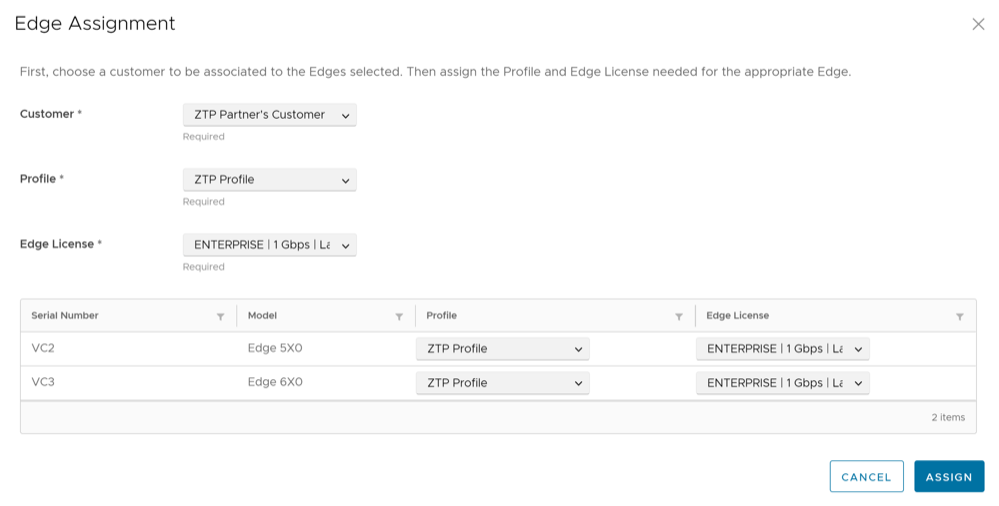
Reassign an Edge to Another Customer
If you choose to reassign an Edge that is already activated, you must deactivate the Edge, and then reassign the Edge to another Customer. For instructions on how to deactivate an Edge, refer to the Remote Actions topic in the Arista VeloCloud SD-WAN Troubleshooting Guide. Once you deactivate the Edge, the Edge state changes to Offline. You can now reassign the Edge to another Customer.
To reassign an Edge to another Customer: