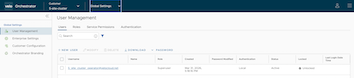
Given the number of services available in the Orchestrator, the Administration section has evolved from the SD-WAN service into its own centralized settings shared across services.Thus, the original Administration section is split into Global Settings and SD-WAN Settings. All Edge or SD-WAN-specific settings are moved to Service Settings within the SD-WAN service, and all Administration-related or shared settings across services are moved to the Global Settings service.
The Enterprise Global Settings service is located in the Enterprise Applications drop-down menu along with SD-WAN services. The features under Global Settings are shared across all services.
The following features reside under Enterprise Global Settings:
Figure 1. Global Settings
Selecting the Global Settings service displays the User Management screen by default.
For additional information on each of these features, see the topics below: