
Site Configurations
Topologies for data centers that include an Hub and branch configurations that are configured using both MPLS and Internet connections. Legacy branch configurations (those without a Edge ) are included, and hub and branch configurations are modified given the presence of the legacy branches.
The diagram below shows an example topology that includes two data center Hubs and different variations of branch topologies interconnected using MPLS and the Internet. This example will be used to describe the individual tasks required for data center and branch configurations. It is assumed that you are familiar with concepts and configuration details in earlier sections of this documentation. This section will primarily focus on configuring Networks, Profile Device Settings, and Edge configuration required for each topology.
Additional configuration steps for traffic redirection, control routing (such as for backhaul traffic and VPNs), and for Edge failover are also included.
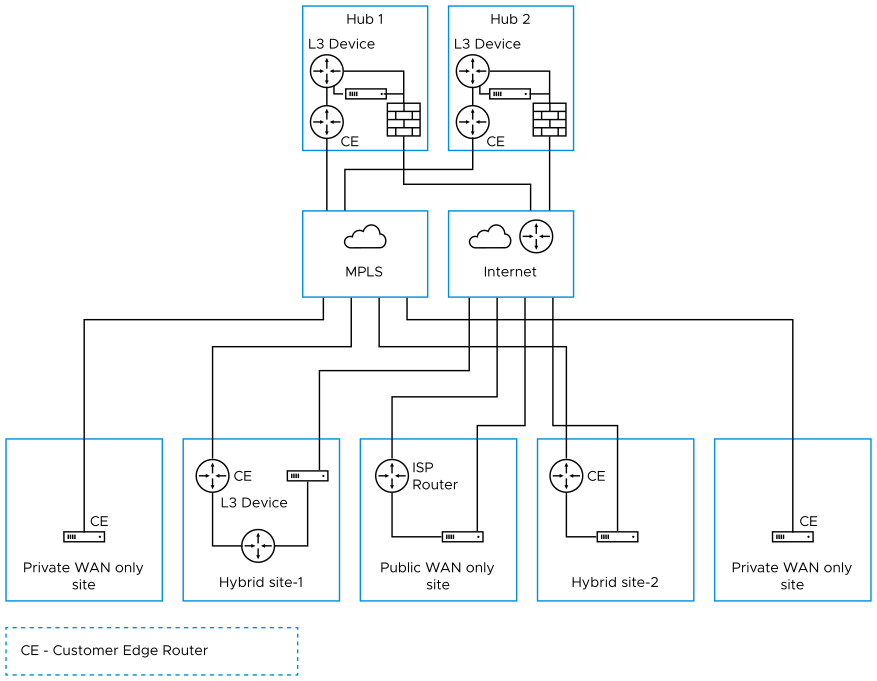
This section primarily focuses on the configuration required for a topology that includes different types of data center and branch locations, and explains the Network, Profile/Edge Device Settings, and Profile/Edge Business Policies required to complete the configurations. Some ancillary configuration steps that may be necessary for a complete configuration – such as for Network Services, Device Wi-Fi Radio, Authentication, SNMP, and Netflow settings – are not described.
Data Center Configurations
An Edge in a data center can act as a Hub to direct traffic to/from branches. The Edge can be used to manage both MPLS and Internet traffic. The Hub in a data center can be configured in a one-arm or two-arm configuration. In addition, a data center can be used as a backup. Datacenter Edge capacity planning must be thoroughly done to enable the datacenter Hubs to handle the number of tunnels, flows and traffic load from branches. Also, the Edge model must be selected accordingly. For additional information, consult the Arista Support or Solution Architect team.
The following table describes the various designs with different options, about how Edge can be inserted into the topology:
| Option | Description |
|---|---|
| Hub 1 | Data Center or regional Hub site with Edge deployed in two-arm topology. |
| Hub 2 | Data Center or regional Hub site with Edge deployed in one-arm topology (same interface carries multiple WAN links). |
| Private WAN link(s) only Site | Classic MPLS sites. |
| Hybrid Site-1 | Edge is deployed off-path. Edge creates overlay across both MPLS and Internet paths. Traffic is first diverted to the Edge. |
| Hybrid Site-2 | Edge is deployed in-path as the default gateway. It is always the default gateway. This topology is simpler but makes Edge a single point of failure and may require HA. |
| Public WAN link(s) only Site | Dual-Internet site (one of the links is behind a NAT router). |
Configure Branch and Hub
This section provides an overview of configuring Edge in a two-arm configuration.
Overview
- Configure and activate Hub 1
- Configure and activate the Hybrid Site-1
- Activate branch-to-Hub tunnel (Hybrid Site-1 to Hub 1)
- Configure and activate Public WAN only Site
- Configure and activate Hub 2
- Configure and activate Hybrid Site-2
The following sections describe the steps in more detail.
- Configure and Activate Hub 1: This step helps you understand the typical workflow of how to bring up Edge at the Hub location. Edge is deployed with two interfaces (one interface for each WAN link).
Below is an example of the wiring and IP address information.
Figure 2. Configure and Activate Hub 1 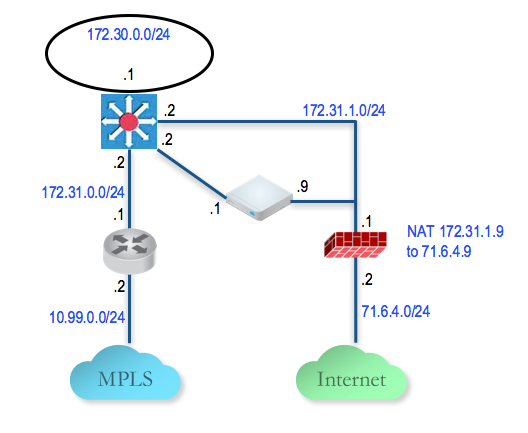
- Configure and Activate Hybrid Site-1: This step helps you understand the typical workflow of how to insert the Edge at a Hybrid Site-1. The Edge is inserted off-path and relies on the L3 switch to redirect traffic to it. Below is an example of the wiring and IP address information:
Figure 3. Configure and Activate Hybrid Site-1 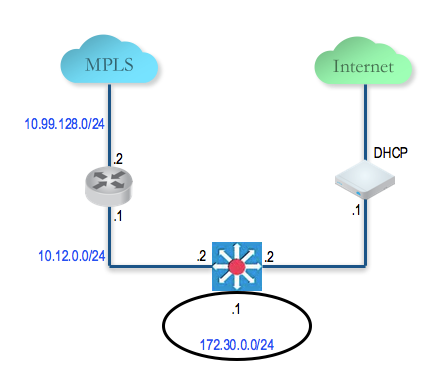
- Configure and Activate Hub 2: This step helps you to configure the "Steer by IP address" commonly used in one-arm Hub deployments. Below is an example of the wiring and IP address information. With one-arm deployment, the same tunnel source IP can be used to create overlay over different paths.
Figure 4. Configure and Activate Hub 2 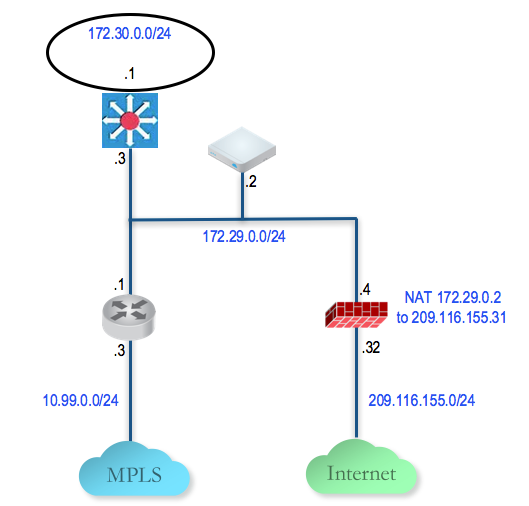
- Configure and Activate Hybrid Site-2: This step helps you create a Hybrid Site-1 – a hybrid site, which has the Edge behind CE router as well as Edge being the default router for the LAN. Below is an example of the wiring and IP address information for each hardware.
Figure 5. Configure and Activate Hybrid Site-2 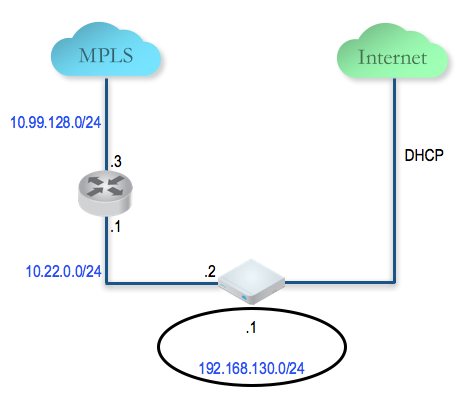
Connect a PC to the Edge LAN or Wi-Fi and use the browser to point to http://192.168.2.1.
For additional information on activation of Edges, see Activate Edges.