
Edge Software Image Management
Edge Software Image Management Overview
The Edge Software Image Management feature provides Enterprise Super Users the ability to upgrade Edge firmware without relying on Arista Support or the Partner.
Traditionally, whenever a new Edge image is published by VeloCloud SD-WAN, the Enterprise Administrators will have to request the Arista support or the Partner to upgrade the software on their enterprise Edges. The Arista Support will then engage with the customer and upgrade all or a subset of the Edges in the customer’s network. With the Edge Software Image Management feature activated, the Enterprise customers can manage the Edge software version that runs in their environment. The Edge Software Image Management feature provides Enterprise Super Users the ability to upgrade Edge firmware without relying on Arista Support or the Partner.
Activate Edge Image Management
The Edge software image management feature is deactivated by default for customers. Only an Operator (or Arista Support) can activate this feature for a Direct Enterprise and the Partner. In turn, the Partners can activate this feature for their Partner Enterprise customers. The feature can be activated during or after the customer creation. The Enterprises with Edge software image management deactivated must engage with Arista Support or Partner for Edge software upgrades.
Activate Edge Image Management for SD-WAN Service
Activate Edge Image Management for New Enterprise Customer
As an Operator User, you can manage the software images assigned to an Enterprise directly by assigning an Operator Profile to an Enterprise or allowing an Enterprise Superuser to manage the available list of software images assigned for an Enterprise by selecting the Allow Customer to Manage Software check box in the navigation path . For more information, see the Create New Customer section in the Arista VeloCloud SD-WAN Operator Guide.
Activate Edge Image Management for New Partner Customer
As a Partner Administrator, in addition to managing the software images assigned to your Partner customers, you can allow a Partner Customer's Superuser to manage the available list of software images for the customer by selecting the Allow Customer to Manage Software check box in the navigation path . The list of software images that you can assign to the new customer is based on the available list of software images assigned to the particular Partner by the Orchestrator Operator. For more information, see the Create New Customer section in the Arista VeloCloud SD-WAN Partner Guide.
Activate Edge Image Management for Existing Customer
As an Operator User or a Partner Administrator, you can delegate Edge image management to Enterprise or Partner Superusers. To delegate Edge image management to Enterprise Superusers, select the Allow Customer to Manage Software check box in the navigation path . For more information, see the Manage Customers section in the Arista SD-WAN Operator Guide.
To update the Edge image management settings for an existing customer, select the Edge Image Management toggle button to ON by navigating to . When the feature is activated, the default software image is the only assigned software image for the customer. Once the feature is activated, you can assign additional software images post activating the feature.
For additional information, see the Manage Customers in the Arista VeloCloud SD-WAN Operator Guide.
Edge Image Assignment and Access
Operator and Partner Super users can assign all or subset of Edge images to their customers from the available list of images assigned to them.
Whenever VeloCloud upgrades a hosted Orchestrator to a newer version of VeloCloud SD-WAN, the respective Edge images are uploaded to the Orchestrator. On a hosted Orchestrator, by default, the newly uploaded Edge images are assigned to Partners automatically after successful completion of hosted Orchestrator upgrade. However, the Edge images are not made available automatically to the direct Enterprise customers. The Enterprise customer must contact the Arista support to request access to new Edge images uploaded to the hosted Orchestrator.
For detailed VeloCloud Edge software versions and recommended releases, refer to the KB article SD-WAN Software Versions: Recommended Releases.
Manage Edge Software Image
- The Edge image has a major bug or vulnerability which is fixed in the subsequent version.
- The Edge image is no longer supported by VeloCloud or it is reaching End Of Life (EOL).
Once the image is deprecated, the image will not appear in the list of available software images or versions to be assigned to Operator Profiles, or Customers or Edges. Also, any Enterprise who has one or more of their Edges running this deprecated image will be notified about the deprecated image when they log into the Orchestrator.
For additional information, see the Edge Management.
Edge Management
Edge Management feature allows you to configure general settings, authentication, and encryption for an Edge. It allows you to activate or deactivate configuration updates for an Edge. You can also select a default Software & Firmware Image.
- You can configure the following options and select Save Changes.
Figure 1. Edge Management 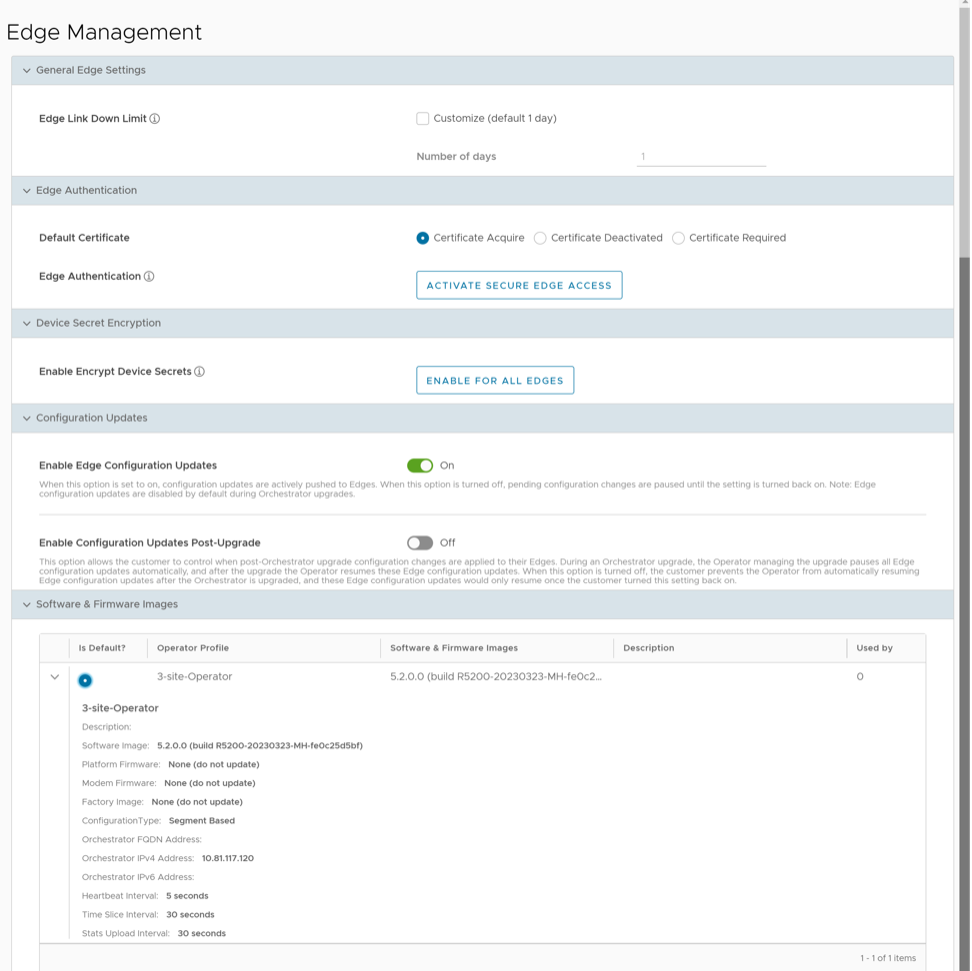
Table 1. Edge Management- Options and Descriptions Option Description General Edge Settings Edge Link Down Limit You can set this value for each Edge by selecting the Customize check box. This overrides the value set through the system property edge.link.show.limit.sec.Number of days Enter a value in the range 1 to 365. The default value is 1. Edge Authentication Default Certificate Choose the default option to authenticate the Edges associated to the Customer. - Certificate Acquire: This option instructs the Edge to acquire a certificate from the certificate authority of the Orchestrator, by generating a key pair and sending a certificate signing request to the Orchestrator. Once acquired, the Edge uses the certificate for authentication to the Orchestrator and for the establishment of VCMP tunnels.
Note: Only after acquiring the certificate, the option can be updated to Certificate Required.
- Certificate Deactivated: This option instructs the Edge to use a pre-shared key mode of authentication.
- Certificate Required: This option is selected by default, and it instructs the Edge to use the PKI certificate. Operators can change the certificate renewal time window for Edges using system properties. For additional information, contact your Operator.
Note: On selecting Save Changes, you are asked to confirm if the selected Edge authentication setting is applicable to all the impacted Edges or only the new Edges. By default, Apply to all Edges check box is selected.Edge Authentication Select the Activate Secure Edge Access button to allow the user to access Edges using Password-based or Key-based authentication. You can activate this option only once. But you can switch to either Password-based or Key-based authentication any number of times. Device Secret Encryption Enable Encrypt Device Secrets Select the Enable For All Edges button to activate device secret encryption for all the Edges in the current Enterprise. This action causes restart of all the Edges. However, Edges which already have this feature activated are not affected. Note: You can activate this option for individual Edges at the time of creating a new Edge. For additional information, see Provision a New Edge.Configuration Updates Disable Edge Configuration Updates By default, this option is activated. This option allows you to actively push the configuration updates to Edges. Slide the toggle button to turn it to Off. Enable Configuration Updates Post-Upgrade By default, this option is deactivated. This option allows you to control when post-Orchestrator upgrade configuration changes are applied to their Edges. Slide the toggle button to turn it On. - Certificate Acquire: This option instructs the Edge to acquire a certificate from the certificate authority of the Orchestrator, by generating a key pair and sending a certificate signing request to the Orchestrator. Once acquired, the Edge uses the certificate for authentication to the Orchestrator and for the establishment of VCMP tunnels.
Upgrade SD-WAN Edges
Enterprise users can upgrade a specific Edge or a set of Edges, or all Edges using the Edge Management feature.
Upgrade All Edges
In the SD-WAN service of the Enterprise portal, select . Scroll down to the Software and Firmware Images area, and select a default image.
Upgrade Specific Edge(s)
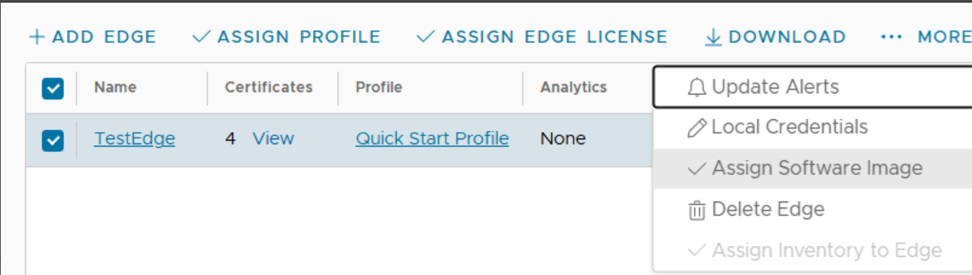
For additional information, see Edge Management.