
Stage an SD-WAN Gateway to Bastion Orchestrator
Optionally, an Operator user can stage a SD-WAN Gateway to Bastion Orchestrator.
- Ensure you have configured two Orchestrators as a Bastion pair. For steps, see Configure Bastion Orchestrator.
- Ensure you have set up the Production Orchestrator to support Bastion configurations. For steps, see Set up Production Orchestrator.
To stage a SD-WAN Gateway to Bastion Orchestrator, perform the following steps.
- In a web browser, launch the Production Orchestrator and login as an Operator user.
- In the Operator portal, select the Gateway Management tab from the top menu and then select Gateways from the left navigation menu.
- Select a SD-WAN Gateway to stage to the Bastion Orchestrator and select Stage to Bastion.
Figure 1. Displaying Gateways 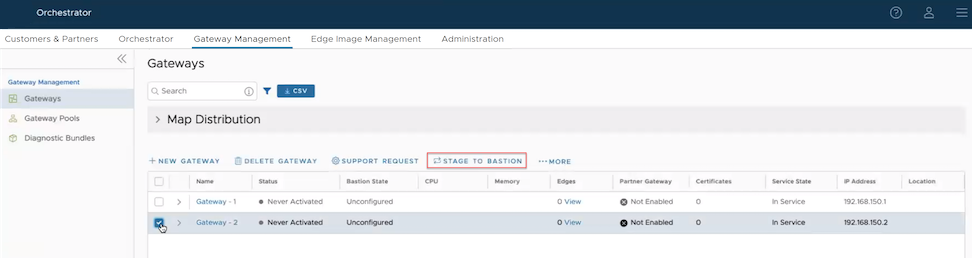 Note: You can stage only a SD-WAN Gateway that is used by a non-activated Edge to the Bastion Orchestrator.The selected Gateway is staged to the Bastion Orchestrator as shown in the following screenshot.
Figure 2. Staging a Gateway to Bastion Orchestrator 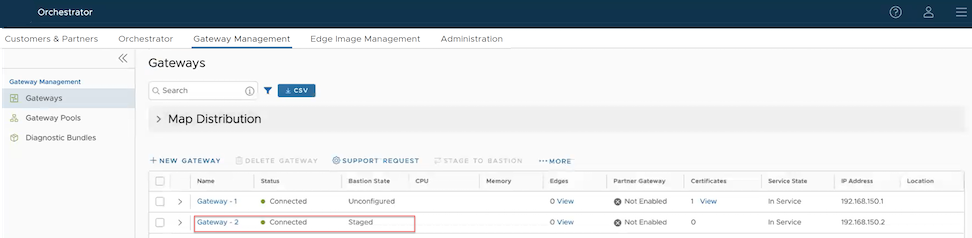
- To remove a staged Gateway from the Bastion Orchestrator, select .